
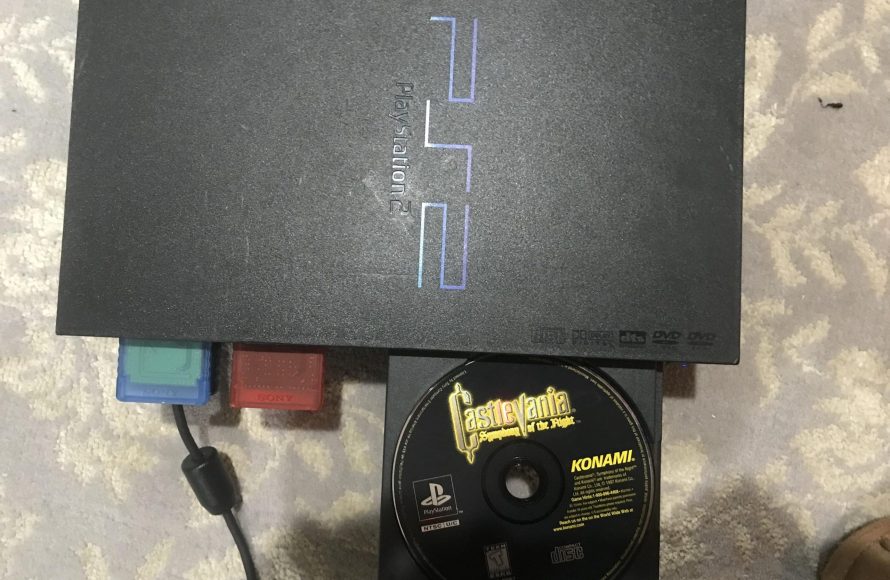
No, PS2 games do not work on PS1 consoles.
Ever wondered if you could play those exciting PS2 titles on your old PS1? It’s a common question for many gamers who still have their original PlayStation. The simple answer is no, PS2 games do not work on PS1 consoles, due to significant hardware differences.
The PlayStation 2 was designed with more advanced technology which is not compatible with the older PS1 system. Therefore you need the correct console to play these games. The discs themselves have different formats too.

Do PS2 Games Work on PS1? The Compatibility Question Answered
So, you’ve got a stack of awesome PlayStation 2 games and a trusty old PlayStation 1 collecting dust? It’s natural to wonder, “can I play these newer games on my older console?” It’s a question many gamers have asked, and the answer, unfortunately, isn’t a simple yes. Let’s dive into why PS2 games don’t work on the PS1, exploring the technology behind both consoles, and understanding the differences that make them incompatible.
Understanding the PlayStation 1 and PlayStation 2 Architecture
To grasp why PS2 games won’t play on a PS1, we need to peek under the hood at what makes these two consoles tick. Think of it like comparing a bicycle to a car – they both get you around, but they operate very differently. The PlayStation 1, released in 1994 (1995 in North America), was a groundbreaking machine for its time. It utilized a 32-bit MIPS RISC CPU and a graphics processing unit designed for 3D gaming. This technology allowed for amazing (for the time) visuals like the ones seen in classics like Final Fantasy VII and Metal Gear Solid.
The PlayStation 2, which arrived in 2000, was a huge leap forward. It featured a powerful 128-bit Emotion Engine CPU and a dedicated graphics synthesizer. These advancements allowed for much more detailed graphics, larger game worlds, and more complex gameplay mechanics. It’s like comparing a drawing done with crayons to a digital painting created on a high-end computer. The PS2 could do so much more than the PS1 could ever dream of.
Key Hardware Differences That Cause Incompatibility
Here are some of the main hardware differences that explain why PS2 games just won’t load on a PS1:
- CPU Architecture: As mentioned, the PS1 uses a 32-bit processor, while the PS2 employs a 128-bit processor. They speak different “languages” in terms of code processing.
- Graphics Processing: The graphics chips in both systems are entirely different. The PS2’s graphics are much more sophisticated and cannot be understood or rendered by the PS1’s much less powerful graphic capabilities.
- RAM (Random Access Memory): The PS2 has much more RAM than the PS1. PS2 games need that extra RAM to store large amounts of data, and that’s not available on the PS1.
- Optical Disc Format: PS1 games came on compact discs (CDs), whereas PS2 games use digital versatile discs (DVDs). The PS1 disc drive simply cannot read or process DVD discs, they are different formats of storage.
- BIOS and Operating System: The software that tells the console how to operate, the BIOS, is also completely different for each system. The PS1’s BIOS is designed to run its own software, not the PS2’s more complex code.
Why PS2 Games are Designed for PS2 Hardware
Game developers create games specifically for the console they are intended to be played on. This includes writing code that tells the console’s hardware how to operate the game. They are programmed for the PS2 to utilize its 128 bit-architecture, the added RAM, the better graphics processor, and the DVD format. The PS1 games are made to work only on the 32 bit architecture, the small RAM, the basic graphics processor and CD format. So, when you try putting a PS2 game into a PS1, it’s like trying to use a car’s engine to power a bicycle – it just doesn’t work.
Imagine if you tried to use a computer program designed for a powerful, modern computer on a much older computer that is lacking the needed hardware and operating systems. The older computer would be unable to run the program, simply because it is incompatible.
The Role of Game Code and Programming
Game code is essentially a series of instructions that the console’s CPU needs to execute for the game to function. PS2 games are built with much more complex code that the PS1 can understand. Game developers use specific development kits and programming languages that are tied to a particular console’s capabilities. So, a PS2 game has code that is written to access the PS2’s specific features, not the older architecture of the PS1. Think of it as two different languages. PS2 games speak a language that the PS1 simply cannot comprehend.
Backward Compatibility: The PS2’s Gift to PS1 Gamers
Interestingly, while PS2 games don’t work on the PS1, the reverse is not true! The PlayStation 2 console was designed to be backward compatible. This means that it can play almost all PlayStation 1 games. This was a major selling point for the PS2 and was a big win for gamers who were making the upgrade but didn’t want to abandon their old PS1 game collections. This is because the PlayStation 2 contained all of the hardware and software required to emulate the PS1’s functions.
How the PS2 Achieved Backward Compatibility
The PS2 has a PS1 “chip” inside it, allowing it to emulate the PS1 hardware. It’s like having a mini PS1 built right into the PS2. When you load a PS1 game into a PS2, the console recognizes that it is a PS1 game and changes to run the PS1 software. This feature allowed you to enjoy both generations of games on a single console.
Exploring the Possibility of Emulation and Alternatives
While direct play is not an option, the world of gaming often offers clever workarounds. While you can’t pop a PS2 disc into a PS1 and expect it to work, there are different ways to enjoy PS2 games, even if you don’t have a working PS2 console.
Emulators: Playing PS2 Games on Other Devices
Emulators are programs that make your computer or other devices behave like a game console. There are emulators for the PS2 that can run on a PC. These emulators are fairly complicated to set up and require powerful computer hardware, because running a Playstation 2 is very complex. Once set up, you can play many PS2 games on your computer. However, emulation isn’t perfect, and you might run into problems like game crashes, graphics issues, or performance issues (the game could run slowly).
It’s important to note that downloading or using game ROMs (the game files needed for emulators) may not be legal in your area. Make sure to know your local laws and be ethical in your approach. It’s best to use ROMs from games you own. There are many free options and resources if you search on the internet.
Modern Re-Releases and Digital Platforms
Another way to enjoy some classic PS2 games is through re-releases or digital platforms. Some popular PS2 games have been updated and re-released on newer consoles such as the PlayStation 4 and the PlayStation 5 or even the Nintendo Switch. These are often remastered with improved graphics and features. Digital platforms like the PlayStation Store also sell some classic PS2 games. These options allow you to experience old favorites in a new way on modern systems. Unfortunately, not every game receives a modern port.
Limitations of PS2 Emulation on PS1
While PS1 games could run on PS2 thanks to back-wards compatibility, unfortunately, the reverse isn’t an option using emulation of any type, with PS2 games on PS1. The PS1 is simply too old and too underpowered. Its limited RAM and outdated processor cannot handle the workload of emulating a much more advanced machine. The technology simply did not exist and was impractical to create. Even trying to emulate the basic instructions of PS2 games would be a huge challenge, and the PS1’s hardware is completely unsuitable. So, while emulation opens doors on PC, phone or other modern platforms, it’s not a way to get PS2 games onto your PS1.
The Technological Divide: Why the Consoles are Incompatible
It’s all about the underlying technology. The leap from the PS1 to the PS2 was a significant one, similar to a large leap in computer technology. It was a change in core systems, not merely an upgrade. The change in processor architecture, graphics capabilities, disc format, memory and internal programs created a strong divide between the two systems. This divide prevents them from communicating on any level, therefore it is not possible to run PS2 games on PS1 console. This means PS2 games simply cannot work on PS1’s hardware. Trying to force this is impossible and will cause a hardware failure. It’s like trying to put diesel fuel into a gasoline engine — it just won’t work, and it can damage the system.
The bottom line is the PS2 games are incompatible with the PS1 console, due to the technological differences and hardware limitations. While the PS2 can play PS1 games, it can not work the other way around. If you have PS2 games and wish to play them, you’ll need the proper PS2 console or an emulator set up on a more modern platform.
Ultimately, the question of whether PS2 games work on PS1 has a definitive answer: they do not. The differences in their designs and technology make them incompatible. However, understanding these differences allows us to appreciate how far gaming technology has come, and it highlights the importance of having the right equipment for the game you wish to play.
Does PS2 play PS1 games
Final Thoughts
The simple answer is no, PS2 games will not work on a PS1 console. PlayStation 2 games require specific hardware components not present in the original PlayStation. The consoles have different architectures.
Therefore, you cannot play your PS2 games on your PS1. This difference in design prevents backward compatibility. So, clearly, ‘do ps2 games work on ps1’ is a question with a negative answer.

