
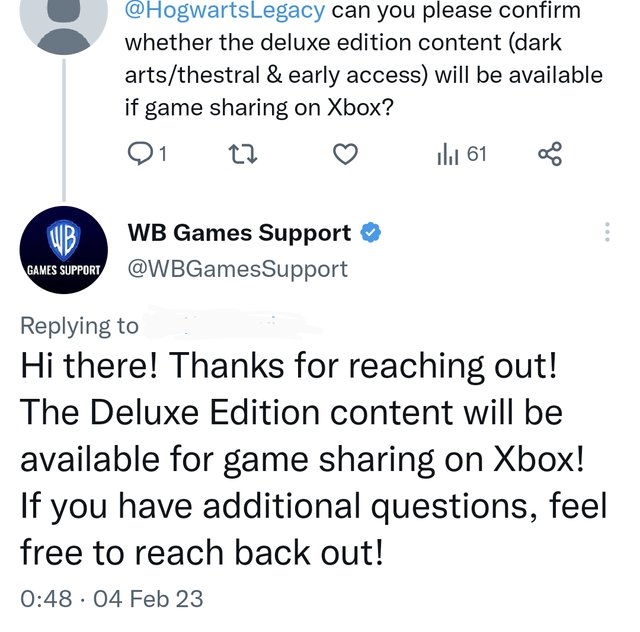
Unfortunately, you typically cannot game share early access versions of games.
Have you ever wondered if you could share that exciting early access game with a friend? The anticipation of playing something new is intense, especially when it’s a title still in development. This question, “can you game share early access,” pops up often among gamers eager to experience the latest releases. Many platforms limit sharing for these specific types of releases.
The way game sharing works usually doesn’t extend to early access builds because the developers often treat them differently. These versions are commonly for testing and feedback, and sharing could impact their internal data and processes. It’s a bummer, but this restriction helps developers control the early access experience and gather better information.

Can You Game Share Early Access?
So, you’re super excited about a new game, and it has early access! That’s awesome! But what if your best friend also wants to play, and you were hoping to share the fun? You’re probably wondering: “Can you game share early access?” It’s a pretty common question, and the answer isn’t always a simple yes or no. Let’s dive into how game sharing usually works and what that means for early access.
Understanding Game Sharing
Before we get into early access specifically, it’s good to know how game sharing works in general. Game sharing lets you share your digital game library with friends or family, usually on the same gaming platform. Think of it like lending a physical game, but digitally. The exact rules are different depending on which system you use. This is all about digital games, because you can easily share physical games with your friends. So, let’s check out how it generally goes!
How Game Sharing Typically Functions
Game sharing usually works through a system that connects game licenses with specific accounts and consoles. Here’s a general idea of how it goes:
- Primary Console: Most systems let you set a “primary” console. This console can play all of the games you own without needing to be logged into your account. This is usually where the account holder plays games.
- Secondary Console: You can log in to your account on another console, but that console will need an internet connection to check that you own the game, and that account will need to be logged in too.
Imagine you have a Playstation 5. You set your own PS5 as your primary console and log into your friend’s Playstation 5 with your account. Your friend can play all of your digital games on their console, as long as you are signed in with your account. But you can also play games on your primary console without needing to always be signed in. This is basic game sharing idea.
Common Platforms for Game Sharing
Let’s look at some popular gaming platforms and how their game-sharing options usually work. Keep in mind this is for regular games, not specifically for early access. We’ll get to that soon!
- Playstation (PS4/PS5): Playstation lets you activate one console as your primary console. Anyone on that console can play games from your library. On other consoles you would need to be signed in for the games to work.
- Xbox (Xbox One/Xbox Series X/S): Xbox also has the concept of a home console. If you set a console as your home console, anyone can play your games on it. You can sign into other Xboxes but then the console needs an internet connection to verify you own the games.
- Nintendo Switch: Nintendo is a little different. You can have one primary Switch console and play games on it from any account on that device. You can access your digital games on other switches but you will need internet and your account will need to be signed in.
- Steam (PC): Steam uses Family Sharing. It lets you share your library with family or friends, but only one person can play your library at a time. And you can’t share every game, if the game developer disables this feature.
The Early Access Game Sharing Complication
Now we’re getting to the heart of the matter: early access. Early access means you get to play a game before it’s officially released. It’s kind of like getting a sneak peek! But because it’s not the final version, things can be a little tricky when it comes to sharing. Here’s where the issues arise.
Why Early Access Is Different
Early access games often come with specific rules. Think about it: these games are still being worked on and developers might be testing things, and they may want to control who gets into the game in this stage. This leads to some common issues with early access game sharing:
- Limited Access Codes: Some early access might come with codes that you activate on your account to access the game. These codes might not be able to be shared, or be attached to only your account.
- Account-Based Access: Early access might be linked directly to the account that purchased it. Meaning only the buying account has the permissions to play the game.
- Beta Testing Restrictions: Sometimes, early access is part of a closed beta test. These often have tight rules and can’t be shared, as it’s only meant to test the game with a certain number of people.
- Platform Specific Policies: Some platforms may have special rules about sharing early access games that are different from their regular game sharing setup.
Common Scenarios and What Might Happen
Let’s look at a few scenarios to see how early access sharing might (or might not) work:
- Scenario 1: The Shared Console: If you and your friend share a Playstation 5 and you purchased early access on your account, your friend will probably be able to play, if your account is signed in, or your ps5 is set as primary console.
- Scenario 2: Different Consoles: If you buy early access on your Playstation and your friend tries to play on their own Playstation, using your account, it might not work. It usually depends on the game and early access rules.
- Scenario 3: Steam Early Access: With Steam, early access games still follow the general Steam Family Sharing rules, but if the developer disabled it, you can’t share it.
- Scenario 4: Early Access Codes: If you got a special code for early access, it’s often tied to your account and won’t work on your friend’s account.
Checking for Sharing Information
The best way to know if you can share an early access game is to check for specific information. Here’s what you can do:
Where to Look for Game Sharing Details
- Game Description: Check the game’s page on the platform (like Steam, Playstation store, Xbox store, etc.). Look for anything saying “account specific” or “not shareable” in the game description or on any early access details pages.
- Developer FAQ: See if the game developer has a FAQ section or an official webpage. They usually write all the limitations, if there are any.
- Platform Support: Check the platform’s support website. Playstation and Xbox have support pages where you can learn how game sharing generally works.
- Game Community Forums: You can also ask in game forums or game communities to check if other players are experiencing similar problems or have found a way to share.
What to Look For
Pay close attention to these keywords when reading:
- “Account-bound”
- “Not shareable”
- “Single user license”
- “Exclusive to the purchasing account”
- “Beta access” (as it might have its rules)
Tips for Sharing Early Access Games (If Possible)
Okay, let’s say you’ve checked everything and you think you might be able to share early access. Here are some tips to make sure the game works smoothly.
Setting Up Game Sharing Correctly
- Set the primary console: Make sure you’ve set up your console as the primary one, or in the case of xbox, home console, for game sharing on that specific system.
- Log in correctly: Make sure your account is signed into the right console where you want to share.
- Check your internet connection: If you are accessing a shared library on a secondary console, make sure you have good internet to check your library.
Troubleshooting Common Issues
Sometimes things don’t go as planned, so here’s what to do if something goes wrong:
- Restart everything: Turn off your console or pc, and then try again. Sometimes a restart solves the issue.
- Check your account settings: Make sure that your account is correctly set up to share games.
- Update everything: Check to make sure your system and game are running the latest version.
- Contact Support: If all else fails, contact the game developer or the platform’s support. They might have special advice.
Why Developers Might Limit Game Sharing
Sometimes, developers choose to limit game sharing for early access, and it can be frustrating. But there are valid reasons why they might do this:
Reasons for Limitations
- Testing purposes: They might want to keep the early access smaller to make testing easier. If too many people are playing the game early, it might be hard for them to find the bugs.
- Security reasons: To stop people who shouldn’t have access to the game from playing it before release. This also stops possible piracy and game leaks.
- Special Offers: Early access can be part of a special deal for people who have preordered or bought a more expensive version of the game, and the devs want to make sure only those people who paid are playing.
Understanding Early Access
Early access is always in a kind of test period. This means that developers are still trying to work on things and find bugs. You should know what that means for the gaming experience.
Early Access Considerations
- Bugs and glitches: Expect to see some issues. The game may freeze or not work perfectly.
- Game Changes: The game is not fully done, the developer can change the game in a big way during the early access.
- Limited content: Some parts of the game might not be finished. You may not be able to do everything in the game.
- Need for feedback: Game developers expect early access player to give feedback so they can improve the game. If you find any bugs or issues, let them know!
The Future of Game Sharing and Early Access
Game sharing is changing and evolving all the time. As more and more games offer early access, platforms and developers may change how they approach sharing. It’s a good idea to stay updated about game sharing policies.
Stay Informed
The world of games is constantly changing. Here are ways to be in the know:
- Follow game news: Look at trusted websites that give game news updates.
- Join online gaming groups: These groups are great for learning and finding out the latest about a game.
- Read official announcements: Pay attention to the news from official gaming sources and the game developers themselves.
So, “can you game share early access?” The answer is, it depends. You need to check the specific game and platform rules. Early access is still a somewhat new thing, and it is always changing, so keep updated and always check the rules before buying it if you are planning to share! Remember to always do your research before making any assumptions. This will ensure you and your friends have the best gaming experience.
How To Game Share On PS5! PS5 Game Share Easy Method!
Final Thoughts
Game sharing early access depends on platform policies. Some platforms permit sharing of pre-release game versions, while others do not. Always check the specific terms for your game and console.
Essentially, whether or not can you game share early access depends on the game’s publisher and platform’s rules. You must consult this information before trying to share access.

