
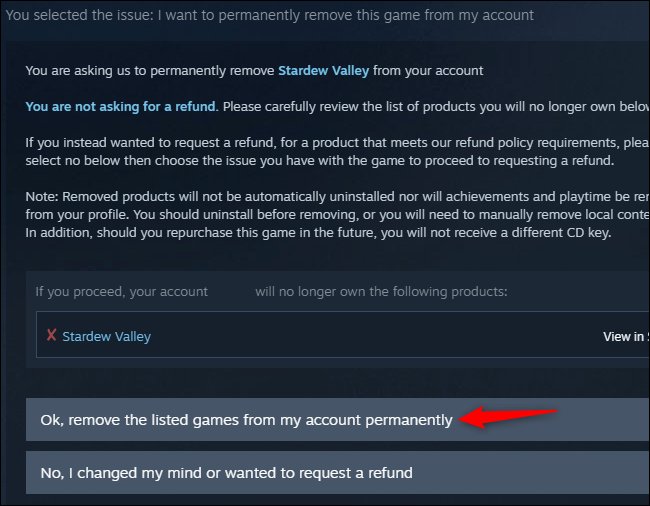
Yes, refunded Steam games get removed from your account.
Ever wondered what happens after you request a refund on a Steam game? It’s a common question among gamers, particularly when you’re not sure about a purchase. Knowing the specifics is always helpful, which is why this question, “do refunded steam games get removed from your account,” is so frequently asked.
Steam’s refund process is fairly straightforward, but it’s understandable to be curious about the consequences. After all, you want to keep track of what you own and what you don’t. It helps to be informed about the aftereffects when you need a refund.

Do Refunded Steam Games Get Removed from Your Account?
It’s a question many gamers have pondered: what happens to a Steam game after you get a refund? It’s like returning a toy – does it disappear from your collection, or is it still there, just waiting for another play? Let’s dive deep into the process and explore exactly how refunds work on Steam when it comes to your game library.
Understanding the Steam Refund Policy
Before we talk about game removal, it’s important to understand why and when you can get a refund in the first place. Steam, the popular platform for buying and playing video games, has a pretty clear refund policy. Here’s the basic rundown:
- You can request a refund for almost any game purchased on Steam.
- You must request the refund within 14 days of purchasing the game.
- You must have played the game for less than two hours.
These rules are there to ensure that people don’t just buy a game, finish it, and then return it. Think of it as a “try before you fully commit” approach. It lets you see if a game runs well on your computer and if you actually enjoy the gameplay.
What Happens When You Request a Refund?
Okay, so you’ve purchased a game, and for whatever reason, you decide it’s not for you. You follow the correct steps on the Steam platform to request a refund. What happens next? The process is fairly quick. Steam will first review the refund request to check if it fits their policy. If your request falls within their time limit and playtime allowance, Steam usually approves the refund without much delay. Then, the refund is processed, and the money is returned to your original payment method. Let’s break down how the refund process work step by step:
- You submit your refund request: You tell Steam that you want to return a game.
- Steam reviews your request: They check to make sure you followed the rules (less than 14 days and less than two hours played).
- Refund approved or denied: If your request is okay, they’ll approve it. If not, they might deny it.
- Refund processed: Once approved, they’ll send your money back.
- Game removal from your account: And yes, if your refund is approved, the game is removed from your Steam library.
It’s important to note that Steam usually sends an email confirming that the refund has been processed and the game removed from your library. This is another way you can confirm that your refund has gone through and that the game is no longer associated with your account.
The Removal of Refunded Games: A Closer Look
Now, let’s get to the heart of the matter. Once Steam has processed your refund and the funds have been returned, what happens to the game itself? The simple answer is: it’s removed from your account. This is not a temporary removal. It’s as if you never purchased the game in the first place. The game will disappear from your library, and you will no longer be able to launch or play it. Even if you still have the game files on your computer, they won’t work without the proper Steam license, which is removed when the game is refunded.
How Can I Verify if a Game is Removed?
You can check if a game is removed by simply looking at your Steam library. You can quickly navigate there by clicking the library button within the Steam client. Here’s how to check:
- Check Your Library: The quickest way to check is to look for the game you requested a refund for in your library. If it’s gone, the refund was successful, and it was removed.
- Search the Library: You can also use the search bar at the top of your library and search for the game’s name. If it does not appear in the list, it is officially removed.
- View Purchase History: You can review all the transactions on your Steam account. Visit your account details and then view purchase history. The refunded game should be there with a “refunded” status on it. This is an indication that the game was successfully refunded and removed.
What Happens If You Try To Play a Refunded Game?
Trying to play a game after it’s been refunded is like trying to use a key that no longer fits the lock. Even if you have the game files stored on your hard drive, Steam will not recognize it as a licensed copy. If you try to start it, you’ll usually receive an error message, or the game will refuse to start. Essentially, without the Steam license linked to your account, the game becomes unplayable.
Exceptions and Nuances to Game Removal
While the general rule is that refunded games get removed from your account, there are a few little details and special scenarios you should be aware of:
Game Bundles and Refunds
Sometimes you might purchase a bundle of games rather than individual titles. What happens if you want to refund one game within a bundle? The general approach of Steam is to refund the entire bundle. Steam does not usually allow partial refunds of bundled games. This means that when you request a refund for a single game from a bundle, you will have the entire bundle removed from your library. However, it can depend on the exact bundle and what Steam allows.
Steam Gifts and Refunds
What if you gifted a game to a friend and they wanted to refund it? The process is similar, but it’s the recipient of the gift that needs to make the refund request. If the refund is approved, the game will be removed from their library and the money will be returned to the original purchaser. So, if you gifted the game, you won’t have the game added back to your library. The funds from the refund will be added back to your Steam Wallet or whatever payment method you used to buy the gift originally.
Pre-Ordered Games and Refunds
If you pre-ordered a game on Steam and wish to get a refund before the game is released, this is possible. The process is generally the same as requesting a refund after the game is released. The game is removed from your pre-ordered list and from your account once the refund is completed. Pre-ordering a game does not prevent you from receiving a refund. As long as you request it within the refund policy guidelines, the refund will be processed as normal.
Steam Play and Game Removal
Steam Play is a feature that allows you to purchase a game once and play it on multiple platforms, like Windows, macOS, and Linux. When you refund a game that supports Steam Play, the game will be removed from your library across all of the supported platforms. There is not separate removal for different operating systems. The license is taken away entirely, regardless of where you might try to play it.
Can You Buy a Refunded Game Again?
The good news is that just because you’ve refunded a game, it doesn’t mean you can’t buy it again. After you’ve refunded a game and it’s been removed from your library, you can purchase it again just like any other game on Steam. The game will again appear in your library once you purchase it again. You can do this after making sure the game is worth it and if you want to try it with a different mind. There isn’t a restriction on purchasing the same game you refunded before, except that Steam might become more careful and suspicious if it happens several times.
Impact on Game Achievements and Save Files
This is important to know. When you refund a game, you lose the access to the game, and this means you will not be able to access to your save files as well. Achievements are tied to your Steam account, and you will not lose the achievements you have earnt in your Steam account, even if you refund the game. Even if the game is later removed from your account, your achievements will stay as proof you played the game.
The Importance of Understanding Refund Policies
Understanding Steam’s refund policy is very important for a couple of reasons. First, it allows you to confidently try new games without the fear of being stuck with something you don’t like. This is especially useful when purchasing games from smaller developers that you aren’t sure about. Second, knowing that a refunded game will be removed helps you keep your library organized and free from clutter. It can also ensure that you don’t try to play the game when you’re under the impression that you still have it.
By making sure that you understand how Steam refunds work, you can make the most of your purchases. You can try games that you are not sure about and keep your Steam library manageable. Always remember to check playtime and refund deadlines so you don’t get stuck with a game that you don’t want.
In conclusion, when you refund a Steam game, it is removed from your library, making it unavailable to play unless repurchased. This is a standard part of Steam’s refund system. So, the next time you consider a refund, rest easy, knowing that your game will be taken from your collection just as it should be, and your money is back in your wallet.
How to Refund Games on Steam 2024 – Refund a Steam Game
Final Thoughts
Yes, refunded Steam games get removed from your account. Once Steam processes your refund, the game’s license gets revoked. You no longer have access to play the game.
The game disappears from your library. Steam essentially undoes the purchase, and this directly affects what you can access. So, do refunded steam games get removed from your account? The answer is a definitive yes.

