
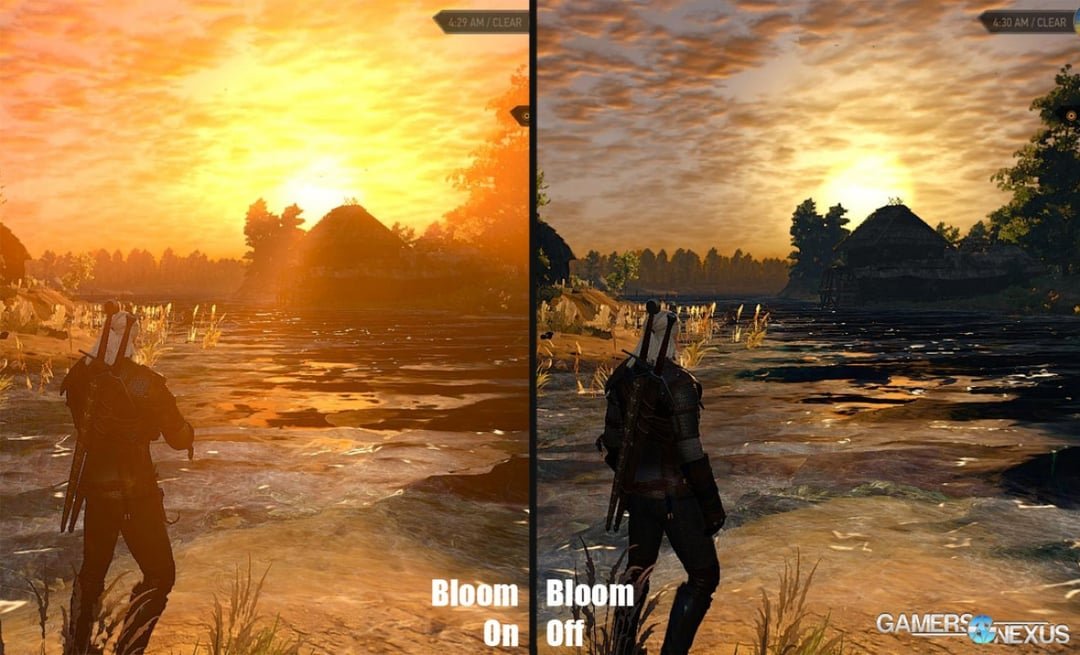
Most players choose to turn bloom off to improve visual clarity and reduce distracting glare, allowing for a sharper gaming experience.
Ever wondered if that shimmering light effect is actually helping or hindering your gameplay? Do you play games with bloom off, or are you a fan of the extra visual flair? Many players find the effect adds too much visual noise.
This article dives into the common practice of adjusting bloom settings. Gamers often prefer a cleaner image over artificial lighting effects. It is all about that personal preference, but you will find out many other reasons here.

Do You Play Games With Bloom Off? Exploring the Impact of Bloom in Gaming
Have you ever wondered why some games look super bright and glowy, almost like they have a soft halo around everything? That’s often due to a visual effect called “bloom.” It’s a technique that game developers use to simulate how light behaves in the real world, but it can also sometimes be a bit too much. So, the big question is: do you play games with bloom off? Let’s dive deep and figure out why some gamers love it, and why others prefer to turn it off completely.
What is Bloom in Video Games?
Before we talk about turning it off, let’s make sure we all understand what bloom actually is. Think about how sunlight looks when it shines through a window. It doesn’t just have a harsh, hard edge; it sort of spreads and glows around the edges. That soft, glowing effect is what bloom is trying to copy. In games, bloom is used to create that similar effect around bright objects, like lights, explosions, or even shiny surfaces. It makes these objects feel more like they’re actually emitting light.
How Bloom Works
Game developers use fancy computer programs to create bloom. Here’s a simplified version of what happens:
- Identify Bright Areas: The computer looks at the screen and figures out which parts are the brightest.
- Blur and Spread: These bright areas are then blurred and spread outwards, making the light seem like it’s overflowing.
- Layer It: This blurred and spread layer is then added on top of the original image, making the final effect.
This creates a visual that’s often associated with fantasy or sci-fi games, but it’s used in many different types of games.
Why Game Developers Use Bloom
So, why bother with bloom at all? Well, it has some key purposes:
- Realism: Bloom helps to make lighting more realistic, mimicking how real light sources behave.
- Atmosphere: It can enhance the mood of a scene, making it feel more dramatic, magical, or intense.
- Visual Impact: Bloom can make certain elements, like explosions or magical effects, more visually impressive.
- Hiding Imperfections: Sometimes, bloom can help to mask some of the less detailed parts of a game’s graphics, especially in older games.
For example, imagine a fantasy game with glowing swords and magical orbs. Bloom can really make those items pop and feel special.
The Case Against Bloom: Why Gamers Turn It Off
Even though bloom has some positives, it’s not always loved by gamers. In fact, many prefer to play with it turned off. Here’s why:
Visual Clutter and Distraction
One of the main reasons gamers turn off bloom is that it can create visual clutter and distraction. When there are too many bright lights or objects with bloom, the screen can become overly bright and confusing. It can be hard to see important details, like enemy movements, because the glowing effect overwhelms everything. This can be particularly annoying in competitive games where clear vision is very important.
Performance Issues
Bloom effects can also put a strain on your computer or console. Processing the blur and spread for bloom can use up a lot of graphics resources, especially in very detailed scenes. This can lead to lower frame rates, stuttering, and an overall less smooth experience. Gamers who play on older machines or want to get the highest performance often disable bloom to get a smoother gameplay.
Eye Strain and Discomfort
For some people, bloom can cause eye strain and discomfort. The bright, glowing effects can be irritating to look at for extended periods of time. It’s like looking directly at the sun for too long. Gamers who are sensitive to bright light often prefer to play with bloom turned off to make gaming more comfortable.
Personal Preference and Visual Style
Sometimes it simply comes down to personal preference. Some gamers just don’t like the way bloom looks. They may prefer a cleaner, sharper image without all the extra glow. They may feel that bloom takes away from the overall detail of the game. Some gamers also feel that bloom can sometimes make a game look too “dreamy” or unrealistic, and prefer a more grounded visual style.
Competitive Advantage
In fast-paced competitive games, a clear view is essential. Having bloom turned off can reduce visual clutter and allow you to see opponents more clearly. This can provide a small advantage, which can be the difference between winning and losing. This is why so many professional gamers prefer to play without the bloom effect.
The Middle Ground: Finding the Right Bloom Setting
It’s not always an ‘all or nothing’ situation when it comes to bloom. Some games offer different levels of bloom control, allowing you to find a balance. This can be done in a few ways:
Intensity Settings
Some games allow you to adjust how strong the bloom effect is. You might find a setting like “low,” “medium,” or “high.” Some even offer a slider, so you can fine-tune it to your liking. Playing around with these settings can help you find a balance between the glowy effect and the clarity you need to play the game.
Dynamic Bloom
Dynamic bloom is a setting where the game automatically adjusts the bloom based on what’s happening on the screen. For instance, if you are indoors where it’s darker, there might be less bloom, but when you go outside into the sunlight or encounter a big explosion, bloom might increase. Dynamic bloom can be a good option for those who want some of the effect without overdoing it.
Modifications and Third-Party Tools
For PC gamers, modifications or third-party tools may provide a finer level of control or allow the complete removal of bloom. These tools often come with many different settings and adjustments that allow gamers to really control their visual experience in the game. But remember to be careful when using third-party tools. Make sure they’re from a trustworthy source so you don’t harm your computer.
How to Tell if Bloom is Affecting Your Game
Not sure if bloom is the issue in your game? Here are some signs to look out for:
- Overly Bright Scenes: Does the game often look washed out or excessively bright, especially around light sources?
- Blurred or Hazy Vision: Are bright objects and areas surrounded by a hazy or blurry glow?
- Frame Rate Drops: Does your game performance seem to dip or slow down in scenes with a lot of bright lights or explosions?
- Eye Strain or Discomfort: Do you feel eye strain or discomfort after playing the game for a while?
If you answered yes to any of these questions, try turning bloom off or adjusting the setting in the game’s video settings menu. If there isn’t an in-game setting, check for online discussions on how to disable or adjust bloom. Sometimes, there are hidden settings you can change by editing configuration files.
Bloom in Different Game Genres
The usefulness and impact of bloom can vary across different game genres. Let’s explore how it shows up in a few different categories.
First-Person Shooters (FPS)
In FPS games, many competitive players prefer to disable bloom because it can make it harder to see enemy players. In this genre, clarity is key, and any visual distraction can put you at a disadvantage. So while the effect may look cool, competitive gamers often turn it off. However, in single-player, story-focused FPS games, bloom can be used to create some amazing cinematic scenes, making the player feel like they are in an action movie.
Role-Playing Games (RPGs)
Bloom is often a very big part of RPGs, especially fantasy RPGs. Think of the glowing magical weapons, spells, and special areas that rely on the bloom effect. In RPGs, bloom is often used to create atmosphere and make the world seem more magical and vibrant. Some players still may choose to turn it off if they feel it makes the game too bright or hard to see, but a lot of people enjoy this effect in these types of games.
Racing Games
In racing games, bloom can be used to create a sense of speed and intensity, like the glare from the sun on a car or the lights at night. It adds to the excitement. However, bloom can also sometimes make it harder to see the track or other cars, which can be annoying to some players, causing them to turn it off.
Puzzle Games
Bloom is usually not as important in puzzle games, but it can still be used. Some puzzle games may use bloom for visual effects, such as making gems or other objects look shiny and more attractive. It usually doesn’t affect gameplay, but it can add a visual appeal, which may be nice for the player.
Bloom and Other Visual Effects
Bloom isn’t the only visual effect that can impact how a game looks. Often, bloom works with other effects, making them more interesting or sometimes more annoying. Here are a few other effects that sometimes work with bloom:
Lens Flare
Lens flare is a visual effect that mimics the way light refracts through a camera lens. It’s often used in combination with bloom to create realistic-looking light sources. When there is a very bright source of light like the sun, it looks like a real camera is pointed to it and a lens flare appears on the screen. But these flares, like bloom, can sometimes make it hard to see what is going on in the game, which is why some players choose to disable them.
Motion Blur
Motion blur is an effect that creates a blur when objects move quickly. Motion blur can work with bloom to give a greater sense of speed or movement, such as the glow around a fast-moving spaceship. But, like bloom, motion blur can also make the game feel less clear. So again some players prefer to turn it off. It’s all down to personal preference.
HDR (High Dynamic Range)
HDR is a technique that shows a wide range of colors and brightness levels on the screen. HDR is different from bloom, but they both deal with lighting in games. Games that support HDR may look very different with bloom on versus bloom off. HDR and bloom can complement each other, making bright areas even more intense. Many gamers enjoy the way HDR and bloom create a better picture on their screen.
Ultimately, whether you choose to play games with bloom on or off comes down to your personal preference and what you find comfortable. There’s no right or wrong answer, and the best approach is always to experiment and see what works for you. Happy gaming!
Bloom: On And Bloom: Off Difference [Genshin Impact]
Final Thoughts
Ultimately, the choice hinges on personal preference. Some prefer a crisper image while others appreciate the visual effect of bloom. Experimenting with it on and off helps determine what works best for you.
Many find that turning off bloom improves performance, especially on less powerful hardware. Therefore, the decision of ‘do you play games with bloom off’ often comes down to balance. Visual fidelity versus smoother gameplay becomes the key.
Ultimately the preference for bloom is individual. Consider what makes your gaming experience enjoyable. Play around with the settings and find the best balance for you.

