
Yes, the 2DS plays DS games.
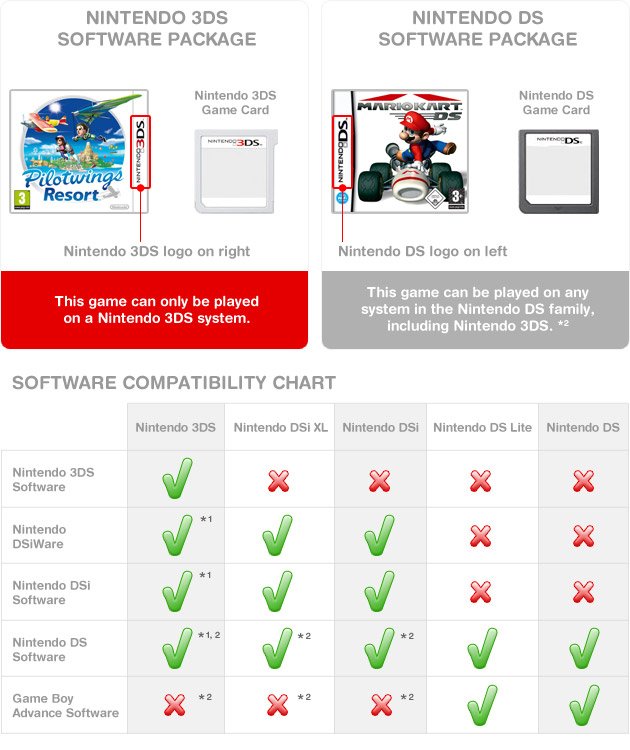
So, you’re wondering, does 2ds play ds games? It’s a common question for anyone curious about Nintendo’s handheld consoles. The 2DS, despite being a later iteration, is actually backward compatible with games designed for the original Nintendo DS.
This is great news for anyone with a collection of older DS cartridges. You can enjoy all those titles on the 2DS without needing a separate console. This compatibility makes the 2DS a versatile device for many gamers.

Does 2DS Play DS Games? A Deep Dive
Let’s get right to it: Yes, the Nintendo 2DS can play Nintendo DS games! That’s fantastic news for anyone who loves those classic titles. The 2DS was designed with backward compatibility in mind, meaning it can play games from older Nintendo systems. Think of it like having a time machine for video games; you can jump back and enjoy all the great DS adventures. But, it’s not just a simple yes or no. There’s much more to explore about playing DS games on a 2DS. Let’s dig in!
Understanding Backward Compatibility
Backward compatibility is a term that means a newer device can play software created for an older device. It’s a bit like a DVD player that can also play CDs. The Nintendo 2DS has this feature for DS games. This means you don’t need to keep your old Nintendo DS to enjoy those games. You can play them on your 2DS, which is super convenient!
What Does This Mean for You?
Imagine you have a bunch of awesome DS games like “Mario Kart DS” or “New Super Mario Bros.” You can simply put those game cartridges into your Nintendo 2DS and start playing! There’s no need to download anything, it works just like it did on the older DS systems. This is really convenient if you’ve collected DS games over the years. No need to keep that old DS around. Your 2DS becomes a dual-purpose system, ready for both 2DS and DS adventures.
How to Play DS Games on a 2DS
Playing DS games on a 2DS is very easy. It’s almost like using a DS. Here’s a step-by-step guide:
- Locate the Game Card Slot: On your 2DS, you’ll find a slot on the side or top of the device. This is where you insert the game card. It’s usually labelled to tell you what type of card goes there.
- Insert the DS Game Card: Gently push your DS game card into the slot. Make sure it is facing the correct way. You’ll feel a slight click when it is inserted correctly.
- Power On Your 2DS: Turn on your 2DS. You can do this by pressing the power button.
- Select the Game: Once powered on, your 2DS should recognize the DS game card. It will appear as a selectable game option on the main menu. Use the D-pad or touch screen to choose the game.
- Start Playing! Just select the game, and you can start enjoying your favourite DS games all over again!
It’s that simple! There’s no complicated setup or settings to adjust. You can start playing those old favorites almost immediately.
DS Games on 2DS: Screen Differences and Gameplay
While the 2DS plays DS games very well, there are a few differences you may notice because of the 2DS screen. The original Nintendo DS had two screens, and the 2DS has two screens as well but in a different format. Let’s discuss what this means:
The Dual-Screen Layout
The original DS used a split-screen format. It had a top screen that displayed the main gameplay and a bottom screen that was a touch screen. The Nintendo 2DS retains this dual-screen concept, displaying the image of both screens on the 2DS’s single display screen. The 2DS has two small areas inside of one single screen, simulating the two screens of the DS. This might take a little getting used to, especially if you are used to two physical screens separated from each other like on the old DS system.
Touchscreen Gameplay
The 2DS, like the original DS, utilizes a touchscreen. So any DS games that require touch control work perfectly fine. You can use the provided stylus to interact with the bottom screen in DS games, just like you would on the original Nintendo DS. Everything will feel very familiar.
Differences in Screen Size
You may notice that the screen on the 2DS is slightly different than the screen on the original DS. The 2DS combines the two screen image inside of one big screen. But, this change usually does not impact the gameplay. Most of the games are designed to adjust to the 2DS’s screen setup. However, some players may prefer the look of two separate screens. Ultimately, both formats are functional.
Advantages of Playing DS Games on a 2DS
There are several great advantages to using your 2DS to play DS games. Let’s look at some of the main benefits:
- Convenience: You only need one device to play both 2DS and DS games. There’s no need to carry two different systems around. This is great for travel and saving space.
- Cost Effective: If you have a 2DS, there’s no need to buy an older DS system just to play DS games. This can save you a bit of money.
- Access to a Large Library: The 2DS gives you access to a huge library of games from both the DS and 2DS libraries. This means you have a wide variety of games you can play on one device.
- Modern Features: The 2DS has modern features that some of the older DS systems might not have, like the ability to use Wi-Fi to download games from the eShop. These additional capabilities enhance your gaming experience.
Potential Drawbacks
While playing DS games on a 2DS is fantastic, there are a few minor things to be aware of:
- Screen Layout: As we discussed before, the 2DS displays both screens within a single frame, which might take some getting used to compared to two separate screens on the old DS system.
- No 3D Capability: The 2DS, unlike the 3DS, does not have a 3D screen. This is not a problem for DS games because they were not designed for 3D. But it is something to keep in mind if you have a collection of 3DS games, you might be better using a 3DS system.
- Comfort of Holding: Some people find the 2DS design slightly less comfortable to hold for long play sessions compared to the original DS, especially the clamshell models.
Are All DS Games Compatible?
Great news! Pretty much all Nintendo DS game cartridges work perfectly fine on the 2DS. You don’t need to worry about some games not working, in general. All the major game titles and even some of the more obscure ones, will load and play as they were intended on your 2DS console. If you happen to face any problems with specific games not loading, this could be related to the game cartridge itself, and not necessarily the 2DS console.
DSi Enhanced Games and the 2DS
The Nintendo DSi was an improved version of the DS, and it added some new features. Some DSi games made use of these extra features. But don’t worry; these DSi enhanced games will work fine on your 2DS, but the DSi specific features of those games may not work. Most of the games are designed to function as standard DS games even if they have extra DSi features. The core gameplay remains the same on your 2DS console.
Tips for a Great DS Gaming Experience on a 2DS
Want to make your DS gaming experience on your 2DS even better? Here are a few tips:
- Clean Your Game Cartridges: Before you play a game, make sure the gold pins on the game cartridge are clean. You can gently blow on it or use a soft cloth to remove dust. This helps ensure the game loads properly.
- Use a Stylus: The 2DS has a stylus to help with touch screen gameplay. Use the stylus rather than your finger for better precision. This improves gameplay a lot, especially in titles that require precise touching
- Adjust the Brightness: Adjust the screen brightness on your 2DS to suit your environment. This helps make the screen easier on the eyes, especially during long play sessions.
- Take Breaks: Remember to take breaks every so often to give your eyes a rest. This is important for keeping your eyes healthy, especially when doing a game marathon!
Purchasing DS Games
If you do not have a collection of DS games, you might be wondering where to buy them. Here are a few options:
- Online Marketplaces: Sites like eBay and Amazon often sell used DS game cartridges. You can find a wide variety of titles at various prices. Just make sure that you are buying from a reputable seller.
- Game Stores: Some local game stores or pawn shops may also have a selection of used DS games. It’s good to check and see if they have games you are looking for.
- Online Game Shops: Some specialized websites focus on retro game sales. These can be a good option if you are looking for more rare titles.
Playing DS games on your 2DS is a great way to enjoy some classic handheld titles, and with a few simple steps, you can easily access all the great games from both the DS and 2DS libraries. It’s a fantastic way to relive those older games or to experience them for the very first time. The 2DS gives you a very easy way to do this, and I hope this article has given you all the information you need. Have fun and enjoy the games!
DS Games on a 3DS?!?
Final Thoughts
Yes, the Nintendo 2DS plays almost all Nintendo DS games. It boasts compatibility with the extensive DS library. This means you can enjoy many classic titles on the 2DS hardware.
Therefore, if you’re wondering, ‘does 2ds play ds games’, the answer is definitively yes. You can absolutely play your DS game cartridges on this handheld. Compatibility is a key feature, making the 2DS a solid choice.

