
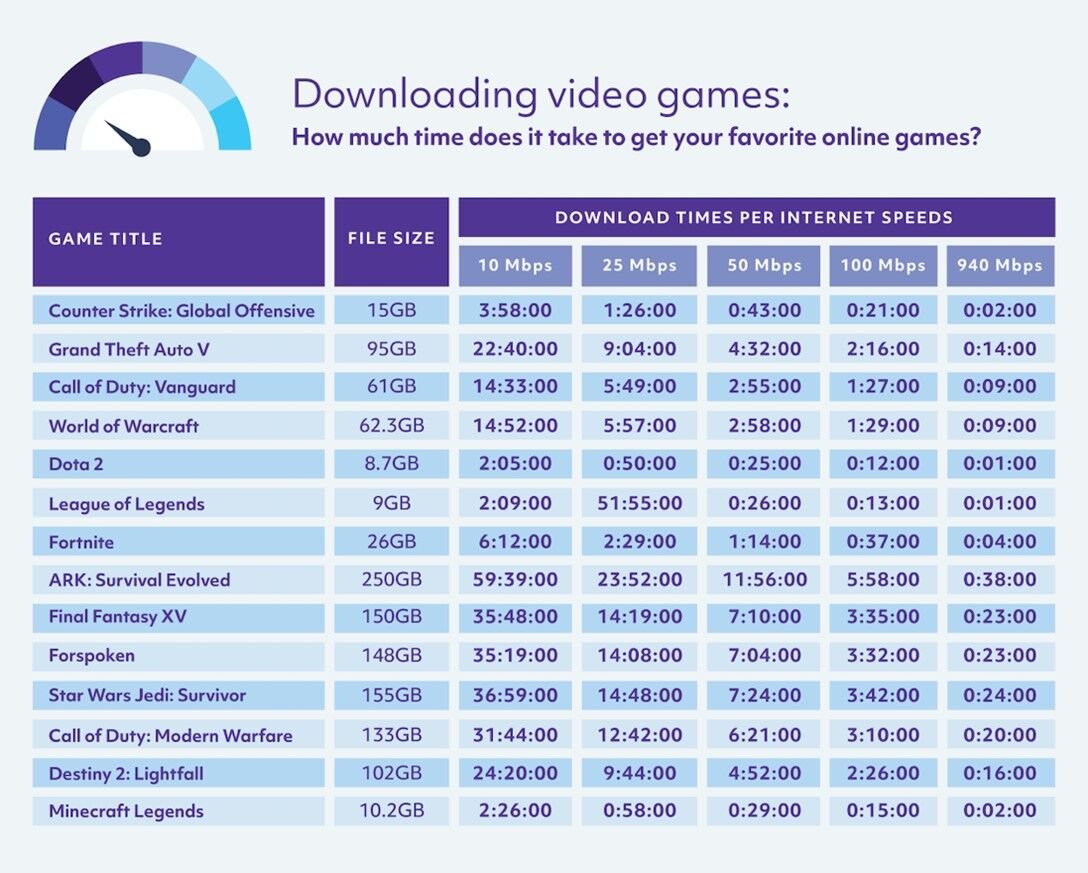
Yes, downloading games absolutely uses data.
Ever wondered about that little data counter on your phone, especially after a gaming splurge? It’s a valid concern. Many of us love to download new games, but the nagging question, does downloading games use data, often lingers in the back of our minds.
It can be quite frustrating to suddenly find yourself out of data when you didn’t expect it. This is why understanding data usage when acquiring digital entertainment is really important to help you avoid surprises. Knowing this will allow you to manage your data and play uninterrupted.

Does Downloading Games Use Data? The Complete Guide
Okay, let’s dive right into it! You’re probably wondering, “Does downloading games use data?” The short answer is a big, resounding YES! Downloading games, whether it’s on your phone, tablet, computer, or console, uses your internet data. It’s like filling up a glass with water; the bigger the glass (the game), the more water (data) you need to fill it up. But it’s not quite as simple as that, so let’s explore all the details.
Why Game Downloads Need Data
Imagine a game as a huge collection of pictures, sounds, and instructions all bundled together. These bits of information, called data, need to travel from the game company’s servers to your device. That’s what downloading is all about: bringing all that data to your device. The bigger and more detailed the game, the more data it requires for that process.
Understanding Data Consumption Basics
Think of your data plan like a water tank for your house. Each time you download a game, you are using water from that tank. If you download too many big games, you’ll run out of water faster. Internet Service Providers (ISPs) usually measure data in gigabytes (GB). A gigabyte can hold lots of smaller files, like documents or pictures, but a big game can use up many gigabytes all on its own.
Here’s a simple breakdown:
- Megabyte (MB): Smaller units of data, used for things like single images, short videos or app updates.
- Gigabyte (GB): Much larger unit of data. Game downloads are usually measured in gigabytes.
- Terabyte (TB): Very large unit, usually for data storage.
Keep this in mind: 1 GB equals 1024 MB. So, when you see a game needing 10GB, you know it is a big file!
Factors Influencing Download Data Usage
Not all game downloads are created equal. Several factors determine how much data a game will use when downloading:
Game Size
The most important factor is how big the game is itself. A small, simple game like a puzzle app might only be a few megabytes. But a large, complex game, such as a first-person shooter or an open-world adventure, can be over 50, 100, or even 150 gigabytes! Think of comparing a coloring book to an encyclopedia; the encyclopedia will always be larger, just as a modern action game will always need more download data.
Game Platform
The platform you are using plays a crucial role. Mobile games on phones and tablets are usually smaller than computer or console games. Here’s a general idea:
- Mobile games: Typically range from a few MBs to a few GBs.
- PC games: Can vary widely, often from 5 GB to 100+ GB.
- Console games (PlayStation, Xbox, Nintendo Switch): Usually range from 10 GB to 100+ GB.
Game Updates and Patches
Games don’t always stay the same. Game developers often release updates, bug fixes, and new content after a game is released. These updates, called patches, also require downloading data. While they are usually smaller than the full game download, they can still add up over time.
Type of Download
The type of download matters. If you are downloading a game initially to a platform, it will require a large amount of data. If you are only downloading a small expansion pack or DLC (downloadable content) it will require much less data.
Download Quality and Settings
Some platforms allow you to choose your download quality settings. For example, you might be able to download a low-resolution or medium-resolution texture pack rather than the higher quality or 4k version of textures. This will reduce the amount of data needed. The file size required for 4k textures will be higher than medium or lower quality textures.
How Much Data Do Different Games Use?
Let’s look at some examples to help you understand the real data impact:
- Simple Mobile Games (like puzzles or arcade): 50 MB to 500 MB
- Popular Mobile Games (like action or simulation): 1 GB to 5 GB
- Indie PC Games (less graphically intensive): 5 GB to 20 GB
- AAA PC Games (big-budget and graphically detailed): 40 GB to 100+ GB
- AAA Console Games (PlayStation, Xbox): 30 GB to 150+ GB
These are general estimates, of course, actual sizes can vary based on the specific game and updates.
Checking Game File Sizes Before Downloading
Before you start downloading, most platforms show you the game’s file size. Look for this information, it is essential for planning if you have limited data.
Here is a quick guide on where to usually check on different platforms:
- Mobile App Stores (Google Play Store, Apple App Store): The game’s page will show the size.
- PC Game Platforms (Steam, Epic Games Store): The game’s store page will display the file size.
- Console Game Stores (PlayStation Store, Xbox Store, Nintendo eShop): The file size will be listed on the game’s product page.
The Impact of Downloading Games on Your Data Plan
Downloading games can have a large impact on your monthly internet data limits, particularly if you have limited data or use a mobile network. It is important to be aware of your own download limits and consumption patterns, especially if you are on a limited plan.
Data Caps and Overages
Most Internet Service Providers (ISPs) have data caps, which are monthly limits on how much data you can use. If you exceed this limit, your ISP might charge you extra fees, slow down your internet speed (throttling), or even cut off your internet until the next billing cycle. Downloading a large game could cause you to go over your data limit.
Mobile Data Plans and Game Downloads
If you rely on mobile data (like 4G or 5G) for game downloads, you need to be extra careful. Mobile data plans often have very strict caps, and downloads use data much faster. Avoid large downloads over mobile networks, instead prefer to use a wifi connection whenever possible.
Tips to Manage Data When Downloading Games
Now that you know how much data game downloads use, here are some smart tips to help you manage your data effectively:
Use Wi-Fi Connections
Always, always prefer using a Wi-Fi connection for downloading games. Wi-Fi is usually faster and doesn’t count towards your mobile data plan limits. This should be your first course of action when you want to download something.
Plan Ahead and Download Wisely
Consider planning your downloads before starting. If you know that you want to download a larger game, do this when you know that you are going to be using an unlimited wifi connection. If you want to download a game when you are away from wifi, try to find a wifi spot to download the game instead of downloading it on your mobile network.
Monitor Your Data Usage
Pay close attention to how much data you are using each month. Both mobile devices and computers have settings to help you keep track of your data usage. Monitoring your data consumption will also help you understand which applications or games are consuming the most data. Set limits on your devices to ensure you don’t accidentally use more data than intended.
Choose Smaller Games
If you are worried about data limits, pick smaller games with lower data requirements. There are thousands of amazing games that do not require large downloads.
Download During Off-Peak Hours
Some ISPs have unlimited data or faster speeds during off-peak hours (often late at night or early morning). You can take advantage of these times to download games without impacting your data plan. Check with your ISP to know if they offer this type of deal.
Turn Off Auto-Updates
Adjust your device and platform settings to avoid automatic game updates. This will enable you to update games manually, at a time convenient for you when you have wifi. This will prevent your device from automatically downloading updates when using mobile networks.
Consider Physical Copies
For console games, think about purchasing physical copies (discs or cartridges) rather than downloading them. Physical copies only require small patches or updates, rather than the entire game download.
Data Consumption During Gameplay
It’s important to understand that downloading is not the only time a game uses data. Once the game is on your device, most games still require a connection to the internet during gameplay. Most games use data when you are actively playing, here are a few examples:
Multiplayer Online Games
Games where you play with others online constantly send and receive data. This is to allow you to interact with the other players in the game and to keep the game state synced between all players. The longer you play online, the more data these kinds of games will use. So it’s not just about downloading the game, your online playtime also consumes data.
Games with Online Features
Even games you play by yourself might use data for features like online leaderboards, cloud saves, or in-game purchases. These features typically use smaller amounts of data than full game downloads or multiplayer games, but it can still add up over time.
Updates and Patches
Games may download small patches in the background while you are playing. Although patches are small, they do contribute towards data usage. So, even if you do not download games often, these background patches can add to your data consumption each month.
Is there a Way to Download Games Without Using Data?
There really is no way to download games entirely without using data because downloading is the actual movement of data. However, there are some ways to reduce or minimise the data required:
Using Physical Copies
As mentioned before, using physical copies of games avoids the initial game download. You will still require a smaller download patch, but it’s a smaller data requirement than a complete download.
Pre-Downloading at Friends’ Homes
If a friend has a faster internet connection or unlimited data, you can download the game at their house and then transfer it to your device. This would prevent your own data being consumed.
Using Public WiFi
Public WiFi options are also available, but be careful using these since they are often not very secure and can be a target for attacks. But these will also help to reduce the data used on your private internet connection.
Understanding Different Data Transfer Rates
While we focus on total data usage, understanding data transfer rates is also helpful. Your internet connection’s speed impacts how fast downloads finish, not the data it uses. Download speeds are measured in megabits per second (Mbps) and determine how long it takes for data to be transferred.
How Download Speed Impacts Data Usage
A faster internet speed means you download the data faster. However, it does NOT reduce the total data a game uses. A faster connection means a quicker download, not a smaller download. Think of it like a faucet; a fast flow (high Mbps) fills a glass faster than a slow flow (low Mbps), but the glass still needs the same amount of water (data) to be full.
Factors Affecting Download Speed
Several factors affect your download speed: Your Internet plan speed, your internet service provider, the number of people using the internet connection, your network and wifi setup and the game servers you are downloading from.
So, to wrap it up, yes, downloading games uses data. Lots of it, sometimes. Understanding how much data is involved and how to manage it can help you to keep enjoying your gaming hobby, without worrying about going over your data limits.
Downloading Games and Data Packages
Final Thoughts
Yes, downloading games uses data. The amount of data consumed varies greatly depending on the game’s size. Larger, graphically complex games will use significantly more data than smaller, simpler ones.
Be mindful of your internet plan’s data limits when you download games. It’s also useful to connect to Wi-Fi for large game downloads to avoid mobile data charges. So always remember, “does downloading games use data,” absolutely it does.

