
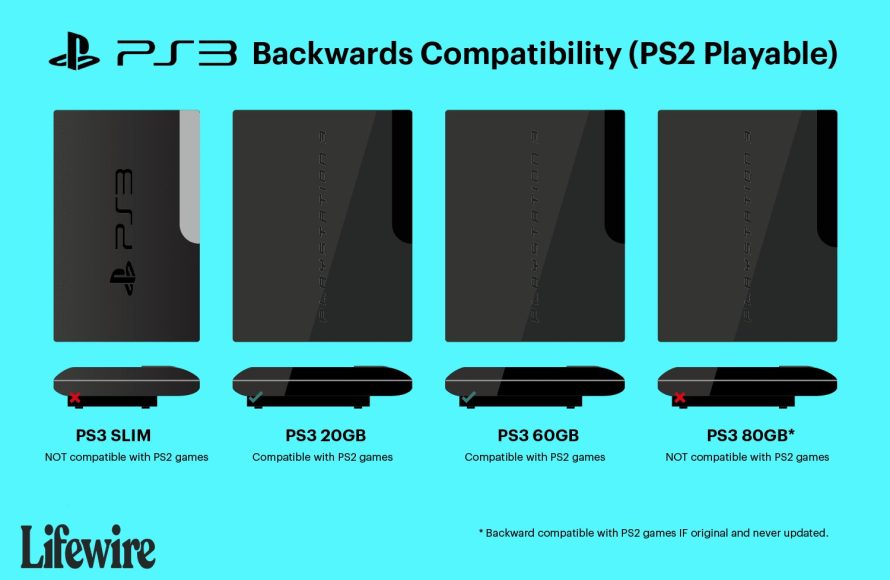
Unfortunately, not all PS3 models can play PS2 games. Only the original “fat” PS3 models offered backwards compatibility for PS2 discs.
Do you remember the excitement of playing PS2 classics? Many gamers wonder, “does my ps3 play ps2 games?” It’s a question that pops up often, given the vast library of PS2 titles.
Sadly, the answer is a bit nuanced. Only specific launch versions of the “fat” PlayStation 3 consoles include the hardware necessary for this function. Later, slimmer PS3 models removed this feature completely.

Does My PS3 Play PS2 Games? A Deep Dive
The question of whether your PlayStation 3 can play PlayStation 2 games is a common one for gamers. It’s understandable! After all, who wouldn’t want to revisit some classic PS2 titles on their newer system? The answer, however, isn’t a simple yes or no. It varies depending on the specific PlayStation 3 model you have. Let’s explore the fascinating history of PS3 backwards compatibility and figure out if your console can handle those old favorites. We will explore the original models which came with a hardware component that allowed them to play PS2 discs. We’ll also examine later versions of the system and why they don’t have this feature. So, grab your controller, and let’s dive in!
The Original “Fat” PS3: The Backwards Compatible Champion
When the PlayStation 3 first hit the market, the early “fat” models were designed with a special feature: full hardware-based backwards compatibility with PlayStation 2 games. This means these specific PS3 consoles contained the actual hardware components from a PlayStation 2. These components allowed them to run PS2 game discs perfectly. Think of it like having a PS2 built right into your PS3! These early units are the holy grail for those wanting to play their PS2 game collection without needing a separate console. The inclusion of dedicated PS2 hardware made it possible for the original PS3 to play both PS1 and PS2 games without issues.
Identifying the Backwards Compatible Models
How do you know if you have one of these special models? It’s not too hard to figure out. The original “fat” PS3 consoles that have this feature usually have certain identifying characteristics. These are the models with a larger, more rounded shape. Look for the following model numbers on the back or bottom of your console:
- CECHAxx (where ‘xx’ is usually 00 or 01)
- CECHBxx (where ‘xx’ is usually 00 or 01)
- CECHCxx (where ‘xx’ is usually 02 or 03)
- CECHExx (where ‘xx’ is usually 01 or 03)
These models were the first ones released. They included the Emotion Engine and Graphics Synthesizer chips. These are the same components that powered the PlayStation 2. Because of this, they offered near-perfect compatibility. Keep in mind that the CECHC and CECHE models offered only partial software-based emulation for PS2 games, which means that these are not truly backwards compatible in the same way as the CECHA and CECHB models.
It’s crucial to check these model numbers carefully before trying to play PS2 games on your console. There is no clear indicator on the console’s outer packaging that shows its backwards compatibility other than the model numbers on the box of the console itself. If your box has been lost you will have to rely on the model numbers printed on the console.
Why the original PS3 is good for Backwards Compatibility?
The reason why original PS3 is so good at playing PS2 games is its unique architecture. The first models had the actual PS2 components in them. This made the compatibility of the older games seamless. It was as if you had a complete PS2 inside your PS3. This eliminated any problems that could come with using software-based emulation, such as lagging or graphical problems.
The Shift Away from Hardware Backwards Compatibility
As the PlayStation 3 continued its life cycle, Sony made the decision to remove the PS2 hardware components. This decision was primarily driven by cost. Adding those PS2 chips to every PS3 was adding a lot to the production cost of each unit. This made each unit very expensive to produce. The change also reduced the overall size and complexity of the console’s internal hardware and production process.
The Introduction of “Slim” and “Super Slim” Models
The later versions of the PlayStation 3, namely the “Slim” and the “Super Slim” models, no longer included the Emotion Engine and Graphics Synthesizer chips. These models rely solely on software-based emulation for PlayStation 1 games. They don’t have any compatibility with PS2 game discs. If you have a “Slim” or “Super Slim” model, you won’t be able to play PS2 games directly from the disc. These models were designed to cut costs and streamline the PS3. This made it more affordable for more people. While this helped Sony sell more consoles, it did mean that PS2 backwards compatibility was a thing of the past.
Why the Later Models Lack PS2 Compatibility
The removal of the hardware components meant that Sony had to rely on software emulation for PS1 game compatibility. Software emulation for PS2 games was also tried, but it wasn’t as reliable or performant as having the original chips. Emulating a complex system such as the PS2 through software is resource intensive and can lead to problems with framerates and graphics. Ultimately, Sony decided to not include the PS2 software emulation on the PS3. They probably felt that they were not able to create a good enough experience to satisfy the gamer, and did not want their customers to have a bad experience. This explains why no later model of the PS3 has the ability to play PS2 games.
Software Emulation: A Limited Solution
While the majority of PS3s can’t play PS2 game discs, there are some PS2 titles available digitally on the PlayStation Store. These games have been ported and optimized to play on the PS3 through software emulation. These digital releases aren’t the same as playing your old PS2 discs, though. The collection available on the store is much smaller than the full library of PS2 games.
PS2 Classics on the PlayStation Store
Sony has released a selection of PlayStation 2 titles as “PS2 Classics” on the PlayStation Store. These games are re-released digitally, and often include some improvements or enhancements for the PlayStation 3. If you have an older PS3, you can buy these and play the games, but they will not be as smooth as playing the discs through the backwards compatible version of the PS3. To access these, you will need to connect your PS3 to the internet and access the Playstation Store. You can find the section that contains the PS2 classics, and download any game that takes your interest.
Limitations of Software Emulation
It’s important to remember that software emulation isn’t perfect. It can sometimes result in less-than-ideal performance, such as occasional stuttering or graphical glitches. Unlike having the original PS2 hardware components, software emulation requires the PS3 to translate the PS2 game’s code into code the PS3 can understand. This process demands a lot of processing power. The quality of emulation also varies from game to game. This means that some titles might run better than others. Because of this, the software emulated games will never be as good as playing the games on a backwards compatible PS3.
Can You Mod Your PS3 for PS2 Games?
Some users have explored the option of modifying their PS3 consoles to play PS2 games. This is generally done through third-party software and often involves installing custom firmware. Please note, modifying your console could potentially void your warranty and may cause permanent damage to the unit. We do not recommend that you do this.
The Risks of Modifying Your Console
While the idea of playing PS2 games on any PS3 through modification might seem appealing, there are significant risks to consider. Modifying your console can lead to your system being bricked or banned from the PlayStation Network. This also involves downloading software of unknown origin, which could be infected with a virus. It also carries legal implications. Sony doesn’t support or endorse any modification of their consoles and doing so will void the warranty of the console, or lead to possible legal action. It is best to avoid these methods, especially if you are not an expert in console modification.
Alternative Ways to Play PS2 Games
If you don’t have a backwards compatible PS3, and you don’t want to modify your console, there are still other ways to experience classic PlayStation 2 games. Let’s discuss some of these options.
Revisit the Original PS2 Console
The most straightforward way to play PS2 games is to simply use an original PlayStation 2 console. The original PlayStation 2 consoles are widely available in the used market at a reasonably affordable price. The advantage of using the PS2 system is the absolute and 100% compatibility with every game released on the console. It is the most genuine experience, and every PS2 disc will play perfectly.
Using a PS2 Emulator on PC
Another option to play PS2 games is by using a PS2 emulator on a PC. These emulators are computer programs that mimic the functions of a PS2. This allows you to play PS2 game files on your computer. While a PS2 emulator is a useful way to play PS2 games, it requires a powerful PC to run them smoothly.
Playstation’s Cloud Streaming Service
With the new Playstation Plus Premium subscription service, you can stream a number of PS2 games through the cloud. This means you are not actually playing the game directly from the console, and you are rather using a remote server that is processing the game and sending you the video feed. This relies heavily on the quality of your internet connection. But it is a perfectly good option if you have a modern console or PC and you don’t have the possibility to get an old one, or are not willing to invest in one.
Quick Comparison of PS3 Models and PS2 Compatibility
To make it easier to understand, here is a quick summary table to compare the different PS3 models and their backward compatibility features:
| PS3 Model | PS2 Game Disc Compatibility | PS2 Emulation | Identifying Model Number |
|---|---|---|---|
| Original “Fat” PS3 (CECHAxx, CECHBxx) | Full hardware compatibility | Hardware based | CECHAxx, CECHBxx |
| Original “Fat” PS3 (CECHCxx, CECHExx) | Partial hardware compatibility | Software based | CECHCxx, CECHExx |
| “Slim” PS3 | No compatibility | None | CECH-20xx, CECH-21xx, CECH-25xx, CECH-30xx |
| “Super Slim” PS3 | No compatibility | None | CECH-40xx, CECH-42xx, CECH-43xx |
Using this table, you can clearly see if your PS3 model has backwards compatibility, or if you will need to explore different avenues to play your old PS2 games.
In conclusion, the answer to the question “Does my PS3 play PS2 games?” depends entirely on the model you own. The initial “fat” PS3 consoles had the unique ability to play PlayStation 2 games natively due to the inclusion of PS2 hardware. Unfortunately, the later slim and super slim versions of the PS3 did not have this backwards compatibility because of cost-cutting measures. While the PlayStation Store does offer some PS2 Classics, these are a limited selection, and their software emulation might not provide the same experience as playing PS2 games on original hardware. If you’re keen on revisiting your old PS2 library, you might consider an original PS2 system or exploring emulators on your PC. This gives you a more authentic gaming experience. You can also take advantage of the PS2 classic game catalogue offered by Playstation plus premium subscription. By understanding the history of backwards compatibility and the various PS3 models, you can make informed decisions on how to enjoy your favorite PS2 titles.
The PS3 Had a Hard Time Playing PS2 Games Because of…..Emotions?
Final Thoughts
So, does my ps3 play ps2 games? The answer is: it depends on the specific PS3 model. Only the original, early “fat” PS3 units included the hardware needed for backward compatibility with PlayStation 2 titles.
Later PS3 models, specifically the slim and super slim versions, removed this PS2 capability. Therefore, these cannot play PlayStation 2 discs. Always check your model if you have questions.

