
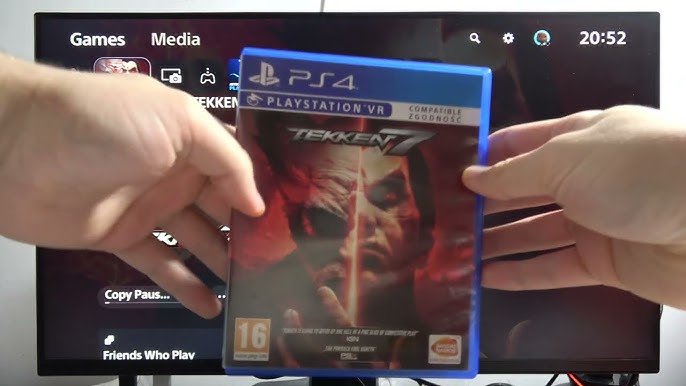
Yes, the PS5 Slim plays PS4 games.
Thinking of upgrading to the new PS5 Slim but worried about your library of PS4 games? It’s a valid concern! Many gamers have invested heavily in their PlayStation 4 collections.
The good news is that the PS5 Slim maintains backward compatibility with almost all PS4 titles. So, you can enjoy your existing games on the newer console without any issues.

Does PS5 Slim Play PS4 Games?
Okay, let’s dive into the exciting world of PlayStation! You’re probably wondering if the shiny new PS5 Slim can play those awesome games you already own for your PS4. It’s a great question, and the answer is a big, happy yes! The PS5 Slim has a fantastic feature called backward compatibility, which means it can play almost all PS4 games. Isn’t that great?
Understanding Backward Compatibility
Backward compatibility is a fancy way of saying that a new console can play games from an older console. Think of it like this: if you have a DVD player, it can usually play both DVDs and older CDs. The PS5 Slim is similar; it can play both the newest PS5 games and almost all of your PS4 games. This is fantastic news because it means you don’t have to leave your favorite PS4 games behind when you upgrade to the PS5 Slim.
How Does It Work?
The PS5 Slim is built with special technology that allows it to understand and run the software of PS4 games. This isn’t always easy to do, as the hardware inside a PS5 is different from a PS4. However, the engineers at PlayStation worked really hard to make sure the PS5 Slim can play most PS4 games smoothly. They added components into the ps5 that mimic the way a ps4 works, so that the console can “understand” the code of the ps4 games. When you pop a PS4 game into your PS5 Slim, the console recognizes it and then switches to a special mode where it acts like a PS4, but with the power of the PS5. This process isn’t always perfect, but it works very well for most games.
Playing Your PS4 Games on PS5 Slim
So, how do you actually play your PS4 games on the PS5 Slim? It’s really straightforward. You have a couple of options, depending on whether you have physical copies of your games or digital versions.
Using Physical Game Discs
If you have your PS4 games on discs, here’s what you do:
- Make sure your PS5 Slim is turned on and connected to your TV.
- Find the disc drive on your PS5 Slim. It’s on the side of the console (if you have the version with the disc drive.)
- Carefully put your PS4 game disc into the drive. Make sure the label side of the disc is facing up.
- Your PS5 Slim will recognize the game and start the installation process. This might take a few minutes.
- Once it’s installed, the game icon will appear on your PS5 home screen.
- Select the game icon and get ready to play!
It’s important to note that if you got the digital-only version of the ps5 slim, you can only play the games that you own the digital copies of. This means that the physical ps4 discs can’t be used in this version of the ps5.
Playing Digital PS4 Games
If you bought your PS4 games from the PlayStation Store, here is how you play them on your PS5 Slim:
- Make sure your PS5 Slim is connected to the internet and you are logged into the same PlayStation account that you used on your PS4.
- Go to your “Game Library” on the PS5 home screen.
- Look for the “Your Collection” tab. Here you should see a list of all the digital games you own.
- Find the PS4 game you want to play and select it.
- Your PS5 Slim will start downloading the game. This might take a bit depending on your internet speed.
- Once the download is finished, you can start playing!
Are All PS4 Games Compatible?
While the PS5 Slim is very good at playing PS4 games, there are a small number of PS4 games that it cannot play. Sony has said that more than 99% of the ps4 games are fully compatible and playable on ps5 slim. There are a few reasons why a game might not work.
- The game might rely on very specific hardware features of the PS4 that the PS5 can’t perfectly replicate.
- There might be compatibility issues that the developers haven’t been able to fix.
- The game is extremely old or obscure and never got the needed updates to work on the PS5.
The good news is that most of your favorite games will work perfectly, and the list of incompatible games is very small. If you have a specific game in mind and are unsure, you can usually find information online by searching for “[Game name] PS5 compatibility.”
Enhancements for PS4 Games on PS5 Slim
Playing PS4 games on the PS5 Slim isn’t just about playing them as they were on the PS4. In many cases, the PS5 Slim actually makes your PS4 games look and play better!
Improved Load Times
One of the biggest enhancements you will see is reduced load times. The ps5 has a very fast SSD storage which drastically cuts the waiting time that the older ps4 used to have. This means that games will load much faster, and you will spend less time waiting and more time playing.
Better Graphics and Performance
The PS5 Slim has a more powerful processor than the PS4. This means that games can often run at higher frame rates, which makes the game look smoother. Games will also have more detailed graphics and better resolution when played on ps5 slim compared to ps4. Some games might even have specific PS5 enhancements patches, which means the developers made upgrades to the game specifically for the newer hardware.
Using PS5 Controller (Dualsense)
You can also play PS4 games on the PS5 Slim using the amazing new DualSense controller. The PS5’s DualSense controller has haptic feedback and adaptive triggers, which provide a new way to feel the game. While these specific features aren’t always used in PS4 games, using the DualSense controller on PS4 games feels very good because it’s more ergonomic and comfortable.
Transferring Saved Games From PS4
Now, what about those hours you spent leveling up in your favorite PS4 games? Don’t worry, you can transfer your saved game data from your PS4 to the PS5 Slim.
Transferring via USB Drive
This is a good option if you don’t have a PS Plus membership.
- On your PS4, go to “Settings,” then “Application Saved Data Management.”
- Choose “Saved Data in System Storage.”
- Select the game data you want to copy, then select “Copy to USB Storage Device.”
- Once copied, safely remove the USB drive.
- Plug the USB drive into your PS5 Slim.
- On your PS5 Slim, go to “Settings,” then “Saved Data and Game/App Settings.”
- Select “Saved Data (PS4),” then “USB Drive.”
- Select “Copy to Console Storage,” and you are all done!
Transferring via PlayStation Plus Cloud Storage
If you are a PlayStation Plus member, you can use cloud storage to transfer your saved games.
- On your PS4, make sure your save data is uploaded to the cloud storage.
- On your PS5 Slim, go to “Settings,” then “Saved Data and Game/App Settings.”
- Choose “Saved Data (PS4),” then “Cloud Storage.”
- Select “Download to Console Storage,” and all your saved data will be transferred!
Transferring via Network
You can also directly transfer the data through the network between your ps4 and ps5, but you need to have both the consoles on the same network. The method is pretty simple, the console asks if you want to transfer data when you log into the ps5, if you choose yes, it will prompt you to set up a network transfer between both the consoles.
Benefits of Playing PS4 Games on PS5 Slim
So, why would you play your old PS4 games on the PS5 Slim instead of just sticking with the PS4? There are actually several good reasons!
Access to a Larger Game Library
With backward compatibility, you don’t have to abandon your PS4 game library when you move on to the PS5 Slim. You can enjoy the latest PS5 games and your old favorites all on the same system.
Improved Performance and Visuals
The better processing power and graphics capabilities of the ps5 slim means your ps4 games can look and perform even better than before. Expect faster load times, smoother gameplay, and improved visuals in most cases.
Consolidation of your Setup
Instead of having both a PS4 and a PS5 set up, you can consolidate everything into one console. This can free up space and reduce clutter, and also keep everything at one place.
Are There Any Drawbacks?
While backward compatibility on the PS5 Slim is really great, there are a few minor things to keep in mind:
- A very small number of ps4 games are not compatible, but that’s a very small list.
- Some PS4 games might not fully take advantage of the PS5’s unique features like haptic feedback.
- There might be minor graphical glitches or bugs, although that’s very rare.
However, these downsides are generally very minor compared to the benefits of playing PS4 games on the PS5 Slim.
The PS5 Slim’s ability to play PS4 games is a fantastic feature. It allows you to keep playing all of your favorite ps4 games while you also begin to experience the best of the ps5 games. With better graphics, faster load times, and the ability to use your new DualSense controller, playing PS4 games on the PS5 Slim is a great experience. So, if you’re thinking of upgrading to a PS5 Slim, you can do it with the confidence that your precious ps4 games will come along with you on this next generation journey.
PS5 Slim: Can I Use PS4 Game Disc on PlayStation 5 Slim – Play PS4 Games #sonyplaystation
Final Thoughts
The PS5 Slim, like its predecessor, plays almost all PS4 games. This backward compatibility allows you to enjoy your existing game library. You do not need to rebuy your favourite games.
Therefore, ‘does ps5 slim play ps4 games’? The short answer is yes, it does. This provides continuity for gamers.

