
No, rebuilding the database on your console does not delete games.
Ever felt your console’s performance dipping or experienced some glitches? Many gamers wonder what exactly happens during maintenance routines. A common question that pops up is does rebuild database delete games? It’s a valid concern.
The process focuses on reorganizing your system’s data, making things run smoother. This operation doesn’t touch your installed games, thankfully.

Does Rebuild Database Delete Games? Unraveling the Truth
Okay, so you’re wondering if rebuilding your PlayStation’s database will send your beloved games to digital oblivion? It’s a super common question, and it’s totally understandable to be worried! We all have those games we love and would hate to lose. The short answer is: no, rebuilding your PlayStation’s database will not delete your games. But, since you’re here, let’s dig into exactly what rebuilding the database does, why it’s useful, and what you should expect when you do it. Let’s get to the bottom of this so you can feel comfortable and confident when managing your console.
What is a PlayStation Database?
Imagine your PlayStation’s hard drive as a giant library. Instead of books, it holds your games, apps, saved progress, system settings, and all sorts of other information. To keep track of everything, the PlayStation uses a database. This database is like the library’s catalog – it tells your PlayStation where everything is stored and how to find it.
Think of it like this: when you download a game, the PlayStation not only saves the game files but also creates an entry for it in the database. This entry includes the game’s name, icon, location on the hard drive, and other important details. The database helps your PlayStation quickly access everything it needs to run smoothly.
Why Does the Database Need Rebuilding?
Over time, like any busy library, the database can become messy. Maybe some entries are damaged, misplaced, or simply aren’t working as they should. This mess can cause some annoying problems. You might notice:
- Slow loading times for games and menus
- Games or apps crashing unexpectedly
- The system being generally sluggish
- Icons disappearing or not loading correctly
- Some saved data not showing
Rebuilding the database is like reorganizing the library. It scans the entire hard drive, deletes any corrupted or unnecessary entries, and creates a fresh new database with everything correctly organized. This can make your PlayStation work much more efficiently and fix those pesky issues.
The Rebuilding Process: What Really Happens
When you tell your PlayStation to rebuild its database, it goes through a careful process. It doesn’t just randomly delete stuff; it’s more like a super thorough system clean-up. Here’s a breakdown of what happens:
- The PlayStation Shuts Down: First, it closes everything down to prepare for the scan.
- Scanning the Hard Drive: The console then looks at every file on your hard drive, checking for any irregularities or errors.
- Deleting Corrupt Data: It identifies the database entries that are causing problems, or entries that are no longer needed, and removes those specific entries.
- Creating a New Database: After cleaning up the mess, the PlayStation creates a brand-new database.
- Updating Entries: It makes new entries for everything that’s still on the hard drive – your games, apps, saved data, and everything else, ensuring they are all accurately listed.
This whole process takes some time, depending on how much stuff you have on your hard drive. But it’s a worthwhile process, like a thorough home cleaning, to make your console work its best. It’s not like formatting a hard drive, which completely deletes everything.
What Rebuilding Doesn’t Do
It’s just as important to understand what rebuilding the database does not do. Here’s a list of things you don’t need to worry about:
- It does not delete your games: Your game files remain untouched. The console only makes new entries for them in the new database.
- It does not erase saved data: Your precious game progress and settings are safe. The database only helps the console quickly find the saved files.
- It does not remove your apps: Downloaded apps, such as streaming services, are untouched.
- It does not change your console settings: Your custom settings, such as parental controls or display settings, are also not affected.
Think of it like a librarian re-shelving books. The books are still there, just in a new, well-organized order.
How Rebuilding Can Help Your Console
After rebuilding the database, your PlayStation can perform much better. Here are some improvements you might notice:
- Faster Loading Times: Games, apps, and menus should load much more quickly.
- Improved Performance: The entire system should feel more responsive and less sluggish.
- Fewer Crashes: Random game or app crashes might stop entirely.
- Correct Icons: Missing or incorrect game icons should now display properly.
- Better Overall Stability: The console will likely run with improved overall stability.
It’s like giving your PlayStation a little tune-up to get it running in tip-top shape.
When Should You Rebuild Your Database?
You don’t need to rebuild your database every day or week. It’s usually best to do it when you notice performance issues. Here are some specific scenarios when rebuilding your database can help:
- If your PlayStation is running very slowly.
- When games are crashing frequently.
- If you have incorrect or missing game icons.
- After your PlayStation has been shut down incorrectly.
- When you are troubleshooting a system problem.
If you are experiencing any of these issues, rebuilding your database is a great first step before trying more complicated troubleshooting methods.
How to Rebuild Your PlayStation Database
Rebuilding the database is relatively simple. The steps are a bit different depending on your PlayStation model (PS4 or PS5), but it’s generally easy to do. Here’s the general process:
Rebuilding on PS4
- Turn off your PS4: Make sure your console is completely powered off, not in rest mode.
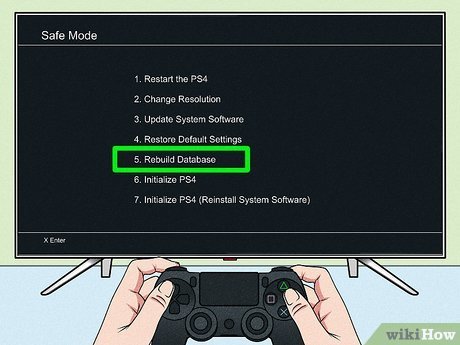
- Boot into Safe Mode: Hold the power button until you hear two beeps. The first beep is when you press the button, the second beep is a few seconds after. This puts your console into Safe Mode.
- Connect Your Controller: You’ll need to connect your DualShock 4 controller using a USB cable.
- Select Option 5: Use the controller to select “Rebuild Database” from the menu.
- Wait for the Process: The PS4 will now scan and rebuild the database. This can take from a few minutes to an hour or more depending on the size of your hard drive.
- Restart your PS4: Once complete, the console will restart, and you’re done.
Note: Always make sure your console is completely off before going into Safe Mode. Do not try to skip steps as this might cause harm to your console.
Rebuilding on PS5
- Turn off your PS5: Make sure your console is fully shut down and not in rest mode.
- Boot into Safe Mode: Press and hold the power button until you hear the second beep. The second beep is a few seconds after the first. This takes you to Safe Mode.
- Connect Your Controller: Connect your DualSense controller with a USB cable.
- Select Option 5: In the Safe Mode menu, select the “Rebuild Database” option.
- Wait for the Process: The PS5 will begin the database rebuilding process, which may take a considerable amount of time.
- Restart your PS5: Once the process is complete, the system will restart.
Note: Make sure that you have a stable power source, in order to avoid any issues. Do not cut power while it’s still rebuilding the database.
Key Takeaways About Rebuilding Database
Let’s quickly recap what we’ve discussed:
- Rebuilding your PlayStation database is safe and won’t delete your games, saved data, or apps.
- It helps to fix common problems like slow loading, crashes, and missing icons.
- You should rebuild the database when you encounter performance issues with your PlayStation.
- It’s a straightforward process that involves booting your console in Safe Mode and selecting the “Rebuild Database” option.
Think of rebuilding the database as a routine system maintenance to keep your PlayStation running smoothly. It is a good thing to do when your console is having issues. So, next time you have trouble, don’t be afraid to try it! It is always a good idea to start with less complicated solutions first. It’s better to try rebuilding the database before deleting and re-installing games.
Rebuilding the database is a safe and effective way to address many common PlayStation issues. It’s a helpful tool to have in your arsenal for keeping your console in optimal condition.
Does rebuild database delete everything PS4?
Final Thoughts
Rebuilding the database on your console can resolve performance issues. It reorganizes data storage. This process generally improves system responsiveness.
Importantly, a rebuild database operation does not delete games. Your saved game data and installed titles remain untouched. So, does rebuild database delete games? No, it only optimizes your console’s data structure.

