
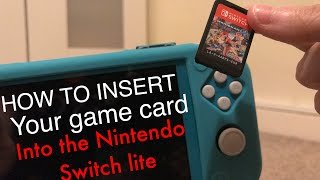
Yes, the Switch Lite does take physical games.
Thinking about grabbing a Switch Lite? A common question pops up: does switch lite take physical games? Many people wonder if this handheld console works the same way as the standard Switch.
It’s a great question, especially if you already have a collection of Nintendo Switch games. The good news is, you can absolutely use physical game cartridges with your Switch Lite. Simply insert the cartridge into the slot, and you’re ready to play.

Does Switch Lite Take Physical Games? Exploring Compatibility
So, you’re curious about the Nintendo Switch Lite and whether it can play those cool physical game cartridges, right? It’s a very good question and a super important one before you buy one. Let’s dive deep into this topic and learn all about how the Switch Lite handles games.
Understanding the Nintendo Switch Lite Design
First off, let’s talk a little about what makes the Switch Lite different from the regular Nintendo Switch. The original Switch is like a chameleon – it can be played on your TV, or you can take it on the go. It has detachable controllers called Joy-Cons that slide off the sides. The Switch Lite, however, is designed purely for handheld gaming. It’s smaller, lighter, and the controllers are built right into the system. You can’t detach them. This design difference is important when we talk about physical games.
What Are Physical Game Cartridges?
Before we go further, let’s quickly clarify what we mean by “physical games.” These are the small plastic cards, or cartridges, that you pop into your Nintendo Switch. They hold the game data and let you play. They’re different from digital games that you buy online and download directly to your system’s memory. Think of it like DVDs for movies versus streaming movies online. Cartridges provide a tangible copy of the game.
The Short Answer: Yes, But With a Twist
Here’s the short and sweet answer: Yes, the Nintendo Switch Lite can play physical games. But there’s a crucial detail you need to know. The Switch Lite has a slot where you can insert game cartridges. If the game is made for the Nintendo Switch, it should, generally speaking, work on the Switch Lite. This is fantastic news for anyone who loves collecting physical copies of their games!
However, the ‘twist’ we mentioned is that some games that work well on the original Nintendo Switch may not function the same, or at all, on the Switch Lite. This typically involves games that heavily rely on the detachable Joy-Cons features like motion control, and Tabletop mode play, which are the things that the Switch Lite doesn’t have.
Diving Deeper: How Physical Games Work on the Switch Lite
Now let’s get into a little more detail about how the game cartridge works with the Switch Lite. You simply open the small cartridge slot cover at the top of the console and insert the game card. Then, the game data is read, and you can start playing, usually, without needing an internet connection. This is where physical games really shine – they don’t rely on Wi-Fi after the initial game setup. This is super handy when you are on the go where Internet access might not be reliable.
The Advantage of Physical Games
Physical games offer several perks compared to digital downloads:
- Shareability: You can lend your game to a friend.
- Collectability: Many gamers love collecting cartridges and their cases.
- Resale Value: You can resell physical games when you are finished with them.
- Immediate Access: You don’t need to wait for the game to download; you can play right away after putting the cartridge in the slot.
These points make physical games a popular choice for many Nintendo fans, and the Switch Lite doesn’t take away from any of these advantages.
Limitations: Games with Detachable Joy-Con Features
Let’s talk about those games that work differently on the Switch Lite. Remember, the Switch Lite doesn’t have detachable controllers or a kickstand for tabletop mode. Here are some issues you might run into:
- Motion Controls: Some games rely heavily on motion controls built into the Joy-Cons. These games might be difficult or impossible to play with the built-in controls of the Switch Lite. For games that use motion controls as a core part of the game, they may not translate to a good experience on the Switch Lite.
- Tabletop Mode: Games that require you to play in tabletop mode (using the kickstand on the original Switch) won’t be easy to play with the Switch Lite, because Switch Lite has no stand. You would need to use a stand purchased separately, and likely some external controller to really play it comfortably.
- Games Designed for Two Players with Separate Joy-Cons: Some games are designed for two players using separate Joy-Con controllers. You can still play these games by purchasing Joy-Cons and connecting them wirelessly to your Switch Lite but they’re not meant for it in particular
Before buying a game, always check the back of the game’s box or the game’s page on Nintendo’s website. This information lets you know if there any controller requirements and compatibility notes. Sometimes, the game will state directly whether it is fully compatible with the Switch Lite.
Examples of Games with Compatibility Considerations
Here are some examples of types of games that may not work great on the Switch Lite:
- 1-2-Switch: A party game designed specifically around using the Joy-Con’s motion features.
- Super Mario Party: Also designed for party play, with many mini-games that need the detachable Joy-Cons.
- Ring Fit Adventure: Requires special physical controllers and therefore does not function on the Switch Lite.
These games can still be played with the Switch Lite using external controllers, but they are not as fun to use as originally designed.
The Importance of Checking Game Compatibility
Because of the differences between the Switch and the Switch Lite, it is very important to check if a game is fully compatible with the Switch Lite. You can find this information in several places:
- Game Box: Check the back of the game box. There should be icons or text that explains what type of controllers you need to play and any compatibility notes, including ones regarding the Switch Lite.
- Nintendo Website: The official Nintendo website has product pages for every game. Look at the details for compatibility information.
- Online Game Stores: If you’re shopping online, read the product description for any notes about Switch Lite compatibility.
- Reviews: Look at video game reviews to see if they mention any compatibility issues.
Look for These Clues
Here are some indicators you should watch out for when checking a game’s compatibility:
- The Joy-Con Icon: If you see a picture of the Joy-Con controllers, it may suggest the game relies on features not in the Switch Lite.
- “Tabletop Mode”: If the game is labeled as requiring ‘tabletop mode’ this likely won’t work so well on the Switch Lite.
- Handheld mode: If the game is labelled as compatible with ‘handheld mode’ then it is generally compatible with the Switch Lite.
Using External Controllers on the Switch Lite
Even though the Switch Lite doesn’t have detachable controllers, you can connect external wireless controllers, such as Joy-Cons or a Nintendo Switch Pro Controller. This means that even if a game is not optimized for the Switch Lite, you can still play with an external controller using wireless pairing, to be able to get the full experience, especially for games that rely on motion control. You can connect up to four external controllers, but note that you will require some kind of external stand in order to play comfortably, for example in tabletop mode.
How to Connect External Controllers
Connecting an external controller is easy to do. Here is how you can do it:
- Turn on your Switch Lite.
- Go to the ‘System Settings’ menu, the icon that looks like a gear.
- Scroll down to ‘Controllers and Sensors.’
- Select ‘Change Grip/Order.’
- Press the sync button on the Joy-Con or Pro Controller.
- The controllers should then pair and you can play!
Digital Games on the Switch Lite
While we are talking about physical games, it is good to also discuss digital games, as these can be purchased from the Nintendo eShop and downloaded onto the Switch Lite’s internal storage or a microSD card. With digital games, compatibility isn’t as big of an issue as physical games, as digital games will typically not have as much of an reliance on controller-specific features. The same is true for games you may obtain through the Nintendo Switch Online service. For these games, compatibility should rarely ever be an issue, although the game size can affect how much space you need to download them onto your device. You will also need a reliable internet connection to download digital games.
Choosing Between Physical and Digital Games
Deciding between physical and digital games is a personal choice. Here are some things to consider:
| Aspect | Physical Games | Digital Games |
|---|---|---|
| Shareability | Can be shared with friends | Tied to your Nintendo account |
| Collectability | Nice to collect | No physical copy |
| Resale | Can be resold | No resale value |
| Portability | Need to carry the cartridges | No need to carry anything extra |
| Accessibility | Immediate access after inserting | Need to download before playing |
| Compatibility with Switch Lite | Check compatibility before buying | Generally compatible |
Both options have their merits, and the best choice depends on what you value most in your gaming experience.
Care for Your Physical Games and Console
It’s very important to take care of both your physical game cartridges and your Nintendo Switch Lite. Keep your cartridges in their cases when you aren’t using them to prevent them from being damaged. Avoid bending or dropping your cartridges. Keep your Switch Lite clean by wiping it down with a soft cloth. Avoid exposing the device to extreme heat or cold, or excessive moisture. Taking care of your games and console will help them last longer and help avoid malfunctions.
Understanding how physical games interact with your Switch Lite can help you make the best choices for your gaming experience. Whether you’re a fan of collecting physical cartridges or prefer the convenience of digital downloads, the Switch Lite has options for you.
Do Nintendo Switch Games Load Faster Physically or Digitally?
Final Thoughts
Yes, the Switch Lite does accept physical game cartridges. You insert them directly into the slot located on the console. This is crucial for anyone preferring physical copies of games.
So, the answer to ‘does switch lite take physical games’ is definitively yes. Players can enjoy their collection of physical Nintendo Switch games on the Switch Lite. This offers flexibility and choice.

