
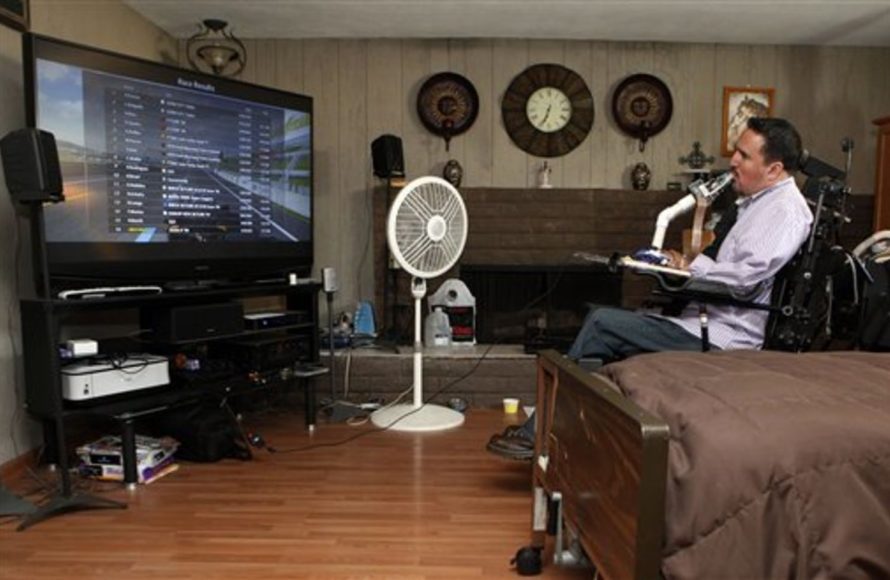
Accessible games for quadriplegics often involve adaptive controllers, voice commands, eye-tracking technology, or sip-and-puff devices.
Here’s the content:
Finding engaging and entertaining activities after a spinal cord injury can seem daunting. But don’t worry; there are many enjoyable options available. Let’s explore the world of games for quadriplegics.
These games offer not just entertainment, but also a way to socialize and challenge the mind. This is especially relevant, as physical limitations should not limit the fun you can have.
We’ll delve into various gaming options and technologies that make gaming accessible and enjoyable for people with quadriplegia. Get ready to explore a world of accessible gaming!

Games for Quadriplegics
Finding accessible entertainment can be a challenge for individuals with quadriplegia. Gaming offers a fantastic avenue for recreation, social connection, and cognitive stimulation.
Fortunately, advancements in technology and adaptive equipment have expanded the options available.
Understanding Quadriplegia and Gaming
Quadriplegia affects muscle control in both the arms and legs. This varies in severity depending on the level and completeness of the spinal cord injury.
Accessibility in gaming hinges on tailoring input methods to individual abilities.
Many factors influence the best gaming setup. Consider hand function, head movement, and respiratory control.
Adaptive Gaming Equipment
A variety of specialized controllers can help overcome physical limitations. These devices facilitate gameplay for individuals with limited mobility.
Head-Tracking Devices
Head-tracking systems translate head movements into cursor control. This allows players to navigate menus and control in-game actions.
They often work in conjunction with eye-tracking technology or switch controls.
Eye-Tracking Technology
Eye-tracking allows users to control a game using only their eyes. This can be particularly useful for individuals with very limited movement.
The system detects eye movements and translates them into commands.
Switch-Based Gaming
Switches provide simple on/off inputs that can be assigned to various game functions. Single or multiple switches can be used.
They can be activated by various body parts, such as the head, cheek, or foot.
Voice Control Systems
Voice recognition software allows players to control games using voice commands. This eliminates the need for physical input altogether.
Players can issue verbal commands to move characters, select options, and perform actions.
Accessible Game Genres
Certain game genres tend to be more accessible than others. These often involve slower-paced gameplay and simpler control schemes.
Turn-Based Strategy Games
Turn-based strategy games require careful planning and decision-making. They allow ample time for each move.
Examples include Civilization, XCOM, and Divinity: Original Sin 2.
Point-and-Click Adventure Games
Point-and-click adventures rely on mouse clicks to interact with the environment. They are generally slower-paced and don’t require precise timing.
Consider games like Broken Age, Thimbleweed Park, and classic LucasArts adventures.
Role-Playing Games (RPGs)
Many RPGs offer customizable control schemes and turn-based combat options. This can make them more accessible to players with limited mobility.
Pillars of Eternity, Disco Elysium, and Wasteland 3 are good examples.
Simulation Games
Simulation games often involve managing resources and building structures. These can be played at a relaxed pace using adaptive controllers.
SimCity, Cities: Skylines, and Stardew Valley offer accessible gameplay experiences.
Real-Time Strategy Games (with Modifications)
RTS games can be challenging due to their fast-paced nature. However, some games offer features that can improve accessibility.
Slowing down the game speed or using voice commands can help.
Specific Game Recommendations
Here are some specific games that are known for their accessibility or can be easily adapted for play with adaptive equipment:
The Last of Us Part II: This game offers extensive accessibility options, including customizable controls, screen reader support, and visual aids.
Forza Motorsport: Features like one-touch steering and assisted braking make it more accessible.
Minecraft: The simple controls and creative gameplay make it a good option. Mods can further enhance accessibility.
Animal Crossing: New Horizons: The relaxed pace and simple controls are suitable for players with limited mobility.
Microsoft Flight Simulator: Can be played with voice control and adaptive equipment.
Setting Up an Accessible Gaming Environment
Creating a comfortable and accessible gaming environment is crucial. Consider the following factors:
Ergonomics
Ensure proper posture and support to prevent strain. Use adjustable chairs and tables to achieve optimal positioning.
Position controllers and switches within easy reach.
Mounting Systems
Mounting systems can secure controllers and switches in place. This allows for hands-free operation.
Consider adjustable mounts for maximum flexibility.
Software Customization
Explore game settings for customizable controls. Remap buttons and adjust sensitivity to suit your needs.
Use assistive software to create custom macros and shortcuts.
Online Gaming and Social Interaction
Online gaming offers opportunities for social interaction and connection. Playing with friends and other gamers can combat isolation.
Multiplayer Games
Choose multiplayer games that offer cooperative gameplay. This allows players to work together towards a common goal.
Games like Sea of Thieves and Overcooked can be played with friends.
Online Communities
Join online gaming communities to connect with other players. Share tips, strategies, and experiences.
Look for communities specifically focused on accessible gaming.
Resources for Accessible Gaming
Numerous organizations and resources provide support for gamers with disabilities.
AbleGamers Charity: Provides grants, equipment, and support to gamers with disabilities.
SpecialEffect: Develops custom gaming setups and accessibility solutions.
Warfighter Engaged: Supports veterans with disabilities through gaming.
Game Development and Accessibility
Game developers are increasingly prioritizing accessibility in their designs. This involves incorporating features that cater to a wide range of players.
Accessibility Guidelines
Follow established accessibility guidelines during game development. This ensures that games are playable by individuals with disabilities.
The Game Accessibility Guidelines (GAG) provide comprehensive guidance.
User Testing
Involve players with disabilities in user testing. This provides valuable feedback on accessibility features.
Iterate on designs based on user feedback.
The Future of Accessible Gaming
The future of accessible gaming is bright. Advancements in technology and a growing awareness of accessibility needs are driving innovation.
Brain-Computer Interfaces (BCIs)
BCIs hold the potential to revolutionize gaming for individuals with quadriplegia. These interfaces allow players to control games directly with their thoughts.
BCI technology is still in its early stages but shows great promise.
Virtual Reality (VR) and Augmented Reality (AR)
VR and AR offer immersive gaming experiences that can be adapted for players with disabilities. These technologies can provide new ways to interact with games.
Personalized Accessibility Solutions
The future will see more personalized accessibility solutions. Tailored hardware and software will cater to individual needs and preferences.
Maintaining Physical and Mental Wellbeing
Gaming can provide many benefits, but it’s important to maintain physical and mental wellbeing.
Regular Breaks
Take regular breaks to avoid fatigue and strain. Stretch and move around to improve circulation.
Proper Posture
Maintain proper posture while gaming. Use ergonomic equipment to support your body.
Mental Health
Gaming should be a fun and enjoyable experience. If you’re feeling stressed or frustrated, take a break.
Seek support from friends, family, or a therapist if needed.
Modding Games for Accessibility
The modding community often develops modifications that enhance accessibility. These can range from simple control remapping to complete overhauls.
Finding Accessibility Mods
Search online forums and mod repositories for accessibility mods. Read user reviews to find mods that suit your needs.
Creating Your Own Mods
If you have technical skills, consider creating your own accessibility mods. Share your creations with the community.
Tablet and Mobile Games
Tablet and mobile games offer a more casual gaming experience and can be highly accessible.
Touchscreen Controls
Touchscreen controls can be intuitive for some users. Games designed for touchscreens often have simple interfaces.
Accessibility Features
Some mobile games offer accessibility features like adjustable text size and colorblind modes.
Console Gaming Accessibility Options
Modern consoles such as PlayStation, Xbox, and Nintendo Switch are increasingly incorporating accessibility features.
PlayStation Accessibility
PlayStation offers controller customization, screen reader support, and text-to-speech options.
Xbox Accessibility
Xbox features the Adaptive Controller, which can be customized with various switches and accessories.
Nintendo Switch Accessibility
Nintendo Switch offers button remapping and simplified control schemes.
Evaluating Game Accessibility
Before purchasing a game, research its accessibility features.
Reading Reviews
Look for reviews that specifically address accessibility. Check for information on control options, visual aids, and audio cues.
Watching Gameplay Videos
Watch gameplay videos to get a sense of the game’s pace and complexity. Pay attention to the control scheme and user interface.
Trying Demos
If possible, try a demo of the game before purchasing it. This will allow you to assess its accessibility firsthand.
Funding Accessible Gaming Setups
Accessible gaming equipment can be expensive. Fortunately, several funding options are available.
Grants
Apply for grants from organizations like AbleGamers and SpecialEffect.
Crowdfunding
Consider launching a crowdfunding campaign to raise money for your gaming setup.
Insurance
In some cases, insurance may cover the cost of adaptive equipment.
Building a Support Network
Connecting with other gamers with disabilities can provide valuable support and encouragement.
Online Forums
Join online forums and communities dedicated to accessible gaming.
Social Media
Follow accessible gaming advocates on social media.
Local Groups
Look for local support groups for people with disabilities.
Legal Considerations for Accessible Gaming
Accessibility in gaming is increasingly recognized as a legal right.
The Americans with Disabilities Act (ADA)
The ADA requires businesses to provide reasonable accommodations for people with disabilities. This may include making games accessible.
Copyright Law
Be aware of copyright law when modding games for accessibility. Obtain permission from developers if necessary.
DIY Accessibility Solutions
Creative individuals can often develop their own accessibility solutions.
3D Printing
Use 3D printing to create custom controller attachments and mounts.
Arduino Projects
Build custom switches and input devices using Arduino microcontrollers.
Remote Play and Accessibility
Remote play allows you to stream games from a console or PC to another device. This can improve accessibility by allowing you to play in a more comfortable position.
Streaming Services
Services like Steam Remote Play and PlayStation Remote Play allow you to stream games to tablets and phones.
The Psychological Benefits of Gaming
Gaming can provide numerous psychological benefits, including:
Cognitive Stimulation: Games can improve memory, attention, and problem-solving skills.
Emotional Regulation: Games can provide a sense of accomplishment and help manage stress.
Social Connection: Online gaming can combat isolation and foster friendships.
Accessibility Beyond Gaming: Broader Implications
The advancements in accessible gaming technology have broader implications for other areas of life.
Assistive Technology
Gaming technologies can be adapted for use in other assistive devices.
Rehabilitation
Gaming can be used as a rehabilitation tool to improve motor skills and cognitive function.
Staying Informed About Accessible Gaming
Keep up-to-date on the latest developments in accessible gaming.
Following Blogs and Websites
Read blogs and websites dedicated to accessible gaming news and reviews.
Attending Conferences
Attend conferences and workshops on accessible gaming.
Troubleshooting Common Accessibility Issues
Address common issues that may arise during gameplay.
Controller Configuration
Ensure that your controller is properly configured and calibrated.
Software Conflicts
Resolve any software conflicts that may be interfering with accessibility features.
Technical Support
Contact technical support for assistance with accessibility problems.
How I Game As A Quadriplegic #DisabledGamer
Final Thoughts
Ultimately, accessible games offer vital entertainment and cognitive stimulation. Quadriplegics can greatly benefit from adapted gaming solutions. These provide opportunities for social connection and skill development.
From voice-controlled adventures to eye-tracking puzzles, options exist. Finding the right setup is must for maximum enjoyment.
These games for quadriplegics represent a powerful way to engage, learn, and connect. Adapted technology allows access to exciting virtual worlds. Explore and find the best fit for individual needs.

