
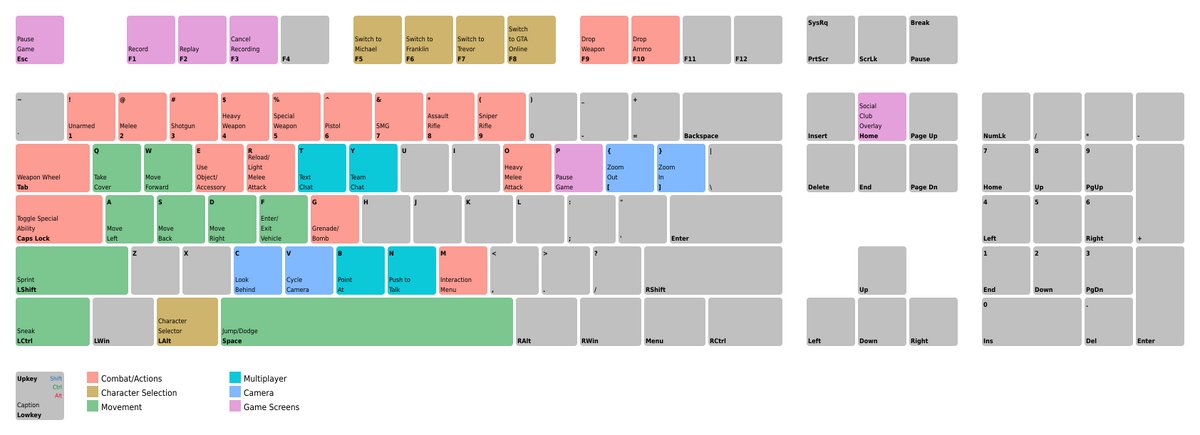
The standard GTA 5 Online keyboard controls for movement include W, A, S, D keys; Shift for sprinting; Spacebar for jumping; and the mouse for camera control and aiming.
Navigating the chaotic world of Los Santos in GTA 5 Online requires you to know the ins and outs of your keyboard. Getting a handle on these controls is essential for everything from evading cops to pulling off heists. Understanding your gta 5 online keyboard controls can mean the difference between mission success and utter failure.
These keyboard inputs act as your virtual hands, directly dictating how your character interacts with the environment and other players. Learning these commands will greatly improve your gameplay experience. Spend some time practicing and you’ll soon be dominating Los Santos.

GTA 5 Online Keyboard Controls: Your Guide to Los Santos
Okay, so you’re diving into the wild world of Los Santos in GTA 5 Online, and you’re using a keyboard and mouse. Great choice! But let’s be honest, all those buttons can feel like a jumbled mess at first. Don’t worry, we’re here to help you get comfortable and start dominating the game. Think of this as your ultimate guide to all the key commands you’ll need. We’ll break it all down, so you can go from a confused newbie to a smooth operator in no time. From basic movement to complex actions, we’ve got you covered.
Basic Movement Controls
Let’s start with the absolute basics: how to move around! These controls are super important because you’ll be using them constantly, whether you’re walking on the sidewalk, running from the cops, or just exploring.
- W Key: This is your go-forward button. Press it, and your character will move ahead. The harder you press, the more you push your character to move faster.
- S Key: Want to go back? Use the S key. This will make your character walk backwards.
- A Key: This key makes your character move left or turn left.
- D Key: And, you guessed it, this one moves your character to the right or turn right.
- Spacebar: The spacebar is for jumping. Press it to jump over low walls or just to get some air.
- Left Shift Key: Hold down the left shift key to sprint. This makes your character move faster, but it also uses up their stamina.
- Left Ctrl Key: This key activates stealth mode, allowing you to walk quietly. This can be super handy for sneaking around or avoiding unwanted attention.
Getting used to these keys will make moving around in the game feel much more natural and comfortable.
Camera Controls
Now that you can move, let’s talk about seeing where you’re going! These camera controls let you look around the world of Los Santos.
- Mouse Movement: This is how you control the camera. Move your mouse, and the camera will move with it.
- Mouse Wheel: Use the mouse wheel to zoom in or zoom out. This is great for getting a closer look at things or for checking your surroundings.
Vehicle Controls
Los Santos is a big place, and sometimes walking just won’t cut it. Get ready to hit the road with these essential vehicle controls.
Driving
- W Key: Press the W key to accelerate. Just like when walking, the more you press it, the faster you go.
- S Key: The S key is your brake pedal. Press it to slow down. Press harder to brake harder.
- A Key: The A key turns your vehicle left.
- D Key: The D key turns your vehicle right.
- Spacebar: The handbrake! Use this to make quick turns or stop your car on a dime.
- Left Shift Key: Use this for boosting! It will use some sort of your car’s power to speed it up for a brief period. It’s great to use if you want to go faster.
Other Vehicle Actions
- F Key: Press ‘F’ to get in or out of your vehicle. This key is how you enter and exit the game’s different vehicles.
- E Key: Press ‘E’ to use vehicle’s horn, use it to get people out of the way or let your friend know to go.
Weapon Controls
Things in Los Santos can get a little heated, so you’ll need to know your way around some weaponry! Here’s how to handle weapons using your keyboard and mouse.
Selecting Weapons
- Mouse Wheel: Scroll through weapons with your mouse wheel. Each scroll changes weapons in the game.
- Number Keys (1-9): Press any number on your keyboard to quickly select a weapon. These numbers correlate to a specific category of weapon, like a pistol or a shotgun.
Using Weapons
- Left Mouse Button: This is your fire button. Click it to shoot the currently selected weapon.
- Right Mouse Button: Hold this button to aim your weapon. When you do, the crosshair will appear.
- R Key: Use the R key to reload your weapon when you’re low on ammo.
Interactions
Los Santos is full of people and things to interact with. Here are the main keys you’ll need.
- E Key: The E key is the primary interaction key, press it to enter vehicles, pick items, and talk to people in the game.
- Tab Key: Opens the Interaction Menu. This menu allows to change game play style and do different activities, like changing your player outfit, etc.
- F3/F4 Key: These keys control the quick interaction with your character, F3 for gestures and F4 for facial expression.
Phone and Menu Controls
You’ll be using your phone and menus a lot in GTA Online, here’s a rundown of how to control them.
- Up Arrow Key: Use it to scroll up in menus.
- Down Arrow Key: Use it to scroll down in menus.
- Left Arrow Key: Use it to scroll left in menus.
- Right Arrow Key: Use it to scroll right in menus.
- Enter Key: Press Enter to select an option in a menu.
- Backspace Key or ESC Key: Use this to go back or exit out of a menu.
- Up Arrow Key (Hold): Hold the Up Arrow Key to pull out your phone.
Advanced Controls and Tips
Once you feel comfortable with the basics, you might want to start using some of the more advanced controls in GTA 5 Online. These can give you an edge, helping you to move more freely, drive better and generally improve your game play.
Combat Tips
- Q Key: Take cover, This can help in avoiding the bullets in gun fight.
- Caps Lock Key: Locks you on to your desired target, making it easier to shoot.
- V Key: Switch your view, great for looking around corners without moving.
Driving Tips
- Left Ctrl Key (While Driving): Brake, but also allows you to drift with ease.
- Mouse Wheel (While Driving): Switch view, from first person to third person while driving.
Other Handy Controls
- H Key: To heal yourself, This can be used with a health kit or food.
- M Key: Brings up the map, which can be very useful for planning and for setting a route.
- Z Key: Use for special abilities, if your character has any.
Customizing Your Controls
Here’s a pro tip: you don’t have to stick to the default controls if they don’t feel right for you! GTA 5 Online lets you customize your keyboard controls to your own liking. In the game settings menu, you’ll find an option to rebind or remap different controls to the key you want. Doing this can make the game feel much more comfortable and easier for you to play.
How to Customize
- Open the game settings.
- Look for the “Controls” or “Key Bindings” menu.
- Choose the specific action you want to change.
- Press the key you want to assign to the action.
- Save the changes.
Experiment a little and find what works best for you. This is your chance to make the game feel personal and comfortable.
Getting the hang of keyboard controls in GTA 5 Online might seem like a lot at first, but with some practice, it will become second nature. And remember, don’t hesitate to customize the controls. The goal is to make the game as fun and easy as possible for you. Start with the basics, take it one step at a time, and before you know it, you’ll be driving cars, shooting guns, and navigating Los Santos like a pro.
GTA 5 CONTROLS PC: Part 1 | How to play GTA 5 | Basic Controls GTA 5 (Gameplay #16)
Final Thoughts
Adjusting to GTA 5 Online keyboard controls might seem tricky initially. However, practice quickly builds familiarity with the game’s movement and actions. Knowing these inputs significantly enhances your gameplay.
Players find it essential to understand core movement and combat keys. Efficient use of these controls allows you to navigate the virtual world effectively. Proper vehicle handling is also tied to keyboard mastery.
Ultimately, a good grasp of GTA 5 Online keyboard controls is the key to success in Los Santos. With practice and memorization, players can improve their gaming experience and achieve the most in the game.

