
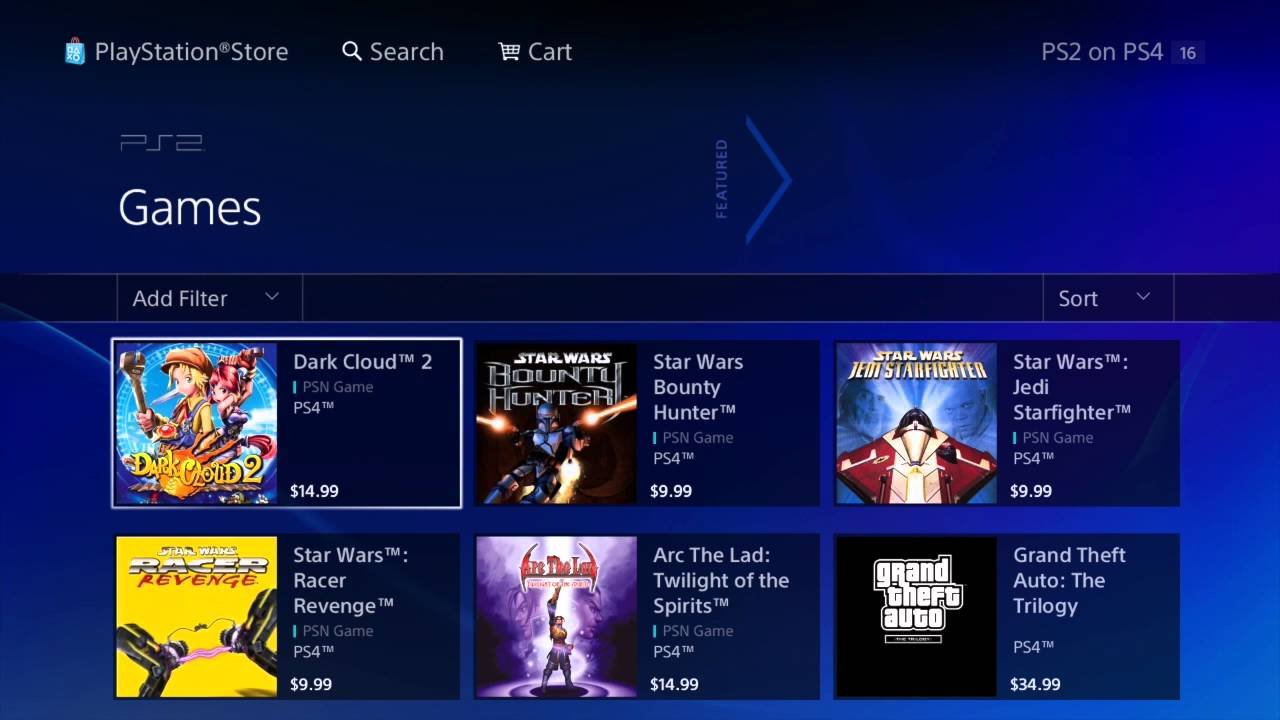
Unfortunately, you cannot directly play PS2 games on a PS4 using physical discs. The PS4 does not have the hardware compatibility for that. Some PS2 titles are available digitally on the PlayStation Store.
Many gamers wonder how can i play ps2 games on ps4. It is a common question, and the answer isn’t straightforward. The PS4 is not built to read PS2 discs. This presents a hurdle for those wanting to revisit classic titles.
However, there’s a silver lining. Sony offers some older games for download through the PlayStation Store. These available titles can help you relive some favorite experiences.

How Can I Play PS2 Games on PS4?
So, you’ve got a PlayStation 4, and you’re feeling a bit nostalgic for those classic PlayStation 2 games? You’re not alone! Many gamers wish they could easily play their old favorites on their newer consoles. While it’s not as simple as popping in a PS2 disc, let’s explore the options you do have.
Understanding the Challenge: Why PS2 Games Don’t Just Work
First things first, it’s helpful to understand why you can’t just put a PS2 game into your PS4 and start playing. It’s all about how the consoles are built and how they read games. Here’s a simplified breakdown:
Different Hardware
The PS2 and PS4 use completely different internal hardware. Imagine trying to play a VHS tape on a Blu-ray player – it just won’t work! The components inside are designed for their specific systems.
Disc Format
PS2 games are stored on DVDs, while PS4 games use Blu-ray discs. This difference means the PS4’s disc drive simply can’t read the older format. It’s like trying to fit a square peg in a round hole.
Software and Emulation
The PS4 also lacks the necessary software to understand the code for PS2 games. To run PS2 games, the PS4 would need an emulator – special software that translates the PS2 instructions into instructions the PS4 understands. Sony didn’t include a full emulator for PS2 within the PS4 system, so direct disc playback is not an option.
Official Options: PlayStation Store and PS2 Classics
Okay, so you can’t use your old discs. But there’s still some good news! Sony has offered some PS2 games for digital download on the PlayStation Store.
What are PS2 Classics?
These are specially ported versions of PS2 games that you can download and play directly on your PS4. They are not simply the old games running as is, they are specifically configured to work on PS4 and usually include some upgrades like higher resolution.
How to Find Them
To see if a game you want to play is available, you can follow these steps:
- Turn on your PlayStation 4 and sign in to your account.
- Go to the PlayStation Store icon on the main menu.
- Use the search bar at the top and type in the name of the PS2 game you’re looking for.
- Check the results. If there’s a PS2 version, it will likely be listed as a “PS2 Classic.”
Not every PS2 game is available this way. The selection is curated, and many of your favorites might not be there. But it’s the easiest and safest method for playing some PS2 titles on your PS4.
Benefits of PS2 Classics
Playing through official PS2 Classic releases has some advantages.
- Easy Access: You can download and play these games directly on your console.
- Improved Graphics: Many PS2 Classics have slightly improved visuals and resolution compared to the original games.
- No Disc Needed: No need to worry about scratches or broken discs.
PlayStation Now (and PS Plus Premium): A Streaming Option
Another official route to play select PS2 games is through the PlayStation Plus Premium subscription. This subscription service provides cloud-streaming access to a large library of games, some of which are from the PlayStation 2 era.
How PlayStation Plus Premium Works
The subscription works by streaming the game from a remote server to your PS4. This means you’re not downloading and playing the games locally, but instead, you’re playing over the internet. This can sometimes feel a bit different than playing the game installed on your console, but it is a good way to play the PS2 games if you are ok with streaming.
Benefits and Drawbacks of Streaming
Here are a few pros and cons of using PlayStation Plus Premium for PS2 games:
- Pros:
- Large Library: Access to hundreds of titles across multiple PlayStation platforms, including select PS2 games.
- No Storage Space Needed: You don’t need to download the game onto your console.
- Convenient: Stream games directly from the service without having to hunt down physical games.
- Cons:
- Internet Dependency: Requires a strong and stable internet connection. Lagging or disconnection can disrupt your gameplay.
- Game Quality: Streaming may sometimes lower the graphics quality and add latency.
- Selection Varies: The library of PS2 games on PlayStation Plus Premium can be limited, and might not include every title you wish to play.
The Murky Waters of Emulation: Not Officially Supported
Now we enter the territory of unofficial methods. There are emulators you can find online that promise to run PS2 games on a computer. While theoretically, one could then use this setup with a PS4, this method has so many hurdles that it’s usually not a practical choice.
What are Emulators?
An emulator is a piece of software that attempts to mimic another system, in this case, the PS2. It translates the instructions of the PS2 game code so that a completely different machine, like your PC, can run it. Then the game screen can be shown through computer display. There are popular and advanced software like PCSX2 available to play PS2 games on PC.
Why This Isn’t Recommended for PS4
Emulation on the PS4 itself is not officially supported, and there are significant barriers to trying it. Here’s why:
- No PS4 Emulators: There are no reliable and working PS2 emulators for the PS4 itself. The PS4’s system is complex and difficult to modify to run such software.
- Risk of System Issues: Attempting to install unofficial software could potentially cause issues with your PS4 system, or it may be permanently bricked.
- Unreliable: Any emulator you might find online that claims to work on PS4 is most likely a scam or a virus.
- Potentially Illegal: Downloading game ROMs (digital copies of the game) from unofficial sources can be illegal, depending on your region.
The Better Choice: PC Emulation
If you are very intent on using emulation, the more practical path is to do so on a PC. This path is still technically complicated and can require a very powerful computer. It is also still legally problematic if you don’t own original copy of the game you intend to run.
Here are the basic steps, but please note that this method is complex and involves legal and technical risk:
- Download a PS2 Emulator (For PC): Get an emulator like PCSX2 on your computer.
- Find PS2 Game ROMs (or back-up your own discs): Acquire the game files of your PS2 games. Note that downloading a game without owning a physical copy can violate copyright laws.
- Configure the Emulator: Setting up the emulator correctly can be quite tricky, requiring adjustments to graphics, sound and controller settings.
- Play the Games: If done successfully, you can now play the game on your PC.
This method is far from simple and can result in many errors and issues. This solution also requires a powerful computer, and you would still not be able to play your games on your PS4.
Summary of Options:
Let’s recap the possibilities:
| Method | Description | Difficulty | Pros | Cons |
|---|---|---|---|---|
| PS2 Classics on PS Store | Download officially ported PS2 games from the PlayStation Store. | Easy | Safe, easy to access, slightly improved graphics. | Limited selection, may not have the game you want. |
| PlayStation Plus Premium | Stream a selection of PS2 games through the PlayStation cloud service. | Medium | Large game library, no storage space is needed on the console. | Requires good internet, potential latency, limited selection of PS2 games. |
| PC Emulation | Use an emulator on a PC to play PS2 games (not officially on PS4) | Very High | Can play many PS2 games (if you can get the software to work). | Difficult to set up, requires a very powerful computer, legally problematic, doesn’t run on PS4. |
Ultimately, the most practical ways to enjoy PS2 games on your PS4 are through purchasing official PS2 Classics from the PlayStation Store or subscribing to PlayStation Plus Premium. While the dream of popping in your old PS2 discs is not possible, these other methods can still offer hours of enjoyment with classic games.
Play PS2 Nostalgia Games on Your PS4! | Step-by-Step Guide
Final Thoughts
Unfortunately, you cannot directly play physical PS2 discs on a PS4. The PS4’s hardware is not compatible with the older console’s games. Sony also does not offer a backwards compatibility feature for PS2 titles on PS4.
The PlayStation Store offers a limited selection of downloadable PS2 games. These are digital versions specifically made for the PS4. The only legitimate way to play some PS2 titles is to buy these individually from the store. So, that is how you can play ps2 games on ps4.

