
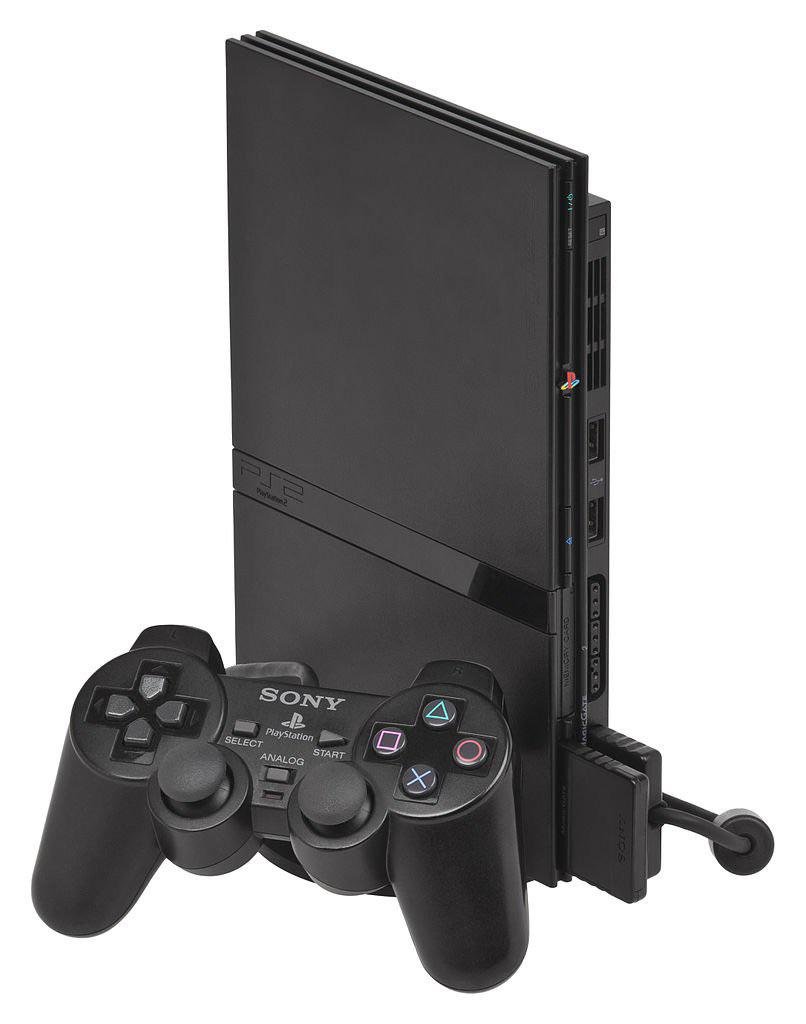
Yes, the PS2 slim can play PS1 games.
Many gamers have fond memories of the original PlayStation. They might wonder, can the PS2 slim play PS1 games? The good news is, it does! This feature makes the PS2 slim a great console for enjoying classics from both generations.
You can experience your beloved PS1 titles on a newer, smaller console. The PS2 slim is backward compatible with PS1 games, so you don’t need the original hardware. This adds to its versatility as a gaming machine.

Can the PS2 Slim Play PS1 Games?
The PlayStation 2 Slim, a smaller and sleeker version of the original PlayStation 2, is a popular console even today. Many people wonder if this little machine can play games from its older brother, the PlayStation 1. The good news is, yes, the PS2 Slim can play most of your favorite PlayStation 1 games! It’s like getting two awesome consoles in one. Let’s dive into how this works and what you should know.
Understanding Backwards Compatibility
Backwards compatibility is a fancy term that means a newer console can play games from an older console. The PlayStation 2, including the Slim model, was designed with this cool feature. Sony made sure that the PS2’s hardware could handle the older PS1 games. This is fantastic because it lets you enjoy a huge library of classic games without needing to keep your old PS1 around. It’s like having a time machine for video games.
How Does it Actually Work?
Inside the PS2 Slim, there’s a special chip that is compatible with both PS2 games and PS1 games. This chip reads the different types of discs and knows how to process the information. When you put a PS1 game into your PS2 Slim, the console recognizes it’s an older game and adjusts to play it correctly. Think of it like a translator that understands two different languages. It understands both the PS2 game language and the PS1 game language.
Playing Your PS1 Games on the PS2 Slim
Getting your PS1 games running on the PS2 Slim is generally simple. There aren’t many extra steps you need to take. Here’s how you usually do it:
- Insert the Disc: Place your PlayStation 1 game disc into the PS2 Slim’s disc tray.
- Close the Tray: Gently close the disc tray.
- Turn on the Console: Power up your PS2 Slim.
- Game Starts: The PS2 Slim should automatically recognize the PS1 game and begin loading it.
That’s it! You should now be playing your classic PlayStation 1 game on your PS2 Slim. It’s often that easy. But sometimes, there can be a few small issues. We’ll talk more about those later.
Visual and Audio Considerations
When you play a PS1 game on a PS2 Slim, you might notice a few things about the way it looks and sounds. Since PS1 games were designed for older TVs, they might not look as crisp and clear as PS2 games on a modern television. You could see the edges of things looking a bit jagged or pixelated.
Audio can also be a little different. Some games might sound slightly different on the PS2 Slim than they did on the original PlayStation. These minor differences usually aren’t a big deal, but it’s something to keep in mind. Think of it like listening to an old song on different speakers – it still sounds good, but it might have a little variation.
Potential Issues with Compatibility
Even though the PS2 Slim is generally good at playing PS1 games, there can sometimes be problems. These problems are not very common, but it’s good to know about them.
Game Compatibility List
Most PlayStation 1 games work perfectly fine on the PS2 Slim. But, very occasionally, you could find a game that does not work correctly. Here’s a table which shows some games which can have issues on PS2.
| PS1 Game Title | Possible Issues |
|---|---|
| Gran Turismo 2 | Occasional Glitches |
| Final Fantasy VIII | Some cutscenes may have visual issues. |
| Castlevania: Symphony of the Night | Rare sound glitches |
| Metal Gear Solid | Rare visual glitches |
| Resident Evil 3: Nemesis | Occasional framerate issues. |
These aren’t a common thing but good to know. If you find that a specific game is not working, search online for specific advice.
Disc Condition
Another thing to think about is the state of your PS1 game discs. If a disc is scratched, dirty, or damaged, it might not read properly in the PS2 Slim. Always make sure your discs are clean and in good condition. To keep your games working at their best, treat them with care. Cleaning a disc with a soft cloth may help. You should avoid touching the bottom, shiny part of the game disc.
PS2 Slim Model Differences
There are a few different models of the PS2 Slim. Some people have reported that very rare games can have compatibility differences between different PS2 Slim models, but these differences are very small and are rare. For the majority of players, all the PS2 Slim models play PS1 games. It is not something to worry about too much. If you ever experience an issue with a specific PS1 game not playing, it is more likely to be with disc condition or something else.
Advantages of Playing PS1 Games on PS2 Slim
Playing PS1 games on your PS2 Slim has some great advantages:
Convenience
The biggest advantage is the convenience. You don’t need to switch between two separate consoles. Just put in your game and play. This is perfect if you don’t have lots of space or don’t want the clutter of two separate game systems. It’s a great way to declutter and still enjoy your games.
Upgraded Video Output
The PS2 Slim can output video through AV cables or Component cables which can sometimes provide better visuals compared to the original PS1. If you use better cables, you can get a slightly better image. It’s not a huge improvement, but can be a nice bonus for gamers who like better image quality.
Memory Card Management
The PS2 Slim uses PS1 memory cards, allowing you to save your games without needing a separate PS1 console. If you have a memory card which you used for your PS1, you can use the same card with your PS2. This makes it easy to transfer saved games across systems. It also saves you money, as you don’t need to buy extra memory cards.
Tips for the Best Gaming Experience
Here are a few tips to help you enjoy playing your PS1 games on the PS2 Slim:
- Keep your discs clean: Always wipe your game discs with a soft cloth. Make sure they are free from dust or fingerprints to prevent reading issues.
- Store discs properly: Keep your game discs in their cases to avoid damage, it helps protect them from scratches and other harm.
- Use the right cables: Use a good quality AV or Component cables to get the best visual quality for your games.
- Check online communities: If you have a problem with a specific game, check online forums or communities. There will always be other gamers who may have found a solution for a specific problem with a specific game.
Exploring the Classic PS1 Game Library
The PS1 library is full of amazing games. Some popular titles that work perfectly on the PS2 Slim include:
- Final Fantasy VII, VIII, and IX
- Metal Gear Solid
- Crash Bandicoot Series
- Spyro the Dragon Series
- Resident Evil Series
- Gran Turismo 2
- Tomb Raider Series
These titles are a great place to start if you are just beginning to explore PS1 games, or if you just want to play the games you loved as a child, there is a lot of fun to be had with the PS1 library. With the ability to play PS1 games on your PS2 Slim, you have many hours of games to enjoy.
The PS2 Slim is a very versatile console that can play both PS2 games and most PS1 games. If you are looking for a convenient console which has both a PS2 and PS1 library in one device, the PS2 Slim is a great choice. Just remember to keep your game discs in good condition. And also be aware that there can sometimes be very rare issues. But mostly, you will have a great time replaying some of the greatest games ever made.
What Happens When you play PS1 games on PS2 Slim #Shorts
Final Thoughts
Yes, the PS2 slim can play PS1 games. This backward compatibility is a key feature. You simply insert your PlayStation 1 disc and the console reads it directly.
The PS2 slim uses the same hardware architecture as the original PS2 in this regard. You can enjoy your old PS1 library on this compact console. This makes it a great choice for classic gaming.
Therefore, if you are wondering “can the PS2 slim play PS1 games?”, the answer is a definite yes. It provides a convenient way to enjoy both PlayStation eras.

