
Unfortunately, you cannot directly play PS2 games on a PS4 console. The PS4 does not have backwards compatibility for PS2 discs or digital titles.
Ever wondered how can you play ps2 games on ps4? It’s a question many gamers ponder, yearning to revisit those classic titles. While the PS4 offers an amazing library, it lacks a key feature: direct PS2 backwards compatibility.
This means inserting your old PS2 discs into your PS4 will not work. You also can’t directly download and play digital PS2 games from the PSN store on a PS4. There are a few exceptions that might offer some hope.

How Can You Play PS2 Games on PS4?
So, you’ve got a shiny new PlayStation 4, and you’re itching to revisit some of those classic PlayStation 2 games? Maybe you want to experience the thrill of Grand Theft Auto: San Andreas again, or dive back into the world of Final Fantasy X. It’s a common wish for gamers who grew up with the PS2. Unfortunately, it’s not as simple as popping your old disc into your PS4. The PS4 doesn’t have the hardware to directly read PS2 discs. But don’t worry; there are still some ways to play those beloved games. Let’s explore these options together!
Understanding the PS4’s Compatibility
The first thing to understand is why your PS2 games don’t just work on the PS4. The PS4 uses a completely different system architecture compared to the PS2. Think of it like trying to play a VHS tape on a Blu-ray player; they simply use different technologies. The PS4 was designed to play PS4 games, not older generations. The hardware inside is entirely different, and it doesn’t have the necessary components to interpret PS2 game discs. This means the laser disc reader, the chips for graphics processing and other parts are not compatible. This is why simply inserting a PS2 game won’t do the trick.
The Absence of Backward Compatibility
The feature many gamers wish the PS4 had is called “backward compatibility.” This means a newer console can play games from older consoles. While some consoles, like the Xbox Series X, do offer some backward compatibility with older Xbox games, the PS4 generally does not support direct disc playback of PS1, PS2, or PS3 games. This lack of direct backward compatibility stems from the cost and complexity of including the older hardware in the newer consoles. It would increase the price and size of the PS4, something Sony opted not to do. It’s important to know this limitation exists from the get-go. Instead of trying to make old discs work, we must look at alternative options.
PlayStation Store and PS2 Classics
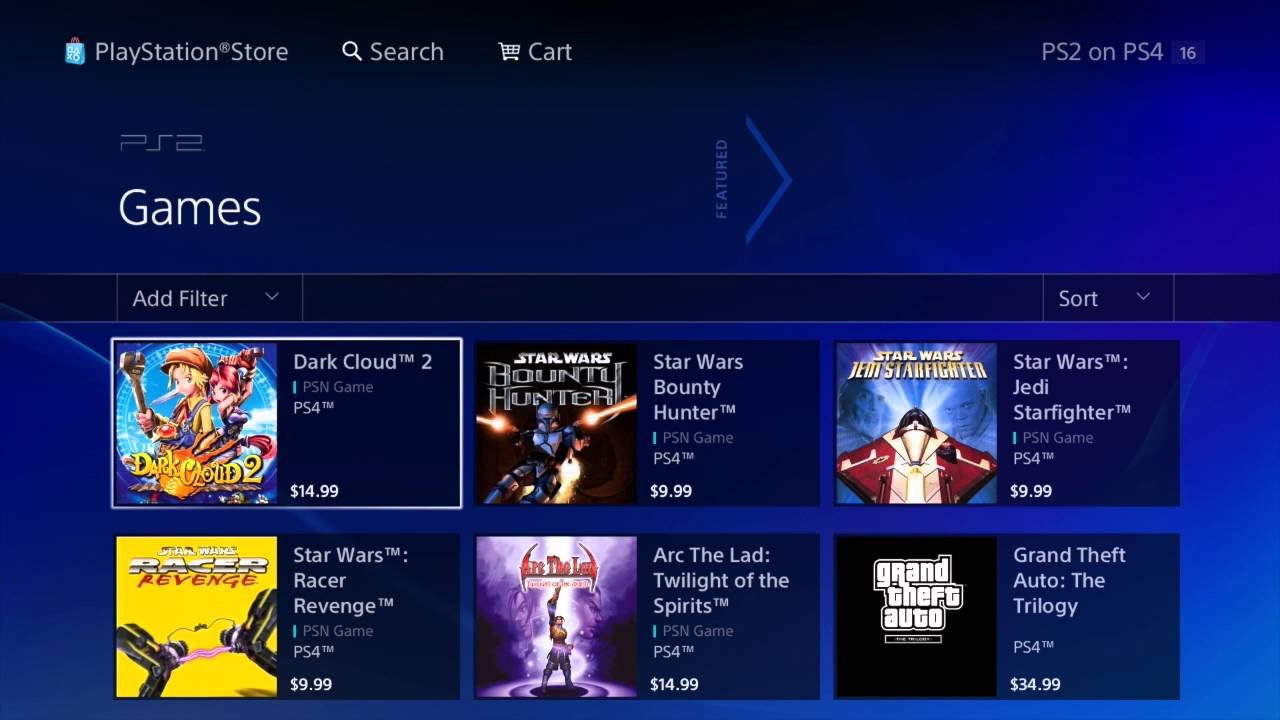
The main way Sony provides access to older games on the PS4 is through the PlayStation Store. Here, you’ll find a selection of PS2 games that have been re-released as digital downloads. Think of it like buying a digital version of your old favorites.
How to Find and Purchase PS2 Classics
Here’s how to navigate the PlayStation Store to find those digital PS2 gems:
- Turn on your PS4 and go to the PlayStation Store: It’s the shopping bag icon on the home screen.
- Use the Search bar: Type in the name of the PS2 game you’re looking for. If it’s available, it will appear in the search results.
- Browse through categories: Sometimes, PS2 titles will be listed under the “Classics” or “Retro” sections if you are just browsing.
- Purchase and download: Once you find a game, you can purchase it using your account funds or a credit card. The game will then download to your console.
Keep in mind that not every PS2 game is available on the store. The selection varies, and you might not find all your old favorites. Sony curates this list, and they add new titles from time to time. If your desired game isn’t available, it’s worth checking the store periodically. The digital re-releases also often have some improvements over the original games, such as higher resolution, better frame rates, and sometimes even trophy support.
Advantages of PS2 Classics
Opting for digital PS2 classics offers several benefits over trying to use physical discs:
- Easy access: No need to search for your old discs; everything is available right on your console.
- Improved experience: Some digital releases come with enhancements, making the game look and perform better than on the original PS2.
- Trophy support: Some titles include PS4 trophies, adding an extra layer of fun and replayability for those who enjoy collecting them.
- Convenience: Games are readily available to play from your PS4’s library as soon as they finish downloading.
Disadvantages of PS2 Classics
There are also some downsides to relying solely on digital releases:
- Limited selection: Not every PS2 game is available on the PlayStation Store. You might not be able to find some of the more obscure or niche titles that you’re looking for.
- Cost: You have to buy the games again, even if you own the original discs. Prices vary but can still add up, especially if you want to collect a library of PS2 games.
- Availability can change: Games can occasionally be removed from the store, so you might lose access if this happens.
- Digital Rights Management: If the game is removed from the store or your PlayStation account has issues you might lose the ability to play it.
PlayStation Now and Game Streaming
Another way to access some PS2 games on your PS4 is via PlayStation Now (currently known as PlayStation Plus Premium), Sony’s game streaming service. This subscription service lets you play a library of games without downloading them directly to your console. It’s like having a Netflix-style library of games available to you.
How PlayStation Now (PlayStation Plus Premium) Works
PlayStation Plus Premium works by streaming games from Sony’s servers to your PS4. Your actions with the controller are sent to their server, and video and audio is sent back to you, all in real time. This means you need a stable and reasonably fast internet connection to play smoothly. Here’s a breakdown of how to access the service and play PS2 games.
- Subscribe to PlayStation Plus Premium: This is the highest tier of PlayStation’s subscription service. Other subscription levels will not grant you access to the same games.
- Navigate to PlayStation Plus: On your PS4 home screen, find the PlayStation Plus icon.
- Browse the game catalog: You’ll find a catalog of games included in the premium tier. This includes a selection of PS2 titles.
- Start streaming: Click on a game to begin streaming. No downloads are required.
PS2 Game Selection on Streaming
The selection of PS2 games on PlayStation Plus Premium varies. Some well-known titles may be there, but just like the digital PS2 classics, not every game you want will be available. The catalog rotates, with new games added and old games removed from time to time. This can be a great way to try out a variety of PS2 games without needing to purchase them individually. But again, keep in mind that it’s a subscription based approach. When your subscription is over, you lose access to them.
Advantages of Game Streaming
Using PlayStation Plus Premium for playing PS2 games offers some distinct benefits:
- Access to a larger library: You get access to not only PS2 games but also PS1, PS3, and PS4 games within the same subscription.
- No need to store games: Because the games stream directly to your console, you don’t need hard drive space.
- Try before you buy: You can try many PS2 games without buying each one individually.
- Newer releases and games: The streaming library is always being added to, and you might see a new PS2 game you would not otherwise have known of before.
Disadvantages of Game Streaming
Game streaming with PlayStation Plus Premium also has its limitations:
- Internet dependence: You need a stable and fast internet connection for smooth gameplay, otherwise, you might experience stuttering or lag which can hurt the playability.
- Subscription cost: The cost of the PlayStation Plus Premium subscription may be more than simply purchasing the games you want directly.
- Game availability: Not all PS2 games are available on the streaming platform.
- Stream Quality: Streaming quality is sometimes less sharp than natively played games, which can be a consideration if image clarity is important.
- Dependency on Server Quality: If the server you are connected to has a problem, it will cause interruptions in your gameplay.
Other Methods and Workarounds
While the official methods are the most straightforward, some less conventional workarounds exist to try to play PS2 games on your PS4. Note that these methods are not endorsed by Sony and can have varying levels of success and can also be very technical.
Homebrew and Emulation
One of the more technical and difficult ways to try playing PS2 games on your PS4 is through homebrew software and emulation. This involves modifying your console to install unauthorized software and then using a PS2 emulator. This process is not easy, and it comes with risks, which we will discuss shortly.
What is Homebrew?
Homebrew software is software created by hobbyists and programmers outside of the official channels. Think of it as custom code made to change how your PS4 works and unlock different capabilities beyond what is officially intended. Sometimes it’s useful, like the ability to play unsupported media files, but sometimes it is dangerous as well, such as installing viruses or malware.
How Emulation Works
An emulator is a software program that allows one system to mimic another. In this case, a PS2 emulator would attempt to replicate the hardware of the original PS2 so you can run PS2 games on a different system (your PS4 in this case).
The Risks of Homebrew and Emulation
Using homebrew and emulation carries significant risks and it is not something that is recommended for all:
- Voiding Warranty: Modifying your console with homebrew software can void its warranty with Sony. If something breaks you will not be able to get it repaired.
- Ban Risk: Sony might ban your PSN account or even your console from online services if they detect tampering. This can be a major issue, particularly if you play online games.
- Instability: Homebrew software can be buggy or unstable, leading to crashes or problems. It’s often not as polished as official software, and will not be supported by the manufacturer.
- Security risks: Unofficial software might contain malware or viruses, which could compromise your console or data.
- Technical issues: Setting up homebrew and emulation is quite technical and complicated. It requires a good understanding of how systems and software function, and you might need to look for detailed tutorials and technical documents on the internet.
Is it Worth It?
Given the above risks, it’s usually not worth going down this route for most users. Unless you have significant technical expertise and understand the potential issues, it’s much safer and easier to use the official methods.
Using Older Hardware
This might seem like the most obvious solution, but it’s worth mentioning anyway: using older hardware. If you still own your original PlayStation 2, and have access to old TV’s with the proper input, this is the most surefire way to replay your favorite PS2 games. This might not be ideal if you want to play on your modern setup, but it is definitely a foolproof way of enjoying older games.
Dusting off Your Old PS2
If you still own your old PS2 console it might be worth it to dust it off and see if it still works. In addition to this, you will also need:
- A TV or Monitor: A TV that supports older connection methods, such as composite, component, or S-video, is needed to connect an old PS2. Modern TV’s may not have this, so you may need to obtain a legacy display.
- PS2 Cables: You will need the original power cord and video cables for the PS2.
- PS2 Game Discs: You will of course need the actual game discs you want to play.
- PS2 Controller(s): The controllers for the PS2 will also be needed.
Advantages of Using Old Hardware
- 100% Compatibility: Your PS2 console will play PS2 games perfectly with no errors or compatibility issues.
- Authentic Experience: You get the complete experience as intended by the game developers when they developed it.
- No Security Risks: There are no risks to the hardware itself, or being banned from an online service.
Disadvantages of Using Old Hardware
- Hardware Limitations: You will be limited to the resolution that the PS2 outputs. This can be very low by today’s standards.
- Clutter: You may not want another gaming console attached to your TV. Especially for a console that you only rarely use.
- Space: You might not have space in your living area for an extra piece of hardware.
- Need to Preserve Hardware: If the old system breaks, it may be hard to find replacement parts, or to purchase a new one in good condition.
Making a Choice
So, with all these different methods, which is the best way to play PS2 games on your PS4? The answer depends on what is most important to you.
For Casual Players
If you only want to revisit some key PS2 classics every now and then, and do not mind not having the whole library available, the easiest option is to buy the digital versions of games on the PlayStation Store. It’s simple, convenient, and gives you the most reliable experience on your PS4 with little to no technical skills required.
For Gamers with Stable Internet
If you have a good internet connection, a PlayStation Plus Premium subscription will let you play a variety of PS2 games, along with other older console titles. It is a good way to play many different titles for a single subscription price without having to buy each one individually. But if your connection is unstable or slow, you may have issues with game play quality.
For Nostalgic Players
If you are most concerned about authenticity and do not want to modify your console, then pulling your old PS2 out of storage is the best choice, and will also allow for 100% compatibility with the entire catalog of PS2 games, rather than just a select few digital titles.
For Tech Savvy Players
The use of homebrew and emulators can be tempting, but is not recommended for most people as it’s technically complex, and it’s definitely not a simple or easy way of playing. Also, the risks outweigh the benefits for most players, and you might end up damaging or banning your console by accident. If you’re technically inclined, and understand what you’re doing and the risks involved, you may find this path interesting, but for most gamers this is not a recommended path at all.
In short, while you can’t directly play your old PS2 discs on your PS4, there are ways to enjoy many of those classic games. The digital PlayStation Store and PlayStation Plus Premium (formally PlayStation Now) are the most user-friendly options for most people. While the more complicated methods exist, they are best avoided unless you fully understand the consequences. Remember to play safely and within the manufacturer’s guidelines to ensure the longevity of your PlayStation 4 and account.
How To Play PS1, PS2 Games On PS4
Final Thoughts
You cannot directly play PS2 discs on a PS4. Sony does not include backward compatibility for that specific console generation. The PS4’s hardware architecture is completely different.
Some classic PS2 titles are available digitally through the PlayStation Store. These are usually remasters or ports, not the original disc versions. This is the official and simplest method.
In conclusion, how can you play ps2 games on ps4? The official route involves purchasing digitally available ps2 classics. There is no official way to use PS2 discs. The technology isn’t there to allow it.

