
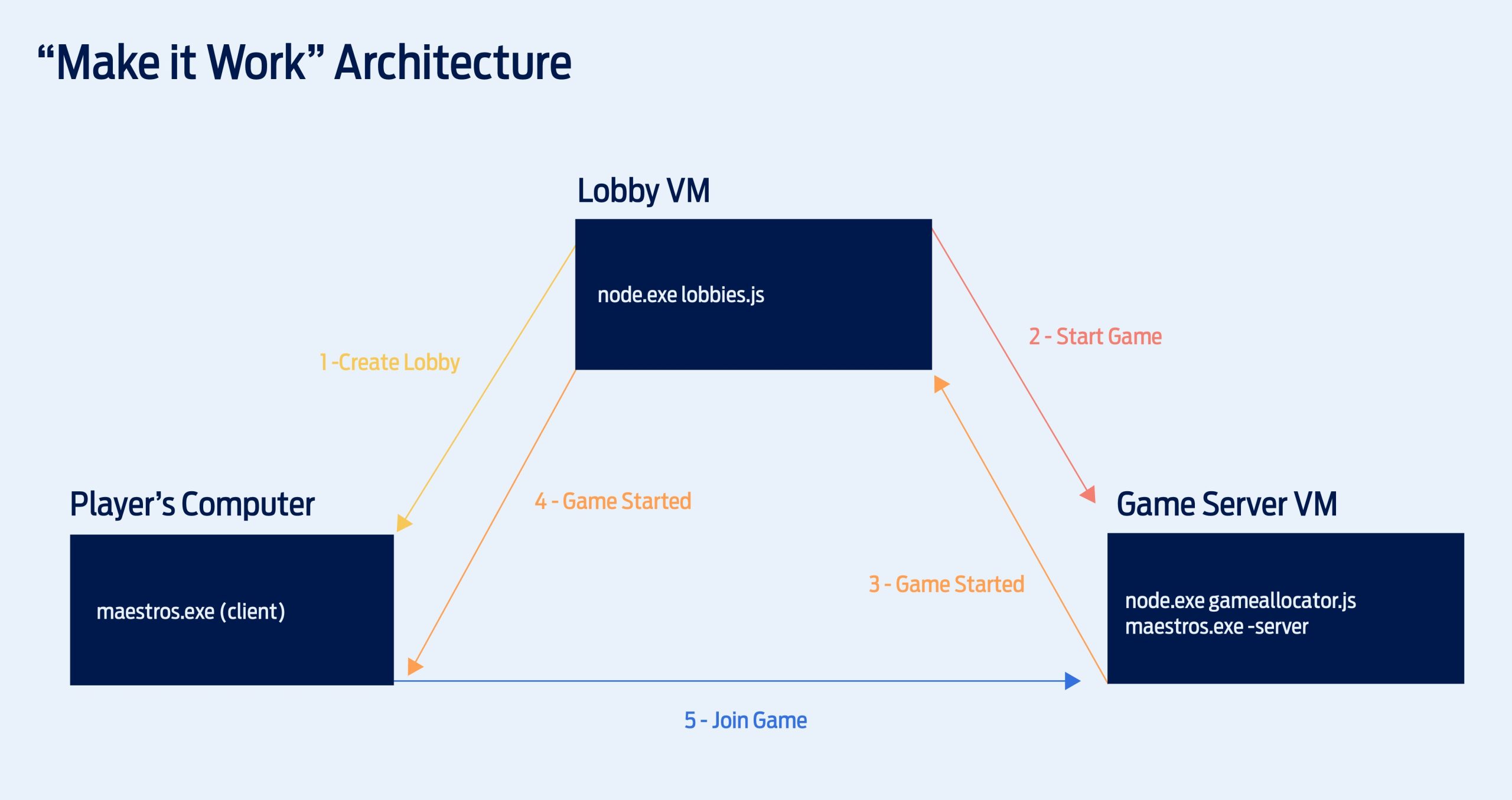
Game servers function by hosting the game world and processing player actions, sending updates to each connected player’s device to keep everyone synchronized.
Ever wondered how hundreds, or even thousands, of players interact in a single online game? It’s all possible thanks to game servers, powerful computers running the game. These servers act as the central hub, making sure all players experience the same game state.
They handle everything from player movements and actions to interactions with the game environment. Understanding how do game servers work is key to appreciating the complex systems behind our favorite multiplayer experiences.

How Do Game Servers Work?
Ever wondered how you can play your favorite video games with friends all over the world? It’s not magic! It’s all thanks to something called game servers. Think of a game server like a super-powered computer that acts as the brain for your online game. It’s the place where all the important game stuff happens, and it allows many players to connect and play together in the same virtual world. But how does this “brain” actually work? Let’s jump in and explore the fascinating world of game servers!
The Role of a Game Server
Imagine a playground where lots of kids want to play together. Without rules or a space to play, it’d be chaos! Game servers are like that playground, but for video games. They provide a shared space and the rules for playing. Here’s a closer look at what they do:
- Keeping Track: The server remembers everything that happens in the game. This includes player positions, scores, items, and even things like the state of the game world (are doors open or closed?). It’s like the game’s memory bank.
- Enforcing the Rules: The server makes sure everyone plays fair. It checks for things like cheating or breaking game rules. If someone tries to do something they shouldn’t, the server will usually stop it.
- Managing Player Connections: When you want to play online, your computer (or console) talks to the server. The server keeps track of who is playing and where everyone is in the game world. It’s like a traffic controller for players.
- Distributing Game Updates: When something changes in the game (like you moving, shooting a gun, or picking up an item), the server sends out messages to everyone else, so they see the same thing on their screen.
Client-Server Model
To understand how a game server works, you need to know about the “client-server model.” It’s the basic system behind almost every online multiplayer game. Here’s a breakdown:
- Client: This is the game program running on your computer or console. Think of it as your window into the game world. It shows you what’s going on, but it doesn’t make all the decisions.
- Server: This is the powerful computer hosting the game world. It’s the boss, making sure everything runs smoothly and fairly.
The client and the server constantly communicate with each other. Your client sends your actions (like moving or shooting) to the server, and the server responds by sending back information about what’s happening in the game world. This back-and-forth communication is what allows you to play with others in real-time.
Types of Game Servers
Not all game servers are the same! There are a few different types, depending on the game and what it needs to do:
Dedicated Servers
These are like the workhorses of the gaming world. Dedicated servers are powerful computers specifically set up to run a game. They do nothing else. This means they can give their full attention to the game, allowing for smoother gameplay, especially with many players. Think of it like a dedicated sports field, built just for playing one game. These servers are often used for large multiplayer games with lots of players and complex simulations.
- Pros: Stable performance, high player counts, more control over the game rules.
- Cons: Higher cost and more technical know-how to manage.
Peer-to-Peer Servers
In a peer-to-peer system, one of the players’ computers acts as the “host” or server. This means the host computer is not only playing the game, but it’s also managing the game for everyone else. It’s a simpler setup, and you usually see it in smaller multiplayer games. It’s like a group of friends deciding to play in one friend’s backyard. The host computer handles keeping track of the game state and sending updates to the other players.
- Pros: Easier to set up, lower cost.
- Cons: Can have performance issues if the host has a slow computer or internet connection. Also, if the host leaves the game, the game ends for everyone.
Listen Servers
A listen server is a type of peer-to-peer setup where the player’s computer is the server, and they are also actively participating in the game. Unlike a dedicated server that exists only to host the game, the listen server simultaneously runs the game and provides the server functions for all players. It’s the same as Peer-to-Peer servers but it does not need to be a computer. It can be console as well. It’s mostly used for smaller groups or if dedicated servers are not available.
- Pros: Similar to Peer-to-Peer, it is easier to set up and does not require additional hardware.
- Cons: Performance is similar to Peer-to-Peer, dependent on the host’s connection and computer power. If the host leaves, the game is disrupted.
Cloud Servers
Cloud servers are servers hosted by big companies like Amazon, Google, or Microsoft. They are stored in huge data centers, not in someone’s basement. These servers are powerful and can handle lots of players and complex games. It’s like renting a super-fast and spacious playground from a company that specializes in playgrounds. Game developers can rent these servers to host their games.
- Pros: Reliable performance, easy to scale up or down depending on how many players are online, less hassle for game developers to manage their own servers.
- Cons: Can be expensive, especially for smaller game studios.
How Game Servers Handle Data
So, we know what game servers do, but how do they actually do it? Let’s talk about how they manage all that information about the game world:
Game State
The game state is like the server’s “memory” of the game. It holds all the information about the current game world. This includes:
- Player positions and movements
- Item locations (like guns, potions, and coins)
- The state of the game world (like whether a door is open or closed, or if a character is alive or defeated)
- Player scores and health
The server updates this information constantly as the game is played. Every time something changes, the server records it in the game state. When a player moves, the game state gets updated with the new position.
Data Transmission
The game server doesn’t send the entire game state to players all the time. Instead, it sends only the information that’s changed, or just the parts of the game world that are near the player. This makes data transmission more efficient and helps reduce lag. It is like sending updates about changes, rather than sending the whole story book every time.
Here is a simplified look at how this data is transmitted:
- A player takes an action (like moving or shooting).
- The player’s client sends a message about this action to the server.
- The server updates the game state based on the player’s action.
- The server sends out messages to other players, telling them what happened.
- Each player’s client receives the messages and updates what they see on their screen.
Latency and Lag
You have probably heard players complaining about “lag.” Lag is caused by delays in the transmission of data between the client and the server. The longer it takes for your computer and the server to communicate, the more lag you will experience, resulting in a delayed experience of the game.
Here are a few things that can cause lag:
- Slow internet connection: If your internet connection isn’t fast enough, data will take longer to travel between your computer and the server.
- Server distance: If the server is far away from you, the data will also take longer to travel, causing lag.
- Server overload: If the server is handling too many players, it may slow down, causing lag.
Game developers do their best to reduce lag by using fast servers and optimizing the way data is transmitted.
Game Server Architecture and Structure
The structure of a game server can be quite complex, especially for large multiplayer games. Here’s a look at some of the key components:
Core Game Logic
This is the part of the server that contains the game’s rules. This determines how players interact with the game world. It includes things like:
- Rules of combat
- How objects interact with each other
- How the physics of the game work
Network Layer
The network layer handles communication between the server and the player’s clients. This layer is responsible for:
- Sending and receiving data
- Handling player connections
- Managing latency
Database
Many online games use a database to store player information, such as:
- Account information
- Player progress
- Items and inventory
Game Engine
The game engine handles many of the core functions of the game itself. It is used by both the client and the server. It includes tools for:
- Rendering graphics
- Handling sound
- Managing physics
Scaling and Server Capacity
Game developers need to make sure they have enough server capacity to handle the number of players online. If there aren’t enough servers, players will experience lag and other problems. This process of adjusting the capacity is known as scaling. The server may either:
- Scale Up: Adding more resources (like more processing power or memory) to an existing server.
- Scale Out: Adding more servers to handle more players.
Good server scaling is essential for a smooth gaming experience, especially during popular game releases or events.
Security and Anti-Cheat Measures
Game servers also have to deal with security issues, such as cheaters or hackers. Game servers have different measures that may include:
- Detecting Cheating: This is done by looking for suspicious behavior, like players moving too quickly or using items they shouldn’t have.
- Anti-Cheat Software: Some servers use special software to detect and block cheaters.
- Security Updates: Game developers release updates to fix security flaws and prevent hackers from gaining access to the servers.
Server security is incredibly important for maintaining a fun and fair gaming environment for everyone.
The Future of Game Servers
Game server technology is constantly evolving. Here are some of the things we might see in the future:
- More Powerful Cloud Servers: Cloud servers will continue to become more powerful and affordable, which will enable bigger and more complex online games.
- Improved Network Technology: New internet technologies will help reduce lag and allow for smoother online play.
- AI in Game Servers: Artificial intelligence may be used to manage servers more efficiently and to create more dynamic and interesting gameplay.
The world of game servers is a complex and constantly changing one. However, its impact is undeniable on the way we play video games. Game servers make it possible for us to connect with people from all over the world and play together. From the simple setup of peer-to-peer connections to the complex architecture of cloud servers, each of these forms enables the exciting online worlds we love.
What is a Server? Servers vs Desktops Explained
Final Thoughts
Game servers function as the central hub for multiplayer gaming. They host the game world and manage player interactions. The server processes player actions, updates the game state, and broadcasts changes to all connected clients.
Essentially, how do game servers work involves a continuous cycle of input, processing, and output. They use powerful hardware and specialized software to handle this intense workload. Therefore, they provide a seamless multiplayer experience.

