
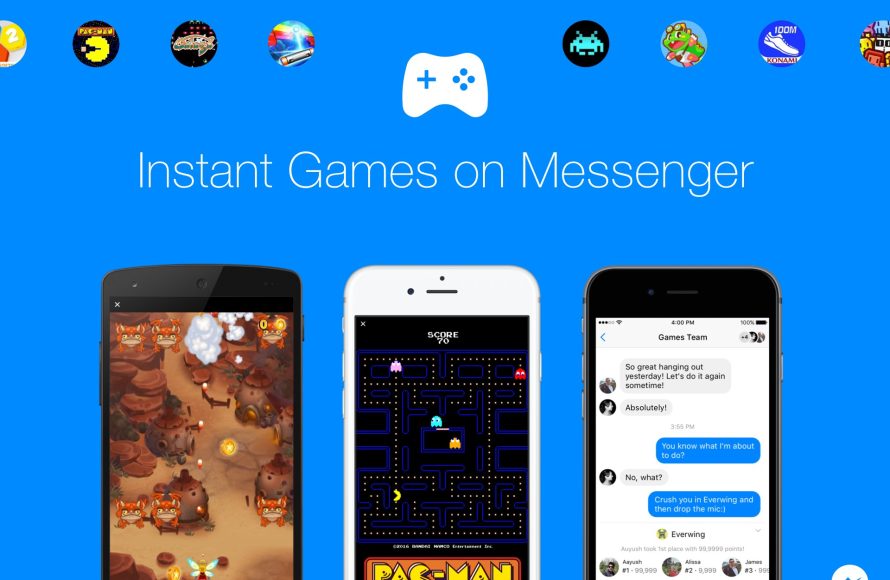
To play games on Messenger, open a chat, tap the game controller icon, and choose a game.
Ever found yourself wondering, “how do i play games on messenger?” It’s easier than you might think! Messenger has a bunch of fun games built right in, letting you challenge your friends directly within your chats.
No extra apps needed, just tap a button and dive into a mini-game. It’s a great way to connect and have some quick fun.

How Do I Play Games on Messenger?
Alright, let’s dive into the fun world of playing games right within your Messenger app! It’s super easy and a great way to connect with friends, even when you’re not in the same place. You might have noticed that little game controller icon pop up in your chats, or maybe you’ve seen a friend’s high score. If you’ve been wondering how to join in on the action, you’ve come to the right place. We will take a step-by-step look at how to start playing games on Messenger, from finding the games to challenging your friends.
Finding Games in Messenger
First things first, you need to know where to look for these games. Messenger doesn’t have a separate “games” section like some other apps. Instead, games are integrated directly into your chat windows. This means that every conversation you have could turn into a game-playing session! Let’s explore how to find games in different places within the app.
Accessing Games Through a Chat
This is the most common way people find and play Messenger games. Here’s how you do it:
- Open a chat: Choose any chat with a friend or a group of friends. It can be someone you chat with all the time or a new conversation.
- Look for the game controller icon: At the bottom of the chat, next to the text input area (where you type your messages), you will see several icons. One of them looks like a little game controller. Tap this icon.
- Explore the options: Once you tap the icon, a window will appear showing you some games you can play. It might show games you’ve played before or suggestions of new ones.
The available games can change, so keep checking back to see what’s new. Some of the games you might see are quick puzzles, sports challenges, or classic arcade-style games.
Using the Search Function
Sometimes, you might have a specific game in mind that you want to play. If you know the name of the game, you can search for it directly:
- Open a chat: Just like before, open any chat. It doesn’t matter who you’re chatting with for this step.
- Tap the game controller icon: Look for the controller icon next to your text box and tap it.
- Use the search bar: In the games window that appears, you will see a search bar at the top. Type the name of the game you are looking for.
- Start playing: If the game is available on Messenger, it should appear in the search results. Tap on it to start playing.
This search function is helpful if you hear about a cool game from a friend and want to find it easily.
Games in Group Chats
Group chats are awesome places to enjoy games with multiple friends at the same time. The steps to find games in a group chat are the same as in a one-on-one chat. Simply open the group chat, tap the game controller icon, and you will see the game options. Playing with a group adds extra fun and allows for friendly competition!
Starting a Game
Once you’ve found a game you want to play, the next step is to get the game going. Here’s how you can start playing games on Messenger:
Selecting a Game
When you’re looking at the available games, you can often see a small preview or a short description. This gives you an idea of what the game is about. Tap on the game you would like to play.
Starting a Game for the First Time
The first time you select a game, the game might ask you to grant permission to access your basic information, like your name. This is very common with apps that connect with Facebook or Messenger. Once you grant permission, the game should begin to load. You may also see some brief instructions on how to play the game.
Inviting Friends to Play
After the game loads, you have several options. You can start playing a solo game to practice, but most of the time, you will probably want to invite friends to play with you. Look for a button that says “Play with Friends” or something similar. You can then choose which friends you want to invite to play. They will get a notification and can join in on the fun.
Challenges and Leaderboards
Many Messenger games have challenge modes and leaderboards. You can send a challenge to your friend to beat your score or you can check leaderboards to see how you compare to your other friends who play the game. This adds a competitive element that can make games even more interesting.
Types of Games on Messenger
The variety of games you can find on Messenger is surprisingly diverse. It is very likely that there are games for different interests. Here are some of the popular categories of games available on Messenger.
Quick Puzzle Games
These games are perfect for when you only have a few minutes to spare. They often involve matching colors, connecting objects, or solving simple puzzles. Examples include puzzle games where you must arrange tiles to create an image or word games where you unscramble letters. These games are usually easy to pick up and play quickly.
Arcade-Style Games
If you like classic arcade games, you’ll find many that are similar on Messenger. These might involve shooting targets, navigating through obstacles, or collecting items. Think of games that are similar to old school games like pac man or space invaders. These are usually fun and very engaging.
Sports Games
You can also play virtual sports on Messenger. Games could include mini golf, basketball, soccer, or bowling. These games often have simple controls and are a fun way to challenge your friends to some friendly competition. It’s fun to try to see who can score more points or have the fastest time.
Word Games
For those who like word challenges, Messenger offers word games such as word puzzles, hangman style games, and those that challenge your vocabulary skills. These can be quite addictive and are great for exercising your mind.
Strategy Games
If you enjoy games that require strategy and planning, you might like games on Messenger that involve more complex thinking. This category could have games where you build structures, manage resources, or try to outsmart an opponent with different moves. These types of games might take a little longer to complete.
Casual Games
Many games fall into the casual gaming category. These games are designed to be relaxing and easy to play. They could include things like collecting flowers, tapping objects, or playing mini-games. Casual games are a nice way to unwind.
Tips and Tricks for Playing Games on Messenger
To make your game play experience even better, here are some handy tips and tricks you should consider.
Stay Updated on New Games
The games available on Messenger often change and new games are added. You should keep checking back to the game options to see what new games have been made available. This way, you will not miss out on the latest and greatest games. You can also ask your friends what games they have been playing or look up new releases online.
Turn off Notifications If Needed
If you find yourself getting too many notifications about games, you can adjust the notification settings for Messenger. You can choose to turn off game notifications so you can focus when you need to. This can be done in the settings menu in your Messenger app.
Play When You Have Time
Don’t feel pressured to play games if you are busy with other things. Messenger games are meant to be a fun way to relax and connect with your friends. You can play them when you have time and when you want to. Don’t forget to have fun.
Understanding Game Mechanics
Each game is different, and it is a good idea to learn the specific rules and controls for each game. Take the time to learn how to play a new game so you can enjoy it more fully. Some games have tutorials or help sections to guide you. Reading those can be useful.
Managing Data Usage
Keep in mind that games use some of your phone’s data. If you don’t have unlimited data, connect to a Wi-Fi network when possible to avoid using too much of your mobile data. This is especially useful if you are playing games that have a lot of graphics.
Invite Different Friends to Play
Try playing games with a variety of your friends. It can be fun to see how different people approach games and who is good at which type of game. You might be surprised by how competitive some of your friends get. You may even find out you like playing different kinds of games with certain friends.
Troubleshooting Game Issues
Sometimes games on Messenger might not load correctly or might have other technical issues. Here are some common things that you can try if you have issues with a game.
Check Your Internet Connection
The most common problem with games that are not working is a bad internet connection. Make sure that you are connected to a stable Wi-Fi network or a reliable cellular data plan. If the connection is weak, you may have problems loading or playing the game.
Update the Messenger App
Another common cause of game problems is using an outdated version of the Messenger app. Make sure you are using the latest version of the app to avoid problems. You can update it in your app store.
Restart the App
Sometimes just closing and reopening the app can solve a lot of problems. If a game isn’t loading or acting strangely, try closing the app and reopening it. It can often fix minor glitches.
Restart Your Phone
If closing the app does not help, try restarting your phone. This can solve many technical problems that may be affecting the game play.
Contact Support
If you have tried all of the troubleshooting steps above and are still having problems, you can contact Messenger support. You can usually find information on how to do this in the Messenger app settings. They may have more suggestions or know of problems with the game you are trying to play.
Making the Most of Messenger Games
Messenger games are meant to be fun and engaging, so here are some ways to ensure you’re getting the most out of your gaming experience.
Use Games to Stay Connected
Games on Messenger are a wonderful way to connect with friends and family, especially when you are far apart. They offer a fun and engaging way to interact and keep in touch. It is a great way to do something fun together when you may not be able to physically be together.
Organize Game Nights
Why not start a game night with your friends? You can choose a specific night of the week to play games together. This can be a regular activity that everyone looks forward to. Group chats are perfect for these kinds of game sessions.
Friendly Competition
Some friendly competition among your friends can make playing games even more exciting. You can try to beat each other’s scores or challenge each other to matches. Keeping it lighthearted will make sure everyone stays friendly and has a good time. Messenger games can be a great way to have a little friendly rivalry.
Discover New Games Together
Take some time to explore new games together with your friends. You can try different games in each session to discover new favorites and to try a variety of games that Messenger offers. It’s more fun to try new games together, so you can share the experience.
Keep it Fun and Relaxed
Most importantly, make sure that you are having fun. Messenger games should be relaxing and enjoyable. Don’t take them too seriously and focus on having a good time playing with your friends. Remember, it is all about connecting and enjoying each other’s company.
How to Play Games on Messenger
Final Thoughts
To play games, open a conversation in Messenger, tap the game controller icon, then choose your game. The games available may vary depending on your region.
You can also play through the games tab, usually found in the app’s menu. ‘how do i play games on messenger’ is answered with these simple steps.
Once you start playing, follow the in-game instructions. Remember, you must have a good internet connection.

