
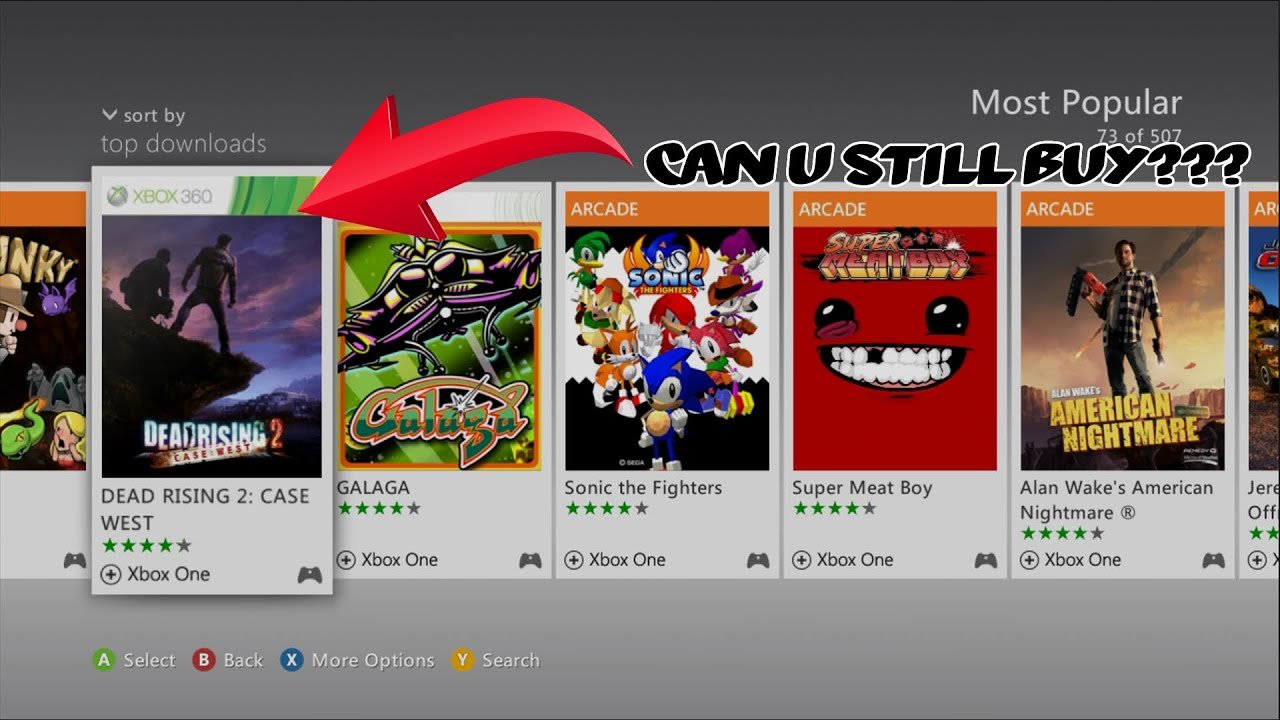
You buy games on Xbox 360 through the Xbox Live Marketplace using your console, or by purchasing physical discs from retailers.
Still rocking your Xbox 360 and want to expand your game library? You might be wondering, how do you buy games on xbox 360 these days?
The process is a bit different from modern consoles, but it’s still possible to get new (to you) games. You can access the Xbox Live Marketplace directly on your console, browse available titles, and make purchases.
Alternatively, many classic titles are still available as physical discs at online retailers, or sometimes even at your local used games store.

How Do You Buy Games on Xbox 360?
Getting new games for your Xbox 360 is like opening a treasure chest filled with adventures! Even though it’s an older console, there are still lots of fun games you can play. But how exactly do you get them? Don’t worry, it’s not as complicated as you might think. Let’s break it down into simple steps, and explore all the different ways you can add awesome games to your collection.
Understanding Your Options for Xbox 360 Games
Before we dive into the how, it’s helpful to know the different ways games come for the Xbox 360. There are two main types: physical discs and digital downloads. Each has its own pros and cons, so let’s take a look:
Physical Discs
These are the classic game discs that you put into the console’s disc drive. They come in a case and often have cool artwork on the cover. Here are some things to keep in mind about physical discs:
- Used Game Stores: You can find a wide selection of used Xbox 360 games at stores like GameStop, EB Games, or smaller local game shops. These are often cheaper than brand new games.
- Online Marketplaces: Websites like eBay and Amazon also have many used Xbox 360 games available. Be sure to check the seller’s rating and read the description carefully before buying.
- Friends and Family: Sometimes you can borrow games from friends or family members. This is a great way to try a game before you buy it or to save money.
- Advantages of Discs: They feel nice to hold, and you can trade or resell them later.
- Disadvantages of Discs: They can get scratched or lost, and you need to physically go to a store or wait for shipping.
Digital Downloads
These are games that you buy online and download directly to your Xbox 360’s hard drive. No disc is needed! This means you won’t have any physical game cases cluttering your room.
- Xbox Live Marketplace: The main place to buy digital games for your Xbox 360 is the Xbox Live Marketplace. You can access this through your console.
- Advantages of Downloads: They are convenient, and you can start playing immediately after downloading. You won’t have to worry about scratched discs.
- Disadvantages of Downloads: They take up space on your Xbox 360’s hard drive, and you can’t resell them.
How to Buy Physical Games
Let’s first explore purchasing physical copies of the games. It’s a straightforward process, but there are a few key steps to remember.
Shopping at Used Game Stores
Visiting a physical store is a fun experience for many. Here’s how you can do it:
- Find a Store: Use a map app or search online to find used game stores near you. Common ones are GameStop, EB Games, or local shops.
- Browse the Shelves: Look through the games available. Game cases are usually arranged alphabetically, or by genre.
- Check the Condition: Make sure the disc doesn’t have any major scratches. A few light scratches may not affect the playability, but a disc with deep scratches may not work. Always check inside the case to see if the game manual is present.
- Ask for Assistance: If you need help finding a certain game, don’t hesitate to ask a store employee for assistance.
- Make the Purchase: Bring the game to the counter, pay with cash, debit card, or credit card, and you are done.
Buying Used Games Online
If you don’t have a game store near you, online marketplaces are a great alternative.
- Choose a Platform: Sites like eBay and Amazon are popular places for purchasing used games.
- Search for Your Game: Type the name of the game into the search box.
- Read the Description Carefully: Make sure the game is in good condition. Check if the game includes the case and manual. Look at the seller’s feedback rating to see if the seller is reliable.
- Buy the Game: Add the game to your cart and go to checkout. Be sure to check your address is correct.
- Wait for Shipping: Your new game will be shipped to you. Once you receive it, start playing!
How to Buy Digital Games on Xbox 360
Now, let’s talk about buying games directly from your Xbox 360 console. It’s convenient, but there are a few things you should know.
Accessing the Xbox Live Marketplace
This is where you will find all available digital games for download.
- Turn On Your Console: Make sure your Xbox 360 is connected to the internet.
- Navigate to Xbox Live: From the Xbox 360 dashboard, go to the “Xbox Live” section.
- Open the Marketplace: Look for the “Games Marketplace” or “Browse Games” option. This will take you to the digital store.
Finding and Choosing Games
Once you’re in the Marketplace, you can browse games.
- Browse Categories: Look through different game genres like action, sports, racing, and more.
- Use the Search Feature: If you know what game you want, type the title into the search bar.
- View Game Details: Click on a game to see more information, including screenshots, trailers, and reviews. Pay attention to the age rating to ensure it’s appropriate.
Making a Purchase
Once you’ve found the game you like, it’s time to buy it.
- Add to Cart: Click the “Buy” button for the game. You might need to confirm the purchase price.
- Payment Methods: You can pay using a credit card, debit card, or Xbox Gift Card that is linked to your Xbox Live account.
- Confirm the Purchase: Once you confirm, the game will begin to download to your console.
Downloading and Installing Your Game
After you buy a digital game, it will start downloading. Here’s what to expect:
- Download Progress: You will see a download progress bar on the screen. The time it takes to download will depend on your internet speed and the size of the game.
- Wait for Completion: Don’t turn off your console during the download. You can play another game or watch something in the background.
- Installation: Once the download is complete, the game will automatically install. After that, you can find it on your game list.
Important Things to Remember
Before you start buying games, here are a few key things to keep in mind:
Xbox Live Gold
An Xbox Live Gold subscription was needed to play online with other people and sometimes access certain game features. However, online play for most Xbox 360 games was discontinued in July 2024. You can still use Xbox Live without a Gold subscription for some features, and you will still need an Xbox Live account to buy digital games from the store.
Storage Space
Digital games take up space on your Xbox 360’s hard drive. Make sure you have enough space before buying too many games. If your hard drive is full, you may have to delete other games or files to make room for new ones.
Game Compatibility
Most Xbox 360 games are region-locked. This means that games bought in one region may not work on an Xbox 360 from another region. Make sure you buy games from the region of your Xbox 360 console. This is not a problem for digital games purchased from the correct region through the Xbox Live Marketplace.
Age Ratings
Video games have age ratings to make sure they are appropriate for different age groups. Always check the age rating of a game before buying it, to make sure it’s suitable for you or the person who will be playing it. Always be sure to get the approval of your parent or guardian before purchasing games for your Xbox 360.
Tips for Saving Money on Xbox 360 Games
Buying games can be expensive, but here are a few ways to save money:
- Look for Sales: Game stores and online marketplaces often have sales on games. Keep an eye out for these deals.
- Buy Used Games: Used games are usually much cheaper than new ones.
- Borrow from Friends: If you have friends who have an Xbox 360, ask if they have any games you can borrow.
- Wait for Price Drops: The price of games will often go down over time, especially as new titles are released. If you can wait, you may be able to buy a game you want at a lower price.
- Check Online Forums: Look at gaming community forums for any deals or sellers offering lower price tags.
- Trade-in Games: If you have older games that you don’t play anymore, you can trade them in at stores or sell them online.
By following these tips, you can start expanding your Xbox 360 library without breaking the bank! There are lots of adventures waiting for you on the platform!
Getting games for your Xbox 360 is pretty easy once you know how. Whether you choose to buy physical discs from stores or digital downloads from the marketplace, you’ll find plenty of fun titles to enjoy. Remember to check for sales, look at used games, and always be aware of age ratings. With a bit of planning, you can keep your Xbox 360 gaming adventures going for years to come. Happy gaming!
How to go on the Xbox 360 Marketplace Again!
Final Thoughts
In short, you buy Xbox 360 games primarily through the console’s store using Microsoft Points or a credit/debit card if available, or by purchasing physical discs from retailers. Remember that digital purchasing directly on the Xbox 360 itself is limited now.
Alternatively, you can acquire physical game copies from various places like online marketplaces or used game stores. This involves checking compatibility with your console and ensuring the disc is in good condition.
Therefore, ‘how do you buy games on xbox 360’ boils down to choosing between the old store method or obtaining physical copies. The process requires careful consideration of the age of the console and available options.

