
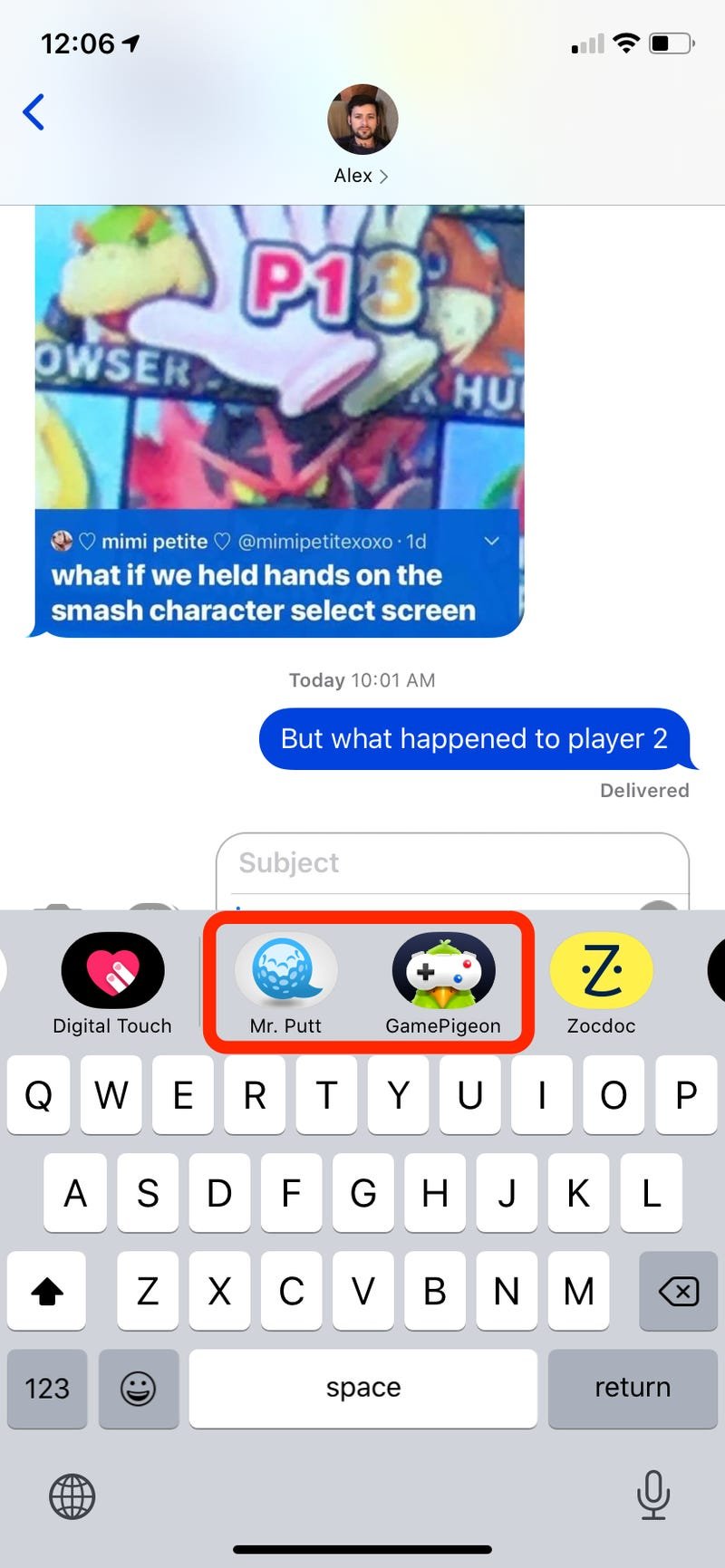
To play iMessage games, open a message thread, tap the App Store icon, choose a game, and then start playing directly within the conversation.
Ever wondered how do you play the iMessage games everyone’s talking about? It’s simpler than you might think! You don’t need to download extra apps to join in on the fun with friends.
The iMessage app drawer is your gateway to a bunch of engaging titles. These games offer quick, competitive, and sometimes collaborative experiences within your chats. They add an interactive element to conversations.

How Do You Play the iMessage Games?
Have you ever wanted to play a fun game with your friends without leaving your text messages? iMessage games are a super cool way to do just that! They’re like little mini-games that you can play right inside your iMessage chats. It’s easy and super fun. Let’s jump into how you can start playing these games and become an iMessage game pro!
Finding iMessage Games
First things first, you need to know where to find these games. They’re not hiding, don’t worry! They’re tucked away in the App Drawer within your iMessage conversations. The App Drawer is like a little shelf of extra tools and apps you can use in your messages. Here’s how to get to it:
- Open the Messages app on your iPhone or iPad.
- Start a new message or open an existing conversation.
- Look for the App Drawer, which is a little gray icon that looks like an “A” with a rounded rectangle around it. You’ll find it just above the keyboard.
- Tap the App Drawer icon. This will open a tray with all sorts of apps and things you can use in your iMessages.
Now, you’ll see a bunch of different app icons. Some of these are for special iMessage apps, including, you guessed it, games!
Installing Games
If you see games in the app drawer, great! you are ready to play. But sometimes, you will see the app icon with a little cloud and a downward pointing arrow, this means you have to download it before playing the game. Here is how:
- Look through the App Drawer for the game you want to play.
- If you see the cloud icon, that means you haven’t downloaded it yet. Tap on the app icon with the cloud icon.
- The game will now start downloading and will show a circle that fills up as it gets downloaded.
- Once the circle is full, the game app is ready to use.
You can also get new iMessage games by visiting the App Store. Tap the App Store icon in your App Drawer, then search for “iMessage games”. You will see a list of games that you can download and play with your friends.
Starting a Game
Okay, you’ve found and maybe even installed a game! Now it’s time for some fun. Starting a game is usually very simple:
- Go back to your iMessage conversation where you want to play the game.
- Tap on the App Drawer icon again.
- Tap on the icon of the game you want to play.
Different Types of iMessage Games
There are lots of different types of iMessage games to enjoy. Here are a few popular kinds to check out:
- Turn-Based Games: These games go back and forth between players. You do your turn, and then you wait for your friend to do theirs. Think of a simple chess or checkers type game.
- Real-Time Games: These games let you and your friend play at the same time. Both you can make your move in real time. These games are usually very fast and more action-packed.
- Puzzle Games: These games challenge your brain. They might have you solve riddles or fit pieces together. These are great for thinking and problem-solving.
- Word Games: These games often involve spelling, guessing words, or unscrambling letters. You can learn new words and become a word master.
- Sports Games: These games will let you play small versions of your favorite sports like mini golf, basket ball and soccer.
The possibilities are nearly endless! You’ll find games about everything from sports to puzzles to drawing. The variety means there’s sure to be something you and your friends will all like!
Playing a Turn-Based Game
Let’s dig into how a turn-based game works. Many iMessage games use a turn system, so understanding how they work is important. Here’s what to usually expect:
- After you start the game, you might need to choose how many people are playing or what the game will be like.
- Then, you take your turn, which might involve tapping, swiping, or drawing on the screen.
- Once you’re done with your turn, you usually tap a “Send” or “Done” button, so the game will pass on to the next player.
- Now, you have to wait for the other player to make their move. You’ll get a notification when it is your turn again.
- You keep taking turns until someone wins or the game is over!
Making Your Move
The specific way you make your move will change from game to game. Here are some general examples of what you might need to do:
- Tapping: Some games require that you just tap on different things on the screen to make your move. For example, in a checkers game, you might tap the checker you want to move and then tap the space where you want to move it.
- Swiping: In some game like a puzzle game, you might need to swipe to move pieces of the puzzle. Or, in a mini golf game, you need to swipe to hit the golf ball.
- Drawing: For some games, you might have to draw something on the screen. This will be used in drawing and doodling type games.
Most games will give you some basic instructions on what you need to do. If you are not sure, look for a tutorial or a “how to play” button. After a few tries, you’ll be a pro!
Playing Real-Time Games
Real-time games are exciting and fast. This means you and your friends will be playing at the same time, so you don’t have to wait to take your turn. Here’s how they usually work:
- Start the game with your friend in iMessage.
- The game screen might show both you and your friend’s player or car or whatever the game has.
- You need to act fast and quick, because the other person will also be taking actions at the same time.
- The game will end either when a player reaches their goal, or after a set amount of time.
Real-time games are often about who is the quickest and the most skilled. These games will keep you on the edge of your seat!
Tips for a Great iMessage Game Experience
To make sure you have the best time with iMessage games, try these tips:
- Choose Games Everyone Will Enjoy: Think about what games your friends like, and suggest something that everyone will find fun.
- Pay Attention to Instructions: Most games have instructions or a quick tutorial at the start. Take a minute to read them. This will help avoid any frustration.
- Be Patient: If a game is taking time to load, or if there’s a little glitch, just be patient. Sometimes technology needs a little extra time.
- Don’t Give Up: Some games can be tough! Keep trying, and you’ll get better with practice.
- Try New Games Often: There are always new games coming out, so be adventurous and try out different types of games.
Troubleshooting Common Issues
Sometimes, you might run into a problem. Here are some things you can try if a game is not working quite right:
- Make Sure You Have a Good Internet Connection: Some games require a good internet connection to play smoothly. Try moving to a spot where you have a stronger Wi-Fi or cell signal.
- Restart the iMessage App: Sometimes, just closing the Messages app and reopening it can solve the issue. It’s like giving your app a fresh start.
- Update Your iPhone or iPad: If you have an old version of the software on your phone or tablet, sometimes games might not work correctly. Go to your settings and make sure there are no updates pending.
- Check the App Store: Sometimes, games release updates too. Check in the App Store to see if there is a newer version of your game.
Understanding Game Controls
Game controls are usually very easy to understand, but here are some common controls you will come across:
- Tap: You simply touch the screen, used for making selections and sometimes performing actions.
- Swipe: Moving your finger across the screen, often used to move things or navigate menus.
- Drag and Drop: Moving your finger from one place to another to drag things, used for moving game elements.
- Buttons: Tapping onscreen buttons, used for confirming actions and starting games.
Games may have a combination of the above controls. It is important to follow the instructions on the game, and you will get the hang of it in no time.
Exploring iMessage Game Variations
While there are many kinds of games, some games even have different ways you can play them. Here are some of the variations you might find:
- Different Game Modes: Some games may have different game modes like “easy,” “medium,” or “hard,” so you can choose how much you want to be challenged.
- Player Selection: Some games will allow you to play in a 1 vs 1 format, and some may support a 2 vs 2 or more, if there are more players in the conversation.
- Theme: Some games may have different themes that you can choose from, or different kinds of game boards or levels.
These variations make it fun to play the same game over and over, without getting bored!
Managing Your iMessage Games
As you add more games, you may need to manage them. Here are a few things you can do:
- Deleting Games: If you no longer want a game, you can easily delete it from your App Drawer. Long press the game app icon, and you will get the option to delete the app.
- Reorganizing Games: You can rearrange the game icons in your App Drawer to put your favorite ones in a more convenient place, in the app drawer.
- Finding New Games: Don’t forget to explore the App Store for new iMessage games. You might find some hidden treasures!
Staying Safe While Playing iMessage Games
While iMessage games are usually safe, here are some basic tips:
- Only Play with People You Trust: Only share game invites with your friends and family that you know.
- Don’t Share Personal Information: Do not share your personal information such as your address, or your personal password with anyone.
- Be Careful of Links: If you see a link in a game, be careful about tapping on it if you don’t know where it is going. Always check with your parents or teacher if you are unsure about something.
iMessage games are a fantastic way to connect with friends and family. They are easy to get started with and have tons of variety. So grab your iPhone or iPad, and get ready to have some fun!
Playing games in iMessage is a simple, fun, and very engaging way to pass the time with your friends and loved ones. With a huge collection of games available for iMessage, you’ll always have something new to try. Just follow the steps we discussed, and you’ll be an iMessage game expert in no time. Now go on, have a great time and start playing!
How To Play Games On iMessage!
Final Thoughts
To start a game, open iMessage and choose a contact. Then, tap the App Store icon and scroll until you see the game you want. Select your game and hit “send” to begin.
Playing is simple; follow the onscreen instructions for each game. Many are turn-based, so you will take your turn and wait for the other person.
How do you play the iMessage games? It is all about finding the game within the app store, starting it and taking your turn, and waiting for your friend or relative to make their next move. must have some fun.

