
You can game share with one person at a time on Xbox.
Thinking about sharing your amazing Xbox game library with your friends or family? It’s a great way to save money and enjoy more games together, but how many people can you game share with on Xbox is an important question. You might be surprised that the answer is limited. You can only officially share with one other account at any given time.

How Many People Can You Game Share With on Xbox?
So, you’re excited about Xbox game sharing, and you want to know how many friends you can include? That’s a great question! It’s like having a bunch of keys to a treasure chest full of games, but you need to know how many friends can use those keys. Let’s dive in and break down the details of Xbox game sharing.
The Basics of Xbox Game Sharing
Xbox game sharing is a fantastic feature that lets you share your digital games and Xbox Game Pass subscription with another person. Think of it like lending your physical games to a friend, but in a digital way. The cool part is that you both can play the games at the same time, and you don’t have to swap discs! This system is designed around the concept of a ‘Home Xbox’. Let’s see how that works.
What is a Home Xbox?
Your “Home Xbox” is essentially one console that is designated as the place where your digital games and subscriptions can be shared. This is super important because it’s the core to understanding how game sharing works. When you set an Xbox as your “Home Xbox,” anyone who uses that console can play your digital games and access your Game Pass subscription, even if you are not logged in. It’s like setting up a family computer; everyone in the house can use your account’s stuff.
- Designation: You can only have one Home Xbox at a time.
- Accessibility: Anyone using your Home Xbox can enjoy your games.
- Your Account: You can play your games on any other Xbox you log into with your account.
How to Designate Your Home Xbox
Setting your Home Xbox is not too hard. Just follow these easy steps:
- Sign in: Log in to the Xbox console you want to set as your home.
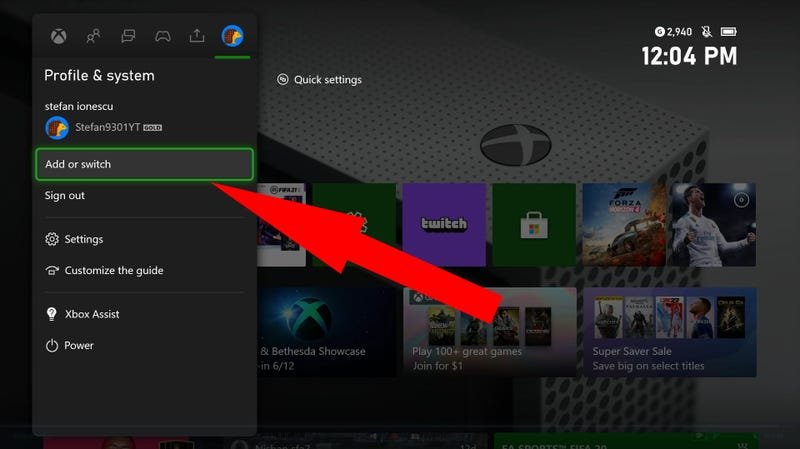
- Open the Settings: Go to “Settings”. You can find this by pressing the Xbox button on your controller, moving over to “Profile & System,” and then selecting “Settings”.
- Go to Personalization: Find and click on “Personalization”.
- Select My Home Xbox: Click on “My home Xbox”.
- Make it Home: Finally, select “Make this my home Xbox.” If there’s another console already set as your home, this will remove that, and set the current one as home.
The “One Friend” Rule: How Many People?
Here’s the key to answering the main question: You can only game share with one other person at a time. Let’s be more precise. You are sharing your stuff with one other person. You cannot have two home consoles or share your library with two other different Xbox profiles. Game sharing happens because your account has a designated Home Xbox, and you, the account holder, can play on any other Xbox, not designated as the home one. So you are sharing your library with one person, by having them use your Home Xbox, and you use any other Xbox.
This system might seem a little limiting at first. Let’s break it down with an example. Suppose you have an Xbox and your best friend has one too. If your friend sets your Xbox as their home Xbox, then they can share their games with you, and you can share your games with them. This is essentially sharing your games with a single person.
How Game Sharing Really Works
Let’s go deeper into how this all functions. It is more than just sharing an account login. It’s a system where your digital purchases and subscriptions are accessible across two consoles.
Sharing Digital Games
When you buy a digital game, it is linked to your account. When that account has a Home Xbox assigned to it, that game can also be played on that Home Xbox, by anyone using that console, even if you are not logged in. So, when you make a purchase, your friend who uses your Home Xbox can download and play your game.
Sharing Xbox Game Pass
The same process applies to your Game Pass subscription. If you have Game Pass, your friend who uses your Home Xbox can access all the games available in the Game Pass library. It means a lot more games available to them without additional cost. This can really save money, and increase the game selection available to both users of the accounts.
Concurrent Play
One of the best parts about game sharing is that you and your game-sharing buddy can play the same game at the same time. For example, you can both play your favorite online multiplayer game together, even if you only purchased one copy of the game. This enhances the gaming experience so that you are both able to enjoy your favorite games.
Important Things to Remember
- Account Security: Sharing requires you to give your friend access to your account. Ensure you are sharing with someone you trust as this gives them access to your purchased games, and other digital content associated with your account.
- Home Xbox Changes: You can switch which console is your Home Xbox, but there are limitations on how frequently you can do this, as explained in the next section.
Restrictions and Limitations
While game sharing is incredibly useful, there are some rules and limitations you need to know to avoid any hiccups.
Switching Your Home Xbox
You can change your Home Xbox up to five times a year. Once you’ve used up your five changes, you’ll have to wait for the reset date (usually a year) to make any more changes. Microsoft does this to prevent abuse of the system. This limitation prevents you from setting up many game sharing combinations, but is easily bypassed if you only intend to share with one person, and do not intend to change your sharing partner during the year. Because the console set as Home Xbox for your account can only be changed a set amount of times yearly, you need to be mindful of when you switch, so you are not locked out for a period of time.
Account Access and Security
Because game sharing relies on using accounts on different Xbox devices, it is very important that you remember to only game share with someone you trust. That is because you must provide them access to your Xbox account in order to allow the game sharing to function correctly. Because of this, we highly recommend that you only do this with people you know well.
Game Availability
Keep in mind that not all games support game sharing, although the vast majority do. Some games, especially those that are part of specific promotions or were acquired in a bundle, might not be eligible for game sharing. Be sure to confirm that the game you intend to share is included in the game-sharing system.
Troubleshooting Common Issues
Sometimes things don’t go as planned. If you run into problems with game sharing, here are some things to check:
Game Not Appearing
If a game isn’t showing up for your friend, make sure that you have set the correct Xbox as your home console. Also, double check that the game is indeed included in the game-sharing program. Sometimes, it helps to simply restart both consoles involved in the sharing.
Home Xbox Error
If you get an error about changing your Home Xbox, it may be that you have reached the limit for the year. You’ll have to wait for the reset date to make further changes. Be sure to keep a track of how many times you have changed your Home Xbox, so you are not locked out of the system. You could even mark it in a calendar!
Internet Connectivity
Both you and your sharing partner need a stable internet connection to play games and use the subscription features. This can be a possible issue if you are both trying to play online games, at the same time, on separate internet connections. A fast stable internet connection is key to enjoying Xbox gaming at its best.
Game Sharing and Family
Game sharing is not only for friends. It’s an awesome feature if you have multiple Xbox consoles at home. For example, if you have one Xbox in the living room, and another one in your bedroom, you can set the living room Xbox as your Home Xbox and access your games on your bedroom Xbox, so you can play your games, no matter where you are in your home. This way, you can use one main account to share all your games throughout the house, for all family members to enjoy.
Maximizing Your Game Sharing
Here are some tips for making the most out of game sharing on Xbox:
- Plan Ahead: Talk to your game-sharing buddy about what games you both want to play.
- Share the Costs: Consider sharing the cost of Game Pass or new games to save money.
- Communicate: Always communicate with your sharing partner about your games, and keep each other informed about planned purchases.
By working together and staying communicative, you can both get the best out of the Xbox game sharing system.
Benefits of Game Sharing
The game sharing option on Xbox offers significant benefits, which is why it is such a popular feature. Let’s explore some of the key advantages:
Cost Savings
Perhaps the biggest benefit is the money you save. By sharing a Game Pass subscription or purchasing games together, you can drastically cut down the cost of gaming. Instead of paying for everything by yourself, sharing lets you split the costs with your friend. This means each of you gets a lot more games, without having to pay a lot of money.
Increased Game Library
Game sharing lets you both increase the number of games available to you. This means you get to enjoy a bigger selection of games than you would if you were buying them on your own. It is a way to open up a much wider selection of the available games.
Playing Together
The ability to play together with friends using only one purchased copy of a game is a fantastic advantage. This is great if you like to play online games with friends. You will be able to play at the same time, on your own Xbox devices, from one copy of a purchased game.
Is Game Sharing Right For You?
Game sharing is a valuable option for people who frequently play games with friends or family. If you play frequently with other people, game sharing is an excellent option to improve the gaming experience for you and your friends, and for cost saving measures. However, this option might not be the right choice for everyone. Here are some things to think about:
- Trust: If you have any concerns about sharing account access with others, game sharing might not be ideal.
- Regular Play: If you and a friend or family member play together regularly, the game sharing system could work very well.
- Ownership: If you prefer to keep all your purchases exclusively to yourself, you may choose not to use the game sharing system, and instead have to make the game purchases for yourself.
Assess your gaming habits and preferences, as well as the preferences of the people you play with, and then you can decide if game sharing will be the right option for you.
In summary, while you can technically only game share with one other person’s account on Xbox at a given time through the Home Xbox system, the advantages of shared games, cost savings, and more make it a great option for Xbox players. Remember to always be aware of security considerations, and communicate with your game-sharing partner.
How to Game Share on Xbox ~The Easy Way~
Final Thoughts
You can game share with one person at a time on Xbox. This means you designate a “home” console and that person has access to your library. Your personal account can still play games on other consoles.
You only can do this with one other account simultaneously. So, how many people can you game share with on xbox? The answer is one, at any given time.

