
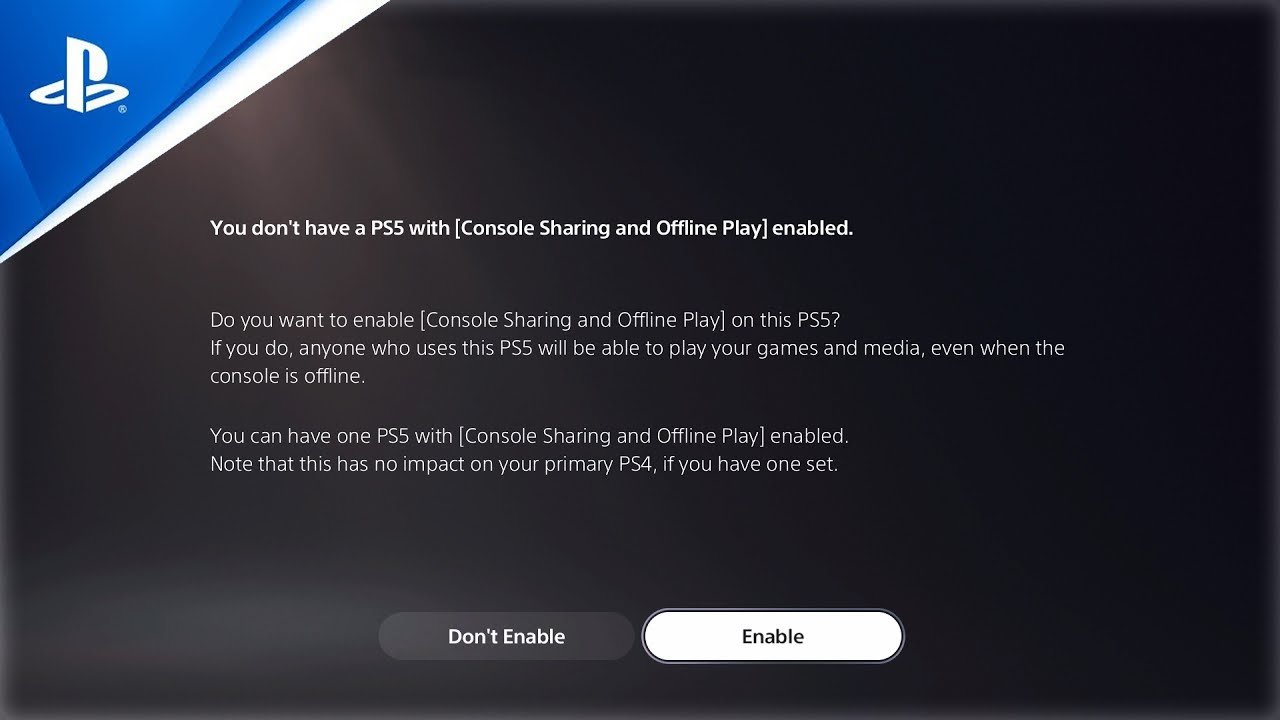
Only one other console can game share with your primary PlayStation 5.
Wondering how many PS5 consoles can game share? It’s a common question for players who want to share their digital library with friends or family. Many people want to know about how many PS5 can game share, and want to ensure all the games can be shared in the household.
Setting up game sharing is simple. However, the limitation is that you can only share with one other console. This can help you maximize your gaming experiences.

How Many PS5 Can Game Share?
Okay, let’s dive deep into the world of PlayStation 5 game sharing! It’s a super cool feature that allows you to share your digital games with friends and family. But just like sharing your toys, there are some rules to follow. So, how many PS5 consoles can actually share games at the same time? The short answer is: It’s not as simple as having unlimited sharing. Let’s explore the details and get you all set up!
Understanding PlayStation Network Accounts
Before we get into the nitty-gritty of game sharing, it’s really important to understand how PlayStation Network (PSN) accounts work. Think of your PSN account as your special key to everything PlayStation. It’s what you use to download games, play online, and of course, share your games. Each person needs their own PSN account when using the PlayStation Network. It’s like having your own login to a shared computer – you wouldn’t want to mess with someone else’s files, right?
Primary and Secondary Consoles: The Key to Game Sharing
This is where things get a bit interesting. With PlayStation, you designate one console as your “Primary” PS5, and other consoles as “Secondary.” The Primary console is like your main home base. This is where your account is most active, and where all of your games are available to play by anyone who uses that console. On the other hand, secondary consoles are places where you can log in with your account, but there are limitations.
- Primary Console: Anyone on this console can play the games you have purchased, even if they don’t have your PSN account linked. It’s a great setup for families!
- Secondary Console: Only the account owner (that’s you!) can play the games on a secondary console. Other users on that console will not have access to your games. If you’re going to use a secondary console, you will need a continuous internet connection to verify your licenses.
The Limit: One Primary Console
This is the big rule: you can only have ONE PlayStation 5 set as your primary console at any given time. This is how Sony keeps things fair and prevents widespread game sharing. So, if you try to set a second console as your primary, the first one will lose its primary status. It will then be considered a secondary console. Be careful and think about which console is your main one!
Here is a short example to help understand better:
Imagine you have two PS5s, one in your living room and another in your bedroom. If you designate the living room PS5 as your primary, anyone can play your games there. If you take the bedroom PS5, log in with your account, and play your games in your room, that makes the bedroom console secondary. However, if you try to switch the primary status to the bedroom PS5, your living room PS5 will become a secondary console. Remember this while you setup your console.
How Game Sharing Works in Practice
Now that you understand the primary and secondary console concept, let’s see how game sharing actually works when you have your PS5’s ready.
Scenario 1: Family Sharing on One Console
This is the easiest example. If you have a family and just one PS5, you can set it as your primary console. This means all family members can create their own individual profiles on that PS5, each with their own trophies, saved games, etc. Anyone who uses the console can access and play any digital games you have purchased or downloaded on your account. No extra steps needed!
Scenario 2: Sharing with One Other Console
Things get slightly more complex when you have a second console. Let’s say you want to share your games with a close friend or a sibling in another home. Here’s how this would work:
- Your Console: Set this as your primary PS5. Everyone at your home can access your games.
- Friend’s/Sibling’s Console: You would log into this PS5 with your PSN account, but you would not set it as your primary. Instead, you will leave the friend’s account as primary, and you would need to log in using your account to play games.
In this setup, your friend or sibling will be able to play your games, but only when logged into your PSN account on their console. This means that while your friend can play, he or she cannot play using their own profile. If you log out from the secondary console, the games will become unavailable for other accounts.
Important Note: This setup requires that both PS5s have a stable internet connection. If your friend/sibling goes offline, their access to the games through your account will be temporarily lost. Additionally, you both cannot be logged into the same game at the same time.
Scenario 3: Sharing with Multiple Consoles
Here’s the real trick part. You cannot share your games across multiple secondary consoles at the same time. You can switch and change which console is your primary and secondary, but this can become cumbersome. The game sharing limit really only allows for one primary console and one or more secondary consoles that will only allow gameplay through your profile. If you want to play your games on your secondary console, someone else would not be able to play the same game on your primary console because you are logged in on two different devices. You need to log out on one system to play on another system.
To summarize: You can only have one primary PS5 and multiple secondary consoles which cannot be played on simultaneously.
Game Sharing Limitations: What You Need to Know
While game sharing is a great way to enjoy your game library with others, it does come with some restrictions:
- Playability on Secondary: Only the account that bought the games can play on the secondary console. So even if you’re game sharing with your friend, they can’t play on their own profile, unless they log into your account to do so.
- Simultaneous Play: You can’t play the same game on multiple consoles at the same time using the same account. If you try, it will kick you out and say the account is already logged in on another device.
- Internet Connection: You need a stable internet connection for game sharing on secondary consoles because it has to verify the license with the PlayStation servers.
- Account Security: Remember, when you log in your account on your friend’s or siblings device, you give them access to your personal information and your account. Make sure you only share with people you trust.
- Subscription Services: Game sharing works with games, but sharing PlayStation Plus subscriptions is a different ballgame and not as straightforward.
Specifics: Playing Different Games at Same Time.
You can, however, play different games on your primary and secondary console simultaneously. For instance, you could be playing a racing game on your primary console, while you’re friend could be playing a role-playing game on your secondary console through your profile. This is something that has made game sharing very popular on the PlayStation.
How to Activate Game Sharing on PS5
Setting up game sharing can seem confusing at first, but it’s actually quite easy. Here’s a step-by-step guide to how to do it. Keep in mind this process is for setting up a primary or a secondary system.
- Log In: On the PS5 you want to make your Primary or Secondary, log in using the PSN account where your games are purchased or downloaded.
- Go to Settings: From the home screen, go to Settings (it looks like a gear icon).
- Select Users and Accounts: Go to “Users and Accounts” in the Settings menu.
- Choose Other: Select the “Other” option.
- Console Sharing and Offline Play: Here’s the magic button! Select the “Console Sharing and Offline Play” option.
- Enable/Disable: If you want to set it as your primary console, choose the “Enable” option. If you are using a secondary console, you will need to log in using your account.
That’s it! It’s important to remember the game sharing guidelines when going through this process. If you decide to change your primary console, simply follow these steps and select “Disable” on your old primary console first, and then “Enable” on the new one.
Tips for Smooth Game Sharing
To make the whole game-sharing experience as smooth as possible, here are a few helpful tips:
- Clear Communication: Be clear with the people you’re sharing with about how it works. Explain the difference between primary and secondary, so they know what to expect.
- Stable Internet: Make sure both consoles have a reliable internet connection. This is vital for the secondary console.
- Account Security: Use strong passwords and enable two-step verification to protect your account. When using secondary console, it would help for security if you log out once you are finished.
- Don’t Forget! Remember to remove your account from a secondary console after you are done.
- Considerations for Travel: When travelling, you may have to switch your primary console to your console on the road and make the other console secondary.
Why Does Sony Limit Game Sharing?
You might be wondering why Sony imposes these restrictions on game sharing. The main reason is to protect the income of game developers and the PlayStation store. If everyone could freely share games with as many people as they wanted, the sales of games would drop dramatically, which would affect game developers and PlayStation’s ecosystem negatively. These limits help make sure that games can be developed and sold for years to come.
Game sharing on the PS5 is a wonderful option for sharing your collection. While there are some guidelines, the ability to let friends and family enjoy your games can be invaluable. So long as you stick to the rules, game sharing will enhance your gaming experience.
How to GameShare on PS5 – OverSimplified (2024)
Final Thoughts
You can game share with one other console at a time on PS5. This means only one friend can access your games via game share. If you want to share with someone else, you must deactivate the previous share.
Therefore, the answer to ‘how many ps5 can game share’ is one other console. Remember only your primary console can access the games that have been shared. This system provides game sharing convenience.

