
You can check Valorant skins without opening the game by using third-party websites or apps that access Riot’s API.
Tired of booting up Valorant just to browse through your collection of skins? It’s a common frustration for many players. You just want a quick peek at that new phantom skin you got or perhaps plan your next purchase. Wouldn’t it be amazing if you could explore your virtual arsenal without the lengthy game loading process?
That’s where we come in. We’ll show you exactly how to check valorant skins without opening game, so you can save time and manage your inventory more efficiently. This simple method keeps you updated on your collection, even when you’re away from your gaming PC.

How to Check Valorant Skins Without Opening the Game
Want to peek at those awesome Valorant skins without having to load up the entire game? Maybe your internet is slow, or you just want a quick look during a lunch break. Good news! You can totally do that. Let’s dive into all the cool ways you can check out those sleek gun cosmetics, agent skins, and more, without launching the game.
Using Third-Party Websites: Your Valorant Skin Encyclopedia
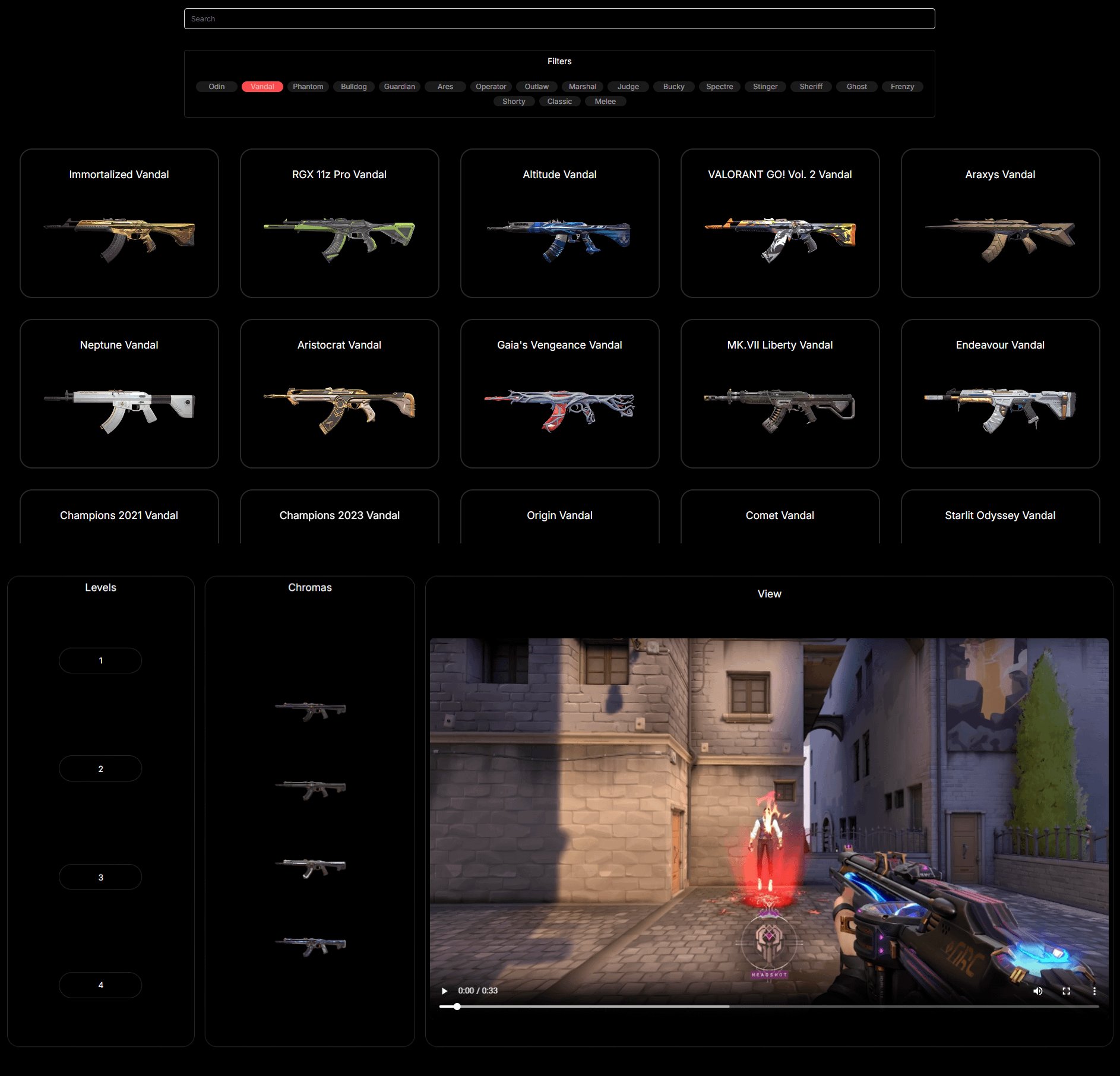
Several websites dedicated to Valorant make it super easy to browse skins. These sites often pull data directly from the game’s files (or use information from the official API) and present them in a user-friendly format. This makes comparing skins, checking animations, and even hearing the sound effects totally possible—all without the game client.
Common Features of These Websites
- Complete Skin Database: They have almost all the skins available in the game. From the basic ones to the super rare and expensive ones, you’ll find it all.
- Detailed Images and Videos: Most websites let you see high-quality pictures of each skin. Some will also have videos showing how the skin looks during gameplay, including special animations.
- Price Information: Want to know how much a specific skin costs? These sites will usually show you the VP (Valorant Points) price and sometimes even the approximate real-money cost.
- Search and Filter Options: Quickly find what you’re looking for. You can filter by weapon type (like rifle, pistol, or shotgun), skin tier (such as Select, Deluxe, Premium, or Ultra), collections, or even the specific agent who might be using the skin.
- Sound effects: You can listen to each skins sounds effect if the skin has any unique sound effects.
- Inspect skins: You can inspect how the skin looks in each angle.
These kinds of sites are a great way to plan your next purchase, or simply admire the artwork of the various skins. Remember though, these websites aren’t official by Riot Games, so it’s a good idea to stick with well known sites.
How to Use These Websites
It’s usually very straightforward. Simply:
- Open your web browser.
- Type the name of one of the popular Valorant skin websites.
- Navigate to the “Skins” or “Cosmetics” section.
- Use the filters or search bar to find the specific skin you’re after.
- Click on the skin to view details like images, price, and even videos.
Official Valorant Channels: Riot’s Sneak Peeks
Riot Games, the creator of Valorant, sometimes previews skins on their official social media and other platforms. While you won’t find a complete database, this is a good way to keep up with new releases and see skins in action.
Where to Find Official Previews
- Twitter/X: Follow the official Valorant accounts. They often post videos showcasing new skins.
- YouTube: The official Valorant channel will often do reveal trailers for big skin collections.
- Instagram: Look out for images and short videos of skins on their official account.
- Riot Blogs/Website: They sometimes have posts on their website, talking about the design process of specific skins, and showing off what they look like in the process.
Official content is great because you know the information and imagery is correct, direct from the source. Plus, seeing skins in official trailers gives you a much better sense of how they look in an actual match.
Valorant Skin Communities: Sharing the Passion
There are many online groups and forums dedicated to Valorant. Many of these groups are good for getting a second look on different skins.
How to find communities
- Reddit: Subreddits for Valorant usually have posts discussing different skins. You can search for specific skin discussions or look at community members’ posts who show off the skins they have bought.
- Discord Servers: Many big Valorant communities also have Discord servers. You can often find dedicated skin channels where people share screenshots or videos of their collection or just to get a second opinion about a particular skin.
- Facebook Groups: While not as commonly used for gaming content as Reddit and Discord, some Facebook groups may have sharing about Valorant skins, often posted by those that participate in the game on a casual level.
The advantage here is that you’re seeing what the skins actually look like in-game from the perspective of everyday players. You can ask questions and see things from multiple angles that you might not have considered.
Valorant Tracker Websites
These are the websites that you can use to check your stats and track your games. They also allow you to see what your current skins are.
Benefits of Tracker Websites
- See Skins You Own: These sites let you link to your Valorant account. When you do that, you can see all the skins that you own currently in your account.
- See Your Friends Skins: You can look at your friend’s inventory to see their skins. If you are looking for inspiration, or are simply curious, this can help you see a variety of skins.
- See In-Game Stats: In addition to skins, these websites also have the feature to check your in-game stats, which can also improve your overall gameplay experience.
Tracker websites give you a way to see a list of the skins you own in your inventory, without having to open the game.
Why Check Skins Without Opening the Game?
There are a bunch of reasons why you might want to do this. Here are a few:
- Slow Internet: Loading Valorant can take time and data. Checking skins online is much faster for those with bad internet.
- Quick Looks: You might not want to fire up the entire game just to see a few skins.
- Planning Purchases: Looking at skins outside the game can help you decide what you want to save up for next.
- Comparing Skins: It’s easier to compare different skins side-by-side on a website, rather than flipping between them in the game’s store.
- Sharing and Discussion: If you’re talking to friends about skins, it’s easier to show them a link or image from a website than to try and describe it.
- Work or School Breaks: Maybe you can’t play Valorant during the day, but you can certainly browse skins on a website.
- Performance Issues: If you’re game is having performance problems, you can use a website to check skins instead of loading the game and making performance even worse.
Basically, there are many things you might be doing that could mean that you cannot actually open the game. Thankfully, you can still check out skins with these methods.
Understanding Skin Tiers and Rarities
Valorant skins come in different tiers, which usually indicates how elaborate the skin is. These tiers impact the price, and sometimes the look and sound of the skins.
Skin Tier Breakdown
It’s helpful to understand these skin tiers when browsing sites or watching videos.
- Select Edition: These are usually the most basic skins and are the least expensive. They often have simple designs and no special effects.
- Deluxe Edition: Deluxe skins come with slightly more complex designs than Select edition skins, usually with some visual flourishes.
- Premium Edition: This tier is where things start to get pretty cool. These skins often have unique animations, sound effects, and sometimes even special effects.
- Ultra Edition: The top tier of skins! Ultra skins usually come with a totally new look, awesome animations, special sounds, and effects. They are usually also the most expensive.
- Exclusive Edition: These skins are often only available for a limited time or through events, they are not in the store and usually come with complex animations and designs.
How Tier Affects Pricing
The higher the tier, the more expensive the skin will usually be.
- Select skins are the most affordable, usually costing under 1000 VP.
- Deluxe skins cost around 1275 VP.
- Premium skins will cost around 1775 VP.
- Ultra skins are the most expensive, usually around 2475 VP.
- Exclusive skins usually cost the same as Ultra Edition skins, around 2475 VP, but it varies between collections.
Understanding the different tiers helps you make smart choices about which skins you want to get.
Tips for Safe Browsing
When using third-party websites, it’s essential to stay safe. Keep these tips in mind:
- Stick to Known Sites: If you’re not sure, ask other Valorant players for recommendations.
- Avoid Shady Links: If a website or forum seems suspicious, it’s better to avoid it.
- Don’t Enter Your Login Info: Legitimate skin preview sites don’t need your Valorant login details. Never enter your password anywhere except the official Riot Games login page.
- Use Virus Protection: Keeping your device safe with good virus protection is always a good idea.
- Be aware of Phishing: Make sure the website you are visiting is not pretending to be someone else, and always double check the site before doing any kind of action.
Staying safe online is important! When it comes to third-party websites, always do your research.
So, there you have it. You can check out all the amazing Valorant skins without ever needing to open the game. Whether you are planning your next purchase, or you are simply trying to share skins with a friend, now you have an easy and safe way to do it. Enjoy browsing the variety of designs!
How to: Check Valorant Store Items Without Opening The Game!
Final Thoughts
You can easily check Valorant skins without opening the game. Various websites and apps allow you to preview skin collections, variants, and animations. These platforms often display prices and availability.
Using these third-party resources is a quick way to explore cosmetics. This saves you time from launching the game just for skin checks. Therefore, you can efficiently plan your next purchase.
Ultimately, learning how to check valorant skins without opening game provides a convenient way to view in-game items. These methods are effective for all players.

