
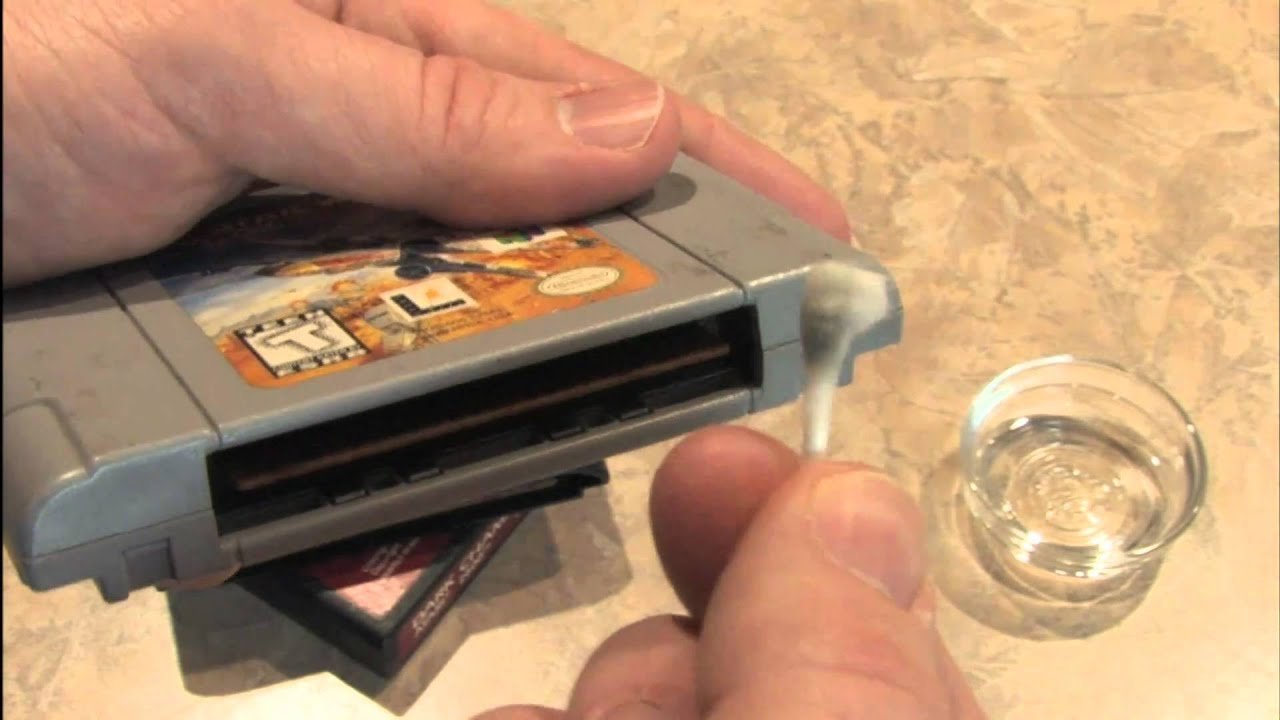
To clean a N64 game, use a cotton swab lightly dampened with isopropyl alcohol to gently clean the gold connector pins. Avoid excessive moisture and allow the game to air dry completely before use.
Dust, grime, and years of use can leave your cherished Nintendo 64 games in a sorry state. Don’t worry, bringing them back to life is simpler than you might think! Knowing how to clean a N64 game properly can restore playability and protect your collection.
This guide will help you quickly get your games running again. We will cover the crucial steps to take for safe and effective cleaning. Just follow these tips, and you’ll be back to saving Hyrule in no time.

How to Clean a N64 Game: A Step-by-Step Guide
Alright, let’s talk about those awesome N64 games! You know, the ones with Mario, Zelda, and all sorts of other cool characters. Sometimes, these cartridges get a little dusty or dirty, and they might not work as well as they should. Don’t worry! Cleaning your N64 game cartridges is not hard. With a few simple tools and some careful steps, you can get them working great again. This guide will walk you through everything you need to know to take care of your precious games.
Why Cleaning Your N64 Games Is Important
You might be thinking, “Why bother cleaning my game? It still kind of works!” Well, there are several good reasons why keeping your N64 games clean is a good idea. First, dust and dirt can build up on the gold connector pins inside the cartridge. These are the parts that actually make the game work with your N64 console. When these pins get dirty, the console might have trouble reading the game. That can lead to glitches, freezing, or the game not starting at all. Second, grime on the outside of the cartridge can make it look bad and feel gross. Nobody wants to handle a sticky, dirty game, right? Finally, taking good care of your games helps them last longer. This means you can keep enjoying your favorite N64 games for years to come!
Gathering Your Cleaning Supplies
Before you start, you will need to gather your cleaning supplies. Having everything ready will make the cleaning process much smoother. Here’s what you need:
- Cotton Swabs (Q-tips): You’ll use these to get into the small crevices and clean the connector pins.
- Isopropyl Alcohol (91% or higher): This is the best solution for cleaning electronics because it evaporates quickly and doesn’t leave behind residue. Avoid using rubbing alcohol that has a lower percentage, as it contains water that can harm your game.
- Soft, Lint-Free Cloth: A microfiber cloth works really well for wiping down the cartridge. Avoid using paper towels which can leave behind lint.
- A Can of Compressed Air (Optional but Recommended): This is great for blowing away loose dust and debris from the cartridge.
- Small Bowl or Container: To hold the isopropyl alcohol during the cleaning process.
- Toothbrush (Soft Bristled): An old, clean soft bristled toothbrush can be beneficial for getting rid of stubborn dirt on the external parts.
Safety First!
Remember, when working with isopropyl alcohol, it’s a good idea to work in a well-ventilated area. Don’t use it near an open flame or while smoking. Avoid getting it on your skin if you can, and keep it away from little brothers or sisters.
Step-by-Step Guide to Cleaning Your N64 Game Cartridge
Now, let’s get into the actual cleaning process. Follow these steps carefully to safely and effectively clean your N64 game cartridges.
Step 1: The Initial Inspection and Dry Cleaning
First, take a good look at your game. See where the dirt is. If there’s a lot of dust or loose debris, use the compressed air can to blow it away. Hold the can a few inches away from the game and give it a few short bursts. This will remove any easy-to-remove particles before you start with the cleaning liquids. After using the air, take your soft, lint-free cloth and give the outside of the cartridge a good wipe. Get rid of any visible dust or grime. If there is any sticky spots, don’t worry, we will take care of that in a little bit.
Step 2: Cleaning the Connector Pins
The most important part of cleaning a N64 cartridge is making sure the connector pins inside the game cartridge are clean. These gold pins are what your N64 console reads to start the game. If they are dirty, the game will not work properly.
To clean them, take one of your cotton swabs and dip the tip into a small amount of isopropyl alcohol. You don’t want the cotton swab to be dripping wet. Just a little moist is enough. Now, gently rub the damp cotton swab back and forth along the gold connector pins. Make sure you get into all the little nooks and crannies. You might notice some dirt coming off on the cotton swab. If that happens, grab a new cotton swab and repeat the process until you see no more dirt being transferred to the swab. Once finished, let the area dry for a few minutes before moving on.
Important Tip: Don’t press too hard while rubbing the connector pins. You only want to lightly clean the surface. Too much pressure can potentially damage the connector pins. And always use a new cotton swab when the previous one gets dirty. You do not want to smear any dirt back on the pins.
Step 3: Cleaning the External Casing
Now it is time to clean the outside of the game cartridge. Take your soft bristle toothbrush and lightly brush the cartridge, focusing on any areas where dirt is noticeable. This will help remove stubborn spots of dirt. Next, using the lint-free cloth and a small amount of isopropyl alcohol, gently wipe down the entire exterior of the cartridge. This should help remove any remaining dirt, grime, or sticky residue. If you notice a specific area with a more stubborn sticky spot, use a cotton swab with a small amount of isopropyl alcohol to target just that spot. You can also use the toothbrush to get into the small cracks and crevices of the cartridge. Make sure that the game is completely dry before moving on to the next step.
Step 4: Final Inspection and Testing
After cleaning, carefully inspect your game cartridge. Make sure all areas are clean, dry, and there is no dirt or grime left behind. If you find more dirty spots, do another quick cleaning with the appropriate cleaning supply. Once you are satisfied with how clean the game is, let it air dry for a few more minutes. Then, it is time for the moment of truth! Take the game and insert it into your N64 console. Turn on the console and see if the game starts up! If it works perfectly, congratulations, you have successfully cleaned your N64 game. If it still doesn’t work, or is glitching, you may need to repeat the cleaning process, and focus particularly on the connector pins, making sure you clean thoroughly.
Dealing with Stubborn Dirt and Grime
Sometimes, you might come across a N64 game that has some really stubborn dirt or grime that just doesn’t come off with the regular cleaning process. Don’t worry, there are a few extra steps you can take.
Using a Pencil Eraser (with Caution)
For really stubborn spots on the connector pins, you can use a clean pencil eraser (the pink type) very gently. Rub the eraser back and forth along the connector pins, then wipe away the eraser debris with a clean, dry cotton swab. Only do this if you feel comfortable and only if the isopropyl alcohol and cotton swab method fails. This method is more aggressive than the usual method, so make sure you are very gentle with it.
Advanced Cleaning with a Multi-Tool
For the most stubborn cases where dirt is really embedded, you can use a multi-tool that has different ends that are good for getting into small spaces. Be extra careful when using any sharp or pointy tool so that you don’t damage the game in any way. Only use this method if you feel that all other methods haven’t worked.
Proper Game Storage to Prevent Future Issues
Once you’ve put in the effort to clean your N64 games, you want to keep them clean and working well. The way you store your cartridges will affect their lifespan. Here are some ideas for protecting your games.
- Store in a Clean, Dry Place: Keep your N64 games in a cool, dry place away from direct sunlight or humidity. Moisture is a big enemy when it comes to electronics, and humidity can damage or degrade the electrical connections over time.
- Use Cartridge Cases or Sleeves: Consider storing your cartridges in protective cases or sleeves to shield them from dust and scratches. Many of these cases are still available for purchase.
- Keep Away from Food and Drinks: Always keep your games away from food and drinks. Spills can cause serious damage that may be difficult to repair, and sticky residue from food can be tough to remove.
- Handle With Clean Hands: Avoid touching the connector pins directly with your fingers when handling the game. It is best to always handle games by the sides. When not in use, keep your games put away in a safe place, so that they don’t get damaged or dirty.
When to Seek Professional Help
Sometimes, no matter how much you clean a game, it still might not work. If you have tried multiple cleaning methods and the game is still not functioning, the issue might be something else. There might be an internal issue with the game that you can’t fix on your own. In this case, it might be time to seek professional help from a retro game repair expert. They will have the knowledge and tools to diagnose more complicated issues and might be able to fix the game for you.
Maintaining Your N64 Console
While this article is mainly about cleaning N64 game cartridges, it’s also important to take care of your N64 console itself. Dust and dirt can also affect the console’s performance. Regularly cleaning the console can also help reduce the amount of dirt that goes onto the cartridges. So remember to clean your console regularly to ensure it is working in top condition, along with your game cartridges.
By following this guide, you can confidently clean your N64 game cartridges and ensure they work well for years to come! You can now enjoy your classic games without worrying about glitches or freezes. With just a few simple steps and a little bit of care, you can keep your collection looking and playing great!
Cleaning a NASTY Nintendo game #videogames #n64
Final Thoughts
Cleaning an N64 game involves using isopropyl alcohol and cotton swabs. Gently wipe the metal connectors. Be sure to remove any visible dirt or grime.
Use a soft cloth to clean the plastic casing. Avoid excessive pressure which can damage the game. This method effectively restores gameplay.
Following these steps will teach you how to clean a n64 game. Proper maintenance ensures long lasting enjoyment of your classic cartridges. This approach is key for reliable play.

