
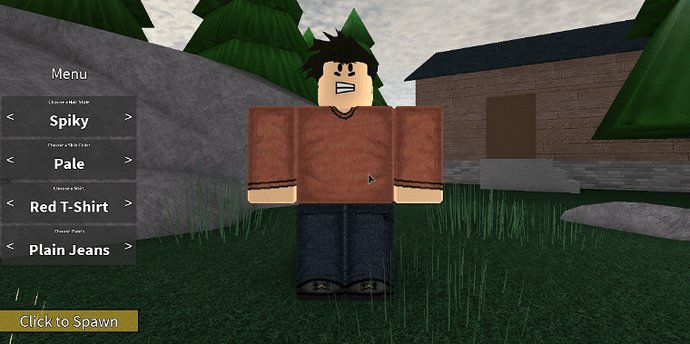
Creating custom Roblox characters requires using Roblox Studio to import or build your own 3D models, then scripting their behavior.
Ever felt like the standard Roblox avatars just don’t quite cut it? The game offers amazing tools, and it is truly possible for anyone to dive into the exciting world of design. This guide will show you how to create custom roblox characters, and bring your own unique vision to life.
You can go beyond the standard characters.

How to Create Custom Roblox Characters
Have you ever looked at your Roblox avatar and thought, “I wish I could make it look totally different!”? Well, you’re in luck! Roblox lets you change almost everything about your character. This means you can go beyond just picking from a few pre-made options. You can create a truly unique avatar that’s all your own.
Understanding the Basics of Roblox Avatars
Before we jump into making totally custom characters, let’s talk about what makes up a Roblox avatar. Think of it like building with virtual LEGOs. Your avatar is made of different parts that you can mix and match.
Avatar Body Parts
The basic parts of your avatar include the head, torso, arms, and legs. Each of these parts can have different shapes, sizes, and even textures.
You’ll find these parts in the Avatar Editor on Roblox’s website or app. This is your workshop for making your character awesome. Think of it as your digital fashion studio.
Clothing and Accessories
Beyond body parts, your avatar has clothing and accessories. These are the extra touches that add personality. You can wear shirts, pants, hats, glasses, and tons of other fun items.
Many of these items can be bought with Robux, Roblox’s in-game currency. You can also get some for free through events or promotions.
Getting Started with the Roblox Avatar Editor
Okay, let’s get started with the practical part! The Avatar Editor is where the magic happens. It is available both on the Roblox website and within the Roblox app on your phone or tablet. Make sure that you’re logged into your account. This is how the computer knows which avatar you want to change.
Accessing the Editor on the Website
Go to the Roblox website and log in. Look for the “Avatar” option in the navigation bar, usually near the top left of the screen. Click it, and you will enter the Avatar Editor. This is your command center for character customization.
Accessing the Editor on the App
Open the Roblox app on your phone or tablet. You will typically see a character icon at the bottom of the screen. Tap on it. This will take you to your avatar profile, where you will find an “Customize” button. Tap this to enter the Avatar Editor on the app.
Customizing Your Avatar’s Appearance
Now that you are in the editor, let’s get to work on your avatar. There are many ways to adjust the look of your character. Let’s explore some of the most common customization options.
Changing Body Types
Roblox offers various body types. You can adjust the proportions of your avatar. You can make your character tall, short, thin, or a bit more chunky. Choose a body type that suits your character’s style.
Working with Skins and Colors
Skins are the textures and colors applied to the avatar’s body parts. You can select different skin tones to make your character look like you or someone completely different. There’s also a wide selection of pre-set colors and patterns available to customize the skin.
Adding Hairstyles and Faces
Hair is a very important part of your avatar! It adds lots of personality. Choose from many different hairstyles. Pick the hair color that you like, and make your avatar look just right. The face is also another very important element. There are many different faces you can choose from, with different expressions.
Some faces may even animate, making your character even more expressive. Experiment with different combinations to see what fits your style.
Dressing Up Your Avatar
Clothing and accessories are what really bring your avatar to life. They add detail and flair to your character. Let’s see the different options you have to dress up your avatar.
Shirts and Pants
Shirts and pants are the main components of your character’s outfit. You can choose from many different styles. You can also purchase custom-made clothing designed by other players. It is a great way to find unique items.
Hats and Headwear
Hats and headwear are great for adding a touch of fun or style. There are all kinds of hats available, from beanies to cowboy hats. Try a silly hat or a cool helmet to make your avatar stand out.
Accessories and Special Items
Accessories can include glasses, backpacks, wings, and other interesting items. These are perfect for adding extra details. Some of the items can even be animated. This can make your avatar even more visually appealing.
Using the Marketplace
The Roblox marketplace is where you find most of the clothing and accessories. It is a large hub where both Roblox and other players offer items to customize your avatar. Let’s talk about how to use this.
Navigating the Marketplace
You can access the marketplace from the Roblox website or app. Look for the “Marketplace” option in the menu. Here you can browse through a large collection of avatar items. Items are organized into categories, so you can find exactly what you are looking for.
Searching for Specific Items
If you have something specific in mind, use the search bar. Type in keywords like “blue shirt” or “red hat” to narrow down your choices. Using filters can also help you refine your searches further.
Buying Items with Robux
Most items in the marketplace are bought with Robux. Robux is the in-game currency in Roblox. If you don’t have enough Robux, you may need to buy more. Remember to check the price before you make a purchase.
Also, some items are limited. These tend to be more expensive and collectible. If you see something you really want, you should act fast.
Finding Free Items
Sometimes Roblox will offer free items as part of promotions or events. These are great for sprucing up your avatar without spending Robux. Keep an eye out for announcements about free items!
Creating Your Own Custom Clothing
Want to go beyond just buying clothes from the marketplace? You can also create your own shirts and pants! This lets you have total creative control over your character’s fashion. It’s a bit more involved, but it is definitely doable.
Understanding Templates
To create custom clothing, you need to understand the template system. The template is a flat layout of the shirt or pants that you will design. You can download these templates from Roblox. You’ll use them as a guide for creating your designs.
Using Image Editing Software
You will need to use an image editing program. This can be software such as Photoshop, GIMP, or even simple online editors. You will import the templates to start your designs.
Designing Your Clothing
Now it’s time to get creative! Use the tools in your image editor to draw your designs. You can add patterns, colors, logos, and anything else you want. Remember, the template shows you where the design will appear on the character. So, keep that in mind as you make your design.
Uploading Your Creations to Roblox
Once you’ve finished your design, save it as an image file. You can upload it to Roblox through the “Create” section on the website. There will be options for shirts and pants. Upload them to Roblox for approval. Roblox will review your design to make sure it follows the rules.
Using Pre-made Assets for Advanced Customization
Roblox has many different pre-made assets that you can use to further customize your character. These are assets that other people made, and you can purchase and use them. This gives you more ways to design your avatar. Let’s look into some of these assets.
Exploring Catalog Items
The catalog is where you find all sorts of user-made assets. It includes custom body parts, accessories, and even special effects. These items give you a lot of flexibility to design your avatar.
Working with Packages
Packages are a group of assets that are designed to work together. They are often a full set of body parts and clothing. This creates a unique look for your avatar. They are also very convenient to use. This will help you save time when customizing.
Using Emotes
Emotes are special animations that your avatar can do. They are a way to express yourself in the game. They include things like dancing, waving, and other fun actions. You can acquire emotes from the catalog. You may also receive them as rewards during in-game events.
Tips for Creating Great Custom Characters
Here are a few tips to make sure your custom characters are amazing!
Plan Your Design
Before you start making changes, think about what kind of character you want. Do you want to be a knight? Or maybe a space explorer? Or maybe something completely unique? A plan will help you choose the best body types, clothing, and accessories.
Mix and Match Items
Don’t be afraid to try out different items to see how they look. The Avatar Editor is all about creativity. Mix and match different clothing items, hats, and accessories to create a look that’s truly unique.
Check for Compatibility
Some clothing items and accessories might not look good together. Some of them might also conflict visually, meaning they may overlap in a strange way. Always check to make sure everything looks right before you finalize your design.
Get Inspired by Others
Look at other people’s avatars for inspiration. There are many amazing and creative avatars on Roblox. Seeing what others do can spark new ideas for your own character.
Experiment and Have Fun
Don’t be afraid to try new things. The Avatar Editor is a playground for your imagination. Experiment with all the different options. Have fun creating the perfect custom avatar.
Sharing Your Creations
Once you have created an amazing custom avatar, you will want to show it off! It’s easy to do. Your avatar is visible to others when you play Roblox. Here’s a quick guide on how to make sure everyone can see your work.
Displaying Your Avatar in Games
Your custom avatar will automatically appear in any Roblox game you play. This is a great way for your character to be seen by your friends. And of course, other Roblox players too!
Taking Screenshots
You can take screenshots of your avatar in the Avatar Editor. It’s easy to do on both PC and mobile. You can share these images on social media. You can also show them to your friends.
Sharing Your Ideas Online
Many online communities discuss Roblox avatar design. You can share your ideas and get feedback from other players. These online communities can be found through platforms like Discord and Reddit. They are a great place for sharing and finding inspiration.
Creating custom Roblox characters is a fun way to express yourself and be creative. With the variety of tools available, you can make a totally unique avatar that shows off your personal style. Whether you’re tweaking body parts, designing custom clothing, or mixing accessories, the possibilities are endless. So, have fun, experiment, and create a character that is completely your own.
How to Create Your Own Custom Roblox Character
Final Thoughts
Creating unique Roblox characters involves using the Avatar Editor and various tools. You can modify existing avatars by changing body parts, clothing, and accessories. This process helps you express your creativity in the game.
Learning how to create custom roblox characters is very rewarding. You will learn to use the platform’s design tools. This lets you achieve the exact aesthetic that you desire.

