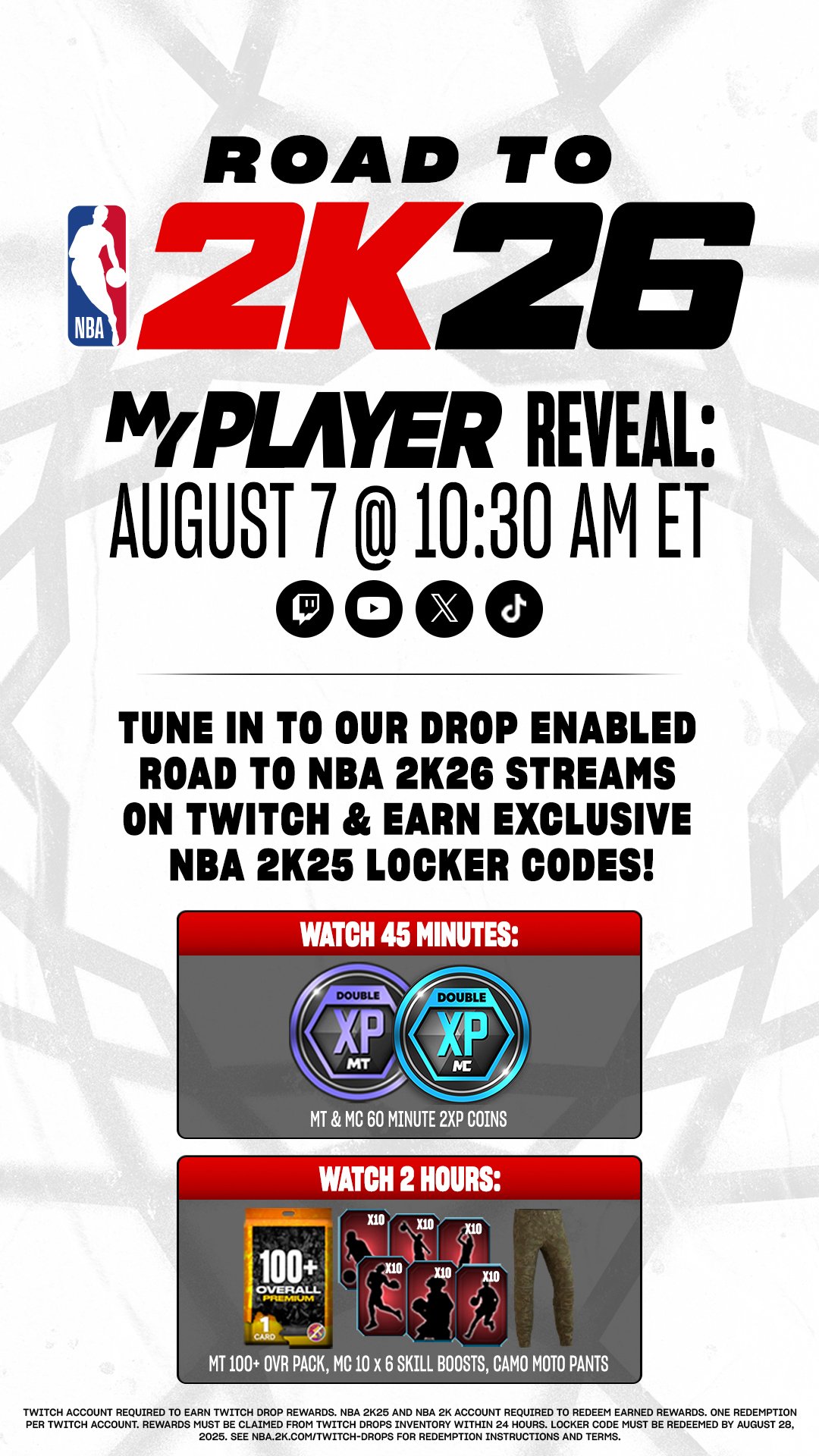
To get exclusive player cards from Twitch drops for NBA 2K26 MyTEAM, link your NBA 2K and Twitch accounts, then watch eligible NBA 2K26 streams on Twitch with drops enabled. Claim your drops after meeting the viewing time requirement.
Want those elusive, game-changing player cards for your NBA 2K26 MyTEAM but unsure where to start? It’s all about Twitch drops!
This guide breaks down exactly how to get exclusive player cards from Twitch drops for NBA 2K26 MyTEAM. Connecting your accounts is key, and knowing when and where to watch helps you build the best team. We’ll cover it all!

How to Get Exclusive Player Cards from Twitch Drops for NBA 2K26 MyTEAM
Twitch Drops are a fantastic way to snag exclusive content in NBA 2K26 MyTEAM. Getting those coveted player cards requires a few steps.
It’s all about linking your accounts and watching eligible streams. Let’s break down exactly what you need to do.
Linking Your NBA 2K and Twitch Accounts
This is the foundational step. Without linking, you won’t receive any drops.
Go to the NBA 2K Website: Navigate to the official NBA 2K website.
Sign In: Log in using your NBA 2K account credentials (the one you use to play the game).
Link Twitch Account: Find the “Connections” or “Linked Accounts” section and link your Twitch account. You’ll likely be redirected to Twitch to authorize the connection.
Authorize the Connection: Grant NBA 2K permission to access your Twitch account. Make sure the correct Twitch account is selected.
Confirmation: Look for a confirmation message indicating that the accounts are successfully linked.
Double-check that the correct Twitch account is linked. This avoids missing out on rewards.
Finding Eligible NBA 2K26 Twitch Streams
Not all streams offer Twitch Drops. You need to find streams that are participating in the promotion.
Look for the “Drops Enabled” Tag: Twitch streams that offer Drops will usually have a “Drops Enabled” tag. This is often displayed directly on the stream preview.
Check NBA 2K Social Media: The official NBA 2K social media channels (Twitter, Facebook, etc.) will announce which streams are participating in Drops promotions.
Visit the NBA 2K Forums: The official NBA 2K forums often have threads dedicated to Twitch Drops. Community members will usually post information about eligible streams.
Twitch Campaign Page: Sometimes Twitch has a dedicated campaign page listing all participating channels. Look for this on the Twitch website.
Streamer Announcements: Many streamers will announce when they are doing a Drops-enabled stream. Pay attention to your favorite NBA 2K streamers.
Pay close attention to the official announcements. They contain vital information.
Watching and Claiming Your Twitch Drops
Once you’ve found an eligible stream, it’s time to watch! You need to meet the viewing requirements.
Watch the Stream for the Required Time: Each Twitch Drop promotion will have a specific watch time requirement. This could be 15 minutes, 30 minutes, an hour, or longer.
Don’t Mute the Stream (Sometimes): Some promotions require the audio to be on. Check the specific rules of the promotion.
Claim Your Drop: After meeting the watch time requirement, you’ll receive a notification on Twitch that you’ve earned a Drop. Click the “Claim” button.
Check Your Twitch Inventory: You can also check your Twitch inventory to see your claimed Drops. This is found in your Twitch profile settings.
Link Twitch to NBA 2K Again (If Needed): In rare cases, you might need to relink your Twitch and NBA 2K accounts if you are not receiving the drops in-game.
Make sure you actively claim your drops! Unclaimed drops expire.
Receiving Your Player Cards in NBA 2K26 MyTEAM
Claiming the drop on Twitch is only half the battle. You still need to redeem it in the game.
Launch NBA 2K26: Start up NBA 2K26 on your console or PC.
Go to MyTEAM: Navigate to the MyTEAM game mode.
Check Your Unopened Packs/Rewards: The player card will usually be delivered as an unopened pack or reward in the MyTEAM menu. Look for a notification indicating you have a new item.
Redeem the Pack/Reward: Open the pack or redeem the reward to receive your exclusive player card.
If You Don’t See It: Restart your game. Sometimes it takes a few minutes for the reward to appear. If it’s still missing after a restart, contact 2K Support.
Be patient; sometimes it takes a few minutes for the card to appear. If not, try restarting.
Troubleshooting Common Twitch Drop Issues
Sometimes things don’t go as planned. Here’s how to troubleshoot common issues.
Account Linking Issues: If you’re not receiving drops, the first thing to check is your account linking.
Verify Account Links: Double-check that the correct Twitch and NBA 2K accounts are linked. Make sure you’re logged into the right accounts on both platforms.
Relink Your Accounts: Try unlinking and relinking your accounts. This can often resolve connection issues.
Twitch Inventory Full: Twitch has a limited inventory for Drops. If your inventory is full, you may not be able to claim new Drops.
Clear Your Twitch Inventory: Delete older, unwanted Drops from your Twitch inventory to make room for new ones.
Browser Issues: Sometimes browser extensions or ad blockers can interfere with Twitch Drops.
Disable Browser Extensions: Try disabling your browser extensions or using a different browser to see if that resolves the issue.
Check Twitch Status: Twitch itself may be experiencing issues. Check the Twitch status page to see if there are any known problems.
Contact 2K Support: If you’ve tried all of the above and are still not receiving your Drops, contact 2K Support for assistance. Provide them with as much detail as possible, including screenshots.
Check Twitch Drop Rules: Ensure you are fully compliant with the Twitch Drop requirements.
Don’t hesitate to contact 2K Support if you’re stuck. They can often help resolve issues.
Maximizing Your Chances of Getting Drops
Increase your chances of obtaining those valuable player cards. A little strategy helps.
Watch Multiple Streams: Watch several eligible streams simultaneously (if your internet can handle it). This increases your chances of accumulating watch time and earning Drops.
Follow NBA 2K Streamers: Follow your favorite NBA 2K streamers on Twitch. They’ll often announce when they’re doing Drops-enabled streams.
Set Reminders: Set reminders for upcoming Drops-enabled streams. This ensures you don’t miss out on any opportunities.
Join NBA 2K Communities: Join NBA 2K communities online (forums, Discord servers, etc.). These communities are often a great source of information about Twitch Drops.
Pay Attention to Promotions: Be aware of all current NBA 2K Twitch Drops promotions. Understand the requirements and rewards for each promotion.
Staying informed and proactive will improve your chances. Preparation is key.
Understanding Different Types of Player Cards from Drops
Not all Twitch Drop player cards are created equal. Learn about the different types.
Base Tier Cards: These are common cards, often lower-rated. They’re good for building up your initial MyTEAM lineup.
Mid-Tier Cards: These are better than base tier cards, with higher ratings and more desirable stats.
Premium/High-Tier Cards: These are the most coveted cards, often featuring top players with excellent ratings and special badges.
Limited Edition Cards: Some Twitch Drops feature limited-edition cards that are only available for a short period. These cards are often highly valuable.
Untradeable Cards: Most Twitch Drop player cards are untradeable, meaning you can’t sell them on the Auction House.
Reward Cards: Some cards can be reward cards for completing certain in-game objectives. They usually have better stats than base cards.
Knowing the card tiers helps you understand their value. It guides your strategy.
How Often Do Twitch Drops Happen for NBA 2K26?
The frequency of Twitch Drops can vary. It’s important to stay updated.
During Special Events: Twitch Drops are often tied to special events in NBA 2K26, such as the start of a new season, the release of a new game mode, or major tournaments.
During NBA Events: Sometimes Twitch Drops are offered in conjunction with real-world NBA events, such as the NBA Playoffs or the NBA Draft.
Regularly Scheduled Drops: Occasionally, 2K will run regularly scheduled Twitch Drops promotions, offering rewards on a consistent basis.
Follow Official Announcements: The best way to stay informed about upcoming Twitch Drops is to follow the official NBA 2K social media channels and forums.
Stay vigilant for announcements. They’ll keep you in the loop.
Twitch Drop Etiquette: What to Do and What Not to Do
Be a good member of the community while pursuing Twitch Drops.
Do Be Respectful in Chat: Be respectful to the streamer and other viewers in the chat. Avoid spamming or being disruptive.
Do Follow Stream Rules: Follow the streamer’s rules for the chat. Some streamers have specific guidelines for chat behavior.
Don’t Ask for Drops: Avoid repeatedly asking the streamer to give you a Drop or to make sure you’re eligible. This is generally considered bad etiquette.
Don’t Spam: Don’t spam the chat with messages about Drops. This can be annoying to other viewers.
Don’t Use Bots: Don’t use bots or other automated tools to watch streams. This is against Twitch’s terms of service and can get you banned.
Respect the community and follow the rules. It’s the right thing to do.
The Future of Twitch Drops in NBA 2K
Twitch Drops are likely to remain a part of the NBA 2K experience. Expect evolution.
Continued Integration: Expect to see continued integration of Twitch Drops in NBA 2K26 and future installments.
New Types of Rewards: 2K may introduce new types of rewards through Twitch Drops, such as VC, MT, or cosmetic items.
More Complex Requirements: The requirements for earning Twitch Drops may become more complex, requiring viewers to engage with the stream in specific ways.
Personalized Drops: Future Twitch Drops may be personalized based on viewers’ in-game progress or preferences.
Stay tuned for future developments. The system will likely continue to evolve.
Understanding Twitch Prime and its Potential Impact
Twitch Prime (now Prime Gaming) can sometimes offer additional benefits. Keep an eye out.
Exclusive Drops: Prime Gaming members may receive exclusive Twitch Drops that are not available to regular viewers.
Faster Claiming: Prime Gaming members may be able to claim Twitch Drops faster or more easily.
Additional Rewards: Prime Gaming members may receive additional rewards in NBA 2K26 beyond Twitch Drops.
Consider Prime Gaming if you’re a dedicated NBA 2K player. It might be worthwhile.
Security Considerations When Linking Accounts
Protect your accounts! Security is paramount when linking accounts.
Use Strong Passwords: Use strong, unique passwords for your Twitch and NBA 2K accounts.
Enable Two-Factor Authentication: Enable two-factor authentication (2FA) on both your Twitch and NBA 2K accounts. This adds an extra layer of security.
Be Wary of Phishing Scams: Be wary of phishing scams that try to trick you into giving away your account information.
Only Link to Official Sites: Only link your accounts to official NBA 2K and Twitch websites. Avoid clicking on suspicious links.
Review Permissions: Regularly review the permissions you’ve granted to linked applications and revoke access if necessary.
Always prioritize security. Protecting your accounts is essential.
Alternative Ways to Acquire MyTEAM Player Cards
Twitch Drops are great, but explore other avenues too. Don’t rely solely on Twitch Drops.
Playing the Game: Earn player cards by playing MyTEAM games and completing challenges.
Buying Packs: Purchase MyTEAM packs with VC or MT to acquire new player cards.
Auction House: Buy and sell player cards on the Auction House.
Lock-In Rewards: Collect a set of player cards to earn a lock-in reward card.
Challenges and Agendas: Complete challenges and agendas to earn player cards and other rewards.
Diversify your approach. Don’t put all your eggs in one basket.
Here Is Some Free VC 🤭 #jxtiq #nba2k25 #2k25 #2kcommunity #ytshorts #vc
Final Thoughts
To get exclusive player cards from Twitch drops for NBA 2K26 MyTEAM, link your NBA 2K and Twitch accounts first. Then, watch eligible NBA 2K26 streams marked with “Drops Enabled”.
Ensure you meet the specified watch time requirements during these broadcasts. Keep an eye out for notifications in your Twitch inventory after claiming your drops.
Finally, redeem your earned Twitch drop in NBA 2K26. You must claim them to add those exclusive player cards to your MyTEAM. That’s how to get exclusive player cards from Twitch drops for NBA 2K26 MyTEAM.