
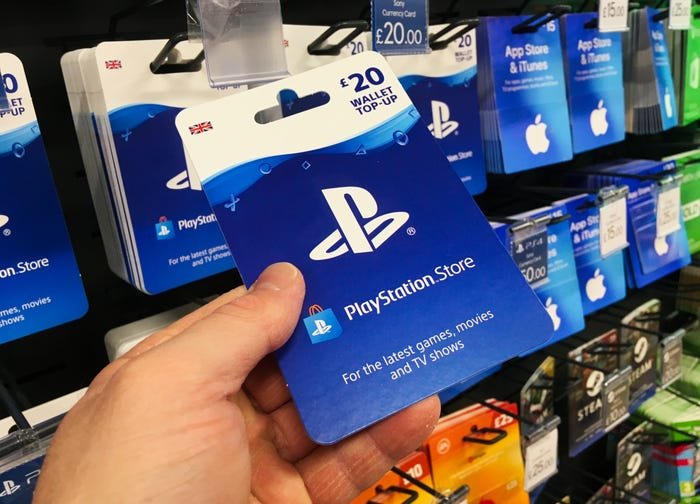
Gifting PS4 games digitally requires purchasing a code from the PlayStation Store or a retailer and then sending that code to the recipient. You can also gift physical disc copies directly.
Want to surprise a friend with their favorite title or introduce them to something new? Figuring out how to gift PS4 games can feel tricky, but it is actually quite straightforward. There are two main avenues to achieve this, both digital and physical methods.
Picking the correct method depends on whether you want the game instantly delivered or prefer a tangible present. We’ll explore both to make your gaming gift-giving process smooth and enjoyable.

How to Gift PS4 Games
So, you want to give the gift of gaming, and a PlayStation 4 game is just the thing! That’s awesome! But how exactly do you get a game into the hands of your friend or family member? It’s not always as simple as handing over a physical disc anymore. Don’t worry, we’re going to walk you through all the different ways you can gift PS4 games, covering both digital and physical options. Whether you’re dealing with a birthday, holiday, or just a “thinking of you” present, you’ll be a gifting pro by the time you finish reading this.
Understanding Digital vs. Physical Games
Before we dive into the how-tos, let’s quickly talk about the two main types of PS4 games: digital and physical. Knowing the difference is key to choosing the right gifting method.
Digital Games
Digital games are just like the name implies, they are not physical at all. They are downloaded directly to the console through the PlayStation Store. Think of it like an app on your phone. There are lots of benefits, for example, no discs to lose or get scratched! Also, you can purchase a digital copy from your console or from a web browser.
- Pros:
- Instant access after purchase.
- No physical disc to worry about.
- Can be pre-loaded before the game’s official release date.
- Cons:
- Tied to a PlayStation account.
- No physical item to wrap.
- Can’t be resold or traded.
Physical Games
Physical games are the traditional kind, you get a box with a disc inside. If you’re going to gift a physical game, you will either buy the game from the store and give it to someone, or have someone else buy it online and send it to the person.
- Pros:
- Can be a nice, tangible gift to unwrap.
- Can be resold or traded after you’re done playing.
- Can usually be found on discount in stores or online.
- Cons:
- Can be damaged or lost.
- Requires a physical disc drive in the PS4 console.
- You have to wait for the store to ship it or go to a physical store.
Gifting Digital PS4 Games Through the PlayStation Store
The PlayStation Store is where all digital games live. Sony makes it pretty straightforward to gift a game digitally, but there are a few things to keep in mind. Here’s how it’s done:
Using a PlayStation Gift Card
This is often the easiest and most flexible method to gift a digital PS4 game. Instead of buying a specific game for someone, you give them PlayStation Store credit and they can use that credit to buy any game they want, or even other things like DLC. Think of it like a gift card to their favorite game store.
Steps:
- Purchase a PlayStation Gift Card: You can buy them from many retail stores, either in-store or online. The cards come in various amounts.
- Present the Gift Card: Give the card to the recipient so they can redeem the code on their PS4 console or via the PlayStation website.
- Redemption: They enter the code, which adds the funds to their PlayStation account.
- Shopping Spree: They can now purchase any digital games, add-ons, or movies they like!
Why this is a great option:
- Choice: The recipient can pick out exactly what they want.
- Versatility: They can use the credit on any PlayStation Store content.
- Easy to give: You can email the code or present a physical card.
Directly Gifting a Digital Game (Sometimes Limited)
The PlayStation Store sometimes offers the ability to directly gift a specific digital game to a friend. This option isn’t available for all titles, and it depends on a variety of factors and Sony doesn’t always allow gifting a specific title.
How it usually works, when available:
- Go to the Game’s Page: Find the game in the PlayStation Store that you want to gift.
- Look for the Gift Option: If available, you’ll see a “Gift” or “Buy as a Gift” option. This is usually beside where the “Add to Cart” option is located.
- Select Your Recipient: You’ll be prompted to enter the recipient’s PlayStation Network ID or email address.
- Complete the Purchase: Complete the purchase like normal and Sony will send a code to your recipient which will allow them to get the game.
Important Notes:
- Regional Restrictions: Make sure the recipient’s account region matches the region from which you are buying the game. For example, a game bought from a European account may not be available to a U.S. account.
- Limited Availability: This feature can be turned off by the publisher, so it’s not an option for every game.
- Recipient Notification: The recipient will receive a notification via PlayStation Network or email, that will guide them to claim the game.
Gifting Physical PS4 Games
Physical games are the more traditional option. They are great for gifts because there is something to physically open, and you can often find them at a discount.
Buying from a Retail Store
The most straightforward method is to go to a store that sells games. If you’re unsure about what your friend might like, you can often ask a store employee for recommendations.
Steps:
- Head to the Store: Visit a store that sells video games, such as Best Buy, Walmart, or GameStop.
- Choose a Game: Pick out the specific game you know the person will enjoy, or consult with a store employee for suggestions.
- Purchase: Bring it to the register and buy the game.
- Wrap it Up: Wrap it in some nice gift wrap, if you want to.
- Give the Gift: Present the game to your friend, family member, or whoever it’s for.
Buying Online and Shipping
If you’d rather do your shopping from your couch, you can order games online from websites like Amazon, Best Buy, or GameStop. They will ship the game directly to the person you’re gifting it to, or you can ship it to your home and then give it to them in person.
Steps:
- Find a Website: Go to a trusted online retailer.
- Choose a Game: Browse the website and pick out the game.
- Shipping Option: Be sure to select the recipient’s shipping address.
- Add a Gift Note (Optional): Many retailers let you add a personalized message.
- Complete the Order: Finish the purchase and wait for the game to be delivered.
Buying a Pre-Owned Game
To save a little money, you can buy a pre-owned physical game. Often, they are sold at a big discount and will still play like new.
Things to consider:
- Condition: Inspect the disc and case carefully, if possible. Make sure they are in good condition.
- Price: Check the price against new versions of the game. Sometimes the saving isn’t worth it if there is a great sale on new games.
- Store Policies: Check the store’s return policy, in case there’s a problem with the game.
Considerations When Gifting
Before you settle on how you are going to gift a PS4 game, here are a few more things you might want to think about.
The Recipient’s Preference
What does the person you’re gifting prefer? Do they like physical or digital games? Do they have a preference for certain kinds of games? If you aren’t sure, a gift card to the PlayStation Store is usually a safe bet because they can pick what they want.
Age Appropriateness
PS4 games have age ratings. Be sure the game is age appropriate for the person you’re gifting it to.
Region Compatibility
Digital games and DLC from one region may not work on consoles from another region. Make sure the region of the game matches the region of the recipient’s account.
Game Duplicates
Before you buy a game, ask to make sure they don’t already have it.
Gift Timing
If you are giving a game as a birthday or holiday gift, try to time your purchase so that the game will be available on or near the actual day. Check shipping times or try to plan a trip to the store to buy the gift.
Checking for Sales
Keep an eye on sales. Both digital and physical games can go on sale frequently, especially around holidays.
Gifting a PS4 game can be a fun and exciting present for any gamer. By considering the options, you’re sure to find the perfect way to deliver the joy of gaming to someone special. Whether you go digital or physical, a game can provide hours of entertainment. Now go find that perfect game, and get to gifting!
PSN Update Needed : PS4 Gifting Games ! (Concept)
Final Thoughts
Gifting digital PS4 games involves purchasing codes from retailers or the PlayStation Store directly. You then provide the recipient with this code. Physical copies are simpler to gift, just like any other item.
Remember to choose the correct region for the game. Double-check the recipient’s console to avoid compatibility issues. These methods make gifting a PS4 game easy.
So, now you know how to gift ps4 games. Select a great title, ensure compatibility, and deliver joy to your gaming friends. The process is simple and enjoyable.

