
To go offline on Epic Games, you need to disconnect your computer from the internet before launching the Epic Games launcher.
Ever wanted a break from the online world but still wanted to play your favorite Epic Games titles? It’s a common desire! Sometimes, you just want to enjoy a game without worrying about updates or social features.
Knowing how to go offline Epic Games can be beneficial in these situations. We’ll quickly explain the simple steps involved. You will be enjoying your games offline in no time.

How to Go Offline on Epic Games: A Simple Guide
It’s super annoying when your internet decides to take a break right when you’re ready for some gaming fun, right? Luckily, Epic Games has a way for you to still play your favorite games even when you’re not connected to the internet. This means you can keep gaming during those frustrating internet outages or while you’re on the go without Wi-Fi. It’s all about switching to offline mode, and it’s simpler than you might think! Let’s jump into how you can get your games up and running offline with Epic Games.
Understanding Offline Mode
Before we dive into the how-to, let’s chat a bit about what offline mode actually means. When you’re playing games online, your game is constantly chatting with the game’s servers. This lets you play with friends, get updates, and save your progress to the cloud. Offline mode, however, lets you play your game without needing that constant connection to the internet.
What Happens in Offline Mode? In offline mode, you can play single-player games or certain parts of multiplayer games if those parts don’t need a constant server connection. You won’t be able to play with friends online, receive game updates, or access online features that need an internet connection.
Why Use Offline Mode? Offline mode is great for when you’re traveling and don’t have internet, your internet is down, or you just want to play without any online distractions. It makes it so your games aren’t just sitting there gathering dust when you can’t connect.
Games That Work Offline: Some games are made to work better offline than others. Games that have a good single-player mode, like many adventure or story-based games, will work great. Some multiplayer games might have parts that you can play offline, like a practice mode. However, purely online games will not work in this mode. We’ll talk about specific games later.
Preparing for Offline Play
Getting ready to go offline is more than just pressing a button. There are some important steps to make sure your games work well.
Updating Your Games
Before disconnecting from the internet, make sure all your games are completely updated. This is essential because offline mode won’t allow your games to download new files.
How to Update: To update your games, open the Epic Games launcher while connected to the internet. Go to your game library, and any games that need an update will show a download icon. Click that icon, and let the game finish downloading any needed files.
Check for Updates Often: It’s a good idea to update your games often. This will make going offline easier when you have no time to waste. Keep an eye on your library and regularly download any game patches.
Logging into Your Account
It is essential to log in to your Epic Games account before going offline. This step proves that you are the legitimate user and also syncs your profile with the Epic Games launcher to ensure offline access is permitted for games.
Sign-in: Make sure you sign into the Epic Games launcher using your login credentials. Don’t just start the launcher without logging in. This helps in validating your purchase and ownership of the games.
Check Sign-in Status: Check that the Epic Games launcher shows that you’re logged in with your correct username before you plan to go offline. Your profile avatar and name should be visible on the launcher, confirming that you are signed in correctly.
Verifying Your Game Files
Sometimes game files can get corrupted, causing problems. So, before you go offline, you should verify your game files. This will help check if everything is in place and prevent problems later on when you are offline.
How to Verify: In the Epic Games launcher, find the game you want to play offline in your library. Click on the three dots next to the game’s name. This opens a menu with options. Select the “Verify” option.
What Verification Does: The game launcher will check your installed files. If it finds something is missing, it will download it again. This guarantees that you have all of the correct files before going offline.
Do This For All Games: It is a good practice to verify the files of all the games you plan to play offline. Doing this can help prevent issues that may come up after you have disconnected from the internet.
Switching to Offline Mode
Once you have completed all the necessary preparation steps, it is now time to actually put the Epic Games launcher in offline mode.
Using the Launcher’s Setting
The Epic Games launcher makes it very simple to switch to offline mode, which can be done with a couple of clicks.
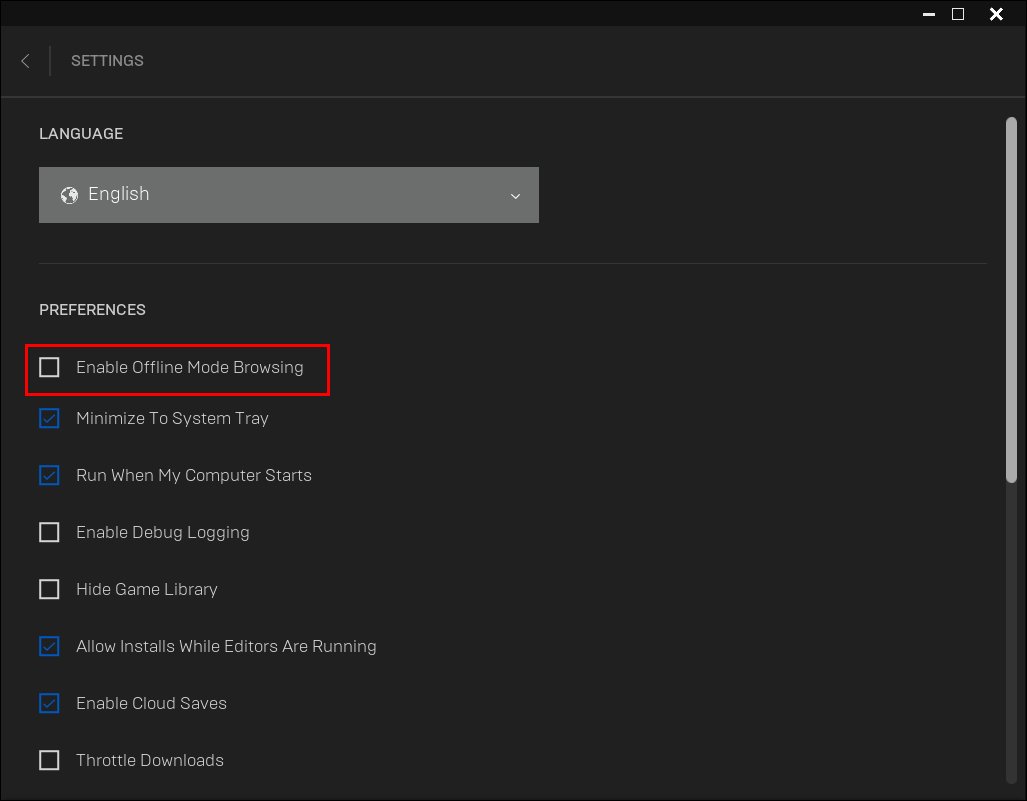
Go to Settings: Open the Epic Games launcher. In the lower-left corner, you’ll see your username; click on it and then click on “Settings”. A new window will pop up with the launcher settings.
Enable Offline Mode: In settings, search for the “Enable Offline Browsing” option. Put a checkmark in the box beside it. This will put the Epic Games launcher in offline mode.
Restart if Prompted: The launcher may ask you to restart. If you are asked, click “Restart Now,” so your changes will take effect.
Note: Remember, your launcher will not work like the usual when you are in offline mode.
Alternative Method for Launching Games Offline
Sometimes, even without going to the settings menu, you may still be able to play your games offline using a simple trick.
Start the Game from the Shortcut: If you made a shortcut for the game, click on the shortcut to start your game. Even if the launcher is not in offline mode, you might be able to play if the game supports offline mode. This trick could save your day, especially when you’re in a hurry to start your game.
What to Expect in Offline Mode
When the Epic Games launcher is in offline mode, there are a few things you should anticipate. There will be some changes to the gaming experience.
Limitations in Offline Mode
Offline mode is not a full substitute for online mode. It’s essential to know its limitations.
No Multiplayer Access: You won’t be able to play any online multiplayer games, or parts of multiplayer games that need a constant connection.
No Cloud Saves: Your game progress won’t be backed up to the cloud in offline mode. If you get a new computer or have to reinstall, your progress may not carry over.
No Game Updates: Your games won’t receive any updates while offline. This includes new content, bug fixes, and changes to the game. You’ll need to connect to the internet to download those updates when you reconnect.
No In-Game Purchases: You cannot make in-game purchases when you are offline. You will need to reconnect to the internet to purchase any new content for your games.
Limited Features: Some games have online features that will not work when you’re in offline mode. This may include leaderboards, challenges, and social features.
Enjoying Single-Player Games
The best part of offline mode is that you can still play most single-player games. This means you can still play all your favorite story-based games and enjoy all their content without any need for an internet connection.
Story-Driven Games: Many games with strong narratives work very well in offline mode. You can continue from where you left off and enjoy the game’s complete storyline.
Solo Adventures: Games that focus on single-player adventures can give you plenty of fun offline. Exploring worlds, solving puzzles, and battling enemies can be done without internet.
Practice Modes: Some multiplayer games might have a practice mode, which will work in offline mode. You will not be able to play with friends online, but the mode will let you enhance your skills.
Replayability: You can try playing your old single-player games, and this will make offline play enjoyable. If you haven’t played a game in a while, offline mode is a great time to revisit them.
Troubleshooting Offline Issues
Sometimes, things may not go as planned, even when you are all prepared. Here are a few things you can do if you find issues with offline play.
Game Not Starting
If a game doesn’t start in offline mode, there are a few reasons that could be the reason.
Game Needs Internet: First, make sure that the game does not need a constant internet connection to work. Some games will not work at all if you are offline.
Incorrect Sign-in: Make sure you are logged into your Epic Games account on the launcher before going offline. If you are not logged in, the games might not load.
Verify Game Files Again: Sometimes the files could have become corrupted again. Re-verifying the game files might help fix any issues.
Restart Launcher and System: If the issue persists, try restarting the Epic Games launcher and then also your computer.
Game Freezing or Crashing
Sometimes, your game might start, but it may freeze or crash frequently.
Check PC Requirements: Make sure that your computer meets the game’s minimum requirements. If your computer is having problems, the game may crash more often.
Close Background Apps: Close unnecessary apps running in the background. These apps may use your computer’s resources, which can cause problems while playing games.
Update Graphics Drivers: Check if your graphics card drivers are updated. Outdated drivers can cause many issues with gaming.
Epic Games Launcher Issues
If the Epic Games launcher is not acting as it should, here are some quick fixes.
Restart Launcher: Close the Epic Games launcher and open it again. Sometimes, simply restarting it can help.
Reinstall the Launcher: If restarting doesn’t work, try reinstalling the launcher. This can fix a lot of issues, including file corruption and software issues.
Contact Support: If you’ve tried all the steps and still have problems, you may need to contact Epic Games support for help.
Specific Games and Offline Play
Not all games are created equal, and some work better in offline mode than others. Let’s look at specific game types and how well they work offline.
Games That Generally Work Well Offline
These games usually have single-player campaigns or game modes that work without needing an internet connection.
Single-Player Adventure Games: Games that have a strong story with lots of exploring usually work well. You can easily continue your game without any issue.
Simulation Games: Games where you build cities, farms, or other virtual places usually can be played offline. These games tend not to rely heavily on online features.
Puzzle Games: Games that involve solving puzzles are also good for offline play. They don’t need an internet connection to give you a great experience.
Indie Games: Many indie games that are based on stories or single-player experience work without the internet.
Games with Limited Offline Play
Some games may have features that work offline but may not work fully.
MMORPGs: Most MMORPGs will not work offline. These games need an internet connection to play.
Competitive Multiplayer Games: Games where players compete online will not work offline. These games need an internet connection.
Games that Need Cloud Saves: Some games save their progress only in the cloud, which means that the game progress may be lost if you are playing offline.
Example Games and Their Offline Capabilities
Here is a table showing some popular games and how well they work in offline mode:
| Game | Offline Capability |
| —————————— | ————————————————- |
| The Witcher 3: Wild Hunt | Works fully in offline mode |
| Grand Theft Auto V | Single-player works; no online play |
| Civilization VI | Works fully in offline mode. |
| Fortnite | Limited offline play; only creative mode available |
| Rocket League | No offline play available |
| Borderlands 3 | Single-player works; no online play |
| Assassin’s Creed Series | Usually works fully in offline mode. |
It is very useful to know which games you can play offline. Check before going offline to be sure that the games you like can actually work offline.
Going offline on Epic Games is not hard when you know the right steps. You can still have fun playing your favorite games, even when your internet is not working or you are on the go. Just remember to update, verify, and log in before disconnecting from the internet, and you will be prepared for great offline play. Now, go on and enjoy your games!
How To Appear Offline In Epic Games
Final Thoughts
To play Epic Games offline, simply launch the client without an internet connection. Games you previously downloaded will be playable. This process allows enjoyment even without a network.
Remember that online features require connectivity. You won’t get updates or multiplayer access in offline mode. This affects only game specific content.
Therefore, going offline is straightforward. You just need to disconnect. That is how to go offline epic games.

