
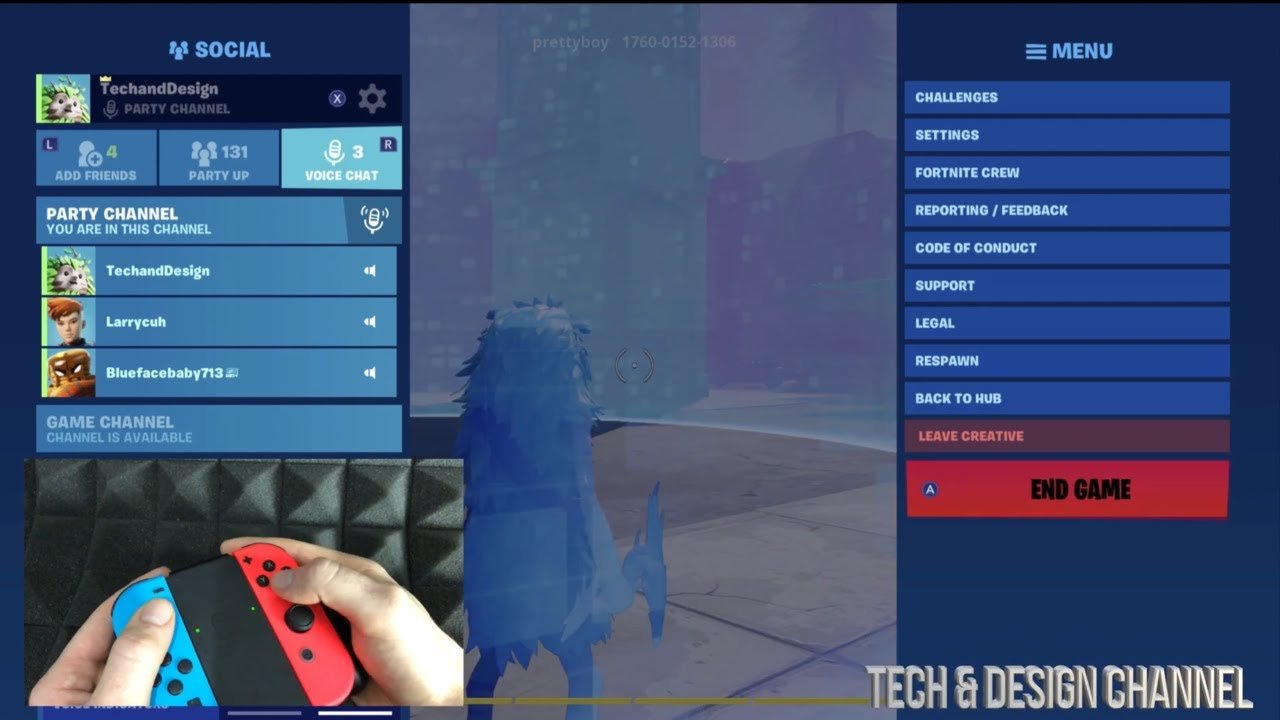
To leave a Fortnite game, simply access the in-game menu, usually by pressing ‘Esc’ on PC or the ‘Options’ button on consoles, and then select the ‘Leave Match’ option.
Ever felt that pull, that need to step away from the battle royale? Sometimes, it’s time to log off, and understanding how to leave Fortnite game is key for any player. You might need to take a break or switch to a different mode.
It’s pretty straightforward once you know where to find the exit. This action puts you back in the lobby, ready for your next adventure, or your well-deserved rest.

How to Leave Fortnite Game
Okay, so you’ve been battling it out in Fortnite, maybe building awesome forts or zooming around in vehicles. But now, you’re ready to do something else, right? Maybe homework is calling, or dinner is on the table, or you just need a break. Learning how to leave Fortnite game is super important so you don’t accidentally stay longer than you planned or just shut down your whole system! This section will break down all the different ways to exit the game, making sure you’re ready for your next adventure (even if it’s just going to bed).
The Simple Ways to Exit a Fortnite Match
Let’s start with the easiest exits. These are your go-to methods when you’re just done playing and want to get back to the lobby or your system’s home screen. There are a few simple ways to exit a match, depending on the platform you are using to play Fortnite.
Using the Menu Button
This method works across almost all platforms, whether you’re on a Playstation, Xbox, Nintendo Switch, PC, or even playing on your phone! It’s like your universal escape button. Here’s how it works:
- Find the Menu Button: During a match, you need to find the button that brings up the game’s menu. Usually, this is the ‘Start’ button (on PlayStation and Xbox), the ‘+’ button (on Nintendo Switch), or the ‘Esc’ key (on PC). On mobile, it’s usually located in the top-right corner of the screen.
- Select “Leave Match”: Once you open the menu, look for an option that says something like “Leave Match,” “Quit,” or “Return to Lobby.” Select that option.
- Confirm: The game will likely ask you to confirm that you really want to leave. Just say “yes,” and you’ll be whisked away from the match.
This method is great because it lets you leave a match quickly and safely. You won’t lose any progress you’ve made on your Battle Pass or daily quests, as those are tied to your account not the specific match.
Exiting from the Eliminated Screen
Sometimes, you might get knocked out of a match. It happens to everyone! But even from the eliminated screen, you can leave the game gracefully.
- Wait for the Spectate Option: Once eliminated, you may get a few seconds of spectating the player who took you down or your team.
- Choose “Return to Lobby”: In the spectating screen, look for an option that says something like “Return to Lobby” or “Leave Match.” Select it.
- Confirm: Just like before, confirm that you want to leave, and you’ll be taken back to the lobby.
This way, you don’t have to wait until the entire match is over if you’re no longer able to participate. It’s a quick way to get back to the main menu and start another match.
Understanding the Different “Lobbies”
When you leave a match, you usually end up in one of a few different places. It’s important to know the difference between them so you know where you are and what you can do next:
The Main Lobby (or Main Menu)
This is where you go to select your game mode (like Battle Royale, Creative, or Zero Build), manage your cosmetics, check your challenges, and start new matches. This is where you probably spend most of your time when you’re not actually in a game. When you leave a match, it’s here that you will return to and be able to access all the areas of the game.
The Pre-Match Lobby
This is the area where you hang out with other players before a match begins. Think of it like the waiting room for the real fun. You can do things like practice your building, dance, or just see who else is going to be in the game. Leaving this lobby is similar to leaving the main lobby, you go back to the main menu.
Platform-Specific Ways to Exit Fortnite
While the menu button method is pretty universal, there are sometimes platform specific ways you can exit the game too.
Exiting on PC
PC gaming offers a couple of extra ways to leave a match or the game in general:
- Using the Alt + F4 Shortcut: On a Windows PC, you can quickly close the game by pressing the “Alt” key and the “F4” key at the same time. This works in any match or in the lobby, but it’s a bit like pulling the plug so it won’t save the game or any progression in the specific match you left, so you should avoid using this method unless you are having issues with the game and need to quickly exit for any reason.
- Using the X on the Game Window: You can also close the game by clicking the ‘X’ in the top-right corner of the game window, just like closing any other program. This, again, is a hard exit, and is mostly used when you need a quick exit from the game.
Remember, while these methods are quick, they don’t give you a chance to exit the game in the appropriate manner. So try to use the menu to quit where possible.
Exiting on Consoles (PlayStation, Xbox, Nintendo Switch)
For consoles, it’s usually best to use the menu button, but you can also use the console’s home button:
- Using the Home Button: You can press the home button on your controller to go back to the console’s main menu. From there, you can usually close the game by selecting it and then choosing the “Close Game” or similar option. This method is helpful when you want to leave the game completely, for example to go and watch TV.
This is a good way to exit completely, if you are finished with the game for the day and want to switch to another game or app.
Exiting on Mobile (Android and iOS)
Mobile gaming offers unique challenges. Here’s how to exit on your phone or tablet:
- The Menu Button: As with other platforms, you can use the in-game menu to leave. The menu button is often located in the top right corner of the screen.
- Using the App Switcher: You can also exit by using your phone’s or tablet’s app switcher. This will take you out of the game and to your home screen. You can close the app by swiping it away in the app switcher.
These ways of exiting are common for mobile gaming, they are good for exiting the game completely when you’re done.
What Happens When You Leave a Match?
It’s a good idea to know what exactly happens when you leave a match to avoid any frustration. Let’s go over the common things you may encounter:
Progress and Rewards
Your battle pass and quest progress is saved whenever you finish a match. So you don’t have to worry about losing progress from matches when you quit. Any progress you have made will be safe and kept on your profile and account for the game. So if you get several kills or level up during a game and then you leave, all this will be saved to your account and you will see it in the lobby area of the game.
Match Penalties
Fortnite doesn’t really punish you for leaving a regular match early. You can quit, and go back to the lobby with no issues or penalties. However, in certain modes of the game, such as competitive arena modes, leaving early may result in penalties such as the removal of points or even temporary suspension from the mode. So make sure you are aware of the rules of any mode before you begin playing.
The Importance of Exiting Properly
It’s important to leave using the methods shown above, especially if you are in the middle of a game, and not use hard exits, like Alt + F4 on your PC or switching off your device. These exits may not save your game progress or any data in the match you were playing. This could cause you to lose out on progression or experience gained.
Also, proper exits help to keep the game running smoothly for others in the match, so you’re being a good team player when you exit using the menu option. If you just quit or turn off the game in the middle of a match, it could cause issues for your teammates.
Finally, always make sure to fully exit the game to ensure it is saved properly so that you don’t find yourself replaying a game or match you already finished. Closing it completely is a good way to ensure that all your progression is safe, and you can start afresh when you begin playing the game again.
Troubleshooting: What to Do When You Can’t Leave
Sometimes, things go a bit wonky, and you might find yourself in a situation where you can’t easily leave a match. Here are a few things to try if this happens to you:
The Menu Isn’t Working
If you try to press the button to bring up the menu, and nothing happens, the game might be having a problem. In this case try restarting your device by switching it off, and then turning it back on. This may fix any minor issues with the game.
Game Freezing
Sometimes the game might freeze, and you can’t do anything. In this case you may have to force quit the game using methods like Alt + F4 on a PC, or using the home button of your device. If this happens a lot you may have to check for updates, or even consider reinstalling the game.
Connection Issues
If you are having trouble leaving, this may be because of a bad internet connection. Try restarting your modem or router. Or try closing and restarting the game.
Reaching out for help
If none of the above work, you can consider reaching out to Epic games customer support. They may have specific advice for your type of problem and will be able to assist you in fixing your game.
In short, leaving Fortnite is a simple task once you get the hang of it. Whether you’re exiting after a big win or heading out for dinner, the key is to know the different methods to quit, understand what happens when you leave and be able to troubleshoot issues that may arise.
How to leave a Game in Fortnite
Final Thoughts
To leave a match, you can simply open the menu. Choose “Leave Match” option; then confirm your selection. This gets you back to the lobby.
Alternatively, pressing escape key(PC) or options button (console) brings up the menu. Select “Leave Match” and confirm. You’ll return quickly.
Remember, ‘how to leave fortnite game’ is quite straightforward. These simple steps will help you exit a match.

