
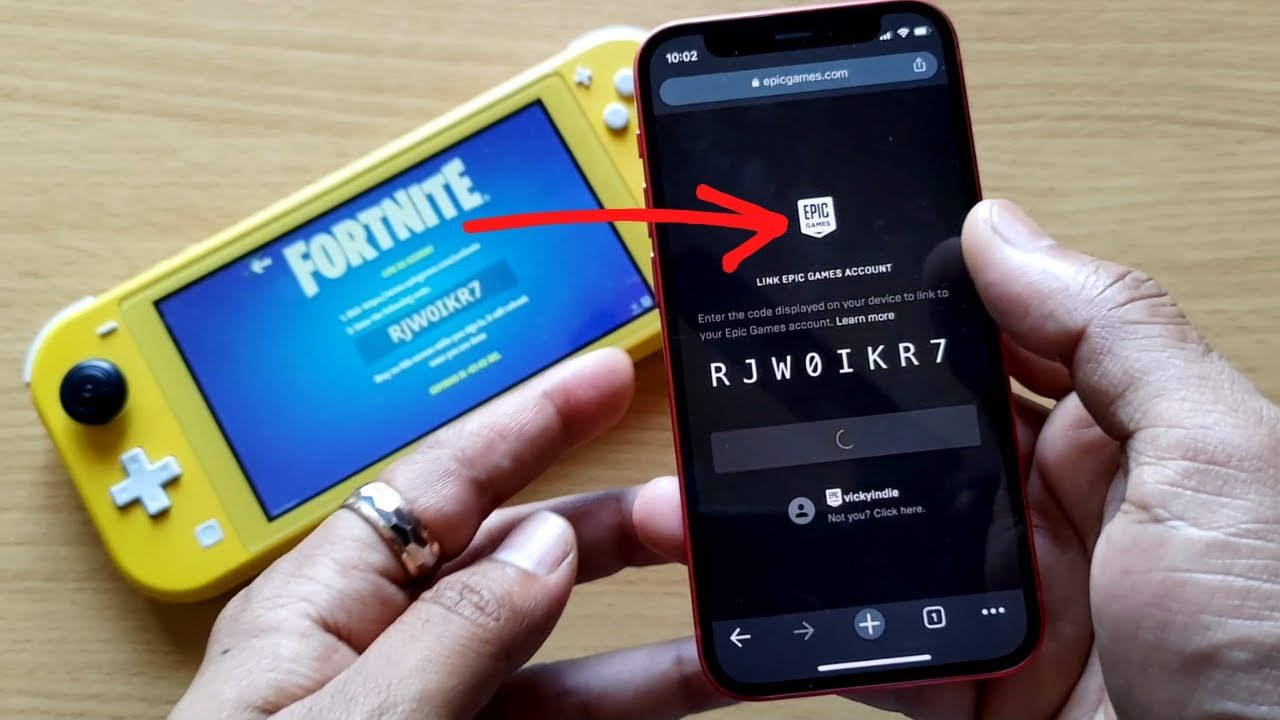
To link your Switch to Epic Games, you’ll need to go to the Epic Games website or the game you are playing, sign in to your Epic account and then choose the option to connect your Nintendo account using the provided linking process.
Want to enjoy cross-platform play or share progress across devices? If yes, you’ll need to know how to link switch to epic games. It’s a pretty straightforward process that will allow you to access your favourite titles on both your Nintendo console and PC.
This simple link makes it so you can seamlessly jump into matches on any of your devices. Many players are already enjoying the benefits, so don’t miss out.

How to Link Switch to Epic Games
Have you ever wanted to play your favorite games on your Nintendo Switch and also on your computer or other devices, keeping all your progress in one place? Well, you can! By linking your Nintendo Switch account to your Epic Games account, you can do just that. It’s like having a magical key that opens the door to playing your games wherever you go. This process is super helpful, especially if you enjoy games like Fortnite, Rocket League, and Fall Guys, which are all available on both platforms.
Why Link Your Nintendo Switch to Epic Games?
You might be wondering, “Why should I even bother doing this?” There are some great reasons to link your accounts. Let’s look at some of them:
- Share Game Progress: When you link your accounts, you can start playing a game on your Switch and then pick up exactly where you left off on another device, like your PC or PlayStation. No more starting over from the beginning!
- Access Cross-Platform Play: Linking allows you to play with your friends, even if they are using a different game system. Imagine playing Fortnite with your friends on their Xbox while you are on your Switch.
- Keep Your Items and Purchases: When you link accounts, items you earn or buy in games like Fortnite are available on all linked systems. All of those cool skins and dances are yours on every platform.
- Epic Games Account Benefits: A single Epic Games account provides access to all Epic games and other games that may use its services. It helps you keep your library and all your game-related data organized.
Getting Started: What You’ll Need
Before you jump in, make sure you have everything you need. This will make the whole process a lot easier and smoother.
- Nintendo Switch: Of course, you’ll need your trusty Nintendo Switch and it should be charged up and connected to the internet.
- Epic Games Account: If you don’t have one yet, you’ll need to create an Epic Games account. It’s free and easy.
- Internet Access: Your Nintendo Switch will need a good internet connection. A strong Wi-Fi connection is best.
- Email Address: Make sure you have access to the email address linked to your Epic Games account.
Step-by-Step Guide to Linking Your Accounts
Ready to start the linking process? Here’s a step-by-step guide to make it super simple.
Method 1: Linking through an Epic Games Title on Switch
This is the most common way to link your accounts. You’ll use a game like Fortnite, Rocket League, or Fall Guys to do it.
- Start Your Game: Turn on your Nintendo Switch and open a game that uses the Epic Games account system like Fortnite.
- Look for the Sign-In Option: When the game starts, it will usually ask you to sign in to your Epic Games account. This may be on the main menu or after you press a button to continue.
- The Linking Page: The game should now redirect you to a page that tells you to either sign in to an existing Epic Games account or create a new one. If you have an existing account, click “Sign In”. If not, you can create one.
- Sign in to your Epic Games Account: Use your email address and password that are linked with your epic games account.
- Accept the Linking Permission: After you log in successfully, you will get a notification asking to link your Epic Games account with your Nintendo account. Click on the accept button.
- Enjoy Your Linked Accounts: Once the process is done, your accounts will be connected, and all changes you make in games will sync across both systems.
Method 2: Linking through the Epic Games Website
You can also connect your Nintendo Switch account via the Epic Games website, especially if you don’t want to use a game to do it or are having problems. Here’s how you can do it.
- Visit the Epic Games Website: On your computer, tablet, or phone, open your web browser and go to the official Epic Games website.
- Sign In to Your Epic Games Account: Click on the “Sign In” button at the top right of the screen and log in using your email and password.
- Go to Account Settings: Click on your username in the upper right corner of the screen and then select “Account” from the dropdown menu.
- Navigate to Connections: On the left-hand side menu, find and select “Connections”.
- Find Nintendo Switch: Look through the list and find the “Nintendo Switch” option, click on the Connect button.
- Sign In to Your Nintendo Account: You will be directed to the Nintendo Account website where you’ll need to sign in. Use your Nintendo Network ID or the email associated with your Nintendo Account.
- Confirm the Connection: Review the information and if everything is good, click on confirm to authorize the connection.
- Your Accounts are Linked: Once the process is done, your accounts are linked and you’ll see that on your Epic Games account under “Connections”.
Troubleshooting Common Issues
Sometimes, things don’t go exactly as planned. Here are some common problems and how to fix them:
I Can’t Remember My Epic Games Password
If you’ve forgotten your password, don’t worry. Here’s how you can reset it:
- Visit the Epic Games Sign-In Page: Go to the Epic Games website and click “Sign In.”
- Click the Forgotten Password Link: Click on the “Forgot your password?” or a similar link.
- Enter Your Email Address: Enter the email address associated with your Epic Games account.
- Check Your Email: Epic Games will send you an email with a link to reset your password. Follow the instructions in the email.
My Account is Already Linked
If you’re getting a message that your account is already linked, it means your Nintendo Switch might be connected to a different Epic Games account. Here is what you can do:
- Log in with the Correct Account: Make sure you are logging into Epic Games using the correct email address that you use to play games on your Nintendo Switch.
- Check Account Connections: Go to the Epic Games website and check the connections page to verify which Nintendo account is linked.
- Unlink the Accounts if Needed: If you must unlink accounts, reach out to Epic Games support for help because that action can only be done by them.
I’m Getting an Error Message
Error messages can be confusing but they often include a code. Try this:
- Write Down the Error Code: Take a note of the error message and the code.
- Check the Epic Games Website: The Epic Games website has a support section where you can search for the specific error code you are receiving.
- Contact Support: If you still can’t find the solution, reach out to Epic Games Support for help.
Tips for a Smooth Linking Experience
To make sure the linking process goes as smoothly as possible, consider these tips:
- Have Your Info Ready: Before starting, make sure you have your Epic Games and Nintendo account information ready.
- Stable Internet: A strong internet connection helps prevent problems during the process.
- Double-Check Your Info: Always double check your email address and password before entering them.
- Take Your Time: Don’t rush the process. Read each step carefully.
- Keep Your Software Updated: Make sure your Switch and your games are updated to their latest versions.
What Happens After Linking?
Now that you have linked accounts successfully, you can enjoy cross-progression and cross-platform play. This means:
- Playing Anywhere: Start a game on your Switch and continue on your computer or other systems.
- Keeping Your Items: All the items you earned in-game are accessible on any device linked with the same Epic Games account.
- Playing with Friends: Play with friends, no matter what system they use, making the gaming experience more social and fun.
Linking your Nintendo Switch to your Epic Games account is a super useful way to enjoy your favorite games across multiple platforms, making the games accessible everywhere you go. By following these steps and tips, you can have a smooth and fun linking process and all your data will be synced across devices. This process is useful for gamers who enjoy playing on multiple devices and playing games with friends on other consoles.
How To Connect Nintendo Account To Epic Games – Full Guide
Final Thoughts
To link your Switch to Epic Games, navigate to the Epic Games website or the game’s website directly. You must log into your Epic Games account there.
Next, find the connections section. Select the Nintendo Switch icon and confirm the link. This process directly binds your accounts.
Now you know how to link switch to epic games; you can share progress across platforms. Enjoy your gaming experience!

