
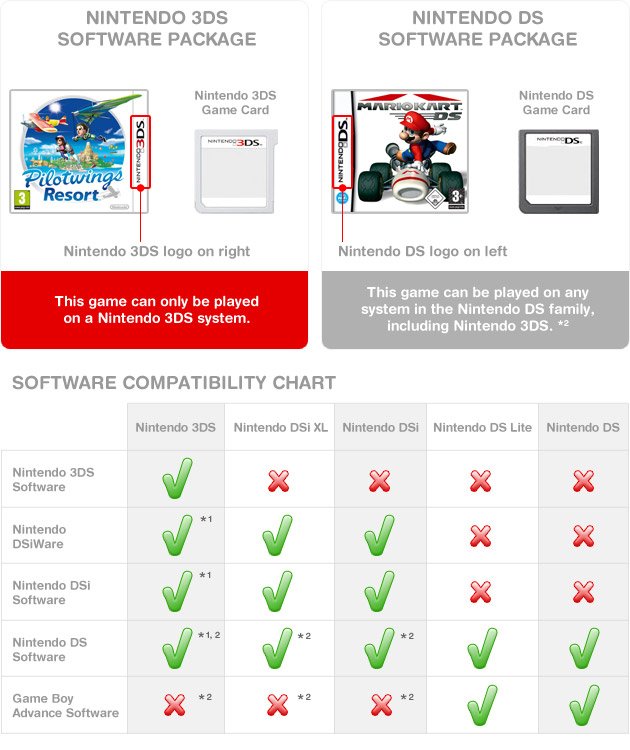
Playing DS games on a 3DS is simple: just insert the DS game cartridge into the 3DS’s cartridge slot, and it will play just like on a regular Nintendo DS.
Ever wondered about revisiting your old favorites from the Nintendo DS library on your 3DS? It’s a great way to enjoy those classic games again. The 3DS has full backwards compatibility.
This means you don’t need any special software or hacks. learning how to play ds games on 3ds is incredibly straightforward. Just pop the cartridge in and play!

How to Play DS Games on 3DS
So, you’ve got a Nintendo 3DS and a bunch of awesome Nintendo DS games collecting dust? Good news! Your 3DS is like a super-powered time machine that can play both 3DS and DS games. That’s right – you don’t need to keep your old DS around to enjoy those classics. Let’s dive into how you can start playing all those amazing DS titles on your 3DS console. It’s easier than you think!
The Magic of Backwards Compatibility
The Nintendo 3DS is designed with something called “backwards compatibility.” This fancy term simply means that it can play games from an older system, in this case, the Nintendo DS. This is great news because it means you can revisit all your favorite games from the DS library on your newer handheld. Think of it like a bonus feature – you get two systems in one!
What DS Games Work on 3DS?
Almost every Nintendo DS game will work on your 3DS, including DS Lite games and DSi games. There are very few exceptions. You can pop in cartridges for games like:
- Mario Kart DS
- New Super Mario Bros.
- Pokémon Diamond, Pearl, Platinum, HeartGold, and SoulSilver
- The Legend of Zelda: Phantom Hourglass and Spirit Tracks
- Animal Crossing: Wild World
The few games that might not work perfectly are generally less common. But, by and large, you’re good to go with your collection!
Are There Any Region Restrictions?
Yes, there are some region restrictions to keep in mind. Nintendo consoles, including both the DS and 3DS, usually have regional lockouts. This means that a game designed for a system in one region (like Europe) might not play on a console from a different region (like North America). So, if your 3DS is from Japan, it might have trouble playing DS games bought in the USA. The good thing is that this is less of a problem for people who bought their consoles and games in their own countries.
Here’s a quick look at the typical regions:
- North America (USA, Canada, Mexico)
- Europe (UK, France, Germany, etc.)
- Japan
- Australia
If you purchased your 3DS in a country that’s different than where you bought your DS games, it’s a good idea to double check the compatibility before purchasing.
Getting Started: Inserting Your DS Game
Let’s get to the real fun: actually playing your DS game. The process is very straightforward, just like putting a 3DS game into the system, but there are a couple of differences.
Finding the Right Slot
The Nintendo 3DS actually has two slots, one for 3DS game cartridges and one for DS game cartridges. The slot for DS games is usually on the top of your 3DS system, while the 3DS game slot is usually on the side. It’s very easy to spot the difference as the 3DS card will be smaller. Make sure you put the DS cartridge in the correct slot. DS cartridges have a slightly larger notch to the side than 3DS cards. If you try to force a game into the wrong slot you might damage the console or cartridge.
Gently Insert the Cartridge
Take your DS game cartridge and carefully insert it into the DS game slot. Make sure you align the cartridge correctly – the label should face outward. Don’t force it! If it doesn’t slide in smoothly, double-check the orientation and try again. Once in, the game will sit snug inside the slot.
Powering On Your 3DS
Now, turn on your 3DS. After the system starts up, it will recognize that a DS game has been inserted. You will see the DS game displayed on the bottom screen of your 3DS, it’ll be just like a normal 3DS game icon.
Selecting Your Game
Just tap the game’s icon on the lower touch screen, and the game will start. Just like that, you’re back in your favorite DS game!
Understanding the Screen Display
When you play a DS game on your 3DS, you’ll notice something interesting about the screens. DS games were designed for two smaller screens, while the 3DS has a larger screen.
The Standard Display
By default, your 3DS will display DS games with a black border around the game screen. This keeps the game from being stretched out and looking weird. The screens of the DS game will be displayed on the top and bottom screens of the 3DS, just like it was when you played it on the DS.
Changing Screen Size
You can change how the DS screen is displayed on your 3DS, but keep in mind it might make the game look a little bit blurry. Here’s how to change it:
- While in the DS game, go to the HOME menu by pressing the HOME button. It looks like a little house.
- Select “Screen Settings”.
- Choose your desired screen size display option. You can change the screen to be stretched or play in original mode. If you choose to stretch the game the display will fill the screen.
Experiment with different display modes to see which one you prefer. But, for most players, the original mode will be best because it keeps the game sharp and clear, without stretching the images.
Using the Touch Screen
The bottom screen of your 3DS functions as the touch screen just like it did on the regular DS. For games that use the touch screen for controls, you will be able to use them on your 3DS just like you did before. Your stylus will also work like a charm when using the touch screen.
Important Differences to Consider
While playing DS games on a 3DS is generally smooth, there are a few key differences to be aware of.
No 3D Effect
DS games will not have any 3D effect when played on the 3DS. The 3DS system’s special 3D function is exclusive to 3DS games and cannot be added to old DS games. So, you’ll be playing your DS games in regular 2D, just like you always did!
No Enhanced Graphics
Your DS games will look exactly the same on a 3DS as they did on a DS. They will not get any kind of graphic updates. The 3DS has better hardware than the DS, but this doesn’t mean your DS games will automatically look better. Games are designed for the hardware they were created for.
Limited Download Play
Download Play is a feature of Nintendo DS, where players can share game data and play together, even if only one player has the cartridge. Unfortunately, it doesn’t work for DS games played on a 3DS with other DS consoles or 3DS. You’ll need two DS systems, not 3DS systems, to use this feature. If you want to play the multiplayer version of a DS game, you will need multiple DS systems.
Some Games Are Better Than Others
While the majority of DS games work flawlessly on the 3DS, there can be some very small issues for a handful of titles. These issues are almost always minor and shouldn’t stop you from having fun with your favorite classics. Most games will run perfectly, but some might experience tiny glitches.
Taking Care of Your Games and System
Now that you know how to play your DS games on your 3DS, here are some important things to keep in mind to make sure both your games and console stay in good shape.
Keeping Your Cartridges Clean
Always keep your game cartridges clean. Dust or dirt on the connectors can prevent the games from working properly. Before inserting a cartridge, you can carefully blow on it to remove any dust or dirt. Be careful to not use any liquids to clean the cartridge, as that can damage the circuits of the game. Keep the DS games stored in their case when not in use to keep dust and other debris away from them.
Avoid Rough Handling
Be gentle with your games and your 3DS. Avoid dropping them or putting pressure on the cartridge slot. Rough handling can cause damage to your console and game cartridges.
Storing Your 3DS Properly
When not in use, store your 3DS in a cool, dry place. Avoid putting it in direct sunlight or near heat sources as this can cause damage. A good way to protect the console is to purchase a case. A case will protect your console from scratches, dents, and other damage.
Battery Care
The 3DS has a rechargeable battery. To prolong its lifespan, avoid leaving it plugged in for long periods after it is fully charged. Unplugging your charger once the console is fully charged is a good habit to get into.
Troubleshooting Common Problems
Sometimes things might not go as planned. Here are some common problems you might encounter when playing DS games on your 3DS, and what you can do about them.
Game Doesn’t Start
If your game doesn’t start, make sure that the cartridge is inserted correctly. Remove it and re-insert it. If that doesn’t work, try cleaning the cartridge with a soft, dry cloth to remove any dirt or dust. If it still doesn’t work, the game or console might have a problem. You may want to try the same game on another 3DS or DS console to see if that works.
Game Freezes or Glitches
If your game freezes or has glitches, this can be due to a dirty cartridge or something wrong with the game itself. Cleaning the cartridge is the first step. If it keeps happening with the same game, it might have a problem. If multiple games are having problems it could mean the console needs to be looked at by a professional.
Touch Screen Not Working
If the touch screen is not responding, try calibrating it by going to system settings on the home screen of the 3DS. If that doesn’t fix it, then there may be something wrong with the system itself and you might have to have it fixed professionally.
Region Compatibility Error
If you see an error message about region compatibility, you are trying to play a game from a different region than your console. It’s impossible to play those games without doing a complex process that is usually not recommended, as it can potentially brick or damage your system.
Enjoying Your DS Library
That’s all there is to it! Playing DS games on a 3DS is a simple process that lets you enjoy classic titles without needing an old DS. Just insert your games, make sure they’re in good shape, and enjoy your favorite stories, adventures and challenges all over again. The 3DS is a very versatile system that is built to play both 3DS and DS games, which makes it great value for your money. The best part about playing DS games on your 3DS is being able to take the older games you love with you wherever you go!
Now you’re all set to begin. Have fun exploring all the amazing games you might have forgotten about!
How to Play DS Games on 3DS Homebrew
Final Thoughts
Playing DS games on a 3DS is simple. Insert the DS game cartridge directly into the 3DS. The system recognizes it automatically, then you can start playing.
No special software or emulators are needed. The 3DS handles DS game playback natively. This makes ‘how to play ds games on 3ds’ straightforward.

