
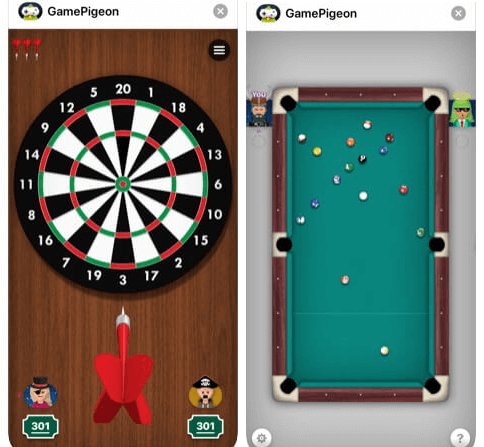
Unfortunately, you cannot directly play Game Pigeon on Android devices. Game Pigeon is an iMessage app exclusive to Apple products.
Ever wished you could join in on the Game Pigeon fun with your Android friends? You’ve seen the popular iMessage games and now you’re wondering how to play game pigeon on android, right? It’s a common question, and while there isn’t a direct way, we will explore what options exist.
Apple’s iMessage platform is where Game Pigeon resides, meaning access is limited to iPhones and iPads. So, playing it directly isn’t possible on Android phones. This poses a problem for players who want to engage their Android friends.

How to Play Game Pigeon on Android
Alright, let’s talk about Game Pigeon! It’s super fun, right? You know, those little mini-games you can play with your friends in messages? Well, they’re usually on iPhones, but what if you have an Android phone? Is it possible to join the Game Pigeon fun? That’s the big question, and we’re diving deep to figure out the best ways you can try to get your game on, even without an iPhone.
Understanding Game Pigeon’s Limitations on Android
Okay, first things first. Game Pigeon is designed specifically to work with iMessage on Apple devices. That’s why you see it pop up when your friends with iPhones want to challenge you. Apple made it to be used with their texting app only. This means, there isn’t an official Game Pigeon app you can download on the Google Play Store for your Android device. It’s not as simple as clicking ‘install.’ That’s the sad truth. So, before we get our hopes up too high, we need to know what we’re working with. This means, getting the same exact experience with the official iMessage game integration isn’t possible on Android.
The iMessage Connection
The core of Game Pigeon is linked to iMessage, Apple’s messaging system. The games are built as extensions that plug into iMessage conversations. Think of it like a cool set of add-ons that make texting more than just typing words. These add-ons are only meant for iMessage and cannot be used elsewhere, making a direct port to Android a challenge. This creates a problem, as Android uses its own messaging systems (like Google Messages) which are built differently.
Why No Direct Android Version?
Apple builds products that often work best within their own ecosystem. That means, the ways that iPhones, iPads, and other Apple products work together is really tight. Game Pigeon is part of that ecosystem, and Apple hasn’t released it for use on Android. They want it to be a special reason why you might choose Apple over other options. This is one of the main reasons there isn’t an official Game Pigeon for Android phones yet.
Exploring Alternative Ways to Play Similar Games
Okay, so we can’t get the real Game Pigeon, but don’t worry! There are tons of apps that let you play similar games with your friends on Android. Instead of looking for a direct replacement, we’re going to look at the kind of games that Game Pigeon offers and find other options. Think of it like searching for a copy of your favorite book at another library instead of looking for the exact same one.
Finding Look-Alike Games
Game Pigeon has a bunch of popular mini-games, like:
- 8 Ball Pool
- Mini Golf
- Word Games
- Basketball
- Cup Pong
- Chess
- And many more!
The good news is that many of these games are available as standalone apps on the Google Play Store. You can find apps that offer the same kind of fun without needing iMessage at all. These may not be the exact game pigeon implementation, but they will satisfy your craving for games with friends.
Searching for Game Genres
Instead of searching for “Game Pigeon for Android,” try searching for the specific game genres you enjoy. For example, if you like “8 Ball Pool” from Game Pigeon, just search for “pool game” in the Play Store. If you love the word games, look for “word puzzle games” or “Scrabble-like apps”. This will give you a great list of apps that will have what you are looking for.
Here is a list of game genres to get you started:
- Pool
- Mini golf
- Word games
- Board games (chess, checkers)
- Sports games (basketball, bowling)
Popular Android Games Similar to Game Pigeon
Let’s look at some real examples to give you an idea of what’s out there:
- 8 Ball Pool by Miniclip: This is a hugely popular pool game with online multiplayer, just like Game Pigeon’s version.
- Words with Friends: If you like the word games from Game Pigeon, this app lets you play word games with friends or random people.
- Golf Clash: A great alternative for mini golf. It has nice graphics and lots of online players.
- Chess by Chess.com: For Chess fans, this app is awesome. You can play with friends and people around the world.
- Basketball Stars: If you enjoy the Basketball game, this app will give you a fun experience.
These are just a few of the many possibilities. When you check out these apps, you can invite your friends to join in, and you can have a good time playing together.
Using Third-Party Messaging Apps with Game Support
Some messaging apps have their own built-in games, or they have ways to integrate with other games. These apps are an alternative to iMessage, and you might be able to find something close to the Game Pigeon experience. These might not be exactly like Game Pigeon, but it can offer some similar features and allow you to play with friends on different devices.
Exploring Messaging Apps with Game Features
Look for apps that have games that you can play within the app, or that let you quickly launch other apps to play with your friends. Some popular examples might include:
- Facebook Messenger: Has instant games that you can play directly with your friends.
- Telegram: Includes bots that can let you play simple games with contacts.
- Discord: While Discord is mostly known for voice chat, it has a lot of bots and integrations that can let you play games with friends.
Pros and Cons of Using These Apps
Before you download any messaging app, it’s good to think about the good and bad sides:
Pros:
- You can play simple games with friends quickly.
- You might be able to find a game similar to a Game Pigeon game.
- You get to use features that these messaging apps offer other than the game options.
Cons:
- The game selection might not be as wide or as good as Game Pigeon.
- You and all your friends need to download the same app to play together.
- It is not officially a game pigeon app.
Tips for Playing Games with Friends Across Platforms
Even if your friends use iPhones and have Game Pigeon, and you have an Android, you can still have fun playing games with them! The main key here is communication and working together to find the best options that work for everyone.
Communication is Key
Talk to your friends about what kind of games you all enjoy. Then you can start checking out different apps and see if they meet your needs. Maybe you all like to play pool, so you can download the same pool app. Or maybe some of you like word games, so you can download Words with Friends. The trick here is making sure everyone agrees on an app.
Staying Up-to-Date with New Apps
The app world is always changing and new apps come out often. So, it is wise to keep up with new game apps and try new things. Here are some tips:
- Check the App Store/Play Store: Look at new and popular games on the app stores every once in a while.
- Read Reviews: See what other people say about the games before downloading them.
- Ask Friends: Find out what apps your friends are playing and you might find a fun new game.
- Use Social Media: Sometimes people will talk about new games on social media, so follow game developers or gaming pages.
Using a Strategy of Patience
It is important to be patient when trying to find alternatives to Game Pigeon. It might take some time to find an app or game that you and your friends love. Don’t get discouraged if you try something, and it doesn’t work out. Just keep exploring and you’ll discover new games that you can all enjoy together. Make it a fun goal to try out different games until everyone finds a favorite!
The Future of Cross-Platform Gaming
The world of gaming is changing fast! Developers are working hard to make it easier to play games with friends, no matter what kind of phone or device you have. While we can’t predict the future, it’s possible that, someday, cross-platform compatibility will be the norm and maybe a future game pigeon version might work on both iOS and Android, but that is just a hopeful thought.
The Shift Towards Cross-Platform Play
More and more game makers are making games that work on different platforms. For example, some console games now let you play with people who are on computers or other consoles. This is great news because it means more people can play together, regardless of the device they use. As this trend continues, we might see more games like Game Pigeon that also come to multiple platforms.
Looking at the Developer’s Perspectives
Game makers understand that people want to play with their friends, no matter what phone they have. So, they are exploring ways to make games available to more people. This might mean bringing games to multiple app stores, or using technology that lets people on different devices play together. Keep an eye out for announcements from developers as they work on making this a reality.
Keeping Hope Alive
While there isn’t a simple, straightforward way to play Game Pigeon on Android right now, it’s good to stay hopeful. Things are always changing and who knows, maybe Apple and Google will find a way to make these kinds of games work between their devices in the future. For now, we can enjoy the games we have found and try to stay informed about the changing gaming world. So, don’t give up hope just yet, there is always something new to try!
In short, while the official Game Pigeon remains an iMessage exclusive, the world of mobile gaming provides many fun alternatives. Communication, research and a bit of patience will make sure that you and your friends have no shortage of fun games to play. We hope that this helps you in the quest to connect with friends through a good gaming session.
GamePigeon Alternative For Android / iOS! (2020)
Final Thoughts
Playing Game Pigeon on Android requires using a third-party app, like Pigeon. You install this app from the Play Store. Then, you connect it to your iMessage account. This allows you to play the games.
The game selection is usually limited compared to iOS. Some games might not be available or perform differently. Remember, these methods are not officially supported. You should exercise caution when using third-party applications.
So, that’s how to play game pigeon on android. You can explore these options for gaming. Be mindful of potential risks and limitations during the process. Enjoy playing with your friends.

