
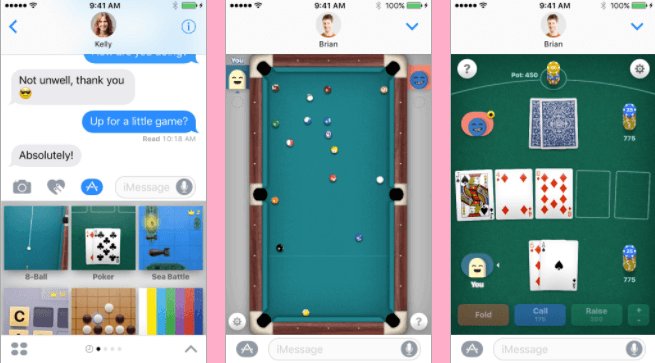
Unfortunately, you cannot directly play iMessage games on an Android device because iMessage is an exclusive Apple service.
Ever felt left out of the fun when your friends are battling it out in iMessage games? It’s a common frustration for Android users wanting to join in. The allure of these simple, social games within iMessage is undeniable, yet access remains locked for many. The question then lingers – how to play iMessage games with android? It’s a challenge but there are alternatives!

How to Play iMessage Games with Android
Ever wanted to join in on the fun with your friends who have iPhones, especially when they’re playing those cool iMessage games? It can be a bummer when you’re left out because you have an Android phone. Well, the good news is, while it’s not perfectly straightforward, there are ways you can get in on some of that iMessage gaming action. Let’s explore how you can get a piece of the iMessage game pie, even with your Android device.
Understanding the iMessage Challenge
Before we dive into the “how-to,” it’s essential to understand why playing iMessage games on Android isn’t as simple as downloading an app. iMessage is an exclusive messaging service created by Apple. It’s built right into their iOS operating system, which means that it’s made specifically for iPhones, iPads, and Macs. The games inside iMessage are also designed to work within this closed ecosystem. Because Android operates on a completely different system, there isn’t a direct way for your Android device to communicate with iMessage servers to play games.
This doesn’t mean it’s impossible to participate. We just need to think outside the box a little and find workarounds.
The Reality: No Direct Access
Let’s be crystal clear: You can’t directly download an iMessage game onto your Android phone, and you can’t use the iMessage app itself. There’s no app you can install that magically lets you access iMessage features on Android. This is because Apple keeps iMessage tightly controlled within their own ecosystem. Any solution we find won’t actually be making your phone use iMessage; instead, they will be ways around the problem to get you in the game. This is a really important distinction to understand before we explore the different options available.
Workarounds for iMessage Gaming on Android
While direct access to iMessage games on Android isn’t possible, here are the main workarounds you can consider. They involve either finding similar games on Android or relying on someone with an iOS device to help you participate.
Option 1: Similar Games on Android
This is the easiest and most straightforward method, since it doesn’t require your friend with an iPhone to get involved. Instead of trying to get the iMessage games, find games on the Google Play Store that are similar in style or gameplay.
Many games mimic the popular iMessage games. Games like ‘8 Ball Pool,’ ‘Words with Friends,’ and various mini-game collections have versions that are available on both platforms. You and your iPhone friends can download these and play against each other or together.
- How to Do It:
- Search the Google Play Store for games similar to the ones your iPhone friends are playing in iMessage. For example, if they play ‘Game Pigeon’ you might search for ‘mini-game collection.’
- Download the chosen game.
- Create an account, if needed.
- Add your friends through their usernames, emails, or via a linked social media account.
- Start playing!
Option 2: Using Screen Sharing with a Friend
This method involves a friend with an iOS device acting as a “proxy” for you. You won’t be directly playing the game from your Android phone, but you can see what’s happening and make choices through your friend. It’s a bit indirect, but it can let you participate if you are flexible.
- How to Do It:
- Ask your friend with an iPhone to start a screen sharing session using a video call app, such as Zoom, Google Meet, or even Discord.
- Your friend should open the iMessage game they want to play.
- Now you can see the game via the screen share on your Android phone.
- Discuss with your friend and give them instructions to play the game on your behalf.
This method will only work with games that are turn-based. If the game is real-time, there will be delays that make it frustrating.
Screen sharing apps like Zoom and Google Meet, or even Discord, let you see what is happening on your friends’ screen. You can talk with them and tell them what moves to make in the game, letting you at least participate a little.
Option 3: Remote Control Applications
In a similar vein to the previous option, you could use remote control applications to gain limited control over your friend’s iOS device. This would allow you to interact with the game more directly rather than just giving them verbal instructions. This is definitely more of an advanced option, and it requires a very trusting relationship with your friend.
- How to Do It:
- Have your friend install a remote access app on their iOS device, such as AnyDesk or TeamViewer.
- You will also need to install the corresponding app on your Android device.
- Your friend will need to give you a code to connect.
- Once connected, you can see their device screen and, in some cases, control it directly.
- Start the iMessage game, and have fun!
Important Note: Be extremely cautious when granting remote access to your device or someone else’s, as it allows someone to have access to their device. Only use this method with trusted friends or family members.
Considerations and Limitations
While these workarounds can allow you to enjoy a taste of iMessage games on your Android, it’s important to remember these limitations:
- It’s Not Seamless: None of these methods offer the seamless experience that iOS users have with iMessage games. You will likely need to make some sacrifices for less direct access.
- Lag and Delays: Screen sharing and remote control methods can have lag or delays, which can affect games that need quick responses.
- Reliance on Others: Some methods require someone with an iPhone to be available and willing to help you.
- Security Concerns: Remote control applications can potentially be risky if not used carefully or with trusted individuals.
Why Not Try to Make Your Own Games?
Instead of only trying to access games from another platform, why not try playing games that you and your friends can both access? There are plenty of fun, interactive games on Android’s Google Play Store that offer great gameplay and opportunities for social interaction. Look into these options instead.
- Cross-Platform Games: Many games available on the Google Play Store work on both Android and iOS devices. These games don’t rely on iMessage and can be enjoyed with friends, no matter what kind of phone they use.
- Board Game Apps: There are many digital versions of popular board games you can play with your friends, like Ticket to Ride, Catan, or Monopoly. Many of these are cross-platform.
- Online Multiplayer Games: Games that let multiple people play together online are great options. Many different games have this capability.
- Social Games: These types of games help people interact and have fun together. Look for party games and other unique ways to have fun, and invite your friends!
Exploring different games within the Android ecosystem can bring even more enjoyment, without having to work around iMessage limitations. Sometimes, the best option isn’t to try and join a closed ecosystem, but to embrace what you have available to you!
The Future of Cross-Platform Gaming
While we can’t predict the future, the tech world seems to be moving towards better cross-platform compatibility. Maybe one day, messaging services and games won’t be tied to specific devices and we’ll all be able to play together no matter what brand of phone we use. Until that time, hopefully these ideas give you a good way to have fun with friends.
So, while playing iMessage games directly on your Android phone isn’t possible at the moment, these methods offer ways to participate in some of the fun. Remember to choose the method that best suits your needs and always be cautious when using any software that allows remote access to your devices. And don’t forget that there are tons of other games out there that you can enjoy with friends, regardless of their phone type!
How To Play iMessage Games on Android (Easy!)
Final Thoughts
Essentially, playing iMessage games with Android requires using third-party apps that simulate the iMessage experience. These apps facilitate cross-platform communication. They let you play certain games with your iMessage contacts.
Unfortunately, direct iMessage game functionality does not exist for Android. You need these workarounds. Keep in mind that the game selection will likely be more limited.
Therefore, for playing iMessage games with Android, explore alternatives providing game compatibility through intermediaries. There is no direct way to play natively, but these methods do allow access.

