
You cannot directly play PS2 games on a PS4 using the disc. The PS4 does not have backward compatibility for PS2 discs.
The question on many gamers’ minds is, how to play ps2 games on a ps4. Sadly, the PS4 doesn’t offer native support for PS2 discs, a design choice that has left many fans yearning for the past. This means, that you cant simply insert a PS2 game into your PS4.
However, hope is not entirely lost. There are still some ways you might get to experience those classic games, and we’ll discuss the options that may work for you.

How to Play PS2 Games on a PS4
So, you’ve got that itch, that nostalgic craving for the good old days of PlayStation 2. Maybe it’s the thrill of Grand Theft Auto: San Andreas, the magic of Final Fantasy X, or the frantic fun of Kingdom Hearts. You dust off your PS2 game collection, only to realize…your PS2 is long gone. But wait! You’ve got a PS4, right? Can you somehow play those beloved PS2 games on your shiny new console? This is a very common question and a valid one.
The short answer, unfortunately, is a little complicated. The PS4 doesn’t have a straightforward way to play PS2 discs like your old console did. There’s no magic slot or setting to load those games directly. However, don’t lose hope! There are still ways to experience those classic games on your PS4, but it involves understanding how Sony has made some of these games available digitally and how the PS4 handles older PlayStation titles. Let’s explore these options step by step.
Understanding PS4 Backward Compatibility
First things first, let’s clear up some confusion about “backward compatibility.” This term means a new console can play games from an older console. The PS4 wasn’t built with the hardware to read PS2 discs. The technology inside a PS2 and a PS4 are quite different, like comparing a bicycle to a car. They operate very differently, making it impossible to directly play the older games on the new system. Think of it like trying to put a square peg into a round hole. It just doesn’t work!
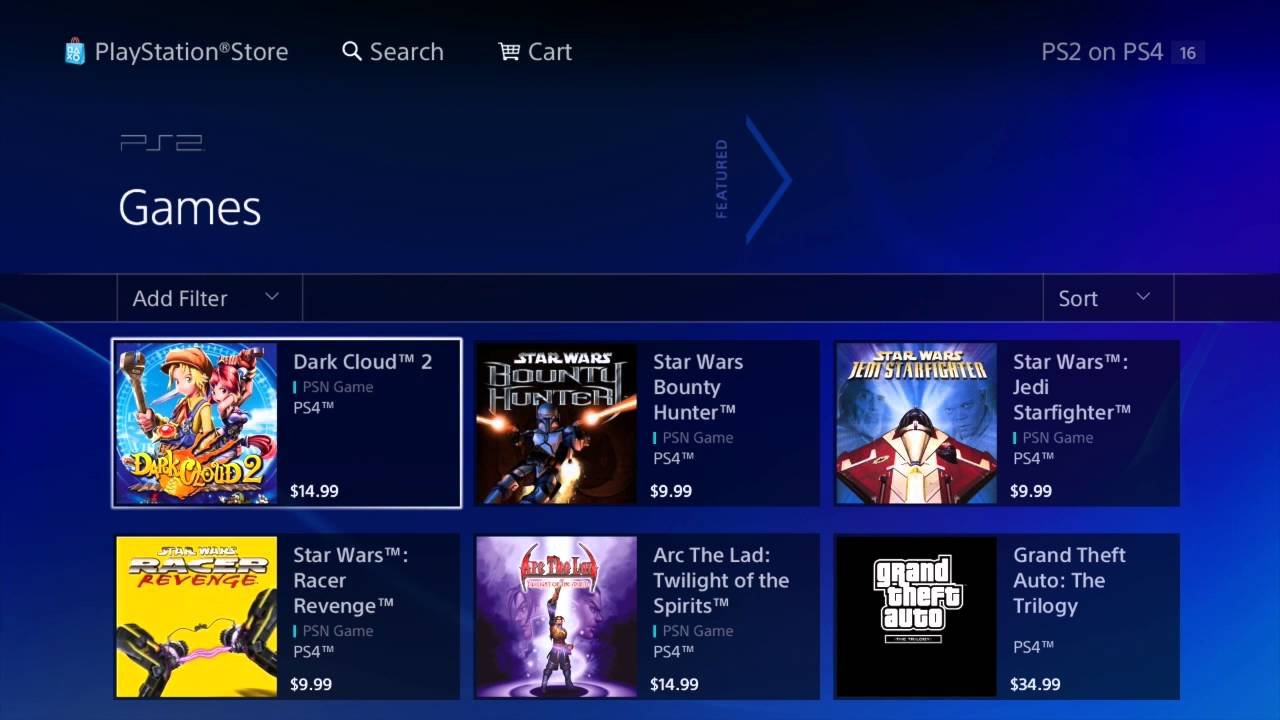
Instead of physical backward compatibility, Sony decided to offer certain PS2 games through the PlayStation Store, as digital downloads. These are not the original disc versions, but emulated versions that have been modified to run on the PS4. This system doesn’t cover every PS2 game ever made, so it can feel a bit limited.
Emulation: The Key to Playing PS2 Games on PS4
Emulation is a clever trick where the PS4 pretends to be a PS2. It uses software to translate the instructions of the PS2 games so the PS4 understands them. Imagine you have a friend who speaks a different language. Emulation is like having a translator who helps you understand what they are saying. This is how you can technically “play” PS2 games on the PS4.
These emulated PS2 games available on the PlayStation Store are also often tweaked and improved for the PS4. Some games may have better graphics (upscaled resolution), support trophies, and even include features not present in the original PS2 releases. This helps these older games look and play better on modern TVs and consoles.
How to Find and Download PS2 Games on the PlayStation Store
So, how do you actually get your hands on these emulated PS2 games on your PS4? Here’s a detailed look at how it’s done:
- Go to the PlayStation Store: On your PS4, navigate to the main menu and find the PlayStation Store icon, it usually looks like a shopping bag with a PlayStation logo on it. Click on it to open the store.
- Search for PS2 Games: Once the store is open, you will find a search bar at the top. In the search bar type in “PS2 games”, or the name of the specific PS2 game you are looking for.
- Browse the Results: The results will show you all the PS2 games that are available. You will notice a list of the games, some might be familiar to you, some might not.
- Check Game Details: Clicking on a game title will give you information on it. It will show you screenshots and videos from the game, the price, the file size, and the language of the game. It is a good idea to check these details before you decide to buy a game.
- Purchase and Download: If you find a game you like, you can add it to your cart and buy it using the payment options that are set up for your account. After buying, it will automatically start to download to your console.
- Install the Game: Once the download is done the game will automatically be installed to your PS4. You can then find the game on your game library and start to play.
It’s important to know that not every PS2 game is available on the PlayStation Store. The selection is limited, and you may not find all your favorite games there. Sony has a specific list of compatible titles. You need to always check if your desired game is available, it can be quite disappointing to look for a game that is not in the store.
Navigating the Limitations
Unfortunately, the situation is not perfect. There are some limitations to be aware of when playing PS2 games on a PS4:
Limited Game Selection
The biggest limitation is that only a fraction of PS2 games are available for download. The PS4’s digital store does not have every single game that was ever made for PS2. You will need to check the store to see if your favorite games made the list. Don’t expect to find every single game you remember from your childhood.
No Disc Compatibility
As mentioned earlier, you cannot insert your old PS2 game discs into the PS4. Your disc copies of PS2 games are sadly useless for playing on your PS4 console. This is why the digital downloads on the store is the only way that you can play them on your PS4.
Purchase Required
Even if you own a physical copy of a PS2 game, you still have to purchase the game again from the PlayStation Store to play on the PS4. This can be annoying if you already own the game. Consider this as paying for a way to play that classic game on the modern system.
Benefits of PS2 Emulation on PS4
Although there are drawbacks, playing PS2 games through emulation on the PS4 also comes with perks:
Improved Graphics
Many of the PS2 games on the PlayStation Store are upscaled to higher resolutions. This results in sharper, clearer images than you would get when playing those games on the original PS2 console. The graphics are usually smoother and more detailed, making them look better on modern televisions.
Trophy Support
Many of the emulated games have been modified to support PlayStation trophies. These trophies are a fun addition, letting you earn awards for accomplishing challenges in the games. It can also add more play time to a game, as you might be motivated to play it again to get all the trophies.
Convenience
Having your PS2 games as digital downloads can be more convenient than using physical discs. There is no need to search for a disc when you want to play a game, and there is less risk of a disk getting scratched or damaged.
The “Greatest Hits” and Other PS2 Classics
Many of the PS2 games that have been released on the PS4 are from the “Greatest Hits” library. These are often considered the best or most popular games of the PlayStation 2 era. This library is a great place to start if you are looking to explore some of the best of what PS2 had to offer. Keep an eye out for these titles when browsing the PS Store.
Alternative Methods and Why They Aren’t Recommended
You might stumble upon mentions of other ways to play PS2 games on a PS4, such as third-party emulators or hacked consoles. However, these methods are often unreliable, illegal, and can damage your console. Here’s why they should be avoided:
- Risk of Bricking: Unauthorized modifications to your PS4 can potentially “brick” it, making it unusable. You would essentially break your console, and be left with a useless piece of electronics.
- Security Risks: Downloading files from unofficial sources may contain viruses or malware that can damage your console and compromise your personal information.
- Illegal: Using unauthorized emulators and ROMs (game files) is against the law and can result in legal problems.
- Poor Performance: Unofficial emulators often don’t work well, resulting in glitches, crashes, and a poor gaming experience. You probably would have less fun playing the games through these emulators.
- Lack of Support: There’s no official support if you run into problems with these unofficial methods. You will be on your own and no one will help you if the console does not work.
It’s always best to stick to official methods and avoid any shady or illegal routes. The only official and safe method for playing PS2 games on your PS4 is through the PlayStation Store, so stick with that to avoid any problems.
Tips for Getting the Best PS2 Experience on PS4
Here are some tips to make your PS2 gaming experience on PS4 even better:
- Check the Store Regularly: The list of available PS2 games on the PlayStation Store can change and update over time. Sony might add more games or even remove older ones, so it’s a good idea to regularly check and see what’s available for purchase.
- Read Reviews: Before purchasing any games, look up reviews by other people who played them on PS4. This can help you understand how well the game runs and if there are any problems. User reviews can help you choose the games that you would enjoy playing the most.
- Use a Good TV: Playing on a TV with good screen resolution can make the upscaled graphics of the games look even better. Make sure the TV is optimized for gaming to get the best experience.
- Adjust Display Settings: PS4’s display settings can be modified to help optimize the graphics and resolution of PS2 games. Experiment with different settings to see which one you like best.
Is it Worth Playing PS2 Games on PS4?
The experience of playing PS2 games on a PS4 is different from playing them on the original PS2. However, it can be a great way to experience or revisit classic games if you do not have an older system available. It is a convenient method to access and play those classics on your modern system, with the added benefits of better graphics and trophy support. While the game selection is limited and you have to purchase the games again, it is an official and safe way to play PS2 games on the PS4.
If you are a fan of the PS2 and are feeling nostalgic, this could be a great option for you. If you don’t mind that you can not play your old disks or the limited list of games, the PlayStation Store is a good way to keep these classics alive for a newer generation.
Ultimately, the decision depends on your priorities. If you absolutely want to replay specific titles that aren’t available, or if you want the authentic experience of using original discs, then the PS4 approach might not be ideal for you. If, however, you’re happy to revisit some classics in a modernised form, and you are content with the digital library that the PlayStation Store has available, playing PS2 games on your PS4 is definitely a viable option.
Sony continues to add titles to their PS2 digital library from time to time so you might want to keep an eye on the store for the new additions. There is always a chance that your favorite PS2 game might get added to the store.
Remember, the most important thing is to have fun. So, dive into the PlayStation Store, explore the available PS2 games, and enjoy the experience!
Play PS2 Nostalgia Games on Your PS4! | Step-by-Step Guide
Final Thoughts
You cannot directly play PS2 games on a PS4 using the disc. The PS4 is not backward compatible with PS2 discs. You must purchase digital PS2 classics available on the PlayStation Store.
These digitally released games are specifically designed to work on the PS4. So, if you’re wondering how to play ps2 games on a ps4, buying digital versions is your only option. You can download and enjoy these titles easily.

