
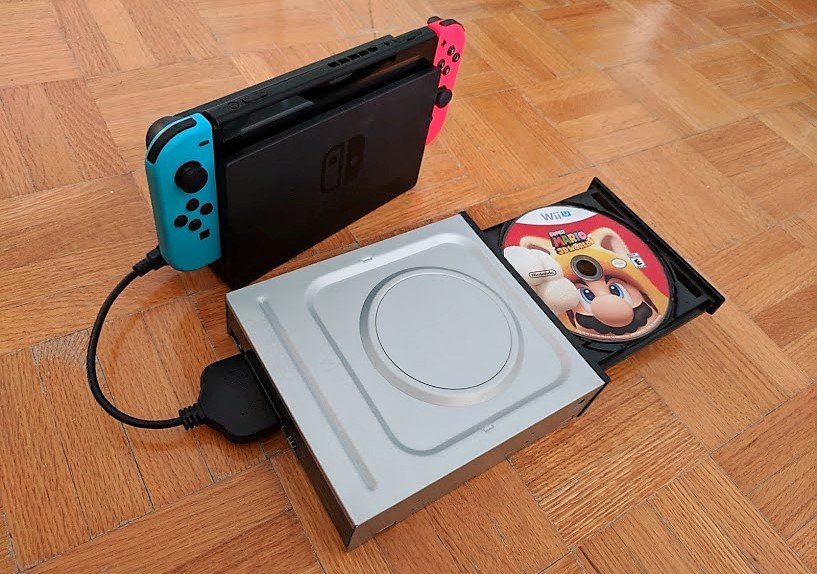
Unfortunately, you cannot directly play Wii games on a Nintendo Switch console because the Switch does not have the hardware compatibility.
Want to revisit some classic Wii titles? It’s a common question among Nintendo fans wanting to experience old favorites on their newer Switch. Many people wonder how to play Wii games on switch. The consoles are different and not designed to run games from each other.
This means you cannot insert a Wii disc into a Switch or download Wii games directly from the eShop. There are other options, however, if you want to enjoy those games again.

How to Play Wii Games on Switch
So, you’ve got a shiny Nintendo Switch and a mountain of classic Wii games gathering dust? You’re not alone! Many gamers have fond memories of wagging the Wii Remote and diving into amazing adventures. While the Switch is a fantastic console, it sadly doesn’t have a built-in way to play those old Wii discs. But don’t worry, this doesn’t mean you can’t enjoy those titles again! We’re here to guide you through the options, the challenges, and what you can actually do to get some of that Wii magic on your Switch.
Understanding the Compatibility Issue
Let’s get this straight from the beginning: the Nintendo Switch doesn’t have the hardware to play Wii game discs. There’s no disc drive, and the systems are built differently. It’s like trying to put a square peg in a round hole. The Switch uses game cartridges and digital downloads, while the Wii relied on discs. They’re just not compatible with each other at a physical hardware level. This is the biggest challenge and the main reason why there is no simple way to play wii games on switch. There are no easy hacks or any straightforward option offered from Nintendo.
Why the Hardware is Different
The Wii’s hardware was designed for a different type of gaming experience with its motion controls and disc-based media. The Switch, on the other hand, is built for portability and digital game distribution, with cartridges as a secondary option. The processors, graphics chips, and even the storage systems are completely different. The core architecture is very different. Trying to run a game designed for the Wii on the Switch would be like trying to run an old computer program on your phone – it just wouldn’t work.
Official Nintendo Options: What’s Available?
While you can’t directly play your old Wii discs, Nintendo has provided some ways to experience some beloved Wii titles on the Switch. These options are officially supported and are the safest routes.
Wii Games on Nintendo Switch Online
Nintendo Switch Online is a subscription service that lets you play classic games from older consoles like the NES, SNES and some Nintendo 64. They’ve started including games from the Game Boy, Game Boy Advance, and Nintendo DS as well. Sadly, at present, there are no Wii games available through the service. Nintendo may add some in the future, but for now, this isn’t an option for playing those old Wii games you’re craving. It is the most asked question from many users, if wii games will arrive on Nintendo online. Everyone is waiting for it.
- Pros: Official, easy to access, no extra hardware needed.
- Cons: No Wii games available yet, limited selection, requires subscription.
Wii Games as Re-Releases or Remasters
Nintendo has released certain Wii games as enhanced versions or remasters on the Switch. These are usually the popular games with upgrades such as better graphics, new features, or updated gameplay. These titles aren’t the exact same games you played on your Wii, but they provide a similar experience and often include additions. Some popular Wii games that have come to the Switch include:
- Mario Kart 8 Deluxe (an enhanced version of Mario Kart 8 on the Wii U, but it includes a lot of content originally from Wii’s Mario Kart)
- New Super Mario Bros. U Deluxe
- Metroid Prime Remastered
- Legend of Zelda: Skyward Sword HD
These releases are great because they provide better visuals and performance compared to playing them on original hardware. While not every Wii game will get this treatment, it’s a way to enjoy some titles on a modern console. It is a good alternative to keep the gaming experience fresh. Check the Nintendo eshop regularly for new game releases.
- Pros: Enhanced graphics and performance, official, easy to access.
- Cons: Limited selection, not all Wii games are available.
Emulation: A Technical Dive
Emulation is a more technical method of running games from one system on a different system. This method uses software to recreate the environment of the original console on another device, which then lets you run the games in that simulated environment. This process usually involves downloading specific applications. It’s the closest most users get to playing original Wii games on their modern hardware.
Understanding Emulators
An emulator is a program that mimics the hardware and software of one system so another system can run programs from the first system. Think of it as a translator that allows a Wii game to be read by your computer or another device. Emulation is a complex process because every piece of hardware and software has to be accurately simulated. You are trying to copy the entire system virtually. These emulators are developed by programmers in the community who reverse engineer the gaming hardware.
Dolphin Emulator
The most well-known emulator for Wii and GameCube games is called Dolphin. It’s a very powerful tool, and is available on Windows, Mac, and Linux systems. It does a good job running these games, and you can usually get a pretty good experience. The Dolphin emulator is the most commonly used emulator. It has been around for a long time and has a large user base. The emulator is continuously being developed by the programmers.
Emulating Wii Games on the Switch?
Now, for the tricky part, the Nintendo Switch is actually powerful enough to potentially run the Dolphin emulator, as it contains a NVIDIA Tegra chip which can easily do the emulations. However, running this on the Switch itself is very complicated and requires a modded console. This process is not easy and is not officially supported by Nintendo.
The Challenge of Homebrew
To install emulators and run games on a Nintendo Switch, you typically need to modify the console using “homebrew” software. This involves exploiting security loopholes in the Switch’s firmware to run unauthorized code. It’s not simple, and can potentially make your console unusable. You have to be very careful. Any type of errors while modding the console can cause permanent damage and brick your console.
Homebrewing also voids your warranty and could lead to Nintendo banning your console from online services, which means you can’t play online games anymore. You can also face legal actions in some regions, as this is against the terms of service of Nintendo. Make sure you are fully aware of the risks involved.
- Pros: Can potentially play most Wii games.
- Cons: Requires technical knowledge, risky, voids warranty, potential legal issues.
Alternatives to Emulation on Switch
Since directly emulating Wii games on the Switch can be difficult and risky, most people prefer using other options. Here are a few ways you can use emulation.
- Emulating on a PC: If you have a good computer, using the Dolphin emulator on your PC is a great option. The process is much simpler, and most PCs have enough power to run the games smoothly. You can also use the original Wii remotes using a USB sensor bar.
- Emulating on a phone/tablet: Powerful android phones and tablets can run Dolphin emulator. The process is very similar to the PC version, but performance depends on your device.
Legality of Emulation and ROMs
This is a very important aspect of the discussion. While emulation itself is technically legal, downloading and using game ROMs (digital game files) is where things get complicated. Here’s what you should know:
Copyright and Game ROMs
Game ROMs are copies of the games you purchase. Distributing and downloading ROMs of games you don’t own is a violation of copyright laws. Copyright laws protect the works of artists, which includes video games. This is usually seen as piracy and can lead to legal action. You should only play games which you own legally.
- Legal: Using the emulator itself.
- Illegal: Downloading ROMs of games you do not own.
- Gray Area: Creating ROM backups of games you own for personal use may vary on region.
Where to get games legally?
Always make sure that you buy games legally. There are several options that you can use to buy games legally. Here are some examples of where you can buy games.
- Physical copies: Buy original wii games from online marketplace or shops that sell used games.
- Digital Copies: Keep an eye out on Nintendo eshop for wii remasters and rereleases.
Realistic Expectations
It’s important to have realistic expectations when trying to play Wii games on the Switch. Here’s what to keep in mind:
No Easy Solution
There is no official and easy way to play Wii games directly on the Switch. It is not as simple as putting the disc on the console and start playing. Using the Dolphin emulator on a different device is the easiest way to enjoy the wii games. Do not fall for any tricks or offers that claim to play wii games directly on Switch, they are mostly scams or dangerous methods.
Time and Effort
If you decide to mod your Switch or set up an emulator on your PC, it will take time, effort, and some technical know-how. It is not a process that you can complete in a few minutes. Do not underestimate the complexity of the setup process. Research is the key, do some research and learn all about the process before starting.
Not a Perfect Experience
Even if you get things working, the experience might not be exactly the same as playing on the original Wii. Emulation can have glitches or performance issues on some games. And the remastered games may feel different, too, if there are changes to the gameplay. Be prepared for some differences from your original Wii gaming experience. Not all emulators provide a perfect emulation.
So, Can You Play Wii Games on the Switch?
The short answer is: not directly using your old game discs. You can’t put a Wii disc into your Switch and expect it to work. However, you can still experience some of the beloved Wii games. Some Wii titles have been re-released or remastered for the Switch. There’s also the option of emulating Wii games on your PC or other devices using the Dolphin emulator. But that requires a bit more technical knowledge and isn’t officially supported. Keep an eye out for news regarding Nintendo Online, they might add support for the wii games in the future.
Ultimately, the best way to play your old Wii games is to keep your original Wii console. That will give you a hassle-free experience. If you don’t have your old console, you should try playing these games on a PC. In conclusion, while there is no official straightforward option to play the wii games on Switch, there are some methods available that you can explore based on your comfort level. Be aware of the risks involved.
Using a Wii Emulator on my Nintendo Switch…
Final Thoughts
Playing Wii games on Switch requires utilizing homebrew software. You must install this software carefully. It allows you to emulate Wii titles.
Then, obtain legal copies of your Wii games. Transfer these files to your Switch’s storage. Finally, you can play them using the emulator.
Therefore, how to play wii games on switch is about installing homebrew and using an emulator.

