
Playing Wii games requires connecting the console to a TV, using the Wii Remote and Nunchuk controllers to interact with the games, and inserting game discs into the console.
Remember the joy of swinging a virtual tennis racket? Or perhaps you recall navigating through a fantastical land with a flick of your wrist? The Nintendo Wii brought motion controls to the forefront. So many want to learn how to play Wii games and have some old school fun.
The simplicity of the Wii made it accessible to everyone. This guide will provide a quick overview, so you can experience that same fun now. Grab your Wii Remote, it is time to play.

How to Play Wii Games
Ready to dive into the world of Wii gaming? It’s super fun, and not too tricky once you know the basics! This guide will walk you through everything you need to know, from setting up your console to playing your favorite games. We’ll cover different kinds of controls, how to understand the game screens, and even some tips and tricks to become a Wii whiz! Let’s get started on your Wii adventure!
Setting Up Your Wii Console
Before you can play any games, you need to get your Wii ready. Don’t worry, it’s easier than you think!
Connecting the Wii to Your TV
First, you’ll need to plug your Wii into your TV. Here’s how:
- Find the right cables: The Wii uses special cables that connect to the colored holes on the back of the console and your TV. These colors are usually red, white, and yellow for older TVs. Newer TVs often use a different kind of cable (Component cable) with red, green, and blue connectors, along with red and white for sound.
- Plug in the cables: Make sure you match the colors on the cable to the colors on the back of both your Wii and the TV. Plug the yellow cable (or the green one for component) into the video input, and the red and white cables into the audio inputs.
- Select the right input on your TV: Grab your TV remote and find the button that says “Input,” “Source,” or something similar. Use this to select the input your Wii is connected to. If you connected the component cables it might be ‘Component’ input, otherwise it’s the AV input.
Connecting the Power Supply
Next you’ll need to get the Wii power on.
- Find the power cable: Take the power adapter that came with your Wii.
- Plug into the wall: Plug the power adapter into a wall outlet and the other end into your Wii.
- Press the power button: Now you can press the power button on the Wii console, and it should light up. If you’ve done everything correctly, you’ll see the Wii Menu on your TV.
Setting Up the Wii Sensor Bar
The sensor bar is a very important part of the Wii. It works with the Wii Remote to track your movements! Here’s how to get it set up correctly:
- Plug it in: Plug the sensor bar into the back of the Wii, make sure you have the correct input.
- Place it correctly: The sensor bar needs to be either above or below your TV, and it should be facing where you’ll be sitting when you play. It needs to be in a straight line across from you so the controller can see it, don’t put it off to one side. Make sure nothing is blocking it.
Understanding the Wii Controller: The Wii Remote
The Wii remote, sometimes called the Wii-mote, is the main controller for the Wii. It looks like a TV remote, and it’s what you’ll use to play most Wii games. Let’s see what all the buttons do!
Wii Remote Buttons and Functions
The Wii remote has several buttons, each with a specific function. Here’s a quick run down:
- Power Button: The round button, usually found near the top center of the controller. Use this to turn the Wii remote on and off.
- A Button: Usually the big button in the center of the controller. The “A” button is mainly used to select actions in games, like confirming choices or firing. It’s like the ‘enter’ key for the Wii.
- B Button: Located on the back of the controller like the trigger on a toy gun. The “B” button is mostly used as an action or for holding onto things in a game. It is also used to move the screen when you have zoomed into a game screen.
- Plus (+) Button: The small, plus shaped button, It is used to start or skip in-game menus, or to start a new game.
- Minus (-) Button: The small, minus shaped button, it’s usually used to go back to a previous screen or to exit something in a game.
- Home Button: The little house button, It is used to pause a game and take you back to the Wii Menu where you can make changes to settings, or close a game down.
- 1 and 2 Buttons: The 1 and 2 buttons are often used for specific actions or special moves during games. They change from game to game so try them and see what happens.
- Directional Pad (D-pad): This is the + shape button at the top of the remote. This is mostly used to move through menus, move the character on screen or to use special items.
The Wii Nunchuck
Some games use the Wii Nunchuck, a small controller that connects to the bottom of the Wii Remote. It adds an extra dimension to gameplay by giving you another way to move and control actions in the game!
- Analog Stick: The stick is used to move characters in the game.
- Z Button: Usually used for an action, but can vary by game.
- C Button: Usually used for an action, but can vary by game.
Starting a Wii Game
Now you’ve setup all the controllers, and connected everything, its time to start a game!
Inserting the Game Disc
- Turn on your Wii: Make sure your console is on and you see the Wii Menu on your TV.
- Open the disc drive: Press the eject button to open the disc tray. It is usually near the front of the console.
- Place the disc inside: Put the game disc into the tray with the label facing up. Then carefully close the tray by pushing it back in.
- Wait for it to read: The Wii will read the disc and the game’s icon will show up in the Wii Menu.
Navigating the Wii Menu
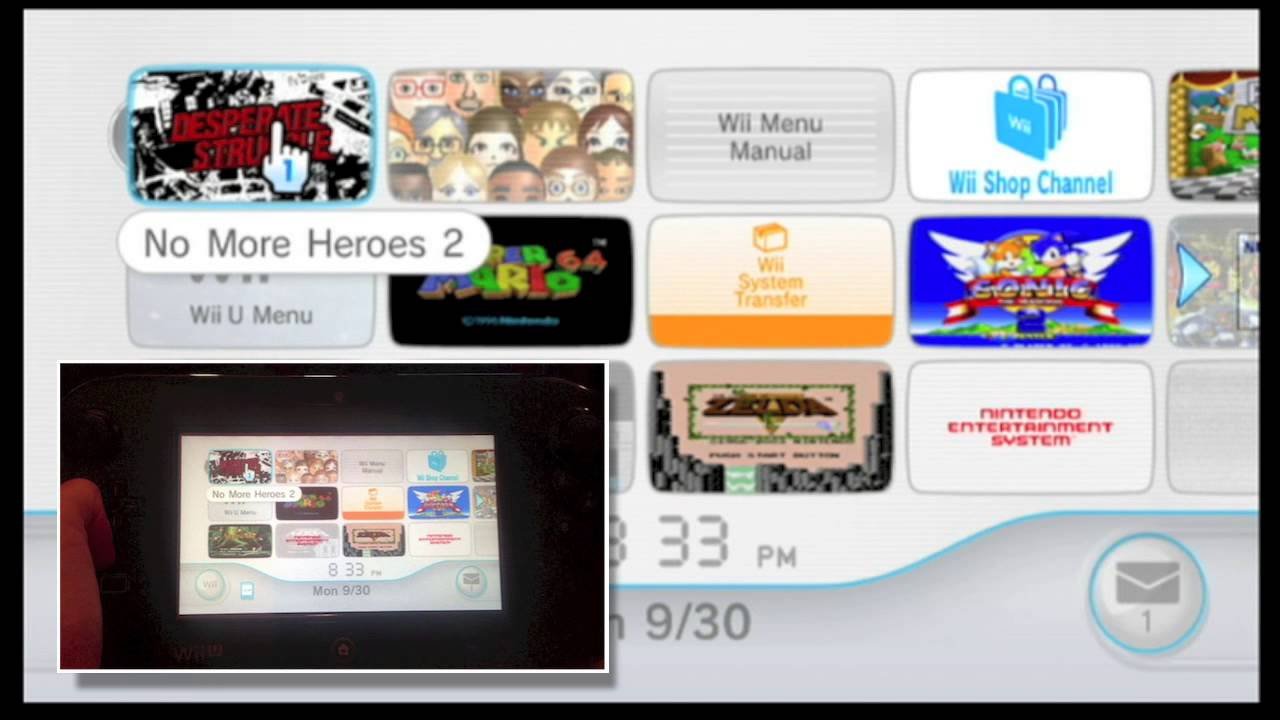
The Wii Menu is where you can access all your games, channels, and settings. When you first start up the Wii, you’ll see a screen with different squares, known as ‘channels’, like this:
- Using the Wii remote to select: Use the Wii Remote to point at the game icon and press the A button to start it.
- Moving the cursor: Move the Wii remote around to see how it controls the cursor on screen.
Starting Your Game
Once you’ve selected your game, just follow the on-screen instructions to begin playing. It might ask you to choose a character or start a new game.
Understanding Game Controls and Gameplay
Now you know how to start a game, let’s look at how to play it!
Basic Wii Game Controls
Most Wii games use motion controls which means moving the Wii Remote to control what happens on the screen. Here are some common things you will do:
- Pointing: Point the Wii Remote at the TV screen. Use the pointer to select items on screen. The pointer is usually a hand, or an arrow.
- Tilting: In some games you may need to tilt the remote. Try tilting it forward, back and sideways to see what happens.
- Swinging: Some games use a swinging motion, try swinging it like a sword or a baseball bat.
The basic controls are usually used in combination, or used together with the buttons on the remote for more complex actions.
Understanding In-Game Menus and Screens
When you play a Wii game, you’ll see different screens and menus. These often have words that may not make sense at first. Here’s what they usually mean:
- Main Menu: This is the first screen you see when you start the game. You may see options like ‘Start Game’, ‘Settings’, or ‘Options’.
- Pause Menu: In most games when you are playing you can pause the game by pressing the home button. When you do this you may see options like ‘Restart’, ‘Exit’, ‘Save’ or ‘Change Settings’.
- Health Bar: Usually displayed as hearts, a bar or a number, it shows how much health your character has left. When this gets to zero the game is usually over.
- Inventory: This usually shows what items your character has, and the items that you can use in the game.
Tips and Tricks for Playing Wii Games
Ready to step up your game? Here are some tips and tricks to make you a better Wii player:
Practice Makes Perfect
The more you play, the better you’ll get! Don’t get discouraged if you don’t get things right away. Try games that have easy modes, as well as normal or hard modes. When you start you can play easy mode and when you have got used to how the game controls then you can try harder modes.
Experiment with Controls
Don’t be afraid to try different things with your Wii Remote. You might find new ways to play, or be able to do a different action than you thought was possible.
Read the Instructions
Many games have instructions or tutorials that can teach you how to play. When you start a new game, pay attention to what the game tells you, so you don’t miss any important things to help you play.
Take Breaks
Playing for too long can make you tired and affect your gaming. Take a break if you start to get tired, stretch, and come back to it when you’re ready.
Adjust the Sensor Bar
If your Wii Remote doesn’t seem to be working right, try adjusting the position of the sensor bar. If it is not straight, or facing the right way, your controller may not be able to find it.
Check Your Controller Batteries
If your remote is not working, check the batteries to make sure they’re still working. If you have a rechargeable battery pack it may need to be charged.
Different Types of Wii Games
There are so many different types of Wii games that there’s sure to be something you’ll love. Here are some popular types:
Sports Games
These games let you play different sports like tennis, bowling, and baseball using the Wii Remote. They are often very active games which are fun to play with friends and family.
Adventure Games
Adventure games usually have a storyline that you follow, usually involving exploration, problem solving, and challenges. They often involve combat or puzzle solving.
Platform Games
These games are fun to explore, often running and jumping through a world, and usually collecting items.
Racing Games
In these games you drive cars, bikes, or other vehicles in a race to be the winner. You use the Wii remote to control the steering.
Party Games
Party games usually have lots of fun mini games that are easy for anyone to play, these are great fun for friends and family.
Puzzle Games
Puzzle games can be different things but most involve using your brain to solve them. They are good for helping improve your problem solving skills.
Common Issues and Troubleshooting
Sometimes things might not work perfectly when playing Wii. Here’s what you can do if something goes wrong:
Wii Remote Not Connecting
If your Wii remote is not connecting to the Wii, here’s what to do:
- Check batteries: Put in new batteries or make sure your rechargeable batteries are charged.
- Sync your remote: Open the battery compartment on the Wii Remote and press the red SYNC button. Then press the SYNC button on the console itself (usually on the front).
- Restart the console: If that didn’t work, turn off the console and turn it on again.
Game Not Loading
If your game disc won’t load, here’s what to try:
- Check the disc: Make sure the game disc doesn’t have any scratches or marks. If it does, try cleaning it.
- Restart the console: Try turning off your Wii and turning it back on again.
- Try a different game: See if another game works to see if the problem is with that disc, or with the Wii itself.
TV Screen is Black
If all you see is a black screen:
- Check the input: Make sure the TV is set to the correct input for your Wii.
- Check the cables: Make sure all the cables are plugged in correctly.
- Try a different cable: It might be a problem with your cable, so try a different one.
Playing Wii games is a great way to have fun, stay active and play with your friends and family. With a little practice, you’ll become a Wii pro in no time!
FULL GUIDE to Play Games on Wii (USB Loader GX Tutorial Working 2024)
Final Thoughts
To play Wii games, simply connect the console to your TV and power it on. Insert the game disc, and then use the Wii Remote and Nunchuk for control. Remember to sync the controllers first if you have not done so.
Navigating menus is straightforward with the D-pad. The A button often selects options or confirms actions. Once you’re in the game, the control scheme will depend on the specific game itself. Therefore, knowing how to play Wii games means getting familiar with these basic principles.

