
To publish game on Steam, you need to enroll in the Steamworks program, pay a fee, prepare your game’s store page, and build/upload your game files.
So you’ve finished creating your game? Congratulations! Now, getting it in front of players is the next step, and many developers dream of seeing their creation on Steam. Understanding how to publish game on steam can feel like a challenge.
The process involves several crucial steps, from initial sign-up to creating a compelling store presence and submitting your build. This journey requires attention to detail but, with the right guidance, you can make it happen.

How to Publish Your Game on Steam
So, you’ve poured your heart and soul into making a fantastic video game. Congratulations! Now, you’re probably wondering, “How do I get this thing onto Steam?” It’s a big question, but don’t worry. This guide will walk you through all the necessary steps, just like leveling up in your favorite game! Getting your game on Steam is an exciting journey, but it does take some preparation and effort. We’ll break it down into easy-to-understand sections, so you can navigate the process with confidence.
Getting Started: The Foundation
Before you even think about clicking that “publish” button, you need to make sure your game is ready for the world. This means more than just a working game; it needs to be polished and professional. Here’s what you should focus on:
Game Quality and Polish
This is the most important part. Is your game fun? Is it bug-free? Does it have good graphics and sound? Players on Steam have high expectations. They want games that are enjoyable and well-made. Before you think about publishing, make sure you’ve done plenty of testing, gathered feedback, and fixed as many issues as possible. Here are some questions you should consider:
- Does the game work smoothly?
- Are there any big bugs or glitches?
- Is the game engaging and fun to play?
- Are the graphics clear and understandable?
- Does the sound enhance the experience?
Setting up Your Steamworks Account
The first step into making your game available on Steam is creating a Steamworks account. Steamworks is the developer portal where you’ll manage everything related to your game. Think of it as the control center for your Steam operations. This process requires some real-world information. Here is what you will need:
- Business Information: If you have a game studio name or registered company.
- Tax Information: Steam needs this information to ensure you can get paid properly. This might be the trickiest part, but make sure you get it right to avoid future issues.
- Bank Account Information: Where Steam will deposit the money you earn.
Once you provide the required information, Valve, the company behind Steam, will need to verify it. After verification is complete, you will need to pay the Steam Direct fee.
Steam Direct Fee
To publish on Steam, you’ll need to pay a non-refundable fee, usually referred to as the Steam Direct fee. This fee helps Steam manage the large number of submissions they receive. The fee is there to make sure only serious developers are taking advantage of the platform. You need to pay this before you can actually upload your game. The fee usually varies and it’s not a small amount, so make sure you factor that into your development budget. After you’ve paid the fee, your Steamworks account is set, and you’re ready to proceed further.
Preparing Your Game Page
Okay, now it’s time to create the game page that players will see on Steam. This is like the game’s store front. It’s crucial to make a good first impression. Here’s how to build an appealing game page:
Captivating Store Graphics
Your game’s page needs more than just words. People are visual. The images and videos you use are extremely important. Here’s what you need:
- Capsule Images: These are the small images that show up in Steam’s store. They need to be eye-catching and accurately represent your game. You will need different sizes.
- Header Image: This is the big image that appears at the top of your game page. Make it look like a poster for your game.
- Screenshots and Videos: These are the best way to show your game in action. Select the best visuals and the most appealing gameplay.
Remember that your game’s graphics and visuals should always communicate what it is like to play your game.
Compelling Game Description
The words you use to describe your game are almost as important as the visuals. You need to tell people what makes your game unique and fun. Here’s how:
- Short Description: This is a very short piece that shows when people scroll through the store. Make it punchy and exciting. Think of it as a one-liner that tells players why they should click on your game.
- Long Description: This is where you can really sell your game. Tell players about its story, features, and why they should buy it. Be clear, but also make it sound interesting. Don’t be afraid to add some excitement to your description.
- Key Features List: Highlight the most important things that your game offers. Use bullet points to make this section easy to read.
Selecting Appropriate Tags
Tags help people find your game when they’re searching Steam. Choosing the right tags is critical to being discovered. Think about what kind of game yours is. Is it a puzzle, an adventure, a strategy, or a combination of genres? Make sure you pick tags that fit your game. Here are some examples:
- Genre Tags: (e.g., Action, Adventure, RPG, Puzzle)
- Theme Tags: (e.g., Fantasy, Sci-Fi, Horror, Historical)
- Feature Tags: (e.g., Multiplayer, Singleplayer, Open World, Controller Support)
Uploading Your Game Build
Now you have all the information filled, it’s time to move on to the technical part. This means getting your actual game files onto Steam. This can sound complicated, but with the right tools and a clear path, you will be all right.
Using the Steamworks SDK
The Steamworks SDK (Software Development Kit) is like a toolkit that allows your game to communicate with Steam. It has all the bits and pieces that you will need to interact with Steam’s system. It provides essential tools and functionalities for your game. Here’s what you need to do:
- Download the SDK: The Steamworks SDK can be downloaded from your Steamworks account.
- Integrate the SDK: Your game code needs to use the Steamworks API (Application Programming Interface) to connect with Steam’s features such as achievements, leaderboards, etc.
- Create a Build: Use your game engine (like Unity or Unreal) to create a build of your game to upload to Steam.
Uploading Your Game Files
Once you have prepared your game build and integrated the SDK, here’s how to upload it to Steam:
- SteamPipe: Steam uses a system called SteamPipe for uploading content. You will need to use command lines to upload the files.
- Depots: Think of depots as containers for your game’s different files. You can set up multiple depots for various operating systems or languages.
- Testing: Before you make your game public, you can test it with a small group of people using a Steam internal testing build. This is important to catch any last-minute problems.
Pricing and Launch Strategy
Getting the pricing and launch right is just as important as the game itself. How much you charge and when you release are key factors that will affect your sales and success.
Choosing the Right Price
Deciding how much to charge for your game is tricky. You want to make money, but you also want to encourage people to buy it. Here are some things to think about:
- Research: See how much similar games are selling for on Steam. This will give you a good benchmark.
- Value: Consider the length and quality of your game. A longer game with lots of content might be worth more than a shorter one.
- Sales: You can run sales events to attract new players. Make sure your price allows for discounts.
Think about running a launch discount to encourage early adoption of your game.
Planning Your Launch Date
When you launch your game can make a big difference. It’s not always good to release on the same day as a big AAA title. Here’s what you should keep in mind:
- Avoid Crowded Dates: Try not to launch during a time when many other games are being released. If a lot of other games are launching on the same day, your game can easily get lost.
- Holidays: Holidays are typically a good time to launch, but consider if people will be playing your game or doing something else.
- Marketing: Plan your launch to line up with your marketing campaigns. You might want to build up some hype before the big day.
Marketing Your Game
Creating a good game and putting it on Steam isn’t enough. You also need people to know that your game exists. Marketing can feel daunting, but it’s a must for your game’s success.
Building a Community
Create a community of fans around your game, even before it launches. This is something that many indie developers do. Start by sharing the development progress of your game. Connect with your audience on various platforms.
- Social Media: Use platforms like Twitter, Instagram, and Facebook to share updates and connect with players.
- Discord Server: Create a Discord server where people can chat and get involved in the game community.
- Forums and Communities: Engage on Reddit and other online gaming forums. Make sure you are following the rules of the platform.
Remember, good communication is key to having a strong community.
Reaching Out to the Press
Getting some coverage of your game in the media can help you increase the awareness and recognition of your game. Here’s how to approach that:
- Press Kits: Put together a media kit that includes screenshots, videos, and a game description.
- Contacting Journalists: Reach out to gaming journalists and bloggers. Make sure to research who covers games like yours.
- Demo Versions: Send out a demo version of your game so journalists can review it.
Steam’s Marketing Tools
Steam offers some marketing tools that you can use to get your game noticed. Here’s a look at some of them:
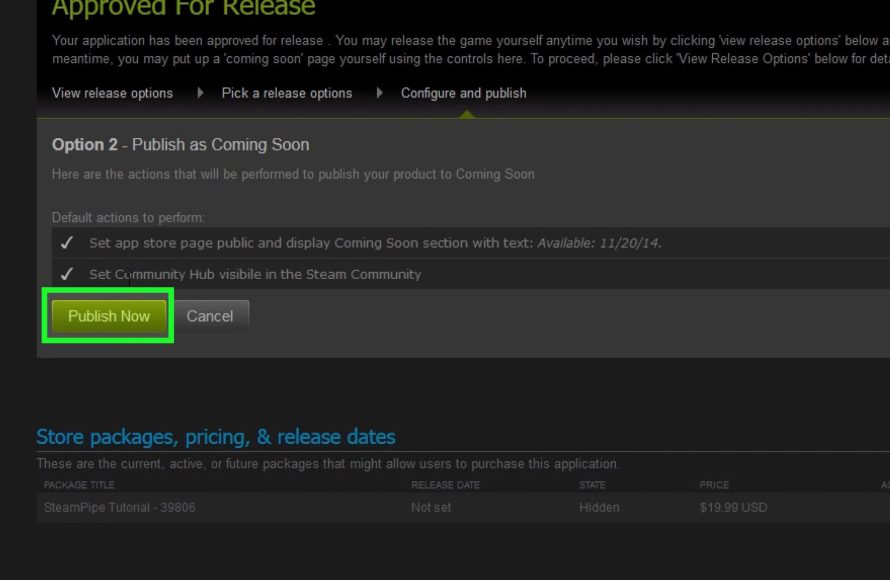
- Coming Soon Page: Set up a “Coming Soon” page to build excitement before release.
- Steam Events: Participate in Steam events to get your game featured on the front page.
- Visibility Rounds: Steam will show your game to more players when you release the game.
Make sure you are taking advantage of these resources. Steam will help your game reach an audience if you use their tools effectively.
After Launch: Sustaining Success
The work doesn’t stop after your game is released! The launch is just the beginning. You must continue to work on the game and listen to your audience. Keep your community engaged.
Monitoring Feedback and Updates
Listen to what players are saying and respond to their suggestions. Use the information you get to make your game better.
- Steam Reviews: Pay attention to the reviews players leave on your game page.
- Community Feedback: Respond to discussions and listen to the ideas of your community.
- Updates and Patches: Keep releasing updates with bug fixes and new content.
Running Sales and Promotions
Sales and promotions help keep your game in the spotlight. Steam runs various sales events throughout the year. Participating in them will help you get more attention.
- Seasonal Sales: Steam hosts major sales during holidays and other occasions.
- Weekend Deals: Offer discounts for a limited time on weekends.
- Bundles: Combine your game with others to offer more value to customers.
Make sure your discounts are appealing enough to encourage more people to try your game.
Long-Term Planning
Think about the future of your game. What is your long-term vision? How will you grow and continue engaging your player base?
- Content Updates: Plan for future content updates that add new gameplay or features.
- Community Engagement: Regularly engage with your community to keep your game alive.
- New Platforms: Look into launching your game on other platforms when it makes sense.
Publishing a game on Steam is a challenging process, but it’s also incredibly rewarding. By following these steps, you can increase your chances of success. From preparing your game and setting up the storefront to actively marketing and continuing development, every step requires care and attention. Don’t forget to learn as you go and keep listening to your player base. Remember that perseverance, hard work, and passion for games will always be your greatest assets.
How to Publish Your Game on Steam in 2022
Final Thoughts
To publish a game on Steam, you first need to become a Steamworks partner. This involves a signup process, payment of a fee, and tax information. Prepare your game build and store page content.
Then, configure your game’s Steam settings. This includes things like pricing and supported languages. After proper testing and review, you can finally release your title. The process of how to publish game on steam can seem daunting, but these are the basic steps.

