
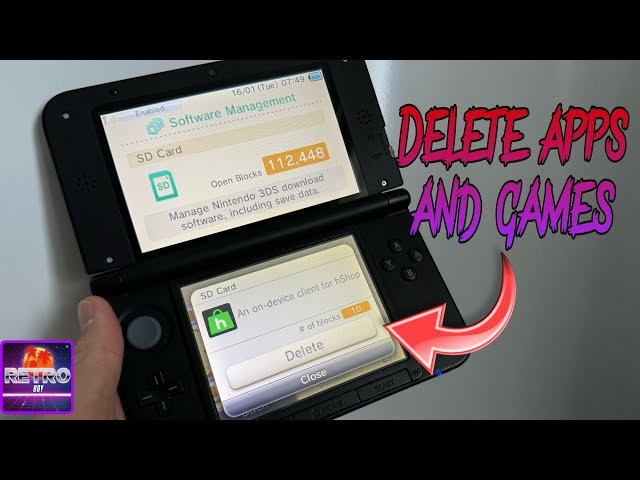
No, uninstalling hShop does not delete 3DS games you’ve installed.
Many 3DS users wonder, does uninstalling hshop delete 3ds games? It’s a valid concern, especially after investing time setting up your device. This question often arises when people are managing their homebrew apps.
The good news is that hShop primarily acts as an installer and does not manage the game files themselves. Games you’ve downloaded remain on your SD card even after you remove hShop. You can safely uninstall the app without losing your game library.

Does Uninstalling hShop Delete 3DS Games?
Okay, let’s get right to the heart of the matter. You’ve got your Nintendo 3DS, maybe you’ve been using hShop to get some games, and now you’re wondering: if I uninstall hShop, are all those games I got going to disappear? It’s a super common question, and it’s smart to be curious. We’re going to explore this topic in detail so you feel comfortable and know exactly what to expect.
Understanding hShop and Game Installation
First, let’s make sure we all understand what hShop is and how it works with your 3DS games. Think of hShop like a special online store, but instead of buying physical game cartridges, you are downloading the game files directly to your 3DS. When you download a game using hShop, it’s not just some temporary thing; the game files are installed onto your 3DS’s storage, which is usually an SD card.
How 3DS Games are Stored
3DS games, whether you get them from a cartridge, the official Nintendo eShop, or through hShop, are stored as files on your 3DS system. These files include all the game’s data, such as the characters, levels, music, everything that makes the game playable. When you download a game from hShop, the game files get placed onto your SD card. These files are pretty similar to those downloaded from the official Nintendo eShop. Once installed, the games appear as icons on your 3DS’s Home Menu, just like any other game.
The Role of the SD Card
Your 3DS’s SD card is essential for keeping your digital games safe. It’s where the game data lives. When you play a game, your 3DS reads the data from the SD card and allows you to enjoy the experience. Understanding that games are on the SD card, just like your photos or music, will help you understand what happens with hShop uninstallation.
hShop: More of a Helper Than a Keeper
It’s important to realize that hShop is just a tool. It’s not actually holding onto your games. It helps you find and download those game files, but once those files are on your 3DS, hShop’s job is done. Think of it like this: hShop is like a delivery truck that drops off a package (the game files) at your house (your 3DS). Once the package is inside, the truck drives away. The package stays safe in your house. hShop’s role in your 3DS’s game library is to get the games there, not to keep them there.
What Happens When You Uninstall hShop?
Now for the big question: if you uninstall hShop, what happens to your games? The good news is that uninstalling hShop does not delete your 3DS games. The games you downloaded through hShop remain safely on your SD card. Remember, hShop is just the method you used to get them. It is no longer directly needed for the games to function, just like when you’ve downloaded a file to your computer, the file stays even if you stop using the program that you used to download it.
Why the Games Stay
The reason your games don’t go away is simple: they are stored directly on the SD card as game files, not as part of the hShop application. When you uninstall hShop, you’re removing the application itself, the store interface from which you downloaded games. You are not removing the game files. These files are completely separate from the program you used to get them, so they’re safe. Your 3DS treats them just like any other games you might have downloaded from the eShop.
The Difference Between hShop and the eShop
You might be thinking, “Well, what if I uninstalled the eShop? Would my games disappear then?” That’s a great question! The official Nintendo eShop is actually part of your 3DS system software, so you can’t uninstall it. But, even if you could, similar to hShop, the games you have downloaded from the eShop would remain unaffected, as they are saved to your SD card. The concept is the same.
How to Check If Your Games are Safe
To double-check that your games are safe after uninstalling hShop, follow these steps:
- Turn on your 3DS: Make sure your 3DS is powered up.
- Go to the Home Menu: This is where you see all your game icons.
- Look for Your Games: See if the game icons of the games you have downloaded from hShop are still there. If they are present, then the games have not been removed.
- Start a Game: Select a game you downloaded using hShop and play it. If it starts without any issues, then everything is working fine, and the games are safely stored on the SD card.
Important Considerations When Using hShop
While your games are safe when you uninstall hShop, there are a few important things you should consider when you’re using it:
SD Card Space
Digital games can take up a lot of space on your SD card. Always make sure you have enough space. If your SD card is full, you might not be able to install new games, and sometimes you may have problems with updates for existing ones.
- Check Your Space: Go to your 3DS system settings to see how much free space you have on your SD card.
- Free Up Space if Needed: If you are low on space, you may need to remove games that you don’t play or get a larger SD card.
Game Updates
Some games have updates that you might need to install for the best gaming experience. If you are using a custom firmware version of 3DS, hShop will allow you to update your games. But if you remove the hShop, you will need another source for your games updates.
- Updates are Important: Always try to keep your games updated for the most stable performance and new content.
- Look for Update Resources: If you’ve uninstalled hShop, you’ll need to find alternative methods for updating your games.
Potential Conflicts With Other Software
While using hShop doesn’t usually cause issues with other software, make sure to be careful and understand how any changes you make might affect your 3DS.
- Compatibility: Be aware that some modifications to your 3DS can sometimes have unexpected effects.
- Do Your Research: If you are unsure about a procedure, research it before proceeding. There are lots of great resources online to help you make informed decisions.
What if You Delete Game Files Accidentally?
Okay, so what if you accidentally delete the game files from your SD card? This is different from uninstalling hShop. If you delete the game files, you will lose the game. Let’s talk about what you should do if that happens.
Accidental Deletion
Sometimes accidents happen, and you may inadvertently delete game files from your SD card. When this occurs, the game icon might disappear from your Home Menu or might not start up properly. This means the game data is gone, and your 3DS no longer has the files needed to play the game.
How to Recover Deleted Games
If you accidentally deleted the game files, do not panic. Here are some options that you may want to consider:
- Check Your Backups: If you made a backup of your SD card, you can restore your games from the backup. Regular backups are a good idea to avoid this sort of situation.
- Re-download if Possible: If you got the game from hShop, you will have to re-download your game from hShop.
- Use a Data Recovery Program: Sometimes you can use data recovery software on your computer to try and recover accidentally deleted files from your SD card. But this is not always successful.
Tips to Keep Your 3DS Games Safe
To make sure you don’t lose any of your games on your 3DS, here are some helpful tips to keep them safe:
Regular Backups
Making regular backups of your SD card is one of the best things you can do to safeguard your games. If anything goes wrong, you will have a backup ready to restore. You will need an SD card reader and computer for this.
- Copy Files to Computer: Periodically copy all the files from your SD card to your computer. This creates a backup in case something goes wrong.
- Store Backups Safely: Store your backups in a safe place, like a separate hard drive, cloud storage, or a USB drive.
Be Careful When Deleting Files
Be extra cautious when you are deleting files on your 3DS or your SD card. Always double-check before deleting anything to avoid accidentally removing game files.
- Read Carefully: Before deleting, make sure you are deleting the correct files and understand the implications of the deletion.
- Slow Down: When working with files, slow down and take your time, so you don’t accidentally delete something important.
Keep Your SD Card Clean
Avoid letting your SD card get dirty, as this can cause errors or damage. When you remove the SD card from your 3DS, store it in a safe place where it won’t get damaged.
- Proper Storage: Keep your SD card in a case, or at the very least, do not let it get loose.
- Handle With Care: Always handle your SD card with clean and dry hands.
Okay, here is the main body of the article as requested:
Does Uninstalling hShop Delete 3DS Games?
Okay, let’s get right to the heart of the matter. You’ve got your Nintendo 3DS, maybe you’ve been using hShop to get some games, and now you’re wondering: if I uninstall hShop, are all those games I got going to disappear? It’s a super common question, and it’s smart to be curious. We’re going to explore this topic in detail so you feel comfortable and know exactly what to expect.
Understanding hShop and Game Installation
First, let’s make sure we all understand what hShop is and how it works with your 3DS games. Think of hShop like a special online store, but instead of buying physical game cartridges, you are downloading the game files directly to your 3DS. When you download a game using hShop, it’s not just some temporary thing; the game files are installed onto your 3DS’s storage, which is usually an SD card.
How 3DS Games are Stored
3DS games, whether you get them from a cartridge, the official Nintendo eShop, or through hShop, are stored as files on your 3DS system. These files include all the game’s data, such as the characters, levels, music, everything that makes the game playable. When you download a game from hShop, the game files get placed onto your SD card. These files are pretty similar to those downloaded from the official Nintendo eShop. Once installed, the games appear as icons on your 3DS’s Home Menu, just like any other game.
The Role of the SD Card
Your 3DS’s SD card is essential for keeping your digital games safe. It’s where the game data lives. When you play a game, your 3DS reads the data from the SD card and allows you to enjoy the experience. Understanding that games are on the SD card, just like your photos or music, will help you understand what happens with hShop uninstallation.
hShop: More of a Helper Than a Keeper
It’s important to realize that hShop is just a tool. It’s not actually holding onto your games. It helps you find and download those game files, but once those files are on your 3DS, hShop’s job is done. Think of it like this: hShop is like a delivery truck that drops off a package (the game files) at your house (your 3DS). Once the package is inside, the truck drives away. The package stays safe in your house. hShop’s role in your 3DS’s game library is to get the games there, not to keep them there.
What Happens When You Uninstall hShop?
Now for the big question: if you uninstall hShop, what happens to your games? The good news is that uninstalling hShop does not delete your 3DS games. The games you downloaded through hShop remain safely on your SD card. Remember, hShop is just the method you used to get them. It is no longer directly needed for the games to function, just like when you’ve downloaded a file to your computer, the file stays even if you stop using the program that you used to download it.
Why the Games Stay
The reason your games don’t go away is simple: they are stored directly on the SD card as game files, not as part of the hShop application. When you uninstall hShop, you’re removing the application itself, the store interface from which you downloaded games. You are not removing the game files. These files are completely separate from the program you used to get them, so they’re safe. Your 3DS treats them just like any other games you might have downloaded from the eShop.
The Difference Between hShop and the eShop
You might be thinking, “Well, what if I uninstalled the eShop? Would my games disappear then?” That’s a great question! The official Nintendo eShop is actually part of your 3DS system software, so you can’t uninstall it. But, even if you could, similar to hShop, the games you have downloaded from the eShop would remain unaffected, as they are saved to your SD card. The concept is the same.
How to Check If Your Games are Safe
To double-check that your games are safe after uninstalling hShop, follow these steps:
- Turn on your 3DS: Make sure your 3DS is powered up.
- Go to the Home Menu: This is where you see all your game icons.
- Look for Your Games: See if the game icons of the games you have downloaded from hShop are still there. If they are present, then the games have not been removed.
- Start a Game: Select a game you downloaded using hShop and play it. If it starts without any issues, then everything is working fine, and the games are safely stored on the SD card.
Important Considerations When Using hShop
While your games are safe when you uninstall hShop, there are a few important things you should consider when you’re using it:
SD Card Space
Digital games can take up a lot of space on your SD card. Always make sure you have enough space. If your SD card is full, you might not be able to install new games, and sometimes you may have problems with updates for existing ones.
- Check Your Space: Go to your 3DS system settings to see how much free space you have on your SD card.
- Free Up Space if Needed: If you are low on space, you may need to remove games that you don’t play or get a larger SD card.
Game Updates
Some games have updates that you might need to install for the best gaming experience. If you are using a custom firmware version of 3DS, hShop will allow you to update your games. But if you remove the hShop, you will need another source for your games updates.
- Updates are Important: Always try to keep your games updated for the most stable performance and new content.
- Look for Update Resources: If you’ve uninstalled hShop, you’ll need to find alternative methods for updating your games.
Potential Conflicts With Other Software
While using hShop doesn’t usually cause issues with other software, make sure to be careful and understand how any changes you make might affect your 3DS.
- Compatibility: Be aware that some modifications to your 3DS can sometimes have unexpected effects.
- Do Your Research: If you are unsure about a procedure, research it before proceeding. There are lots of great resources online to help you make informed decisions.
What if You Delete Game Files Accidentally?
Okay, so what if you accidentally delete the game files from your SD card? This is different from uninstalling hShop. If you delete the game files, you will lose the game. Let’s talk about what you should do if that happens.
Accidental Deletion
Sometimes accidents happen, and you may inadvertently delete game files from your SD card. When this occurs, the game icon might disappear from your Home Menu or might not start up properly. This means the game data is gone, and your 3DS no longer has the files needed to play the game.
How to Recover Deleted Games
If you accidentally deleted the game files, do not panic. Here are some options that you may want to consider:
- Check Your Backups: If you made a backup of your SD card, you can restore your games from the backup. Regular backups are a good idea to avoid this sort of situation.
- Re-download if Possible: If you got the game from hShop, you will have to re-download your game from hShop.
- Use a Data Recovery Program: Sometimes you can use data recovery software on your computer to try and recover accidentally deleted files from your SD card. But this is not always successful.
Tips to Keep Your 3DS Games Safe
To make sure you don’t lose any of your games on your 3DS, here are some helpful tips to keep them safe:
Regular Backups
Making regular backups of your SD card is one of the best things you can do to safeguard your games. If anything goes wrong, you will have a backup ready to restore. You will need an SD card reader and computer for this.
- Copy Files to Computer: Periodically copy all the files from your SD card to your computer. This creates a backup in case something goes wrong.
- Store Backups Safely: Store your backups in a safe place, like a separate hard drive, cloud storage, or a USB drive.
Be Careful When Deleting Files
Be extra cautious when you are deleting files on your 3DS or your SD card. Always double-check before deleting anything to avoid accidentally removing game files.
- Read Carefully: Before deleting, make sure you are deleting the correct files and understand the implications of the deletion.
- Slow Down: When working with files, slow down and take your time, so you don’t accidentally delete something important.
Keep Your SD Card Clean
Avoid letting your SD card get dirty, as this can cause errors or damage. When you remove the SD card from your 3DS, store it in a safe place where it won’t get damaged.
- Proper Storage: Keep your SD card in a case, or at the very least, do not let it get loose.
- Handle With Care: Always handle your SD card with clean and dry hands.
Understanding the Legalities of hShop
It is important to briefly discuss the legal considerations surrounding hShop and the distribution of games through it. While we are focused on technical aspects of uninstallation, a user must be aware about these legal aspects. hShop distributes games without the permission of the copyright holders. This means that the games provided through hShop have not been bought from the creators of the game, and this in turn raises copyright infringement concerns. The people distributing these copyrighted games are not doing so with permission from the original copyright holders.
Ethical Considerations
Apart from the legal issues, there are also the ethical considerations. Downloading a game without paying the developer and publisher means they don’t receive payment for their work. These games can take years to develop, and require huge teams and efforts. Avoiding paying for these games can hurt the gaming industry and the developers who make these games.
Risks of Using Unofficial Sources
When you’re using sources like hShop, you’re also taking risks. Files that you obtain from unofficial sources can sometimes include malicious software like viruses or other forms of malware, which can harm your 3DS device or even potentially your computer. It is very important to be aware of these risks.
Alternative Methods for Getting Games
If you have some concerns about hShop, or just want to consider other ways to get games for your 3DS, there are some options to consider.
Official Nintendo eShop
One of the safest ways to get games is directly from the official Nintendo eShop. Though the eShop has closed for the 3DS, it may still be possible to download the games that you previously purchased from it. This ensures that you are getting a clean and safe version of the game.
Physical Game Cartridges
If you can still find them, physical cartridges are an old-school method of playing your 3DS games. These do not come with the risk of file corruption from unofficial sources, and the physical copies are collectable.
Purchasing Games from Online Retailers
Many online retailers still offer digital games for various platforms, including the 3DS. It is a good practice to check if any online retailers are offering the 3DS games that you are looking for.
Thinking About the Future of Your 3DS
As your 3DS gets older, the way you use it may change. Here are some things to consider for the future:
Maintenance of Your 3DS
Taking good care of your 3DS will keep it working for longer. This includes keeping it clean, storing it safely, and avoiding letting it overheat.
- Clean Regularly: Clean your 3DS screen and buttons with a soft cloth.
- Avoid Extreme Temperatures: Don’t leave your 3DS in direct sunlight or very cold places.
- Store Carefully: Keep your 3DS in a safe spot when you’re not using it.
Exploring Custom Firmware Options
As the community has become more familiar with 3DS system, some users explore custom firmware. These modified versions of the 3DS software can allow you to do more with your console. Be aware that these changes may not be supported by Nintendo and can have unexpected consequences, so do this with caution.
Connecting With Other 3DS Fans
You can always find other 3DS fans online in the community forums. It is possible to find helpful resources, tricks, and guides, along with people who can share your love for the console.
So, to bring it all together, uninstalling hShop is not going to make your games vanish. They are safely tucked away on your SD card, waiting for you to play them. Just remember to take good care of your SD card, back up your games, and stay aware of the legal and ethical considerations regarding the use of unofficial sources. With that in mind, enjoy your games and your trusty 3DS!
How to Delete 3DS Games
Final Thoughts
No, uninstalling hShop does not delete 3DS games. The app manages downloads but does not control your already installed game files. Your game data will remain on your console.
Uninstalling hShop will only remove the application itself. The installed games and their save data are kept separate and safe. Therefore, your installed games stay intact.
Therefore, the answer to ‘does uninstalling hshop delete 3ds games’ is definitively no. You can safely uninstall hShop without worry of losing your game library.

