
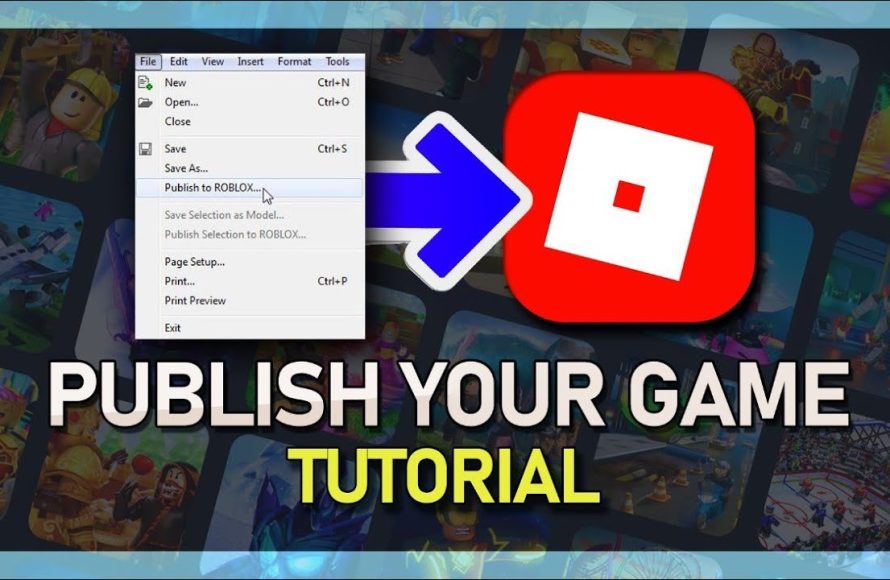
To publish your game on Roblox, you first need to create the game within Roblox Studio, then navigate to the ‘File’ menu, select ‘Publish to Roblox,’ and choose your game or create a new one.
Ever poured hours into crafting your dream Roblox experience and wondered what’s next? The burning question for many creators is precisely how to publish your game on Roblox, and get it into the hands of players. It’s exciting, almost like sharing your art with the world.
This process is actually quite straightforward once you familiarize yourself with the interface of Roblox studio. This guide will show you the steps you need to take to make your game playable by everyone.

How to Publish Your Game on Roblox
So, you’ve poured your heart and soul into creating an awesome game on Roblox. You’ve built worlds, scripted amazing interactions, and designed characters that your friends are already obsessed with. Now, it’s time to share your creation with the world! Publishing your game on Roblox might seem a little tricky at first, but don’t worry. It’s a straightforward process once you know the steps. This guide will walk you through everything you need to know to get your game live and ready for players to enjoy.
Preparing Your Game for Publishing
Before you hit that publish button, there are a few important things you should do to make sure your game is ready for its big debut. Think of it like getting your room tidy before inviting friends over – you want everything to look great and work perfectly!
Testing, Testing, 1, 2, 3!
The absolute first thing you need to do is play your game. A lot. We mean a whole bunch. Have your friends play it too. You want to make sure everything works as it should. Are there any bugs? Are there any places where you can fall off the map? Do all the scripts work? Testing helps you find and fix these problems before other players do. Here are some things to look for while testing:
- Gameplay issues: Does the game play smoothly? Are the rules clear? Is it fun?
- Bugs and errors: Are there any glitches or unexpected things happening? Do any scripts cause errors?
- Map errors: Can players get stuck? Are there holes in the map?
- User Interface: Is it easy to understand and navigate?
- Performance: Does it run smoothly on different devices? Does it lag too much?
If possible, test the game on different devices like a phone, a tablet, and a computer to ensure a good experience for all players.
Creating a Great Icon and Thumbnail
Your game’s icon and thumbnail are the first things players will see when browsing Roblox, so it’s important to make them eye-catching! Think of them as the cover of a book or the poster for a movie. They need to draw people in and make them curious about your game. Avoid blurry or low quality images.
- Icon: This is a small square image that represents your game in search results. It should be simple, clear, and recognizable even at a small size.
- Thumbnail: This is a larger rectangular image shown on your game’s page. You can choose to use a still image, or you can add a custom video if you are a Roblox Premium member. This is where you can show off more of your game’s cool features and exciting gameplay!
Use images that are brightly lit, and clearly show what the game is about. Add a logo or text if appropriate. You could use a screenshot from your game, or you can use graphics software to create a design. Be sure to follow Roblox’s image guidelines. If you have the skills, making it yourself is best, but you can hire a graphic artist for a small fee.
Game Title and Description
Giving your game an amazing title and description is also important because these tell the player what your game is all about. Here’s how to write them correctly:
- Game Title: This should be short, catchy, and easy to remember. It should also give a hint about what the game is about. Try to make the name unique, instead of calling it “Obby 1” when you have made a unique game.
- Game Description: This is where you give players more detail about what to expect in your game. Use clear and simple language. Be sure to mention any special features, what the objective is, and why they should play your game. Make it exciting and tell a story!
You want to make sure your title and description are accurate because no one likes to be tricked. You want players to know exactly what they are getting themselves into.
Navigating Roblox Studio for Publishing
Okay, your game is tested, your icon looks amazing, and you have the best title and description ever. Now it’s time to dive into Roblox Studio for the publishing part.
Saving Your Game
Before you do anything else, make sure your game is saved. Click “File” in the top left corner of Roblox Studio. Then click “Save to Roblox”. This is important! Always save before publishing.
Publishing to Roblox
Now you’re ready to make your game public. If your game is already saved in Roblox, go to “File” again and click on the “Publish to Roblox” button. This opens a new window where you’ll see a few important settings.
Configuring Your Game Settings
This is where you set the game details that will appear on its Roblox page.
- Game Name: Make sure the name you set when you saved the file matches your amazing title. If it is not the name, change it.
- Description: You can edit the description here as well to match your awesome writing.
- Genre: Select a genre for your game. This helps players find your game when searching through Roblox. Choose the one that best fits your game.
- Devices: Select the devices you want your game to be playable on. It is recommended to allow all platforms.
- Private Servers: If you are a premium user you can set a price for a private server, or set it to free.
Game Access Settings
This section allows you to decide who can play your game.
- Private: Only you and those you choose to share it with can play. Use this for beta testing.
- Public: Anyone can find and play your game! This is what you’ll choose when you want to release your game.
For your game to be playable by anyone, make sure the “Public” setting is enabled.
Saving and Publishing
Once you are happy with all of your settings, click the “Save” button. If it is a new game you will be publishing it for the first time. After clicking save, your game will be published to Roblox!
Now, that is not the end! You can, and should, update your game often. When you update your game, you follow the same steps: save the game, click “Publish to Roblox”, confirm, and hit “Save”.
Promoting Your Roblox Game
Publishing your game is a big step, but now you have to make sure people see it. Imagine having the most incredible cake, but not telling anyone about it! Here are some ideas on how to spread the word:
Social Media
Social media is a great tool for promoting your game. You can tell your friends on platforms like X(Twitter), Facebook, Instagram, TikTok, or even make posts on other Roblox communities. Post a short video, a screenshot, or something interesting from your game with a link so people can easily go play.
Roblox Groups and Communities
Roblox has built-in groups and community forums. Look for groups that are interested in games like yours and share your game there. Make sure to follow their rules and be respectful. You can also engage with other developers, and perhaps even cross-promote each other’s games. Join the Roblox developer forum to connect with other developers and share your creation there. You can also get feedback and ideas from other Roblox developers.
In-Game Advertisement
Roblox also offers the chance to spend Robux in order to promote your game. You can purchase sponsored ads, and use game ads that will appear to the Roblox community. This is an effective way to get a ton of new players into your game, if you use a proper graphic for your advertisement. This option also helps you promote to a specific demographic of player, based on age, platform, and other factors. Be sure to monitor the ads to make sure they are performing.
Collaborations
Reach out to other Roblox developers and ask them if they are interested in collaborating. You could create a crossover event that brings players from both of your games together. This expands the audience who sees your game. You can ask influencers to play your game as well. This also helps get your game in front of a large audience.
Update Your Game Frequently
Players are always looking for something new and exciting! Keep your game fresh by frequently adding new levels, challenges, features, or anything else that can make the game better. Make sure players are excited to come back and play your game. Announce updates on your game page as well!
Understanding Game Analytics
After publishing your game, you’ll want to know how it’s performing. Roblox provides game analytics so you can track things like the number of players, the average session time, and other useful information. This helps you see what’s working and what can be improved. These metrics help you to make smarter decisions about updates and gameplay changes. Roblox developer analytics can show you:
- Player counts: How many people are playing your game right now, and over time.
- Average session time: How long people are staying in your game when they play.
- Retention: How many players come back to play again.
- Revenue: How much Robux you are earning from your game.
Looking at these analytics will help you understand if your game is popular, or if you need to make changes.
Monetizing Your Game
If your game becomes popular, you might think about making some Robux from it! Here are some of the ways you can make Robux from your game on Roblox:
- Game Passes: These are special items or privileges that players can buy for a one-time fee. Some examples of things you can sell with a gamepass are special abilities, new skins for the game, or access to special areas of the game.
- Developer Products: These are items or in game currency players can buy multiple times. For example you can sell different amounts of currency for the game.
- Premium Payouts: Roblox will pay you Robux based on the time that premium players spend in your game.
Make sure if you add any of these, that they are adding value to the game, or the players will not be happy with the additions. Don’t just make it a “pay to win” game. Think about ways you can monetize the game, without making the experience worse for the average player.
Staying Safe and Following the Rules
Always remember to follow Roblox’s rules and guidelines while developing and publishing your game. You can find these guidelines on the Roblox website. Following these rules keeps you safe and also helps make the Roblox community a great place for everyone!
Here are a few important things to keep in mind:
- Avoid inappropriate content: Keep your games friendly for all ages.
- Don’t promote scams or bad behavior: Be a positive force in the Roblox community!
- Respect other users: Treat others how you want to be treated.
- Report anything that is bad: If you see something that seems bad, report it so Roblox can handle it.
By being a responsible creator, you help keep Roblox fun and safe for everyone. If you follow the rules, you will have no issues with making your game successful! So have fun, and keep making games!
Publishing your game on Roblox is a super exciting experience. Following these steps will help you get your game out there for people to play. Remember to always test your games, use eye-catching images, and keep players happy with updates and new features. With a little work and some creativity, your game can be the next big hit on Roblox! So what are you waiting for? Go publish your game!
How To Publish A Roblox Game – Full Guide
Final Thoughts
To publish your game on Roblox, first create your game using Roblox Studio. Test it thoroughly to ensure it works. Once satisfied, navigate to the ‘Game’ settings within Studio.
From the settings, select “Publish to Roblox”. You might need to create a new place or update an existing one. Ensure you choose a good name and description.
Set permissions, deciding who can play. After that, the game is live! Knowing how to publish your game on Roblox lets you share your creations.

