
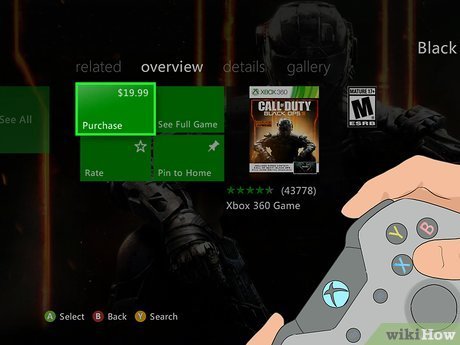
You can purchase games on Xbox 360 through the Xbox Marketplace using a Microsoft account and a payment method. You can also buy physical copies from retailers.
Ready to dive back into your Xbox 360 library? Many of us still cherish that classic console, and adding new games is easier than you might remember. This guide details how to purchase games on Xbox 360, whether you prefer digital downloads or physical discs.
We will walk you through the process of navigating the Xbox Marketplace. It’s also good to know alternative ways to find those older titles that might not be available digitally anymore, like used copies from various retailers.

How to Purchase Games on Xbox 360
Alright, gamers! So you’ve got your trusty Xbox 360, ready for some action, but you’re wondering how to get new games. Don’t worry, it’s easier than you might think! While the Xbox 360 isn’t the newest console anymore, there are still a couple of great ways to snag some awesome titles. Let’s dive into the different methods you can use to purchase games and get playing.
Understanding Your Options
Before we get into the nitty-gritty, it’s good to know your options for buying games. You’re not limited to just one way. Here’s a quick overview:
- Physical Discs: These are the good old games that come in a box. You pop the disc into your console, and you’re good to go! Think of it like borrowing a movie on DVD from your local library, but for a game you’ll have forever (or until the disc gets scratched!).
- Digital Downloads from Xbox Live Marketplace: Think of this like downloading a song or a movie from the internet, but it’s a game that goes straight to your Xbox 360’s hard drive. This means no more discs to worry about, just a quick download and play!
Buying Physical Games
Let’s talk about the classic way first – buying physical games on discs. This is perfect if you like collecting the boxes or if you don’t have a good internet connection.
Where to Find Physical Xbox 360 Games
You have a few places to check out when looking for these:
- Game Stores: Places that specialize in games often have a selection of used Xbox 360 games. Sometimes you might find new copies too, but mostly you’ll see used games as Xbox 360 is now a bit older. Think about stores like GameStop, local game shops, or even pawn shops.
- Online Marketplaces: Sites like eBay, Amazon, and Facebook Marketplace are great for finding deals. You can search for specific games or browse what’s available. You can also try online retailers. But make sure to check the seller’s rating or reputation before buying to avoid bad experiences, and check out the condition of the game’s box and disc before you buy.
- Friends and Family: Don’t forget to ask your friends or family if they have any Xbox 360 games they don’t play anymore. You might get lucky and score some for free or at a good price!
Things to Consider When Buying Physical Games
Buying a physical game is usually pretty simple, but there are a few important things you want to keep in mind:
- Game Condition: If you’re buying a used game, check the disc carefully for scratches. Light scratches are usually okay, but deep scratches can make the game not work properly. Also, look at the box if it’s in good condition, specially if you are a collector.
- Price Comparison: Don’t just buy the first game you see. Compare prices at different stores and online sellers to make sure you’re getting a good deal.
- Game Compatibility: Although not common but sometimes a game might not work on your console if it’s a different region version. Check the region code of the game to make sure it will play on your console. You will find this info on the game box, it is usually on the back of the case.
Buying Digital Games From Xbox Live Marketplace
Now let’s talk about the digital side of things. Buying digital games can be super convenient. You don’t have to leave your house, and the game is ready to play as soon as it’s downloaded!
Accessing the Xbox Live Marketplace on your Xbox 360
To access the Xbox Live Marketplace (also known as the Xbox Store), you will need to connect your Xbox 360 to the internet and have an Xbox Live account (even if it’s a free one). Here’s how:
- Connect to the Internet: First make sure your Xbox 360 is connected to your home’s internet network. You can do this through your console’s settings.
- Sign into Xbox Live: If you don’t have an Xbox Live account, you’ll need to create one. Just follow the instructions on your Xbox 360. It might ask you for some personal information and then create a gamertag (your username).
- Navigate to the Marketplace: Once you’re signed in, go to the “Games” section of your dashboard. Then find the Xbox Live Marketplace. It might be called “Xbox Games Store” or something similar.
Browsing and Searching for Games
Once you’re in the Marketplace, you can browse different categories like “New Releases”, “Top Downloads”, or “Genres” to find the games you might be interested in. You can also use the search bar at the top to find a specific game if you know the title you want. Just type the game’s name in there and press search. It will show results for matching games. When you find a game that looks interesting, select it, and you’ll see more details about it, like the game’s price, screenshots and some description.
Purchasing Digital Games
When you’ve found a game you want to buy, here’s how to purchase it:
- Select the Game: Click the game that you want to purchase. This will take you to the game’s page, where you will see the game’s price and other information.
- Add to Cart (If Applicable): Some marketplaces may use a “cart” system. In this case, you may see an option to add the game to your cart. Once it is in your cart, you can review everything before making a purchase.
- Payment Method: You’ll need to have a payment method linked to your Xbox Live account. You might be able to use a credit card, debit card, or Xbox gift cards. You may need to add a payment method if you have not done it already, and sometimes the store allows the use of PayPal. The payment methods might vary by the country.
- Confirm Your Purchase: After selecting a payment method, you may be asked to confirm your purchase. Double check the game and price before completing your purchase, and if everything looks good, go ahead and buy it!
- Start Downloading: After you complete the purchase, the game will begin to download automatically. You can track the download progress in your active downloads.
Managing Your Digital Games
Once your download is finished, you’ll find your game in your “Games Library”. It might be in “My Games” or something similar in your Xbox 360’s dashboard. From there you can start your game. You can redownload any game that you have already purchased. You can do this anytime even after you have deleted it, just go to your download history. Just make sure to use the same account that you used for the purchase.
Digital Game Deals and Sales
Keep an eye out for sales and deals in the Xbox Live Marketplace! Sometimes, games will be discounted, so it’s a great time to grab a game you’ve always wanted to try! You may also find some games for free from time to time as well, although this is not very common.
Considerations When Buying Games for Xbox 360
Okay, so now you know the basic process of buying physical and digital games. But here are a few extra things to think about:
Storage Space
Digital games take up space on your Xbox 360’s hard drive. Make sure you have enough space before you try to download a game. You can delete games you don’t play anymore to free up space. If you have a small hard drive, you may have to buy additional storage. Some Xbox 360s come with a small amount of storage space, so if you are planning to have a lot of games, it’s good to be mindful about the storage space issue.
Internet Connection
A good internet connection is important for downloading digital games. If your connection is slow or unstable, it will take a long time to download the game, or might not finish properly. If your internet is too slow, or you don’t have an internet connection, you might find buying physical copies as a better option. Some older physical games can also come with downloadable content that you might be able to download online.
Game Availability
Remember, the Xbox 360 is an older console. So, some games might be harder to find both physically and digitally, or you might not find some of the newest titles in the market. You’ll find the best collection in the most popular older titles for the console. If you are trying to buy games from online marketplaces, it’s possible that a game may no longer be available. And some popular games may become harder to find as time goes by.
Game Region
Keep in mind that not all games will work on all consoles. Game regions are a thing that you may come across, specially if you import games from another country. Make sure the game you are buying is compatible with your console. You will find this information in the game box. Games may be region locked, it means the game made for one region may not work in consoles from other regions. Xbox 360 games have the following regions: NTSC-U/C (North America), NTSC-J (Japan), PAL (Europe, Australia, and some other countries).
Used vs. New
When buying physical games, you often have the choice between used and new. Used games are cheaper, but you need to check the disc’s condition carefully. New games cost more, but the box and disc should be in perfect condition. For digital games, this is not an issue as the game is new when you download it.
Check Game Ratings
Before buying a game, check its rating. Games are rated by organizations that determine whether the game is suitable for certain ages. Make sure the game is appropriate for you or for the person who will be playing it. Games might have an “E” for everyone or might be rated “T” for teenagers or “M” for Mature. Some games might even be only for adults. This information can be found on the game boxes, but also it is available in the game’s details page, when buying a digital game.
Getting the Best Value for your Money
Here are a few tips to help you get more bang for your buck:
- Shop Around: Compare prices before you buy both physical and digital games.
- Look for Sales: Take advantage of any sale that you may come across. You might find a good bargain for a game that you always wanted to play.
- Buy Used: If you don’t mind used copies, it’s a great way to save some money.
- Trade Games: You might find some physical stores that accept used games, so you can exchange them for credit towards a new game or used one.
- Gift Cards: Consider using gift cards that you might have received as a present to get games for free or pay a lesser amount.
Purchasing games for your Xbox 360 doesn’t need to be a difficult or complicated. Whether you choose physical discs or digital downloads, there is fun and adventure waiting for you. So grab a new game and get ready for many more gaming hours!
How to go on the Xbox 360 Marketplace Again!
Final Thoughts
Purchasing games on Xbox 360 involves using either a physical disc from a retailer or through the Xbox Live Marketplace. Navigate the marketplace using your console to select and buy digital games. You need a valid payment method linked to your Xbox account.
Remember, older consoles may have limited access to the marketplace. Physical copies still work, providing a method for how to purchase games on xbox 360. Be sure to check the compatibility before purchase, physical or digital.

