
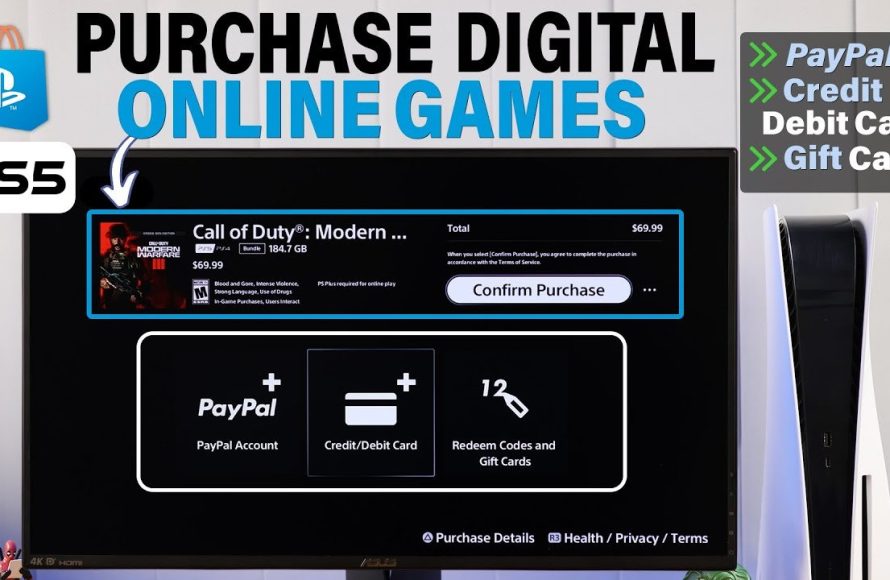
Purchasing PS5 games online typically involves visiting the PlayStation Store or other online retailers, selecting your desired game, adding it to your cart, and completing the checkout process with a valid payment method.
Ready to dive into the exciting world of PS5 gaming? Figuring out how to purchase PS5 games online doesn’t have to be complicated. This guide will help you navigate the process easily.
We will walk you through the steps. You’ll learn the best places to buy games. Plus, we will explain how to complete your purchase quickly and securely.

How to Purchase PS5 Games Online
Buying PlayStation 5 games online is super easy and convenient. You can do it right from your couch! No need to go to a store. This guide will walk you through all the different ways you can get your hands on the newest and coolest PS5 games. Let’s jump in and learn about digital downloads, physical copies, and everything in between.
Understanding Digital vs. Physical Games
Before you start shopping, it’s important to know the difference between digital and physical games.
Digital Games
Digital games are downloaded directly to your PS5. You don’t get a disc. Here are the pros and cons:
Pros:
- Convenient: You can buy and start playing right away. No trips to the store!
- No Discs to Lose: You won’t have to worry about scratching or misplacing a disc.
- Game Sharing (With limitations): On some consoles, it is possible to share games with friends and family to an extent.
Cons:
- Takes Up Storage Space: Digital games need a lot of storage space on your console.
- Can’t Resell: Once you buy a digital game, you can’t sell it to someone else.
- Reliance on Internet: You need internet to download games and play most online games.
Physical Games
Physical games come on a disc that you put into your PS5.
Pros:
- You Own Something: You have a physical item.
- Can Resell: You can sell or trade your physical games when you’re done with them.
- Good for Collectors: Physical copies are great if you like to build a collection of games.
Cons:
- Inconvenient: You have to go to a store or wait for shipping.
- Discs Can Get Damaged: Discs can get scratched, broken, or lost.
- Requires disc drive: Some PS5 consoles don’t have the disc drive and only allow playing digital games.
Where to Buy PS5 Games Online
There are several places where you can purchase your PS5 games online. Each has its own perks, so let’s explore them.
The PlayStation Store
The PlayStation Store is Sony’s official online store for PS5 games. It’s built right into your console and you can also access it through a web browser. This is where you will usually find the latest releases on day one.
- How to Access: On your PS5, look for the PlayStation Store icon on the main menu, or visit the PlayStation website on your computer or phone.
- Variety: The PlayStation store has every digital game you can imagine, from big-budget blockbusters to small, independent games.
- Exclusive Deals: Keep an eye out for special sales and deals on the store. Sometimes, there are great discounts on games.
- Easy Purchasing: It’s very easy to buy games directly through the store using your registered payment method.
Online Retailers
Many big online retailers also sell both digital codes and physical PS5 games. Here are some popular choices:
- Amazon: A great place to find both new and used physical games, as well as digital codes.
- Best Buy: Another good choice for new physical games and digital downloads.
- Walmart: This is another good option to buy new ps5 games online.
- GameStop: This retailer specializes in games.
When buying from these retailers, make sure to check if they are selling digital or physical copies before you complete the purchase. If you are purchasing a digital copy, you will likely receive a code that you can redeem on the PlayStation Store.
Other Websites
Besides big retailers, you will find many smaller shops that sell used games. Be careful when buying from smaller sites to make sure they are safe to use and the games are legitimate.
- Ebay: It’s a good place to find used physical copies of older games. Check seller reviews carefully.
- Facebook Marketplace: You can find great deals from people selling games they don’t play anymore, but again, make sure the seller is trustworthy.
Using Digital Codes
Sometimes you’ll buy a game as a digital code instead of downloading from the Playstation Store. You often get these from the retailers listed above. These codes are usually printed on a receipt or sent to you via email. Here’s how to use them:
- Go to the PlayStation Store on your console or the website.
- Scroll down to the bottom of the menu or to the right of the screen.
- Choose ‘Redeem Code’ option.
- Enter the 12-character code from your receipt or email.
- Your game will begin downloading once the code is verified.
How to Choose the Right Game
Picking the perfect PS5 game is exciting! Here are some tips to help you choose:
Read Reviews
Before you buy a game, read reviews from players. Check sites like IGN, Metacritic, and GameSpot. This helps you see if the game is good and if it’s something you will like.
- Look for common good/bad points.
- Consider what the reviewer likes in a game and if that is like you.
Watch Gameplay Videos
Watching gameplay videos on YouTube or Twitch gives you a better idea of what the game looks and feels like. Seeing a game in action can help you decide if you want to play it.
- Observe the graphics.
- Pay attention to how the game plays.
- Try to get a good understanding if you would like the gameplay.
Check Game Descriptions
Read the game descriptions on the PlayStation Store or retailer websites. They usually include information about the game, such as what it’s about, who made it, and any special features. Check if the game has the features you are looking for, such as multiplayer or story modes.
- Make sure the game is the type of game you want.
- Check for content that interests you.
Consider the Genre
Think about what kind of games you enjoy. Do you like action, adventure, sports, or role-playing games? Choosing a game from a genre you like increases your chances of enjoying it.
Price Considerations
PS5 games can be expensive. Think about how much you are willing to spend, and look for sales. You can save money by waiting for a game to go on sale.
Making a Purchase: Step-by-Step
Let’s go over the actual steps of buying a game.
On the PlayStation Store
- Turn on your PS5 and go to the PlayStation Store.
- Search for the game you want.
- Select the game and look at the information.
- Click on ‘Add to Cart’.
- Go to your cart and then press ‘Proceed to Checkout’.
- Pay for the game using your credit/debit card, PayPal, or PlayStation Store gift card.
- Download the game to your PS5 and start playing.
Buying from Online Retailers
- Go to the retailer’s website.
- Search for the game you want.
- Choose if you want a physical or a digital copy.
- Click on ‘Add to Cart’.
- Go to your cart and then press ‘Proceed to Checkout’.
- Enter your shipping details or, if it’s a digital copy, your email address.
- Pay for the game.
- If you bought a physical copy, wait for it to be delivered. If it’s a digital copy, redeem the code.
Managing Your Digital Games
Once you have downloaded games, it is important to know how to manage them.
Storage Space
Digital games take up a lot of space on your PS5. You might need to delete some old games to make room for new ones. You can also buy an external hard drive to get more storage space for your PS5 games.
Re-downloading Games
You can always re-download games that you bought from the PlayStation Store. If you delete a game, it will stay on your account. Go back to the PlayStation Store, find the game, and then download it again.
Automatic Updates
Your PS5 will automatically update your games. Make sure your console is connected to the internet for it to happen automatically. These updates often contain new content or bug fixes, so they are important.
Tips for Safe Online Shopping
Keeping yourself safe while buying games online is important. Here are some tips to help you:
Use Secure Websites
Make sure the website you are using has “https” in the address bar. This means the website is secure and your information is safe. Look for the lock icon in the address bar.
Be Wary of Scams
Be careful with deals that look too good to be true. If a website is selling a new game for much less than other sites, it might be a scam. Stick to trusted retailers.
Use Strong Passwords
Use a strong password for your PlayStation Network account and any other accounts you use for online shopping. A strong password includes numbers, symbols, capital letters, and lowercase letters.
Check Seller Reviews
When buying from smaller online sites like eBay, look at what other customers say about the seller to ensure the seller is trustworthy.
Never Share your Personal Information
Never give your personal information to someone who asks for it through email or messaging unless you are certain they are a trusted source.
Buying PS5 games online is a fantastic way to enjoy your console. Whether you choose digital or physical copies, remember to shop safely, read reviews, and choose games you will love. Now you are ready to go out there and get your next amazing game!
How To Buy PlayStation 5 Games Online Tutorial
Final Thoughts
To sum up, buying PS5 games online is straightforward. You can easily find games on the PlayStation Store or through retailers. Simply choose your preferred title, add it to your cart, and complete the payment. Then download and start playing immediately.
Remember to check for any deals. Considering a physical disc also gives you an option for resale. Therefore, knowing how to purchase ps5 games online provides flexibility.

