
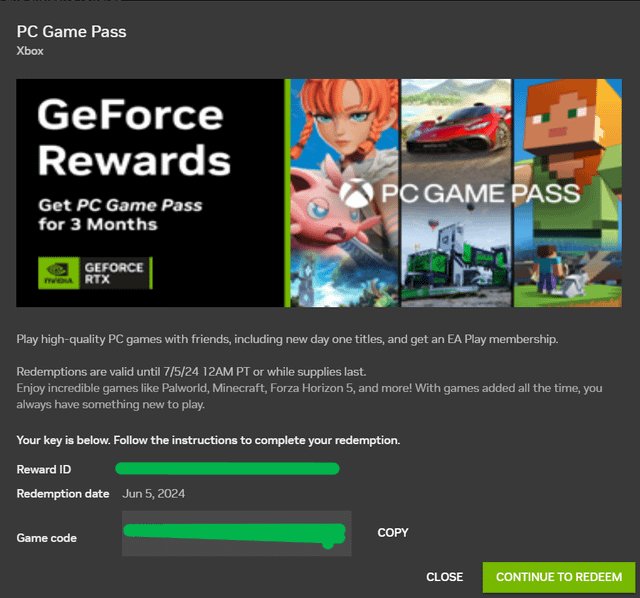
To redeem your Nvidia game code, you typically go to the Nvidia redemption website, log in or create an account, enter your code, and follow the on-screen instructions to claim your game.
So you’ve just snagged a new graphics card or a sweet bundle deal, and you’re staring at a code wondering how to redeem it? It’s a common question and we are here to guide you. The process to redeem nvidia game code is quite simple and straightforward, however many people face issues.
This post will walk you through the steps to get you gaming in no time. You’ll learn everything you need to know about this process.

How to Redeem Your Nvidia Game Code
Getting a new graphics card is super exciting! It often comes with a bonus: a free game! But, you might be wondering, “How do I actually get that game?” Don’t worry; it’s not as tricky as you might think. This guide will walk you through the steps of redeeming your Nvidia game code, so you can jump into your new adventure quickly and easily. Let’s get started!
Understanding Nvidia Game Codes
Before we dive into the how-to, let’s talk about what an Nvidia game code is and why you have one. Basically, when you buy certain Nvidia products, like a new GeForce RTX graphics card or a gaming laptop, you often receive a special code. This code is like a ticket that allows you to download and play a free game. Think of it like a coupon, but for a video game!
These codes are part of Nvidia’s promotions and sometimes come with bundled games that are usually quite popular or brand new. It’s their way of saying “thank you” for choosing their hardware. These bundles change from time to time, so the game you get depends on when and where you bought your Nvidia product. These codes are unique, and they are linked to the specific promotion. That’s why you need to follow the right steps to get your game.
Types of Nvidia Bundles
Nvidia usually has different kinds of promotions. These can be:
- Graphics Card Bundles: These are the most common. You get a game when you purchase a new graphics card.
- Laptop Bundles: Some gaming laptops also come with game codes.
- Partner Promotions: Sometimes, Nvidia works with specific retailers or game developers to offer special bundles.
The game you get might be a brand-new AAA title or a classic favorite, depending on the promotion. Always check the details of the promotion when you buy your Nvidia product, so you know exactly what you’re getting.
Where to Find Your Game Code
So, you have a new graphics card or a gaming laptop, and you’re ready to get your free game. The first step is actually finding that code! Where is it hidden? Usually, there are a couple of places you might find it:
Digital Codes
Many retailers now send codes digitally. This means you will receive the code in an email or on your account on the retailer’s website. Here’s what to look for:
- Email: Check your email inbox, and don’t forget to look in your spam folder too. The email subject might mention “Nvidia game code,” “your free game,” or something similar.
- Retailer Account: Log in to the website where you purchased your Nvidia product. Look in your order history or digital downloads section.
- Order Confirmation: Some retailers will put the game code in your order confirmation email or receipt.
Physical Codes
Sometimes, the game code is printed on a physical card that comes inside the box with your new graphics card or laptop. Here’s what to look for:
- Inside the Box: Open the box carefully and check for a small card or piece of paper with the code printed on it. It might be in an envelope or tucked away with the other paperwork.
- On a Flyer: The code might also be on a small flyer advertising the game bundle.
Important Tip: Make sure you keep the code safe! Treat it like a gift card because once you use it, the code is no longer valid. It’s also a good idea to redeem it as soon as possible in case of any expiration dates.
Step-by-Step Guide: Redeeming Your Nvidia Game Code
Now that you have your code, it’s time to redeem it and download your free game! This process involves using the Nvidia GeForce Experience application. Let’s go through the steps one by one:
Step 1: Installing GeForce Experience
The first thing you need to do is make sure you have the Nvidia GeForce Experience app installed on your computer. This app is essential for redeeming your game code.
- If You Don’t Have it: Go to the official Nvidia website and download GeForce Experience. Run the installer and follow the instructions. It’s a quick and simple process.
- If You Have it: Make sure your GeForce Experience is up to date. Open the app and check for updates.
Step 2: Logging In or Creating an Account
Once you have GeForce Experience installed, you need to log in. If you don’t have an Nvidia account, you’ll need to create one.
- Existing Account: If you already have an Nvidia account, use your email and password to log in.
- New Account: Click on the option to create a new account, and follow the instructions. You’ll need a valid email address and you will be asked to make a secure password.
Step 3: Accessing the Redeem Section
After logging in, you’ll be in the main GeForce Experience interface. Here’s how to get to the redeem section:
- Locate the Redeem Button: Look for a button or option that says “Redeem,” “Redeem Code,” or something similar. It might be in the top navigation, a sidebar, or another menu. If you can’t find it, try clicking the “Account” button and selecting “Redeem”.
- Click the Button: Click on the “Redeem” button to go to the code entry section.
Step 4: Entering Your Game Code
You’ve reached the point where you will finally enter your game code. Get your code ready because this is where you will use it.
- Type or Copy/Paste: Carefully type in the code in the provided box or copy it from your email or the card and paste it in. Double-check that you enter the code exactly as it appears. Even one wrong number or letter will result in the code not working.
- Click Redeem: After you have entered the code, click the “Redeem” button.
Step 5: Choosing Your Game
For some promotions, you might have a choice of different games to redeem. If you do, you will see a screen with a list of eligible games.
- Select Your Game: Choose the game that you want to get.
- Confirm Your Choice: Follow the prompts to confirm your game selection.
Step 6: Linking to Your Game Platform Account
Nvidia game codes are usually linked to a game platform like Steam, Epic Games, or Ubisoft Connect. You will need to link your Nvidia account with the right platform.
- Platform Selection: You will be asked to choose the platform you want to use.
- Login to Platform: Follow the on-screen instructions to log in to your account on the chosen platform.
- Link Accounts: Grant permission for Nvidia to link with your platform account.
Step 7: Claiming Your Game
The last step is to claim your game and add it to your library on the platform you linked.
- Claim Game: Click on the button to claim your game. This will add the game to your platform account and start the download.
- Start Downloading: Open your game platform launcher and find the game. Start the download and get ready to play.
Troubleshooting Common Issues
Sometimes, things don’t go exactly to plan, and you might run into issues when redeeming your Nvidia game code. Here are some common problems and how to fix them:
Invalid Code
If you get an error that says the code is invalid, double-check the following:
- Typing Errors: Make sure you have typed the code correctly. Even a small mistake can make the code not work.
- Copy/Paste Errors: If you copied and pasted the code, make sure there are no extra spaces before or after the code.
- Code Expiration: Check if the code has expired. Nvidia game codes have expiration dates.
- Code Already Redeemed: The code can only be used once. If you have already used it, you cannot use it again.
- Contact Support: If you have done all the checks and you are still having issues, you can contact Nvidia support or the retailer for help.
GeForce Experience Issues
Sometimes the problem isn’t the game code, but with the GeForce Experience app itself.
- Outdated App: Make sure your GeForce Experience is up to date. Outdated versions can cause problems.
- Reinstall App: Try uninstalling and reinstalling GeForce Experience. This can sometimes fix errors.
- Internet Connection: Make sure you have a stable internet connection. A weak connection can interrupt the process.
- System Requirements: Make sure your computer meets the minimum requirements for GeForce Experience.
Platform Linking Problems
Issues when linking to your game platform account are another common problem.
- Login Errors: Double check your login information for the platform you have chosen.
- Connection Issues: Check your internet connection and try again, or try a different browser.
- Account Conflicts: Make sure you are linking the right account. If you have multiple platform accounts, try the others.
- Platform Downtime: Check if the game platform is experiencing an outage. Sometimes, you have to wait before the linking works.
Still Having Trouble?
If you have tried everything, and you are still having trouble, it is best to reach out to the Nvidia support team directly. They have staff who are dedicated to helping people with these types of problems. Also, your retailer might be able to offer assistance. In either case, be sure to have your code ready and tell them everything you have done so far to help them solve your problem faster.
Tips for a Smooth Redemption
To make sure your game redemption goes smoothly, follow these tips:
- Redeem Promptly: Don’t wait too long to redeem your code. It might expire!
- Check Code Carefully: Double-check your code before you enter it, to make sure it is correct.
- Stable Internet: Make sure you have a good internet connection for a smooth redemption process.
- System Requirements: Confirm that your system meets the minimum requirements for the game.
- Account Security: Always be careful about the links you are clicking. Only use official websites to download things.
Getting a free game with your new Nvidia product is a great bonus! By following these easy steps, you’ll be playing your new game in no time. Have fun!
Remember to keep your game code safe and redeem it as soon as possible. With a little patience and these helpful steps, you’ll be enjoying your new game in no time. Happy gaming!
How to Nvidia redeem codes. Nvidia app.
Final Thoughts
To sum up, redeeming your Nvidia game code is straightforward. Typically, you’ll receive the code via email or with your purchase. Go to the appropriate redemption website, log in or create an account, and enter the code.
The platform will then prompt you to download or access your game. Following the platform’s instructions carefully will guarantee successful redemption. This process shows you how to redeem nvidia game code effectively.

