
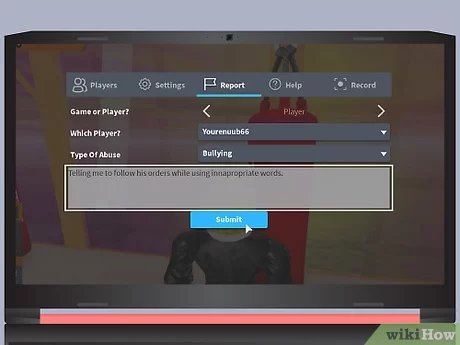
To report a player on Roblox, click the ‘Report’ button located on their profile or within the game menu, then select a reason for the report.
Have you ever encountered someone on Roblox who wasn’t playing fair or was breaking the rules? It can definitely spoil the fun! Knowing how to report a player on Roblox is an important skill for maintaining a positive gaming environment. This guide will quickly show you the steps so you can keep having great experiences in the Roblox world.

How to Report a Player on Roblox
Have you ever played a fun game on Roblox and then run into someone who wasn’t playing fair? Maybe they were saying mean things, cheating, or doing something else that made you feel uncomfortable. That’s not fun! Thankfully, Roblox has a way for you to report those players. This helps keep the game a safe and enjoyable place for everyone.
Why Reporting Players is Important
Reporting bad behavior is very important. When you see someone breaking the rules and report them, you are helping Roblox keep their community safe. Think of it like being a superhero for the game. You’re helping to stop the bad guys from ruining the fun for everyone else.
It ensures that everyone can have a good time playing games and making friends on Roblox. Without the reporting system, problems would just keep happening and nobody wants that.
What Kinds of Things Should You Report?
Not every little thing needs a report. If someone accidentally bumps into you in the game or does something small and silly, that’s probably okay. But, if someone is doing things that are actually mean, then it’s time to report them. Here are some examples:
- Bullying or harassment: This includes saying mean things, calling people names, or making them feel bad on purpose.
- Cheating: When a player tries to get an unfair advantage by using hacks or other tricks, it’s cheating.
- Inappropriate content: Sharing content like inappropriate pictures or links should be reported right away.
- Scamming: Trying to trick people out of their Robux or items is a big no-no and should be reported.
- Spamming: Sending the same message over and over again and disturbing other players.
Reporting someone for false reasons is wrong!
Remember that Reporting someone falsely is against the rules too. Only report players for real reasons.
How to Report a Player During a Game
Reporting someone while you’re actually in a game is often the easiest method. The process is pretty similar whether you’re using a computer, a phone, or a tablet.
Reporting on a Computer
Here’s how to report a player on a computer while you’re playing a Roblox game:
- Find the player’s name: Look in the game for the player who is misbehaving. You need to click on their username. Usually, it will be displayed above their head in the game.
- Open the Player Menu: When you click on their name, a menu will pop up with a few options, look for the ‘Report’ option.
- Report Player: Click the “Report” button, it looks like a little flag icon. It will open up a new screen.
- Choose a reason: You’ll have to select the reason for reporting the player. Choose the reason that best describes what they did wrong. Be very honest here.
- Add a Description: Briefly describe what the player did in the text box provided. Write as accurately as you can. This helps the Roblox team understand exactly what happened.
- Submit the Report: Finally, click the submit button. The report will be sent to Roblox to investigate.
That’s it! You’ve reported the player, and now Roblox will take it from there.
Reporting on a Mobile Device (Phone or Tablet)
Reporting on a mobile device is very similar. Here’s how it works:
- Find the player’s name: In the game, look for the username of the player you want to report.
- Tap their name: Tap the player’s username, this will open up a little menu
- Tap “Report”: Look for the “Report” option which is an icon with a flag on it, and click it.
- Select a category: Pick the reason that best explains why you’re reporting them. Select from the menu.
- Add details: Write what happened in a text box. Be specific.
- Submit the Report: Tap the submit button to send the report to Roblox.
Just like on a computer, Roblox will look into the report.
How to Report a Player from Their Profile
Sometimes, you might want to report someone after a game. Maybe you didn’t have time during the game, or perhaps you only just realized they were breaking the rules. In these situations, you can report someone from their profile page.
Reporting from a Computer
Here’s how to do it on a computer:
- Find the Player’s Profile: On the Roblox website, search for their username in the search bar.
- Go to their profile: Click on their profile, that will open their personal Roblox page.
- Click the three dots: On the top right of their profile page, there are three dots, click them.
- Select Report: From the menu, choose the “Report” option.
- Select a reason: Pick the correct reason for reporting, and write about the situation.
- Submit the Report: Click to submit your report and send it to Roblox.
This method works whether you are reporting because of something they said in a game, or things you saw on their profile page.
Reporting from a Mobile Device
The process for mobile devices is very similar:
- Find the Profile: Use the search bar to search their username and open their profile.
- Tap the three dots: Find the three dots in the upper right and tap on it.
- Tap “Report”: Choose the “Report” option.
- Choose a reason: Select why you’re reporting this user.
- Add details: Add details in the text box provided, explain why you are reporting.
- Submit the Report: Tap the submit button.
The report will now be submitted to Roblox, and they will handle the rest.
What Happens After You Report a Player?
Once you’ve reported a player, Roblox will take over. Their team of moderators will review the report. They check to see if the reported player broke the Roblox rules.
If the Roblox team finds that the player did break the rules, they will take action. Depending on how serious it is, they might:
- Give a warning: Sometimes, they give a warning to the player, telling them to stop.
- Temporarily ban the player: The player might get blocked from Roblox for a little while.
- Permanently ban the player: In serious cases, the player might get kicked off Roblox for good.
- Remove content: They might delete inappropriate images, videos, or text that the player posted.
Important things to keep in mind
Here are some tips to make the reporting process smoother:
- Be as specific as you can: The more details you add to your report, the easier it is for Roblox to understand what happened. Try to include things like what the person said or did.
- Do not report without a proper reason: Do not just report a player because you don’t like them. Report only when they have done something wrong.
- Do not encourage others to harass or report someone without reason: Everyone deserves to be treated fairly. Don’t be a part of bullying or harassment, including false reporting.
- Stay calm: If someone is making you angry, try to stay calm. It’s easier to report when you are not upset and can think clearly.
- Reporting is anonymous: The player you report will not know that you are the person that reported them.
Using the Block Option
Besides reporting, Roblox also has a block feature. This lets you stop a player from contacting you. If someone is bothering you, blocking is a great option. You can do this from their profile.
When you block someone, they can no longer send you messages or join your games. This is a good way to keep people you do not like away from your Roblox experience.
Helping Make Roblox a Better Place
Reporting players might seem like a small thing, but it has a big impact on the game. When we all do our part to report bad behavior, we are all helping to keep the Roblox community safe and enjoyable for everyone. It’s a team effort to keep the game fun and fair.
So remember, if you see something, say something. Use the reporting tools available on Roblox and make a positive impact on the game! Together, we can make Roblox a safe and fun place for everyone to play!
How To Ban Anyone Who Swears
Final Thoughts
Reporting a player effectively involves selecting the specific violation and providing clear details. Doing this directly helps moderators take action. Remember you must also block them to prevent further interaction.
Knowing how to report a player on roblox is crucial for maintaining a safe environment. Reporting misuse keeps the community enjoyable for everyone.

