
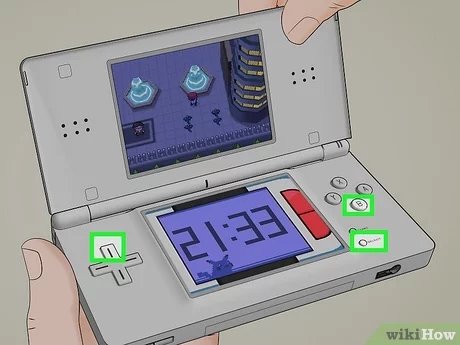
To restart a Pokémon game, you typically need to begin a new save file from the game’s main menu, often by pressing a specific button combination or deleting existing save data within the system settings.
Sometimes you just need a fresh start, whether it’s to play a different starter Pokémon or correct mistakes. Learning how to restart a Pokémon game is quite simple. It allows you to experience the thrill of choosing your first partner all over again.
This guide helps you quickly get back to the beginning and start that journey once more. We will walk through the basic steps you need for restarting, allowing you to start a new game quickly.

How to Restart a Pokemon Game
Ever wanted to start your Pokemon adventure all over again? Maybe you want to try a different starter, or just experience the joy of catching those first few Pokemon once more. Restarting a Pokemon game is a pretty common thing, and thankfully, it’s usually quite easy to do. But the way you do it depends on the system you’re playing on and the specific game. Let’s explore how to clear your save data and get back to Pallet Town (or whichever town your adventure begins in!). We will be covering many different generations and consoles, so you can find specific information for your situation.
Understanding Save Data
Before we jump into the “how-to,” let’s quickly understand what’s going on with save data. Your Pokemon game saves your progress – your collected Pokemon, your items, and your place in the story – in a specific location on your game device. It’s like a bookmark that lets you pick up exactly where you left off. When you want to restart, you’re essentially asking your device to erase that bookmark and start a fresh one. That’s why you have to follow specific steps for each platform, because the way it saves the data is different.
Restarting on Nintendo Switch
The Nintendo Switch is a great way to play modern Pokemon games, from Pokemon Sword and Shield to Scarlet and Violet. Here’s how to restart on the Switch:
Method 1: Using the System Settings
This is the most common way to delete a save file on the Switch. Here’s how:
- First, go to the Nintendo Switch HOME Menu. This is the screen with all your game icons.
- Next, find the “System Settings” icon. It looks like a gear. Click on it.
- Scroll down on the left-hand side menu and find “Data Management”. Click it.
- Now, select “Save Data Cloud”. If you don’t see it, proceed with the next step.
- Then, choose “Delete Save Data” from the options.
- Now, select your Pokemon game from the list that appears. Be sure you choose the correct game.
- The system will ask you to confirm that you really want to delete your save data. If you are sure, click “Delete Save Data.”
- Now, when you start up the game again, it will be like the first time you played, and you can create a new game from the start.
Remember that deleting save data using this method is permanent and can not be undone. So, make sure you are ready to completely restart your adventure.
Method 2: Using a Different User Profile
A cool feature of the Nintendo Switch is that you can have multiple profiles. Each profile can have its own save data. So, if you don’t want to delete your existing game, you can simply create a new user profile on the console. When you start the game using the new profile, you’ll be starting from scratch, without disturbing your previous save. Here’s how to do that:
- Go to your Nintendo Switch’s home screen.
- Click on your user icon at the top left of the screen.
- Select “Add New User”.
- Follow the on-screen instructions to create a new user profile.
- Once the new profile is created, go back to the Home screen and select that new user.
- Start your Pokemon game. You will start a brand new adventure without overwriting your old save.
Using a new user profile is perfect if multiple people share a Switch but want to play their own Pokemon games. It’s also a good idea if you’re a bit nervous about deleting your current save. You can always switch back to your original profile to continue your old adventure.
Restarting on Nintendo 3DS/2DS
The Nintendo 3DS and 2DS systems played host to many great Pokemon adventures, such as Pokemon X and Y, Omega Ruby and Alpha Sapphire, and Sun and Moon. Restarting on these systems is a bit different than on the Switch.
Specific Game Combination
For some games, there is a specific button combination you can press at the title screen. This usually involves pressing a combination of buttons simultaneously. Please note that, unlike the Switch, these methods do actually delete your save data.
- Pokemon X and Y, Omega Ruby and Alpha Sapphire: At the title screen, press Up on the D-pad, B, and X all at the same time.
- Pokemon Sun and Moon, Ultra Sun and Ultra Moon: Press Up on the D-pad, B, and X all at the same time at the title screen.
After pressing the correct combination of buttons, the game will ask you if you want to delete all the save data. Press “Yes” if you are absolutely sure that you want to restart the game, if you are not sure, then click “No” to go back to your original save file. This method is often quicker than going through system settings.
Using System Settings
If the button combination doesn’t work or you are playing a different Pokemon game on the 3DS, you can go through the system settings. Here’s how you can do it:
- Close your Pokemon game and return to the 3DS HOME Menu.
- Tap on the “System Settings” icon, which looks like a wrench.
- Select “Data Management”.
- Choose “Nintendo 3DS” or “DS Data” depending on which game you are trying to erase.
- Select “Software”
- Find your Pokemon game.
- Select the game and then tap “Delete”.
- The system will ask you to confirm that you really want to delete the save data. If you are sure, tap “Delete.”
- Now when you start the game, it will be a fresh start.
Restarting on Older Consoles: Game Boy Advance, DS
Older consoles like the Game Boy Advance and the original Nintendo DS use different methods for saving and resetting games. These methods usually involve deleting the save data directly within the game. There is no system menu to manage the save data as there is on later consoles.
Game Boy Advance Era
Pokemon games for the Game Boy Advance, such as Pokemon Ruby, Sapphire, Emerald, FireRed and LeafGreen, do not use a specific button combo or an option in the system menu to erase the save data. Instead, the only option to start over is done directly within the game itself.
To start a new save, simply turn on the device, and start the game. Usually, the game will prompt you to create a new save file if there is no save file on your cartidge, or it will overwrite the old save file. Be very careful with this, as there is no way to recover an old save once it has been overwritten.
Nintendo DS Era
Pokemon games on the original Nintendo DS use a mix of methods to clear save data. Some games, such as Pokemon Diamond, Pearl, and Platinum, allow for a reset option at the title screen, while other games do not. Games such as Pokemon Black and White do not let you start a new game in the same way, instead, the game asks you if you want to overwrite the existing data.
Here is how to reset on some specific games, and for others, there is no different option than to overwrite your save data.
- Pokemon Diamond, Pearl and Platinum: At the title screen, press Up on the D-pad, B, Select and X simultaneously.
- Pokemon HeartGold and SoulSilver: On the title screen, press Up on the D-pad, B, and Select simultaneously.
- Pokemon Black, White, Black 2, and White 2: The only option to restart is to overwrite the existing save.
Similarly to the Game Boy Advance games, there is no method to recover your previous save, if you decide to overwrite it. So, before overwriting, make sure that you are ready to start your new journey in the Pokemon world.
Important Considerations Before Restarting
Restarting your Pokemon game is a big decision, so consider a few things first:
- Irreversible Action: Once you delete your save data, it’s gone. There’s usually no way to get it back. Make absolutely sure you are ready to lose all your progress.
- Transferable Pokemon: If you have valuable or favorite Pokemon, consider transferring them to another game using the in-game transfer system or Pokemon Home (for Nintendo Switch games) before you restart.
- Multiple Saves: If you just want to try a different playthrough, consider using a different profile (on Switch) or a different game system.
- Trading: If you have Pokemon you want to keep, you might have a friend who can take them and trade them back to you once you restart the game.
It’s always a good idea to take your time and weigh the pros and cons before deleting all that hard-earned progress. There are plenty of ways to start over, so make sure that you use the method that works best for you.
Additional Tips
Here are a few other tips that might help you as you get ready to start your game over:
- Consider your Goal: Before restarting, consider why you want to start over. Do you want to play the game with different Pokemon? Do you want to play with a different strategy? Do you want to experience the story again? Keep that in mind as you prepare to start over.
- Have a Plan: Maybe you want to use Pokemon you have never used before. Maybe you want to try a monotype challenge, or some other challenge. Plan ahead what you want to do to get the most out of your new game.
- Enjoy the Process: Starting from the beginning is a fun experience. Make sure to have fun as you make your way through your new journey in the Pokemon world.
Whether you’re reliving your childhood, exploring a region for the first time, or just want to test different strategies, restarting a Pokemon game is a great way to get more fun from this long-running series. Remember to consider your current save and what you might be losing, and then have fun as you start your new adventure!
How to Delete / Restart Pokemon X, Y, Sun, Moon, Alpha Sapphire & Omega Ruby!
Final Thoughts
To restart a Pokémon game, you typically need to begin a new save file. The specific button combination varies by console generation. For most Nintendo systems, holding up on the D-pad, B, and X, or A simultaneously during startup usually erases your existing save.
You can also try the in-game options menu if available. Check for a new game option to override your current progress. Learning how to restart a pokemon game offers a fresh beginning.

