
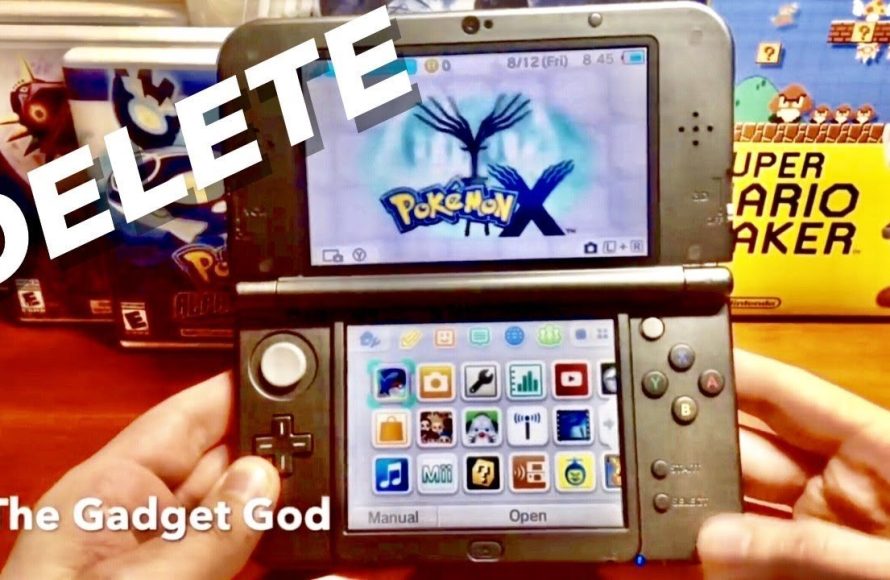
To restart a Pokemon X game, press Up on the D-pad, B, and X simultaneously on the title screen.
Ever felt the urge to revisit the Kalos region with a fresh start? Maybe you want to try a different starter Pokémon or experience the story again. It’s easy to find yourself needing to know how to restart a pokemon x game. Luckily, the process is straightforward. So, lets get started on how to erase your save data and begin a new adventure.

How to Restart a Pokémon X Game
So, you’re thinking about starting your Pokémon X adventure all over again? Maybe you want to try a different starter Pokémon, or maybe you just want to experience the Kalos region with fresh eyes. Whatever your reason, restarting a Pokémon X game is a pretty straightforward process, though it requires a specific approach. It’s not like hitting a simple “reset” button. This guide will walk you through the steps and explain everything you need to know to get back to the beginning of your Pokémon journey.
Why Restart Pokémon X?
Before we dive into how to restart, let’s talk about why you might want to do it. There are plenty of good reasons to want to begin again in Pokémon X:
- New Starter Experience: You might want to start with a different starter Pokémon. Perhaps you chose Froakie initially and now you’re curious about Fennekin or Chespin.
- Different Playthrough: Maybe you want to try a new team of Pokémon, or try the game with a new strategy.
- Missed Something: It is possible to miss some key items, events, or Pokémon during your first run. Restarting gives you another chance to find them.
- Challenge Run: Starting over allows you to do self-imposed challenge runs. For example, a Nuzlocke challenge or a mono-type team run.
- Just for Fun: You might simply want to replay the game because you enjoyed it so much!
Understanding Game Data and Saving
Pokémon X, like most Pokémon games, saves all your progress directly onto the game cartridge or the SD card of your Nintendo 3DS. This means that when you “start a new game,” you’re actually writing over the old save data. It’s important to understand this because, once overwritten, your old save file is gone for good. Think of it like erasing a drawing on a chalkboard to start a new one; the original drawing is lost in the process.
This differs from some other games where you might have multiple save slots or backups. With Pokémon X, the save data is directly tied to the game itself, not to separate files in the system. This is why the restart process works the way it does. There is only ever one single save slot.
The Method: Performing a Soft Reset
Unlike some games, you won’t find a “Restart Game” option on the main menu of Pokémon X. Instead, you must perform a soft reset. A soft reset is essentially a forced shutdown of the game from within the application itself, which will then prompt you to make a new save when the game restarts.
Steps for Soft Resetting:
Here are the steps to perform a soft reset on your Nintendo 3DS:
- Make sure your Nintendo 3DS is on: Open the game. Be sure you are at the game’s main menu screen.
- Press the Buttons: Simultaneously hold down the following buttons: L Button, R Button, and the Start Button (or Select Button).
- See the Nintendo Logo: If you did it correctly, the game will immediately close and return you to the 3DS home screen. You will then see the red Nintendo 3DS logo.
- Start the Game Again: From the home menu, tap the game icon of Pokémon X to launch it again.
- New Game Prompt: When the game loads up, you should be at the screen that reads, “A new adventure is about to begin! Do you wish to start a new adventure?” You will have the options “Yes” and “No”.
- Confirm New Game: Select “Yes” to confirm you want to overwrite your old game data. You’ll now start the game from the beginning.
Important Note: Once you confirm “Yes”, your previous save data is permanently lost. Be absolutely sure you are ready to erase your progress before performing this action.
What Happens When You Restart?
When you restart your Pokémon X game, the following will occur:
- Progress is Erased: All your progress, including your Pokémon team, items, badges, Pokédex information, story progression, and anything else saved in your game file, is completely wiped out.
- New Game Intro: You will be taken through the opening sequences of the game as if you are playing it for the very first time. This will include choosing your character’s gender, appearance, and name.
- Starter Pokémon Choice: You will have the chance to choose a new starter Pokémon. You will have to pick between Chespin, Fennekin, or Froakie.
- Fresh Journey: You start your Pokémon adventure from the beginning, ready to explore the Kalos region all over again.
Things to Consider Before Restarting
Before you make the decision to restart your game, here are some important things to think about:
Pokémon You Might Lose:
- Legendary Pokémon: You will lose any Legendary Pokémon that you captured. If you value these a lot, perhaps you should consider transferring them to Pokémon Bank before starting over.
- Shiny Pokémon: Any Shiny Pokémon you may have caught will also disappear. Again, you might want to use Pokémon Bank to keep them safe.
- Rare Pokémon: If you have Pokémon that were acquired through trading or special events, they will also be gone.
Items You Will Lose:
- Important Items: Key items, held items, and all other items in your bag are going to be deleted. Think about items that you spent a lot of time acquiring.
- Money: All of your in-game money will be reset to zero.
Pokédex Completion:
Your Pokédex entries will also reset. If you were trying to complete the Pokédex, you would lose all of that progress. So you would have to fill the Pokedex from scratch again.
Game Time:
All of your playtime will be erased, and it will start from zero. For some players, total playtime is an important part of their save data.
Alternatives to Restarting (If You’re Not Sure)
If you are having some hesitation about restarting, there might be some alternatives that could work for you:
Pokémon Bank:
Before restarting, you could use Pokémon Bank (a subscription service for older Pokémon games) to transfer your valuable Pokémon to a separate save file. Then you can always bring them back to the new game later. Note that as of this writing Pokémon Bank is no longer supported, but the transferred Pokémon may still be in your account.
Trading with a Friend:
If you have a friend with Pokémon X or Pokémon Y, you could trade your valuable Pokémon to them to keep them safe. Once you’ve restarted, you can then trade them back to your new save file.
Starting a New Game on a Different System:
If you have another Nintendo 3DS or 2DS system, or access to one, you could purchase a second copy of Pokémon X or Pokémon Y and play through that without losing your current save file. This method does not restart the initial save data.
Specific Scenarios and Questions
Let’s go over some specific scenarios that players sometimes ask about when they think about restarting a Pokémon X game:
“I’m in the middle of the story, but I want a different starter. What should I do?”
If you are already deep into the story and want a new starter, your only option is to restart the game. There is no in-game way to get a new starter mid-game.
“I accidentally restarted, can I get my save back?”
Unfortunately, once you confirm a new game, your previous save is gone, and there is no way to recover it. The game overwrites the old data during the save process.
“Can I restart from a specific point in the story?”
No, you can’t choose a specific starting point. The soft reset will always bring you back to the very beginning of the game.
“Will restarting affect my Nintendo 3DS system?”
No, restarting only impacts the Pokémon X game save data itself, not your Nintendo 3DS system in any way. Your system settings, other game saves, and other data will not be altered.
Tips for a Successful Restart
If you’ve decided to restart your game, here are some tips that might help you:
- Plan Your Team: Decide in advance which Pokémon you want to catch and use. This can make your new playthrough more fun.
- Set Goals: Set some specific goals for your new playthrough, whether it’s completing the Pokédex, using a mono-type team, or trying a Nuzlocke challenge.
- Don’t Rush: Take your time and enjoy exploring the Kalos region again!
- Use Online Resources: There are many online resources, such as Serebii.net, that can help you plan and strategize for your new run.
Restarting a Pokémon X game can be a great way to experience the game in a new and exciting way. Remember to think about the information on this page before you decide to start a new adventure.
How to Delete / Restart Pokemon X, Y, Sun, Moon, Alpha Sapphire & Omega Ruby!
Final Thoughts
To restart a Pokemon X game, begin by pressing A, B, X, and Y simultaneously at the title screen. This action prompts a confirmation window. Select “Yes” to initiate the reset, wiping your existing save data. Remember, this process is irreversible.
Be cautious before deciding since all your game progress will be lost. Now you know how to restart a pokemon x game effectively. This is the procedure to begin a completely fresh playthrough.

