
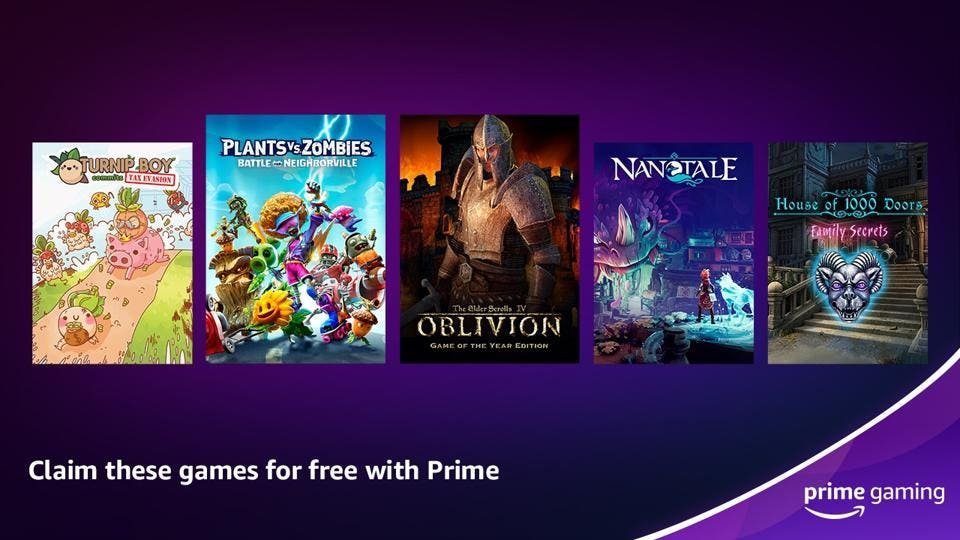
The free games on Amazon Prime are located within the Prime Gaming section of the Amazon website or the Amazon Games app.
Are you curious about what gaming perks come with your Amazon Prime membership? It’s a frequent question, especially when people are trying to find exactly where are free games on amazon prime. Many subscribers may not even realize a whole selection of complimentary titles is waiting for them.
This benefit is actually quite easy to access once you know where to navigate. We’ll show you the simple steps and help you grab those free games you are entitled to.

Where Are Free Games on Amazon Prime?
If you love playing video games, and you’re already an Amazon Prime member, then you’re in for a treat! Amazon Prime doesn’t just give you free shipping and movies; it also gives you access to free games every single month. But where exactly do you find these goodies? Let’s explore all the places you can snag those free games, so you can start playing right away.
Understanding Amazon Prime Gaming
Before we dive into the specifics of finding your free games, let’s make sure we know what we’re talking about. Amazon Prime Gaming, which used to be called Twitch Prime, is a fantastic perk included with your Amazon Prime membership. It gives you a bunch of cool things like:
- Free games every month
- In-game content for popular games (like special outfits or weapons)
- A free Twitch channel subscription
So basically, if you have Amazon Prime, you have access to these awesome gaming benefits. It’s like getting a present every month!
Locating Your Free Games: The Main Hub
The primary place to find your free games is on the Amazon Prime Gaming website. This website is your command center for everything gaming related that comes with your Prime membership. Here’s how to find those precious free games:
Navigating the Amazon Prime Gaming Website
First things first, you’ll need to visit the Amazon Prime Gaming website. You can do this by going to the link above or by simply searching for “Amazon Prime Gaming” on your favorite search engine. Once there, you need to sign in to your Amazon account. You need to make sure you’re signing in with the account that has an active Amazon Prime membership. After logging in, the layout of the site is simple and easy to navigate.
- “Games” Tab: Look for a “Games” or “Free Games” tab, this is usually at the top of the page. Clicking on that is your first step to finding free titles.
- Current Free Games: The current month’s free games should be prominently displayed. They often have big, eye-catching pictures.
- Claim Button: Look for a button that says “Claim Game” or something similar next to each game. Click on this to add the game to your account.
It is essential to note that the games available for free change every month, so it’s worth checking the site regularly to see what new titles are available.
Checking for New Free Games Each Month
The great thing about Prime Gaming is that it keeps things exciting. Each month, new games are available to claim. These games can vary widely – sometimes there are big-name games, sometimes cool indie titles. Here’s what to expect and how to make sure you don’t miss out:
- Monthly Announcements: Amazon usually announces the free games a few days before the month starts. They do this on their blog, through social media, and on the Prime Gaming website. So, keep an eye out in those places.
- Set Reminders: If you know there are games coming out that you would really like to play, consider setting reminders on your phone or computer so you don’t forget.
- Email Notifications: Make sure you have your email notifications enabled for Amazon Prime so they send you information about when the free games are released each month.
Beyond the Website: Amazon Games App
Another way to enjoy your Amazon Prime free games is through the Amazon Games App. It provides a dedicated space on your computer where you can access, manage, and install the games you have claimed through Prime Gaming. Here is what it looks like:
Downloading and Installing the Amazon Games App
If you want a convenient way to manage your free games, you should get the Amazon Games app. This app is available for Windows PCs. Here’s what you do:
- Visit the Amazon Games website: Go to the official Amazon Games website and look for the app download link.
- Download the Installer: Download the installer for the app.
- Run the Installer: Open the installer and follow the on-screen directions to install the app on your computer.
- Sign in: Open the Amazon Games App and sign in with the same Amazon account linked to your Prime membership.
Once you have installed the app and signed in, you can see a list of the games you have claimed and install any of them. It acts like a game launcher and lets you play your games in one place.
Managing Your Games within the App
The Amazon Games App doesn’t just launch your games; it helps you organize them too.
- Library View: You will have a list of the free games that you have claimed, similar to the website.
- Installation: Click the games you want to play and the app starts the download and installation automatically.
- Updates: When new updates are released for your games, they’ll also appear in this app.
Claiming Your Free Games: A Step-by-Step Guide
Let’s break down the process of actually claiming a free game. You need to do this to play the games included with your Amazon Prime membership:
Steps to Claim a Free Game on the Website
The process is pretty easy, but here is a step-by-step walkthrough:
- Visit the Prime Gaming Website: Go to the Amazon Prime Gaming website and log in.
- Browse the Free Games: Look at the section showing the current free games.
- Click “Claim Game”: Find the game you like and click the button that says “Claim Game”.
- Follow On-Screen Directions: The site might give you a code or prompt that you need to follow to finish claiming the game.
- Game is Yours: That’s it! The game should now be connected to your account.
Using the App to Claim Your Games
The Amazon Games App is a great way to claim your free titles as well:
- Open the Amazon Games App: Launch the app on your computer and log in.
- Browse Available Games: Look through the available games.
- Click “Claim Game”: Find the game you want and click the “Claim Game” button.
- Confirm: You may need to confirm your choice.
- Ready to Play: The game is then available in your library to download and install whenever you want.
Types of Free Games on Amazon Prime
Amazon Prime Gaming offers different types of free games, which makes it fun and exciting to see what is offered each month.
Variety of Genres
The variety of game types offered by Amazon is part of why this program is so great. Here is a quick overview of the different types of games you might find:
- Action Games: These are fast-paced games full of excitement.
- Adventure Games: These games take you to exciting places and on fantastic quests.
- Puzzle Games: These challenge your brain.
- Strategy Games: These games need you to make plans and think ahead.
- Indie Games: Unique games made by small groups of people, often very creative.
- Triple-A Games: Big, well-known games with lots of production value.
This range of game types means there is usually something for everyone.
In-Game Content and Perks
In addition to full free games, Amazon Prime also provides you with in-game content. These are extra items or perks for other popular games. You can access these from the same areas you find free games. Here’s what you might get:
- Cosmetics: Special outfits or skins for your characters.
- Weapons: Powerful tools or unique weapons to use in games.
- Boosts: Things that make you better in the game, like boosts to your experience.
- Currency: Free money for in-game purchases.
To claim these, you usually go to the Prime Gaming website, find the game you want perks for, and follow the steps to link your game account.
Troubleshooting Common Issues
Sometimes things don’t work perfectly, so let’s go over some common issues that may occur and how to fix them:
Game Not Appearing in Library
After you have claimed a game, sometimes it might not appear in your library right away. Here are some things to check:
- Refresh the Page/App: Sometimes all you need to do is refresh the page or restart the Amazon Games App.
- Check Account: Make sure you are logged into the right Amazon account, the one that has your Prime membership.
- Wait a Bit: Sometimes, it can take a little while for the game to show up, so be patient.
- Contact Support: If you still do not see the game, you might need to contact Amazon’s customer service for help.
Problems Downloading or Installing Games
If you are having trouble downloading or installing your games, here are some common solutions:
- Check Internet: Make sure you have a stable internet connection. A slow or unstable connection will make it hard to download.
- Free Up Space: Make sure you have enough space on your computer’s hard drive.
- Restart: Try closing and reopening the Amazon Games App, sometimes restarting can fix the problem.
- Antivirus: Sometimes, your antivirus software might be blocking the app. If this is happening, you might need to add the app to the list of allowed programs.
Why Amazon Prime Gaming is Worth It
For many people, the free games and content offered with Amazon Prime Gaming are worth the subscription price all by themselves. Here are the benefits:
Cost Savings
The games offered are often games you might pay for. Getting them for free saves you money. If you compare the price of a video game, and how much you pay for the Amazon Prime membership, the membership often pays for itself.
Exploring New Games
The free games offered each month mean that you get to try out new types of games. You can play games that you have never thought of playing before, and you might even find a new favorite.
Additional Prime Perks
Remember, Amazon Prime membership gives you way more than just free games! It includes free shipping, movie streaming, and other special offers. So, the gaming benefits are just the icing on the cake.
Amazon Prime Gaming provides a great way to get free video games and content. By accessing the Amazon Prime Gaming website or using the Amazon Games App, you can easily locate, claim, and play a variety of games each month. The different types of games and the added in-game content will keep your gaming fun and interesting. So, next time you’re looking for a new game to play, make sure to check what free games are waiting for you on Amazon Prime!
You Can Play Some Amazing Games For Free With Amazon Prime
Final Thoughts
Free games arrive monthly for Amazon Prime members. Access them via the Prime Gaming website or through the Amazon Games app. These platforms serve as the central locations for claiming and enjoying your perks.
You’ll find a variety of titles, from indie gems to AAA games. Remember to check regularly for new offerings. Keep an eye on the main website, because that’s where are free games on amazon prime. The app also helps manage your claimed games.

