
To restart Pokemon Sun and Moon, you must press Up on the D-pad, B, and X simultaneously at the title screen.
Ready to begin your Alolan adventure anew? It’s easy to want a fresh start, maybe to choose a different starter, or revisit the story. Many players wonder how to restart pokemon sun and moon game and fortunately the process is straightforward.
You can easily erase your save data to start over with your character. This guide helps you reset the game quickly and get back to playing Pokemon.

How to Restart Pokémon Sun and Moon Game
So, you’re ready for a fresh start in the Alola region? Maybe you want to try a different starter Pokémon, replay with a new team, or just experience the story again from the beginning. Whatever the reason, restarting Pokémon Sun or Pokémon Moon is totally doable. But unlike some games where you just hit a “New Game” button, these games require a slightly different approach. Don’t worry, it’s not too complicated, and we’re here to walk you through each step! Let’s dive into how you can wipe your old save and begin a brand-new adventure.
Understanding the Save System
Before we jump into the how-to, let’s talk a little bit about how Pokémon Sun and Moon save your progress. These games, like many on the Nintendo 3DS, use a single save file. This means you can’t just have multiple adventures going at once on the same game cartridge. Your progress is saved directly onto the game card itself, making it easy to pick up where you left off. This single save system is why we need to do a little bit more than just selecting “New Game” from a menu – because there isn’t one!
Why You Might Want to Restart
There are many reasons why you might be thinking about restarting your game. Here are some common ones:
- Choosing a Different Starter: Maybe you picked Rowlet, Litten, or Popplio and now you want to see what it’s like with a different one.
- Trying a New Team: Perhaps you want to use different Pokémon this time around.
- A Fresh Story Experience: Maybe you haven’t played for a while and want to relive the adventure from the start.
- Missed an Event Pokémon: If you missed out on special event Pokémon that were available at a certain time, a restart might be your way to get another chance if the event runs again.
- Accidental Save: Maybe someone else played your game and saved over your progress, or you accidentally saved in a spot you didn’t like.
- The Challenge: Some players like the challenge of starting fresh and playing with different strategies.
The Actual Restart Process
Now, let’s get to the main part – how to actually restart your Pokémon Sun or Moon game! The process is pretty much the same for both versions.
Step-by-Step Instructions
Here’s the detailed breakdown of what you need to do:
- Power Off Your 3DS: Make sure your Nintendo 3DS (or 2DS) is completely turned off. Don’t just put it to sleep mode; power it down entirely.
- Hold Buttons: This is the important part. As you power your 3DS back on, you need to hold down a specific combination of buttons at the same time. Press and hold the Up button on the D-Pad, the “B” button and the “X” button all at once. Don’t release them yet.
- Power On and Keep Holding: While still holding those buttons, press the power button to turn your 3DS on. You need to continue holding the Up, B, and X buttons until you see the Pokémon logo on the top screen or if the title card of Sun or Moon appears..
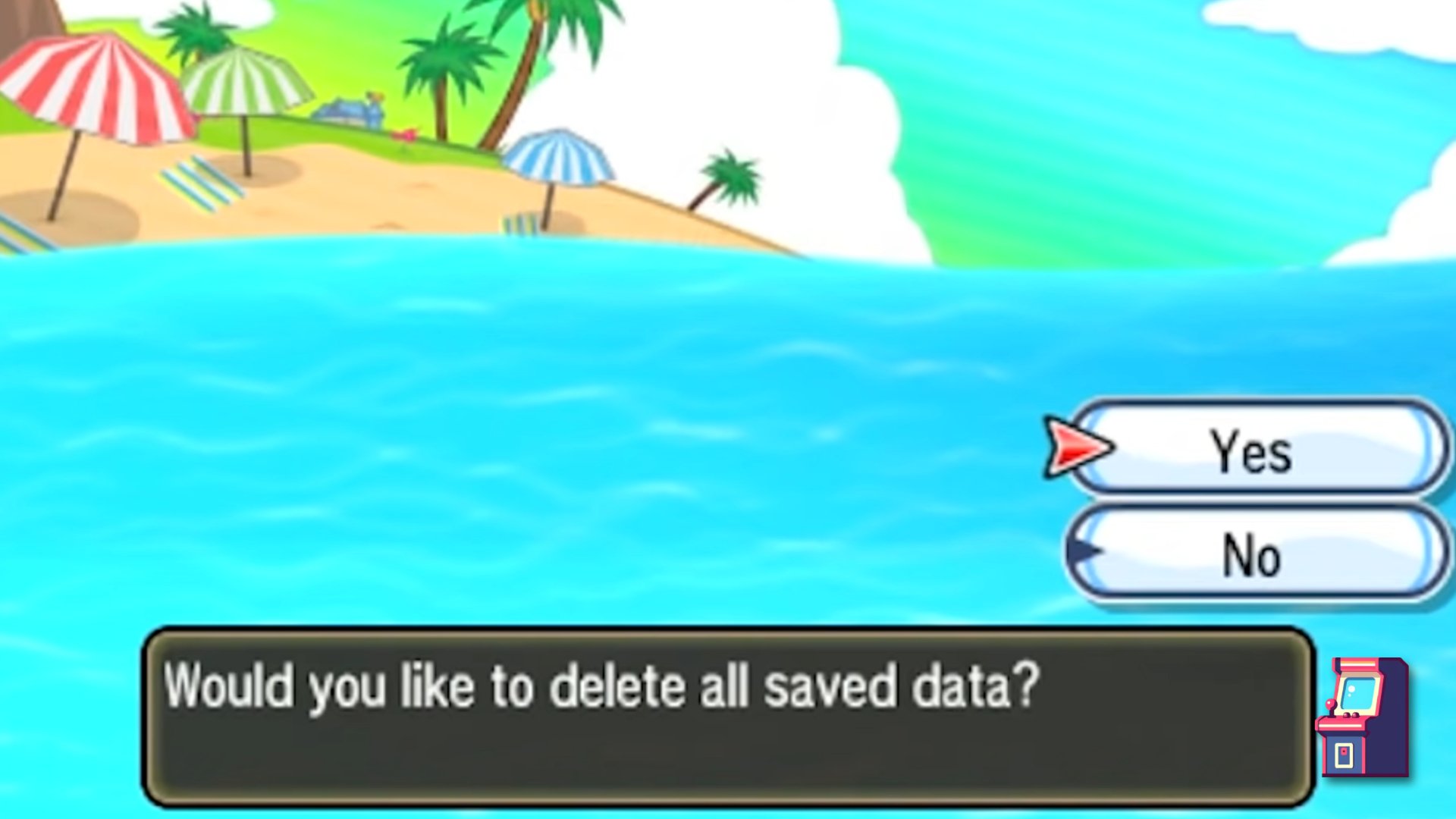
- Confirmation Screen: If you did this correctly, a screen will pop up asking you if you want to delete all saved game data. This is your confirmation, but be sure this is truly what you want, as it will erase all of your previous progress! It may sound scary, but this is exactly what we’re looking for.
- Confirm the Delete: Using the D-pad, select “Yes” to confirm that you want to delete all your game data. After selecting “Yes”, then you have to press A to confirm it.
- Start New Game: Once the deletion is complete, the game will restart to the very beginning. You’ll see the opening sequence and be asked to choose your name and gender, ready to choose your starter Pokémon again, and everything starts anew.
Why These Buttons?
You might be wondering why these particular buttons are needed to perform a restart. These button combinations are a way to get into what’s called a “special boot” menu, which is specifically for erasing save data. Game developers include these types of secret button presses to allow certain system functions or to aid in testing, and often these are used by gamers for situations like this.
Things to Consider Before Restarting
Before you completely wipe your Alola adventure, let’s go over some important things you should think about. After all, a restart is a big step!
Pokémon and Items
Once you restart, all of your precious Pokémon, rare items, and progress will be gone. That includes any special event Pokémon you may have received, any powerful Pokémon you carefully trained, and any rare items you have. This is a major loss, so really make sure you are ready before hitting that yes button.
Trading and Transferring
If you have any valuable Pokémon or items you want to keep, you can’t transfer these to the game you are about to restart. If you have another 3DS and another copy of Pokemon Sun or Moon or another main series Pokemon game, you could trade your valuable pokemon to another game using the festival plaza before restarting. However, if you only have one system, and are just looking to restart, then you won’t be able to transfer them over. Once that save is gone, that Pokémon data is gone too.
Think Twice
It’s not a bad idea to pause and reflect on your decision before you actually restart. If there are any particular Pokémon that you really treasure, that you might have received from a giveaway or are particularly difficult to get, make sure you are ok with losing them. It is not an easy decision to wipe all your progress to start again, so before you do that, make sure you are very sure!
Alternatives to Restarting
Okay, so you might be having second thoughts now about wiping your progress. That’s totally understandable. Luckily, there are some other things you could do before resorting to a full restart.
Starting a New File on a Different 3DS
If you have access to another Nintendo 3DS system (maybe a friend or family member has one) and another copy of Pokémon Sun or Moon, or even another Pokemon main series game, you can trade some of your precious Pokémon and items and start the game over. For example, if you really wanted to experience the game with another starter Pokémon, you can start the game in your other console, choose your new starter, and then trade it over to your main game after you have completed some part of the game.
Challenging Yourself
Instead of restarting, think about setting different goals to challenge yourself. Try playing the game with a specific type of Pokémon, or limiting the amount of items you use in battle, or try a Nuzlocke. All these are ways of enhancing your Pokemon experience, and they don’t require you to erase all of your previous save progress.
Playing Again With Restrictions
You could replay the story with new parameters. Perhaps, you can make rules for yourself for what Pokemon you can catch or what items you use, or what strategies you can use in battle. You can make your own parameters and make a new game experience without having to restart the game.
What Happens After You Restart
Once you do start a new save game, you will be taken back to the very beginning of the story. You will meet your new friends, and you will start your journey again, just as you did the very first time you played this game. You will have to go through all the tutorials, but now you may be faster, because you know what you’re doing! You can use this as an opportunity to plan your new team and come up with a different strategy, if that is what you are looking for.
Starting Your Adventure Again
After the restart, you’ll find yourself on the familiar beaches of Alola, ready to meet Professor Kukui. You’ll choose your starter again, and your adventure is ready to begin again.
New Opportunities
This time you might have new goals. Maybe you want to catch all the Pokémon, maybe you want to try your hand at competitive battling, or maybe you just want to enjoy the story again and appreciate it in a new light.
Enjoy the Journey
Restarting is really a great way to bring a different feel to the game, especially if you are playing it after a long break. There’s a whole world out there to explore again, so make the most of it!
So, restarting Pokémon Sun and Moon isn’t a difficult process once you know the button combo. Remember to be certain of your decision, and that this action will permanently delete all of your progress. But if you’re ready for a brand new adventure, now you know exactly how to do it!
HOW TO RESTART POKEMON SUN AND MOON (3DS)
Final Thoughts
To restart Pokemon Sun and Moon, you must press and hold Up on the D-pad, B, and X simultaneously on the title screen. This action will prompt a confirmation for deleting your save data. Select “Yes” to proceed with a clean slate.
Remember that this will erase all your progress. This process completely resets the game, allowing you to start a new adventure from the beginning. This is how to restart pokemon sun and moon game successfully.

