
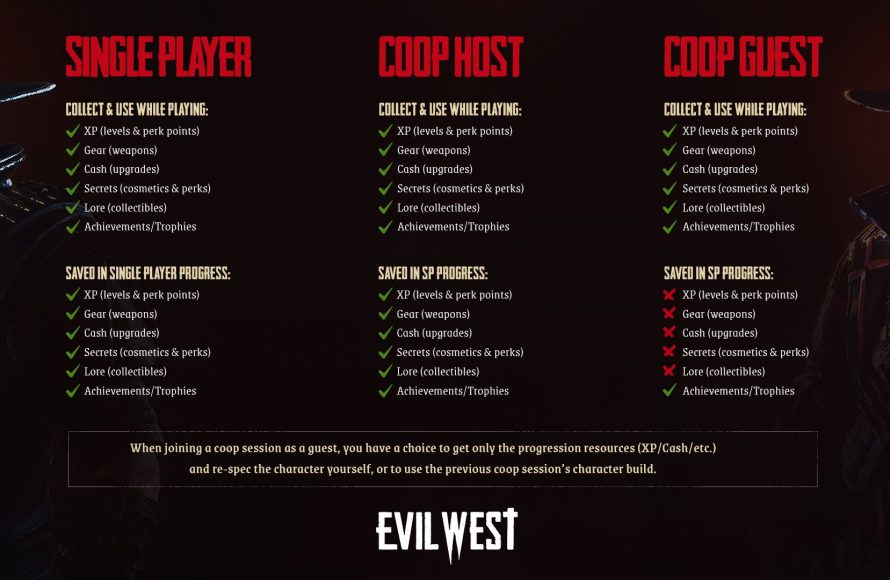
Saving your progress in Evil West happens automatically at designated checkpoints throughout the game.
Venturing into the dark heart of Evil West, you might find yourself wondering how to save game in evil west and secure your hard-earned progress. It’s a valid concern as you battle hordes of monsters and unravel the narrative. The game employs an autosave system rather than manual saves.
You will see the save icon appear on the screen during play, indicating the game has automatically recorded your current state. These frequent checkpoints ensure that you won’t lose much progress if something unexpected occurs. So, focus on the action, and the game handles the rest!

How to Save Game in Evil West
Alright, cowboys and cowgirls! You’re probably having a blast battling creepy creatures in Evil West. It’s a wild ride, for sure! But, like any good adventure, you need to know how to keep your progress safe. Nobody wants to lose all that hard-earned loot and progress by having to start all over. That’s why understanding how saving works in Evil West is super important. Let’s dig into all the details, so you can keep your game exactly where you want it.
Understanding the Saving System
Evil West doesn’t let you save whenever you want, like some other games. It uses a special system called an “autosave” system. That means the game saves your progress for you, automatically, at specific points. These points are usually right after you finish a big fight, or after reaching a new area. It’s like the game is saying, “Okay, you did good! Let me mark that down for you.” You won’t see a “save” button on the screen, so getting familiar with how the autosave works is key.
How Autosaves Work
When you see that little icon – usually a small spinning thing in the corner of the screen – that means the game is saving. It happens pretty quickly, so don’t worry, it won’t interrupt your monster-bashing too much. The game is generally good about saving frequently enough, so you shouldn’t lose a lot if something unexpected happens. This is different from other games that have manual saving where you control when you save.
Key Moments the Game Autosaves
The game picks specific moments to autosave to ensure that you progress smoothly. You can expect an autosave after some specific scenarios. Let’s take a look at some of them:
- After Big Battles: If you have just finished fighting a huge group of enemies or a tricky boss, your progress will be saved.
- Entering New Areas: When you go from one part of the game world to a new one, the game will save to mark your location.
- Completing Objectives: When you finish a task in the game’s main story, your game will be saved.
- During Cutscenes: Right after important storytelling scenes, the game saves your progress.
This game doesn’t have manual save, so it is important to know the autosave functionality of the game
Why No Manual Saves?
You might be wondering why Evil West doesn’t have manual saves. Well, the game is designed to keep you moving forward. By having the game manage the saves, it makes the experience more seamless and keeps you immersed. There aren’t a lot of menus to fuss over, and that keeps you focused on the monster-hunting action. It also helps make sure that players experience the game the way the developers intended. However, if you are used to manual saving, it will take a little time to get used to this system.
What Happens If You Die?
Okay, let’s say you’re in the middle of a tough fight and get knocked out. Don’t panic! The game will reload you at the last autosave point. Usually, this means you’ll start back in the same area, or maybe a little bit before the tough fight. You won’t lose everything, just the progress you made since the last save. So, if you did a little exploring or found some hidden loot before the fight, you might have to do it again. Just think of it as another chance to smash some monsters!
Things to Remember When You Die
Even when you die, keep some of these in mind:
- Items and Loot: If you collected items since the last save point, you will need to find them again.
- Enemy Respawns: Most enemies will be back to fight again since the area reloads.
- Skill Points: Any skill points you have gained is saved already. So, you don’t need to worry about this.
Tips for Keeping Your Progress Safe
Even though you don’t control the save, there are things you can do to help ensure you don’t lose progress. Let’s talk about those!
Playing in Sections
Try to play the game in manageable chunks. Instead of trying to do a long play session all at once, make a goal to reach the next autosave point before taking a break. For example, clear a specific area or finish a side task. This helps make sure you don’t lose too much progress.
Be Aware of Your Surroundings
Pay attention to the screen. When you see that little autosave icon pop up, it’s a signal you’re in a safe place, so keep going. When you make big changes to your character, like adding skill points, know that the game saves after these actions as well.
Restarting a Level
If you get stuck, you can restart a level from the game’s menu. The game provides an option to restart a level. This option lets you start the level from the beginning. Keep in mind that if you do this, your progress in the level will be wiped out, and you will have to start from scratch. However, your character level, abilities, items, and any other progress you have made outside of this level will not be affected. This can help you if you feel like you can take a different approach. This function is useful for completing the game in a different way.
Don’t Quit in the Middle of an Area
Avoid quitting while exploring a level, especially before a boss fight. Make sure you have reached an autosave point so that you don’t have to start again when you play next time. If you aren’t at the safe point, you’ll have to replay some of that part again.
Skill Tree and Game Progression
When you acquire skill points you are allowed to upgrade your skill tree. This allows you to upgrade your character with newer skills and abilities which will help you progress through the game. These changes are always saved through autosave, so don’t worry about losing them.
Using Story Points To Your Advantage
The storyline will move you from point to point and each point has an autosave marker behind it. So, if you do have to quit, make sure that you do it when the storyline is paused for some time. This prevents you from losing a lot of progress in case you have to unexpectedly stop playing.
How Saving Works on Different Platforms
Evil West is available on various platforms, including PC, PlayStation and Xbox consoles. The core saving system, based on autosaves, stays the same on all platforms. The good news is you won’t have to learn a different saving technique for a specific platform. However, there may be minor differences.
PC
On PC, the game saves all the game information within the user profile folder in “documents”. In some cases, it will be within the “AppData” folder that is hidden by default. Sometimes, game save files can be copied over from the user profile to another hard drive. This will serve as a manual backup. However, this is not recommended, and can cause conflict and other saving-related issues.
Playstation and Xbox
On Playstation and Xbox, the game information is saved directly into the console storage. If you have a cloud backup of your console, the game will also back up to the cloud, just like the other games in your console. However, you won’t be able to take this data directly to PC or another console, as it is a specific format to that particular console. As the console saves are automatically saved, so it is very difficult for the game save to be lost. For extra caution, make sure your console has adequate storage and the cloud storage is also working properly.
What to Do If You Have Save Issues
Sometimes, things don’t go as planned, and the game might not save correctly. If you run into any save-related issue, here are some things you can do:
- Restart the Game: Sometimes, restarting the game can fix a simple glitch that is stopping the autosave from working.
- Check Storage Space: If your hard drive is full, that can prevent the game from saving properly. Make sure you have enough room.
- Verify Game Files: if you are playing on PC, you can verify the files. A corrupt file can stop the game from saving. You can verify this through steam or Epic Game store. This will check for corrupted files, and if there are any, it will repair them
- Check Game Updates: Make sure you have the latest version of the game as updates often include bug fixes.
- Contact Support: If you are still having issues, contact the game’s support team. They are always there to help you.
By being aware of how autosaves work, you can enjoy the action-packed adventures of Evil West without worrying about losing your progress. Happy monster hunting!
Evil West – save file location
Final Thoughts
Evil West uses an autosave system. The game saves progress automatically at specific checkpoints. You do not manually save, which some players may find different.
To be sure your progress is saved, complete objectives. Then, proceed until the next checkpoint triggers. This is how to save game in Evil West.
The game does not offer a manual save feature. Keep this in mind while playing. Therefore, progress occurs based on the game’s built-in design.

