
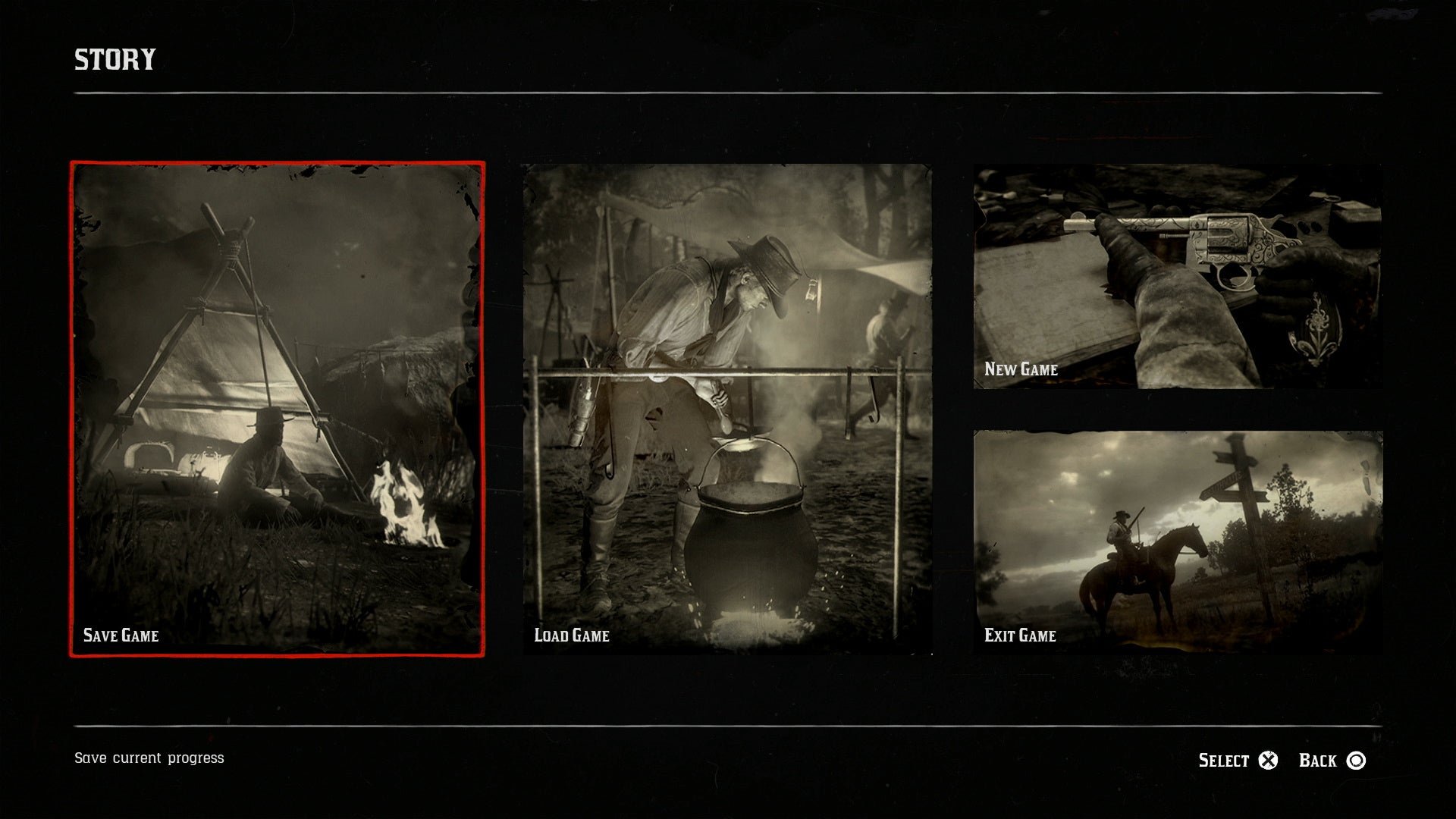
To save your progress in Red Dead Redemption 2, you can either use the in-game menu to manually save or the game will automatically save at certain points.
Lost your progress again in Red Dead Redemption 2? It’s frustrating when hours of gameplay disappear. The game does offer a few ways on how to save game rdr2, but sometimes these aren’t very obvious or reliable.
Manual saves become important since automatic saves won’t always keep everything you want to keep, as they save on your story progress. Having manual saves provides you with a way to revert if you mess something up. This article will explain your save options.

How to Save Game RDR2: A Comprehensive Guide
Red Dead Redemption 2 is a huge game with so much to explore. From riding your horse across vast landscapes to engaging in intense shootouts, there’s always something exciting happening. But all that adventure can be for nothing if you don’t save your progress! Imagine spending hours hunting, completing missions, and building up your camp, only to lose it all because you forgot to save. That’s why knowing how to save your game in RDR2 is super important. This guide will teach you everything you need to know about saving your game, so you never have to worry about losing your hard-earned progress.
Understanding the Save System in RDR2
RDR2 uses a combination of autosaves and manual saves to keep track of your journey. The game automatically saves at certain points, but relying solely on these autosaves isn’t always the best idea. Here’s a look at how it all works:
Autosave
The game has an autosave feature that kicks in periodically. This usually happens after completing a mission, reaching a milestone, or even just when you’ve been playing for a certain amount of time. While autosaves are helpful, they aren’t foolproof and you can’t control them. If something goes wrong, such as accidentally getting killed or making a decision you regret, you might not have a save point right before that moment. That’s why manual saving is so important.
Manual Save
Manual saving allows you to create a save point exactly when you want it. This gives you much greater control over your progress. You can save right before taking on a difficult mission, after a successful hunt, or simply at the end of a gaming session so that you’re ready to go next time. Manual saves are essential for preventing setbacks. You need to know how to save manually to have real control of your game progression.
How to Manually Save Your Game in RDR2
Saving your game manually in RDR2 is a very simple process, it will become second nature to you once you learn it. Here’s how you do it on different gaming systems:
Saving on PlayStation 4 and PlayStation 5
If you’re playing on a PlayStation system, the method is pretty simple:
- Press the Options button on your controller. This is the button in the middle of the controller usually located near the touchpad.
- This will bring up the pause menu.
- Use the shoulder buttons (L1/R1) to scroll through the menu tabs until you reach the ‘Story’ tab.
- In this tab, you will find the ‘Save Game’ option. Choose this option by pressing the X button.
- The game will then give you several slots to save your progress. Select an empty one or overwrite an old one and confirm the save using the X button again.
It’s always a good idea to save regularly and in multiple save slots. Having more than one save can save you in case you run into a game problem or accidental mistake. You can simply load from another save and start again.
Saving on Xbox One and Xbox Series X/S
The save process on Xbox is very similar to PlayStation:
- Press the Menu button on your controller, which is the button with three horizontal lines.
- This will open the pause menu.
- Use the bumpers (LB/RB) to navigate to the ‘Story’ tab.
- From this tab, select ‘Save Game’.
- Choose a save slot and confirm your save by pressing the A button.
Just like on PlayStation, creating multiple save files on Xbox is a smart move that can save you potential headaches.
Saving on PC
Saving your game on the PC version is quite similar to consoles. Here’s what you need to do:
- Press the Esc key on your keyboard to bring up the pause menu.
- Click on the ‘Story’ tab.
- Select the ‘Save Game’ option.
- Choose a slot to save your progress and confirm it by clicking.
PC players should also consider backing up their save files to avoid total data loss.
Best Practices for Saving in RDR2
Knowing how to save is important, but knowing when and how often to save is just as crucial. Here are some best practices to keep in mind:
- Save Regularly: Make it a habit to save your game often, especially after major accomplishments or before starting a particularly risky mission.
- Use Multiple Save Slots: Don’t rely on a single save file. It’s best to have multiple saves in different slots in case one save gets corrupted or if you want to go back to an earlier point in the game.
- Save Before Important Decisions: Red Dead Redemption 2 gives you many choices. If you want to see the different outcomes of your choices, it’s a good idea to create a manual save point before making any major decision.
- Save Before Exploring Unknown Areas: The game world is filled with surprises, not all of them friendly. Save before going into a place that looks suspicious or dangerous.
- Save at the End of Each Session: Before you stop playing, always save your progress. This ensures you can continue your adventure exactly where you left off.
Following these tips will make your gaming experience smoother and much less frustrating. Let’s take a deeper look at some of these practices.
Why You Should Use Multiple Save Slots
There are several good reasons why using more than one save file is a smart choice. Here are a few scenarios:
- Experimenting with Decisions: The game has branching narratives where your actions affect how the story plays out. If you save before important moments, you can reload a previous save to see different possibilities.
- Dealing with Bugs or Glitches: While RDR2 is generally a very polished game, it might encounter some bugs. If something unexpected happens, having a previous save can help you go back to a point before the bug occurred.
- Preventing Data Corruption: Sometimes save files can get damaged or corrupted, preventing you from accessing your progress. Having a backup means you won’t lose everything.
- Recovering From Mistakes: We all make mistakes in the game, whether it’s a wrong decision or getting into a fight we can’t win. A manual save before these events allows you to undo them.
Treat your different save files like different timelines in your journey. You can go back to these timelines to change your path, in a way.
The Risk of Relying on Autosaves Alone
Autosaves are helpful, but they should not be your only means of saving your progress. Here’s why:
- Unpredictable Timing: The game’s autosave feature doesn’t always activate when you need it to. You might complete a long mission, do some hunting, and then get into a fight. If you die in the fight, the autosave may only take you back to the start of the mission and you will lose all the progress you made afterwards.
- No Specific Control: Because autosaves are automatically generated, you don’t get to choose exactly when they happen. They may overwrite progress you wanted to keep, or you might have to replay chunks of gameplay if the autosave isn’t exactly where you wanted it.
- Limited Overwriting: Autosaves will often overwrite each other. This means the older autosave can be replaced with the current one and there will be no older backup. If an autosave is not ideal, then you will have no way of going back if you are using autosave only.
Because of these factors, autosaves should be seen as a safety net, not your primary way of saving the game. It’s far better to save manually on a regular basis.
Specific Scenarios for Saving
Let’s look at some specific situations where saving is particularly important.
Before and After a Major Mission
RDR2 is famous for its action packed missions. Whether you’re robbing a bank, rescuing a friend, or going on a hunting trip, it’s a good idea to save before and after these big events. A save before a mission lets you restart if things go wrong. A save after the mission keeps your earned progress and prevents the need to repeat the mission if you need to restart the game later.
Before Exploring New Territories
The open world of RDR2 is vast and full of surprises. Before you wander into an unknown area, it’s wise to make a save. You never know what dangers or unexpected events you might encounter. Saving allows you to explore without worrying about losing progress if things go wrong or your encounter turns sour.
Before Engaging in a Gunfight
Gunfights can be both exciting and dangerous. If you are going into a situation where you expect some combat, saving beforehand can be a smart idea. This allows you to try out different approaches to the fight without worrying about losing progress. If you die, you will be able to load your last saved game and start the fight again.
After Finding Rare Items or Horses
Finding rare items or horses is always rewarding. If you stumble upon something very valuable, or manage to tame a wild horse that you want to keep, save your game immediately! You wouldn’t want to lose such a great find if your game crashes or a tragic event occurs in the game.
Troubleshooting Common Save Issues
Even with the best practices, you might run into some problems with saving your game. Here are a few common issues and what you can do to resolve them.
Game Not Saving
If you are having problems with your game not saving, here are some things you can check:
- Check your storage space: Make sure that your console or PC has enough space to save. The game needs sufficient storage to save the progress. If the system storage is full, then it won’t be able to save, so, make sure that there is enough storage space on your device.
- Try a different save slot: If one save slot is having issues, try saving in a different one. Sometimes, a particular slot might have an issue.
- Restart your game or console/PC: Sometimes, simply restarting the game or your device can fix save-related issues. This can clear any temporary errors.
- Make sure game is updated: A game needs to have the last updated version so that it functions properly and avoids some minor bugs. If the game is not in the latest updated version it can cause some saving problems.
If the problem continues, you may want to contact the game’s support team for further assistance.
Save File Corruption
Sometimes, save files can get corrupted for various reasons. If your save file is corrupted, there is a high chance that you won’t be able to use it. Here are some things you can do:
- Load an earlier save: If one file is corrupted, you can go back to an older, uncorrupted save. This is why having multiple save files is very important.
- Restart the game: Sometimes, a simple restart can fix the problem.
- Contact Support: If none of this works, you can get in touch with the game’s support team. They may have a solution or advice that you can try.
Always backup your save files whenever you can to prevent a complete data loss.
Autosave Issues
If your autosaves seem to be malfunctioning, here’s what you should do:
- Verify game files: If you are playing the game on PC, try verifying the integrity of game files on the game launcher. This can detect and fix issues with game data.
- Make sure you have enough storage: Ensure that your system has enough storage space for saving the autosaves.
- Restart your console/PC: Again, restarting the device can sometimes help with autosave problems.
If these fixes don’t work, you should rely on manual saves as your primary way of saving the game until you figure out the problem.
Saving your game in RDR2 is very important for a great gaming experience. It protects all your hard-earned progress, allowing you to continue your adventure without problems. By understanding how both the autosave and manual save systems work, and by making use of the best saving practices, you can make the most of your time in the wonderful world of Red Dead Redemption 2. Enjoy exploring the Old West and be safe while doing it.
Red Dead Redemption 2: How to Save Your Game
Final Thoughts
To save your progress in Red Dead Redemption 2, use the in-game menu. Navigate to the ‘Story’ tab and then select ‘Save Game’. This allows you to manually save your current position and activities.
The game also autosaves frequently. Make sure you utilize both options. Knowing how to save game rdr2 prevents lost progress. Remember to save often.

