
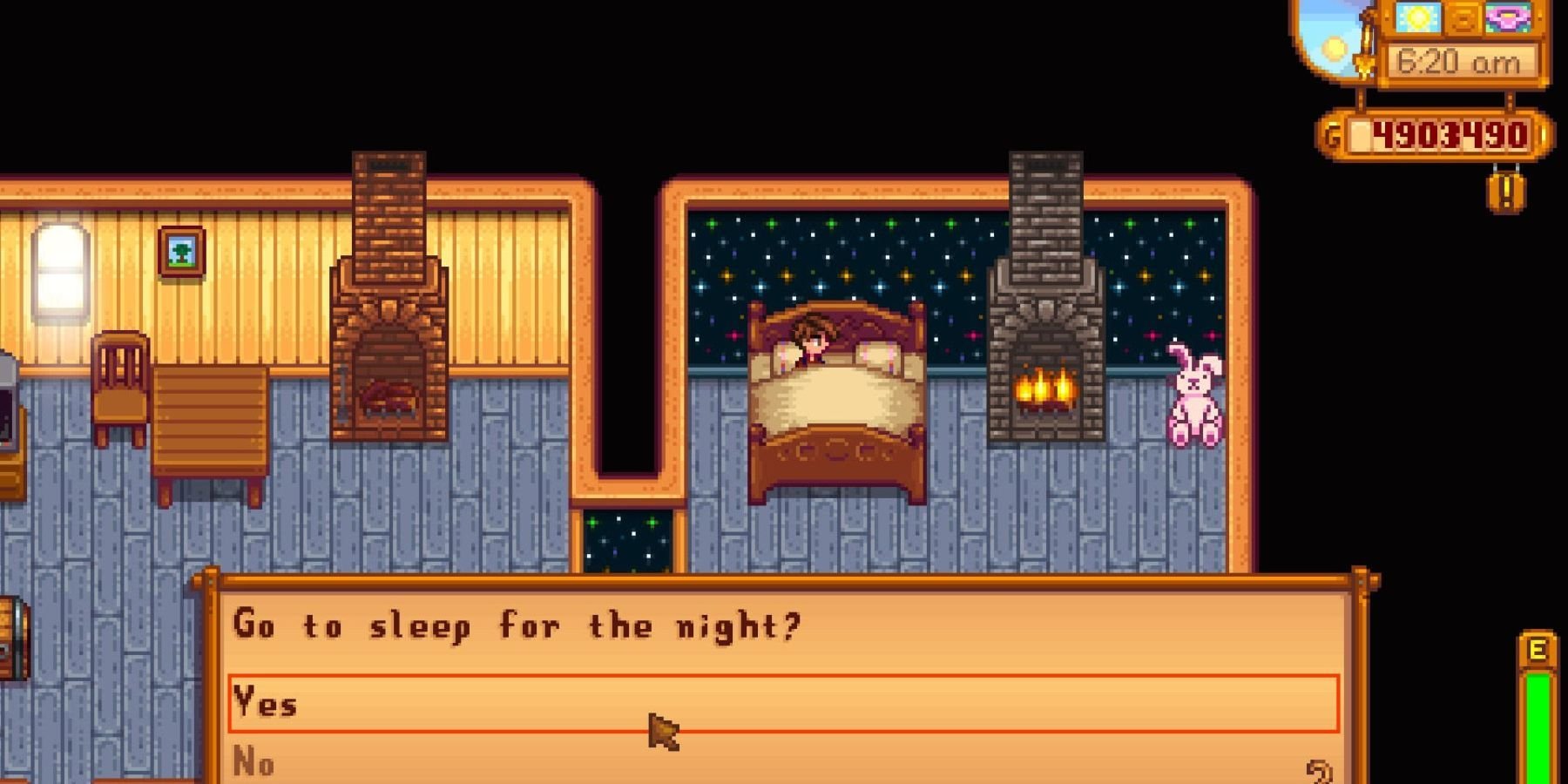
To save your game in Stardew Valley, simply go to sleep in your bed. The game automatically saves when you fall asleep.
Concerned about losing your progress in Stardew Valley? It is quite simple, don’t worry. The game actually handles saving very easily, so you can focus on your farm. Many new players wonder exactly how to save game stardew valley, so lets make it easy.
You don’t need to manually look for a save option. The game will save automatically once you end the day. That is really all you need to know!

How to Save Game Stardew Valley
So, you’re hooked on Stardew Valley, tending to your crops, befriending townsfolk, and maybe even delving into some mysterious mines? That’s awesome! But one crucial thing you need to know is how to save your progress. No one wants to lose hours of hard work! This guide will walk you through everything you need to know about saving in Stardew Valley, ensuring your farming empire is always safe and sound.
Understanding Stardew Valley’s Saving System
Unlike many games that have an instant save button, Stardew Valley uses a different approach. Instead of manual saving, the game saves automatically when you go to sleep at the end of each in-game day. That’s right – your comfy bed is actually a secret save point! This might sound a bit strange at first, but it’s actually a clever way to keep the gameplay smooth and your choices permanent for that day. Let’s dive into the details!
The Daily Save
Every time your character gets into bed and the day ends, Stardew Valley does an automatic save. This means that everything you did that day is recorded. All the watering, planting, foraging, fishing, and even the conversations you had with villagers are all safely tucked away. It’s like hitting the “save” button without actually having to find a save button!
Consequences of the Daily Save
This saving system has a few interesting consequences. Firstly, if you make a mistake and accidentally sell your favorite item or have a bad day in the mines, you can’t simply revert to an earlier save point. Your choices from that day are locked in once you sleep. So, it’s important to think about your actions before ending your day. Secondly, this system encourages you to plan your day carefully. Because you can’t just redo it easily, you have to carefully consider what you want to achieve each day in the game.
Key Moments for Automatic Saves
While sleeping is the primary way to trigger a save, it’s helpful to know exactly when this saving happens. Let’s take a closer look:
- Entering Your Bed: As soon as your character steps into their bed, the day ends. There will be a short screen transition, and then it’s onto the next day, with your game saved.
- The End of Festivals: After attending a festival, once you return to your farm area, the game saves. Your experience at the festival will be stored when the transition to your farm screen starts.
- End of the Night (If you Pass Out): Even if you run out of energy and pass out before reaching your bed, your progress for that day is saved. Though, you might have to pay a small fee to the person who found you. Don’t worry too much about passing out, because you do not lose your important items.
Strategies for Effective Saving
Although you don’t have direct control over when you save, you can employ a few smart strategies to manage your game effectively. These strategies can help you prepare for potential mishaps or manage your progress better.
Time Management
Since saving occurs at the end of the day, time management is crucial. This is the key thing for saving effectively. Make sure that you are aware of how much time you have and how much time will be spent doing all your activities for the day. You must carefully plan your day to accomplish your tasks before the time is up. This will also save you from passing out which will cost you a bit of gold.
Plan Your Daily Actions
Before starting any big project, think through what you want to achieve. If you’re planning a big mining expedition, for example, ensure you have enough food and supplies before heading into the caves. This way you won’t need to regret your decisions after the save.
The Use of Multiple Game Files
The beauty of Stardew Valley is that you can have multiple game files. If you feel like you want to try out a different character design, or explore a different gameplay experience, you don’t need to start a game from the start and delete your progress. Simply start a new game and enjoy it. And if you want to go back to your old farm, it will be there, safe and sound!
Dealing With Mistakes
If you make a big mistake, like selling a rare artifact or forgetting to water your crops, you can’t undo that save immediately. The best solution in this scenario is to be patient and try again the next day. Learn from your mistake and plan better the next day. Remember, everyone makes mistakes in the game, it’s a part of the fun.
Common Mistakes and How to Avoid Them
Even with the simple saving system, there are a few common mistakes new players often make. Understanding these pitfalls will help you keep your game progress safe.
Quitting Without Sleeping
One of the most common mistakes is quitting the game without going to bed. If you simply close the game without passing the day to the next, your progress for the day will not be saved. So, always make sure you’ve gone to sleep before exiting the game.
Forgetting to Check the Time
Pay attention to the in-game time. The clock is in the top right corner. If you stay out too late, you might pass out and lose some gold. Keep an eye on the clock to make it safely back to your farm before passing out. Keep an eye on the time, that is essential.
Not Checking Your Inventory
Sometimes players accidentally sell important items or misplace tools. Double-check your inventory before ending the day to ensure everything is in the right place. Be very careful when you’re at the shop and be sure that you didn’t misplace any important items. You don’t want to get sad when you find out your important item is gone.
Rushing Through the Day
Try to do your daily activities calmly and be careful what you do. Because you can’t revert to an earlier save, you need to be more careful in the game. You don’t want to spend the entire day regretting something that happened. Take your time and enjoy the experience.
Advanced Saving Tips
For players who want to maximize their experience in Stardew Valley, here are some advanced tips to help you manage saves more effectively.
The Importance of Pre-Planning
When you are getting ready to get into the mines, or go fishing, or do any important daily activity, make sure you have everything ready before you begin the day. You don’t want to waste time thinking about what you should’ve done before ending the day. Plan your day carefully to make it as efficient as possible.
Multiple Saves for Different Farms
As we mentioned before, you can start several different game files. This is a fantastic way to experience the game in different ways without losing your first farm. This also enables you to play with your friends in multiplayer without any fear of messing with your other farms.
Using the Game’s Calendar
The game’s calendar is a great way to plan. You can keep track of festivals, villager birthdays, and even when crops will be ready to harvest. Planning with the calendar can make your gameplay much more strategic and efficient.
Understanding Seasonal Changes
Each season brings new challenges and opportunities. Plan your farming and activities around the changing seasons to take full advantage of what each one offers. If you keep track of these changes, you will have a much easier time with your farm.
Frequently Asked Questions about Saving
While the saving mechanism in Stardew Valley is straightforward, you might still have some questions. Here are a few common queries answered.
Can I Manually Save My Game?
No, there is no manual save option. The game automatically saves when you go to sleep or at the end of a festival. You can’t save anytime you want, so be careful what you do.
What Happens if I Don’t Save?
If you don’t go to bed, your progress from that day won’t be saved. You need to go to sleep for the game to save. You can’t save in the middle of the day.
Can I Get Back a Previous Save?
No, the game only keeps the latest save. If you sleep, your previous progress will be permanently gone. This makes the game more exciting, because you have to deal with all of your choices in the game.
Does the Game Save in Multiplayer Mode?
Yes, in multiplayer, the game will still save at the end of the day, once everyone goes to bed. So, each player must sleep so that the game can save. This makes it very interesting when you’re playing with friends.
What if My Game Crashes?
If your game crashes, you might lose some of the progress from the current day. You should always try to make sure that your computer is working properly so that your game doesn’t crash in the middle of your playing experience. It is also a good idea to close the game after every hour or so, to make sure that everything is saved properly.
So, there you have it! Saving in Stardew Valley is as simple as going to sleep. By understanding how this system works, you can manage your farm effectively and enjoy your time in the game without worrying about losing all your progress. Remember to plan ahead, be mindful of the time, and enjoy the little moments. Happy farming!
Stardew Valley: How to Save Your Game
Final Thoughts
Stardew Valley automatically saves your progress each night when you go to sleep in your farmhouse. If you want to exit before the day’s end, select the “Quit to Title” option from the game menu. Remember to always ensure you’ve completed your desired tasks for the day before quitting through this method.
There is no manual save option available. It is good to understand how to save game stardew valley, as your progress depends on the daily automatic saves. This keeps the gameplay flow consistent.

