
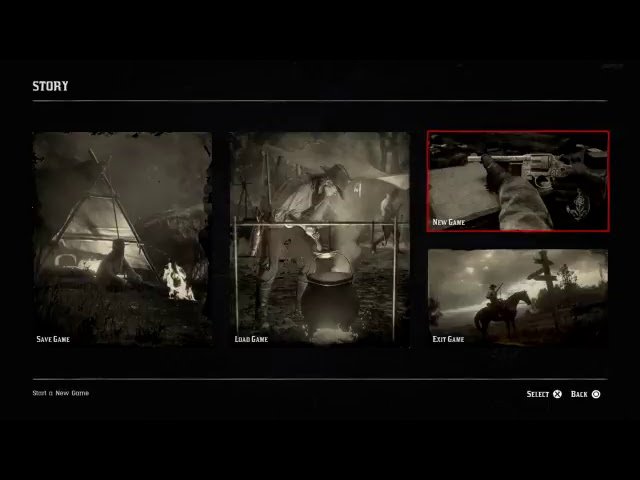
To start a new game in RDR2, navigate to the ‘Story’ tab in the main menu and select ‘New Game’.
Ready for a fresh adventure in the Wild West? Wondering how to start a new game in RDR2? It’s simpler than you might think. The sprawling world of Red Dead Redemption 2 is calling for a brand new journey, a clean slate.
You don’t have to be stuck with previous save, the game allows you to begin a completely new narrative from the very beginning. This lets you experience the main story without any prior progress. Get ready to ride again, right from the snowy peaks.

How to Start a New Game in RDR2
Ready to jump back into the wild west or experience the story of Arthur Morgan for the first time? Starting a new game in Red Dead Redemption 2 is pretty straightforward, but there are a few things you should know. This guide will walk you through all the steps, so you can get back to exploring the open world as quickly as possible. We’ll cover starting fresh, what to expect, and some things to consider before you dive in.
Understanding Save Files
Before you start a new game, it’s important to understand how Red Dead Redemption 2 saves your progress. The game uses a system of save slots. This means that it doesn’t automatically overwrite your previous saves. Instead, it gives you multiple places to keep your game. This is super helpful if you want to replay a specific part of the game, or if you want to keep your current playthrough safe while trying something different.
Think of save slots like different notebooks. Each notebook has a separate story written inside. You can have multiple notebooks, each containing a different journey through RDR2’s world. This ensures that your hard work in one game won’t affect any other game you want to play.
The Importance of Multiple Saves
Having more than one save slot is highly recommended. Here’s why:
- Experimenting with Choices: You can create a save before making an important decision. If you don’t like how things turned out, you can always go back to that save.
- Replaying Favorite Moments: Did you love a specific mission? Save before it and you can easily go back to play it again.
- Avoiding Bugs or Glitches: Sometimes, a game can have unexpected problems. Having multiple save points gives you a backup to fall back on.
- Different Playstyles: Maybe you want to play as a good guy in one game and a bad guy in another. Having different save files lets you do that.
Steps to Starting a New Game
Now that you know why multiple saves are handy, let’s go over the exact steps to start a new adventure:
From the Main Menu
- Start the Game: First, make sure you have the game running and get to the main menu. This is the screen that appears when you first turn on the game. You’ll see options like “Continue,” “Story,” “Online,” and “Settings.”
- Select “Story”: In the main menu, find the “Story” option. It’s usually at the top of the list. Click or select it to proceed.
- Choose “New Game”: On the next screen, you’ll see a few choices. You should see “New Game.” Click or select it. This will begin a completely new story.
- Confirm Your Choice: The game will ask if you’re sure you want to start a new story. This is to make sure you don’t accidentally erase your current one. If you are ready, confirm the selection.
Managing Your Existing Save Files
When you select “New Game,” the game will take you to a screen that shows your existing saves. This is where you decide where to store your new game.
- Choose an Empty Save Slot: If you have empty slots, just select one. The game will automatically start your new game in that slot.
- Override an Existing Save: If all of your save slots are full, you’ll have to choose one to override. This means that the old story will be deleted and replaced with the new one. Be very careful when doing this. Make sure that there is nothing on that slot that you want to keep.
- Save with Caution: Once you choose your save slot and start the new game, the game will start. You will see the intro. If you quit during the intro, your save will be made. So be careful to not override any saves if you aren’t sure which save is saved.
After this, the game will begin with the intro scene, starting from the beginning of the RDR2 story.
Things to Consider Before Starting Over
Starting a new game is exciting, but here are some things to keep in mind:
Losing Your Progress
When you start a new game, everything you’ve done in your old game is gone. This includes:
- Story Progress: All the missions you’ve completed will be reset.
- Character Upgrades: Any upgrades you’ve purchased for Arthur Morgan (or other characters) will be lost.
- Items and Weapons: Any weapons, ammo, clothing, or other items you had will be gone.
- Money: Your hard-earned money will disappear.
- Horse: You lose any horses you owned, including your favorite one.
It’s like starting from scratch. So, think twice before beginning if you are very attached to your current game.
Why Start a New Game?
Even though you lose everything, there are some great reasons to start a new game:
- Reliving the Story: Maybe you want to experience the story from the beginning, or make different choices this time.
- Exploring Missed Content: Maybe you missed some side missions or special places the first time around.
- Trying a Different Playstyle: Maybe you want to try playing as a bad guy instead of a good guy, or focus on hunting instead of missions.
- New Challenges: Starting from zero is a challenge that can make the game feel fresh.
Planning for Your New Playthrough
Here are some tips to make the most of your new playthrough:
Decide on Your Goals
What do you want to achieve this time? Do you want to get 100% completion? Do you want to focus on exploring every corner of the map? Maybe you want to spend all your time hunting. Having a goal in mind can make your game more fun.
Plan your Character Build
Think about the skills you want to prioritize. Maybe you want to be a great marksman, a stealthy hunter, or a skilled horse rider. Focus your character build to support your chosen playstyle.
Keep it Interesting
Don’t be afraid to try new things! Maybe you skipped some side content or choices before? Now’s your chance to experience everything the game has to offer.
Save Frequently and Smart
Keep multiple save files and use them strategically. Save before big missions, or anytime you do something special. This will give you flexibility and prevent potential headaches. Remember to cycle through multiple slots instead of only saving in one spot. This way, you can always come back to multiple points in the game.
Red Dead Online and New Characters
If you are interested in online mode, it’s also important to know how to start a new character in Red Dead Online. You don’t lose your story mode saves when creating a Red Dead Online character, and vice-versa.
When starting a new Red Dead Online character, you will go through a brief character creation system, which allows you to customize your online persona. This system doesn’t impact your story mode progress or saves, allowing you to maintain separate experiences.
The First Few Hours of a New Game
The beginning of RDR2 is a slower-paced experience, meant to get you familiar with the game’s mechanics and story.
- Tutorial: The game will start with a tutorial section that introduces you to the basic controls and gameplay. Pay attention to these instructions!
- Slow Start: Don’t expect to be a gunslinger right away. The first few missions involve setup and slow progression.
- Get to Know the Characters: Take your time getting to know the members of the Van der Linde gang. They are a big part of the story.
Starting a new game in Red Dead Redemption 2 is a way to experience the story from the beginning, try new things, and enjoy the world with a fresh perspective. Remember to manage your saves carefully, and plan your new playthough to make the most of your time. Whether you’re a returning player or a new one, the world of Red Dead Redemption 2 has much to offer and a new game is the perfect way to explore it.
how to start new game without losing old one in#rdr2 #reddeadredemption2
Final Thoughts
To begin a fresh Red Dead Redemption 2 journey, simply navigate to the main menu. Choose ‘Story’ then pick ‘New Game’. This action erases your current progress, so confirm your choice carefully.
Selecting ‘New Game’ starts a completely new story. You must remember all previous game data will be overwritten. Now you know how to start a new game in rdr2, go experience the world again.

